



 Full Games List
 Featured Games
 New Games
 Reviews
 Media
Media Images
 Blogs
Blogs Game Updates
 Images Feedback Summary
 Game Design Highlights
 Tutorials
 Articles
 Scripts
 Utilities / Plugins
 Resources
 Engines
 Engine Bulletins
 What is Makerscore?
 Past Events
 Achievements
 Misaos
 Forums
 Post History
 Chat
Chat New to RMN?
 Full Store List
 RMN Music Pack (free)



RECOLOR REQUEST
Posts
Pages:
1

 bigbadke12
 View playlists
 Close
CloseCould someone possibly recolor the people in this:

To aqua based colored troops?
Need it for my games Aqua/ice styled castle.
To aqua based colored troops?
Need it for my games Aqua/ice styled castle.

I should have it done by the end of the day. Are they supposed to keep their normal skin tone or change to bluish colors as well?

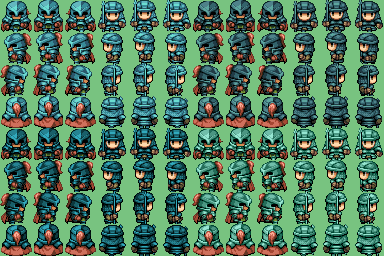
author=Liberty
Here's a few versions.
Thanks :)
Could you do a small favor and recolor the face sets?...
Sorry for not putting it in the first place :/



Depends on what I want to recolour. In the case of sprites I use iDraw3 - it's easy to select just one colour and recolour it with another.
With faces I use Paint Shop Pro 8. I make a layer and set it to 'colour' or 'multiple'. I colour it, then erase the parts that are not needed on that layer - that is the face/skin areas, the background and the red lines, in this case.
I could make a video tutorial of either if you want.
With faces I use Paint Shop Pro 8. I make a layer and set it to 'colour' or 'multiple'. I colour it, then erase the parts that are not needed on that layer - that is the face/skin areas, the background and the red lines, in this case.
I could make a video tutorial of either if you want.

A video tutorial would be lovely Liberty. For a lot of people, the best way to learn is to see it and do it at the same time. The nice thing about videos is that they can be paused.

author=Liberty
Depends on what I want to recolour. In the case of sprites I use iDraw3 - it's easy to select just one colour and recolour it with another.
With faces I use Paint Shop Pro 8. I make a layer and set it to 'colour' or 'multiple'. I colour it, then erase the parts that are not needed on that layer - that is the face/skin areas, the background and the red lines, in this case.
I could make a video tutorial of either if you want.
i use either gimp or paint.net, in either case with the magic wand tool (shift/ctrl click for multiple selections) to select colored sections and then either the recolor tool (if it's cooperating) or the regular brush tool to do the actual recoloring.
layers are awesome and your method seems more efficient than mine (!)
iDraw is great for anything 256 colours because it selects every instance of the colour you're picking, instead of just the closest block. It also can pick more than one colour at a time and has an animation option for those who like to see their work in action. I'm surprised that more people don't use it. ^.^;
But yeah, layers for recolouring the more painted/colour-heavy stuff, like faces and portraits. Hell, even recolouring/messing with default chips can be fun with using layers. Pop one chip on one layer, another beneath it and scroll through the blending options to see what you can create. For example:

Those were made by using blending ranges, the lava tile on a bottom layer and the other tiles you can make out on the top layer. Quickly done and they can look pretty good, too.
But yeah, layers for recolouring the more painted/colour-heavy stuff, like faces and portraits. Hell, even recolouring/messing with default chips can be fun with using layers. Pop one chip on one layer, another beneath it and scroll through the blending options to see what you can create. For example:
Those were made by using blending ranges, the lava tile on a bottom layer and the other tiles you can make out on the top layer. Quickly done and they can look pretty good, too.
author=Liberty
For some reason the VX is only selecting a small box of the face not the whole thing.


It's because it counts facesets to be eight different pictures, so the picture should be big enough to accommodate eight even if there are only two. Try this:

Pages:
1

