



 Full Games List
 Featured Games
 New Games
 Reviews
 Media
Media Images
 Blogs
Blogs Game Updates
 Images Feedback Summary
 Game Design Highlights
 Tutorials
 Articles
 Scripts
 Utilities / Plugins
 Resources
 Engines
 Engine Bulletins
 What is Makerscore?
 Past Events
 Achievements
 Misaos
 Forums
 Post History
 Chat
Chat New to RMN?
 Full Store List
 RMN Music Pack (free)



HELP ME MAKING CLOCK,RUN/SPRINT,AND CUSTOM MENU
Posts
Pages:
1
 Kazuto
 View playlists
 Close
Closei'm using RPG MAKER 2003
hi everyone i have two question:
First.How to make clock show you how long you have been playing your game Like this:
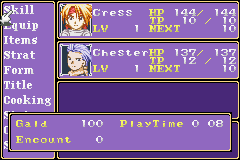
Second.How to make your character Run like some of gameboy games like tales of Phantasia,Pokemon,Megaman,HarvestMoon,and other
Third how to make Custom Menu similiar like this:
http://www.youtube.com/watch?v=E1fUWkizUdY
if you can't help me with custom menu it okay because it not very important but 1&2 is very important for my game,please any help will be very appreciated
please give me the command or send me message for the command i tried some of the tutorial from this site but it didn't work/not as I had hoped
hi everyone i have two question:
First.How to make clock show you how long you have been playing your game Like this:
Second.How to make your character Run like some of gameboy games like tales of Phantasia,Pokemon,Megaman,HarvestMoon,and other
Third how to make Custom Menu similiar like this:
http://www.youtube.com/watch?v=E1fUWkizUdY
if you can't help me with custom menu it okay because it not very important but 1&2 is very important for my game,please any help will be very appreciated
please give me the command or send me message for the command i tried some of the tutorial from this site but it didn't work/not as I had hoped
author=Travio
The most important thing we need to know: what maker do you want this to be in?
i using RPG MAKER 2003
For the timer:
Create a common event, doesn't matter the name - set it to Event Start Condition - Parallel Process
First, have it wait 1 second.
Then have it increase a variable, Seconds, by 1.
Next, have it check if Seconds is equal to 60
If it is, set Seconds to 0 and increase a variable, Minutes, by 1.
Then, have it check if Minutes is equal to 60.
If it is, set Minutes to 0 and increase a variable, Hours, by 1.
That common event will take care of making the actual event that keeps track of your current time in game.
To display that information in a text box, you'll need to use the \v command, where x is the variable number you want to display.
Now, to actually display it in the menu is another story - you'll have to be using a custom menu that you've built yourself, with event graphics keeping track of displaying the timer.
As for running, that can be done by another common event that checks if you're holding a particular button and increases the move speed when you are (and probably changes the character graphic), and sets it back to regular when you're not. I've never done it, so someone else would have to help more with the specifics.
Honestly, given the questions you've asked, it's probably better to put off making a custom menu in RM2k/3 for awhile until you've got a better grasp on the program.
Create a common event, doesn't matter the name - set it to Event Start Condition - Parallel Process
First, have it wait 1 second.
Then have it increase a variable, Seconds, by 1.
Next, have it check if Seconds is equal to 60
If it is, set Seconds to 0 and increase a variable, Minutes, by 1.
Then, have it check if Minutes is equal to 60.
If it is, set Minutes to 0 and increase a variable, Hours, by 1.
That common event will take care of making the actual event that keeps track of your current time in game.
To display that information in a text box, you'll need to use the \v command, where x is the variable number you want to display.
Now, to actually display it in the menu is another story - you'll have to be using a custom menu that you've built yourself, with event graphics keeping track of displaying the timer.
As for running, that can be done by another common event that checks if you're holding a particular button and increases the move speed when you are (and probably changes the character graphic), and sets it back to regular when you're not. I've never done it, so someone else would have to help more with the specifics.
Honestly, given the questions you've asked, it's probably better to put off making a custom menu in RM2k/3 for awhile until you've got a better grasp on the program.

Also, I add that you should read the Tutorials section of the site! It's under "DEVELOPMENT", make sure to take a peek because there are tutorials for everything you just asked. ^^
@Travio helped you this time, but next time you can find it yourself with ease!
Also, there are even some beginner tutorials for you to get the grasp of the program, in case you need. Have fun! <3
@Travio helped you this time, but next time you can find it yourself with ease!
Also, there are even some beginner tutorials for you to get the grasp of the program, in case you need. Have fun! <3
author=JosephSeraph
Also, I add that you should read the Tutorials section of the site! It's under "DEVELOPMENT", make sure to take a peek because there are tutorials for everything you just asked. ^^
@Travio helped you this time, but next time you can find it yourself with ease!
Also, there are even some beginner tutorials for you to get the grasp of the program, in case you need. Have fun! <3
thanks
author=Travio
For the timer:
Create a common event, doesn't matter the name - set it to Event Start Condition - Parallel Process
First, have it wait 1 second.
Then have it increase a variable, Seconds, by 1.
Next, have it check if Seconds is equal to 60
If it is, set Seconds to 0 and increase a variable, Minutes, by 1.
Then, have it check if Minutes is equal to 60.
If it is, set Minutes to 0 and increase a variable, Hours, by 1.
That common event will take care of making the actual event that keeps track of your current time in game.
To display that information in a text box, you'll need to use the \v command, where x is the variable number you want to display.
Now, to actually display it in the menu is another story - you'll have to be using a custom menu that you've built yourself, with event graphics keeping track of displaying the timer.
As for running, that can be done by another common event that checks if you're holding a particular button and increases the move speed when you are (and probably changes the character graphic), and sets it back to regular when you're not. I've never done it, so someone else would have to help more with the specifics.
Honestly, given the questions you've asked, it's probably better to put off making a custom menu in RM2k/3 for awhile until you've got a better grasp on the program.
thank you very much
Pages:
1

