



 Full Games List
 Featured Games
 New Games
 Reviews
 Media
Media Images
 Blogs
Blogs Game Updates
 Images Feedback Summary
 Game Design Highlights
 Tutorials
 Articles
 Scripts
 Utilities / Plugins
 Resources
 Engines
 Engine Bulletins
 What is Makerscore?
 Past Events
 Achievements
 Misaos
 Forums
 Post History
 Chat
Chat New to RMN?
 Full Store List
 RMN Music Pack (free)



[2K3] SWITCH PUZZLE #2000
Posts

 Xenomic
 View playlists
 Close
CloseSo I haven't really messed with switch puzzles yet in my game at all (I have one in my debug room, but it's broken and doesn't work properly for whatever reason), but I'm thinking of having a puzzle like this for a future dungeon.
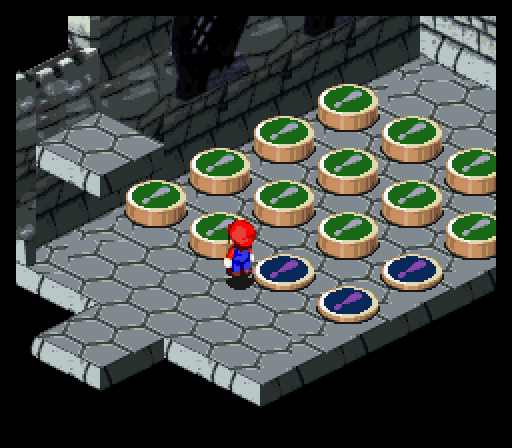
I haven't started any sort of coding for this since well...I wouldn't have any idea on how this would be done. For those who have never played Super Mario RPG, the puzzle here is as such. You step on one switch, all other switches around it are depressed (or undepressed if they're already depressed). The goal therefore is to make them all depressed. Any ideas on how this could be done at all? I know it's ripping off from another game but eh...I'm no expert at switch puzzles or puzzles in general so. ^^;;

This is somewhat similar to the above, where you have to knock one thing over another to make it go away, and leave yourself with only one left. THIS one might be trickier than the other, but yeah...there's that. I'm also wondering if there wouldn't be an interesting way of handling these at all...I was thinking of having these in a beta6 dungeon, which would have a mirror image of the player character, where they have to do things both on their side and the mirror side...
I haven't started any sort of coding for this since well...I wouldn't have any idea on how this would be done. For those who have never played Super Mario RPG, the puzzle here is as such. You step on one switch, all other switches around it are depressed (or undepressed if they're already depressed). The goal therefore is to make them all depressed. Any ideas on how this could be done at all? I know it's ripping off from another game but eh...I'm no expert at switch puzzles or puzzles in general so. ^^;;
This is somewhat similar to the above, where you have to knock one thing over another to make it go away, and leave yourself with only one left. THIS one might be trickier than the other, but yeah...there's that. I'm also wondering if there wouldn't be an interesting way of handling these at all...I was thinking of having these in a beta6 dungeon, which would have a mirror image of the player character, where they have to do things both on their side and the mirror side...
LockeZ

I'd really like to get rid of LockeZ. His play style is way too unpredictable. He's always like this too. If he ran a country, he'd just kill and imprison people at random until crime stopped.
5958
Well, the first one is easy: the event when you step on a particular switch would turn that switch on, and then have four conditional branches for the four surrounding switches, turning them off if they're on and on if they're off. I mean, that's how the puzzle works, right? All I did was tell you how the puzzle works, and that was the same thing as telling you how the code works -_-
LockeZ
I'd really like to get rid of LockeZ. His play style is way too unpredictable. He's always like this too. If he ran a country, he'd just kill and imprison people at random until crime stopped.
5958
Lol. I'm sure if you simply describe how the second puzzle works, you'll suddenly realize that you just wrote out the event code. What happens, exactly, when you press enter while facing a ball? I'll help you think through it if you want.
When pressing enter while facing a ball, if there is no ball on the other side of an adjacent ball, it will go over that ball and remove that ball. If there is a ball on the other side of an adjacent ball, then it will not go over that ball.
So what I'm assuming is this:
Balls on-screen: Variable = 0
Balls jumped: Variable = 1
Space cannot jump to: Variable = 2
If there is an empty space that a ball can jump too, and depending on the direction the player is facing, the coding would check for the direction, and then check to see if the spot the ball would normally go to either has a value of 0 or 1, and if 1, it would trigger the event. If the ball cannot be moved due to no space, then it'd check for the direction and if there is an adjacent ball to jump over, and if there is no ball, then it'd be variable 2. If all remaining balls are variable 2, then game is over.
That's what I assume anyways. Of course, explaining that is harder than it seems, but I think that's the general premise. The first puzzle was even more of a derp for me seeing how simple THAT one was.
So what I'm assuming is this:
Balls on-screen: Variable = 0
Balls jumped: Variable = 1
Space cannot jump to: Variable = 2
If there is an empty space that a ball can jump too, and depending on the direction the player is facing, the coding would check for the direction, and then check to see if the spot the ball would normally go to either has a value of 0 or 1, and if 1, it would trigger the event. If the ball cannot be moved due to no space, then it'd check for the direction and if there is an adjacent ball to jump over, and if there is no ball, then it'd be variable 2. If all remaining balls are variable 2, then game is over.
That's what I assume anyways. Of course, explaining that is harder than it seems, but I think that's the general premise. The first puzzle was even more of a derp for me seeing how simple THAT one was.
LockeZ
I'd really like to get rid of LockeZ. His play style is way too unpredictable. He's always like this too. If he ran a country, he'd just kill and imprison people at random until crime stopped.
5958
You probably want one switch for each spot, to indicate whether a ball is in that spot or not. That's much closer to how the player is thinking about the screen. It could be done with variables but would be more complex.
You're right that when activating a ball, it'll need to check which way the player is facing, and then check if there's anything in that direction. How will it know if there's anything in that direction? You can't simply hard-code that ball 6 is to the left of ball 7 for this one, because the balls can move from their starting positions. You need another way.
Checking for win/lose conditions can come after the mechanics are working.
You're right that when activating a ball, it'll need to check which way the player is facing, and then check if there's anything in that direction. How will it know if there's anything in that direction? You can't simply hard-code that ball 6 is to the left of ball 7 for this one, because the balls can move from their starting positions. You need another way.
Checking for win/lose conditions can come after the mechanics are working.
I'm assuming having the coding check for the ball's (which are probably going to be event tiles anyways) X/Y coordinates is the way to go about handling that bit?
LockeZ
I'd really like to get rid of LockeZ. His play style is way too unpredictable. He's always like this too. If he ran a country, he'd just kill and imprison people at random until crime stopped.
5958
Good, that'll work. Then you can tell which spot it's in. And based on which spot it's in, you know which spot is to the left, and you have a switch to tell you if there's a ball in that spot. So you know if anything is there.
What about the actual movement? It needs to be able to figure out where to go, and then actually go there, and then the puzzle needs to know that it went there.
What about the actual movement? It needs to be able to figure out where to go, and then actually go there, and then the puzzle needs to know that it went there.
My brain's having a fart right now. Umm...moving it would just use the Move Event, I know that much, and then checking that ball's X/Y coordinates against the empty spot, and then storing it into a variable or some such will tell the puzzle where it went?
(Yeah, I've never dealt with these kinds of puzzles before lol. Most I've dealt with are quizzes, sign puzzles, doors, and mazes...^^;; ).
(Yeah, I've never dealt with these kinds of puzzles before lol. Most I've dealt with are quizzes, sign puzzles, doors, and mazes...^^;; ).

This is kind of uncanny because I also remade the Mario button puzzle, not for my major game, but as a sort of side test.
Anyways, I recommend using a common event for the button puzzle. Even for something like this, common events are still your friends! They are like functions, or methods, if you are familiar with other programming languages.
This is the exact event I used. Use it however you please:

This right here might look more complicated at first, but besides this event all you need for each button event is the following:
You also need to set the variable ModulusNum to 4 at some point when you enter the room and begin the puzzle. In fact, if you are only trying to copy this puzzle to a tee, make what is shown as variable #3 here, the value of 4. In the test game of mine, I actually had different sizes of grids for different difficulties so I just made this value a variable instead. Although I think a 5x5 grid is actually impossible to complete with this kind of puzzle! :P
X is a value that corresponds to location in an imaginary grid, or array as shown, which represents the button grid:
1 2 3 4
5 6 7 8
9 10 11 12
13 14 15 16
However, where it says in that common event code to 'check left' or 'check right' it means when X is one higher so one spot right of 4 would be spot 5. Also, if you don't know what mod (short for modulus) is, it's a mathematical operation between two positive integers denoted by % which yields the remainder of whatever the yield would have been if the operation were division.
An example: 5 % 2 = 1
5 / 2 = 2 remainder 1 so the 5 % 2 = 1
Another: 9 % 3 = 0
9 / 3 = 3 remainder 0 so 9 % 3 = 0
The modulus is needed to help determine which buttons are being toggled in the grid.
I hope you found this helpful!
Anyways, I recommend using a common event for the button puzzle. Even for something like this, common events are still your friends! They are like functions, or methods, if you are familiar with other programming languages.
This is the exact event I used. Use it however you please:
This right here might look more complicated at first, but besides this event all you need for each button event is the following:
- Whenever you step on a button, set the variable SwitchNum to a value X (I will explain what X is shortly).
- Then, call that common event.
- Each event will need a 2nd page with its own switch that will keep it "pressed down" whenever you stand on it.
You also need to set the variable ModulusNum to 4 at some point when you enter the room and begin the puzzle. In fact, if you are only trying to copy this puzzle to a tee, make what is shown as variable #3 here, the value of 4. In the test game of mine, I actually had different sizes of grids for different difficulties so I just made this value a variable instead. Although I think a 5x5 grid is actually impossible to complete with this kind of puzzle! :P
X is a value that corresponds to location in an imaginary grid, or array as shown, which represents the button grid:
1 2 3 4
5 6 7 8
9 10 11 12
13 14 15 16
However, where it says in that common event code to 'check left' or 'check right' it means when X is one higher so one spot right of 4 would be spot 5. Also, if you don't know what mod (short for modulus) is, it's a mathematical operation between two positive integers denoted by % which yields the remainder of whatever the yield would have been if the operation were division.
An example: 5 % 2 = 1
5 / 2 = 2 remainder 1 so the 5 % 2 = 1
Another: 9 % 3 = 0
9 / 3 = 3 remainder 0 so 9 % 3 = 0
The modulus is needed to help determine which buttons are being toggled in the grid.
I hope you found this helpful!
I see that this works for 2 sides, but not 4 sides. Though I'm a bit confused as to what that last bit of coding is for. Actually, I'm just confused in general. @_@;;
LockeZ
I'd really like to get rid of LockeZ. His play style is way too unpredictable. He's always like this too. If he ran a country, he'd just kill and imprison people at random until crime stopped.
5958
Well, the x/y coordinates do tell you where it goes, kind of. You also have to take into account the rules of the puzzle to check if it can move at all. Which means: check whether the next spot is empty (or the edge of the puzzle), and also whether the spot after that is empty (or the edge of the puzzle). The X/Y coordinates tell you which two spots to check for those two things. If the spot next to it has a ball and the one after it doesn't, you can move it. You can tell if those two spots have balls in them by checking those two switches.
Moving it is, yes, just Move Event.
As far as telling the puzzle where it went - that's what the switches are for. To tell the puzzle which spots have balls in them. Does that give you a hint?
Moving it is, yes, just Move Event.
As far as telling the puzzle where it went - that's what the switches are for. To tell the puzzle which spots have balls in them. Does that give you a hint?
Let's see, using a little diagram here:
| X O O O |
----------------
*The | are walls in this instance to make things easier. X is empty spot, O are balls, and going from left to right, they'll be ball #1 and so on*
So in this example, ball #1 would be Switch: 0001, ball #2 is Switch: 0002, and ball #3 is Switch: 0003. If the player tried to hit ball #1 to the left, the coding would check that spots X/Y coordinates, and if there's no ball there (no switch at all) active there, it won't move there. Likewise, if the player tries to hit ball #2 to the right, the coding would check to see if there is anything in the spot to the right of it (the wall), and if it found a switch there, then it will not activate. But if the player hits ball #2 to the right, since there is a ball to the left of it (and thus being a switch), the coding will check for that. Afterwards, it'll check for the spot afterwards, and if there is nothing there...
Blah, I was onto something but I confused myself trying to explain it. >_<
| X O O O |
----------------
*The | are walls in this instance to make things easier. X is empty spot, O are balls, and going from left to right, they'll be ball #1 and so on*
So in this example, ball #1 would be Switch: 0001, ball #2 is Switch: 0002, and ball #3 is Switch: 0003. If the player tried to hit ball #1 to the left, the coding would check that spots X/Y coordinates, and if there's no ball there (no switch at all) active there, it won't move there. Likewise, if the player tries to hit ball #2 to the right, the coding would check to see if there is anything in the spot to the right of it (the wall), and if it found a switch there, then it will not activate. But if the player hits ball #2 to the right, since there is a ball to the left of it (and thus being a switch), the coding will check for that. Afterwards, it'll check for the spot afterwards, and if there is nothing there...
Blah, I was onto something but I confused myself trying to explain it. >_<
Sorry, I've been updating that post. Hopefully, it makes more sense now. In hindsight, I could have added more comments knowing I'd be posting it here...
EDIT!!!
Also, looking at the grid of #s that I made above, notice how all of the numbers in the leftmost column when modded by 4 equals 1. This means that we don't do the leftside check for these buttons. Similarly, all of the rightmost column values when modded with 4 equals 0. I have enough if branch to prevent doing the rightside check for these buttons.
I also just realized if you are adding this to a game where you are using other switches (I bet you are, but this test of mine was a fresh project), then you should be careful because the above code will sometimes toggles switches outside the bounds of these 16 button switches whenever you press buttons 2, 3, 14, and 15!!!
An easy way to avoid complications is to just leave 4 empty/unused switch slots before your first switch and after your last switch for switches used for this button puzzle!
EDIT!!!
Also, looking at the grid of #s that I made above, notice how all of the numbers in the leftmost column when modded by 4 equals 1. This means that we don't do the leftside check for these buttons. Similarly, all of the rightmost column values when modded with 4 equals 0. I have enough if branch to prevent doing the rightside check for these buttons.
I also just realized if you are adding this to a game where you are using other switches (I bet you are, but this test of mine was a fresh project), then you should be careful because the above code will sometimes toggles switches outside the bounds of these 16 button switches whenever you press buttons 2, 3, 14, and 15!!!
An easy way to avoid complications is to just leave 4 empty/unused switch slots before your first switch and after your last switch for switches used for this button puzzle!
Ah, I got it now. I was wondering what X was supposed to be there, but now I see that X refers to the pressed switch's location. I'm assuming therefore that the code can be copied for the top/bottom switches, if the switches are applicable to that corresponding switch.
...At least, I THINK I get it. I'd have to make it and test it to see how it goes of course, but...
...At least, I THINK I get it. I'd have to make it and test it to see how it goes of course, but...
kazesui has a puzzle game, http://rpgmaker.net/games/3579/
i think he does one of those puzzles. there are other puzzles here you should take a look at, too.
i think he does one of those puzzles. there are other puzzles here you should take a look at, too.
Hmm...I'll snag that and steal some puzzles see what inspiration I can get from that. It got first place it seems, so it must've been pretty good under those restrictions. Might help with sprucing my game up a bit as well, especially if I can make the puzzles more varied and interesting (assuming of course I'm capable of such a thing. I'm starting to doubt my abilities as a coder now lol...).
LockeZ
I'd really like to get rid of LockeZ. His play style is way too unpredictable. He's always like this too. If he ran a country, he'd just kill and imprison people at random until crime stopped.
5958
I was trying to train you until Shoobinator jumped in and just gave you the answer. :( Give a man some logic and he'll make games for a day, teach a man to create logic and he'll make games for life.
Well, it's there, but I still need to understand how it works properly anyways. Though was I even on the right track to begin with before he gave me the answer (which again, I'll still have to understand when putting it in anyways)? ^^;
Yeah, I figured you could tinker with that to start and then modify it to make an even better puzzle instead of just an exact copy of the SMRPG puzzle. Perhaps, the button example will help with your ball puzzle.
I definitely agree with you on this, but I thought giving a whole example would be more clear to explain through a forum. Now hopefully, Xenomic can break this down and build it back up. Also, I really didn't want him to use the super tedious method of defining every event by having each switch just toggle all the switches around it because doing the brute force method with more complicated problems will only make the implementation harder in the long run.
author=LockeZ
I was trying to train you until Shoobinator jumped in and just gave you the answer. :( Give a man some logic and he'll make games for a day, teach a man to create logic and he'll make games for life.
I definitely agree with you on this, but I thought giving a whole example would be more clear to explain through a forum. Now hopefully, Xenomic can break this down and build it back up. Also, I really didn't want him to use the super tedious method of defining every event by having each switch just toggle all the switches around it because doing the brute force method with more complicated problems will only make the implementation harder in the long run.

