



 Full Games List
 Featured Games
 New Games
 Reviews
 Media
Media Images
 Blogs
Blogs Game Updates
 Images Feedback Summary
 Game Design Highlights
 Tutorials
 Articles
 Scripts
 Utilities / Plugins
 Resources
 Engines
 Engine Bulletins
 What is Makerscore?
 Past Events
 Achievements
 Misaos
 Forums
 Post History
 Chat
Chat New to RMN?
 Full Store List
 RMN Music Pack (free)



RESETTING CHARACTER LOCATIONS, AND DELETING ITEMS?
Posts
Pages:
1
 Royal_Flush
 View playlists
 Close
CloseHey! I was wondering if there was a way, like how some games after a big cut scene change the location of the sprites of characters. Like for example, a character was seen on the far right before the cutscene/battle and after all that they are on the far left.
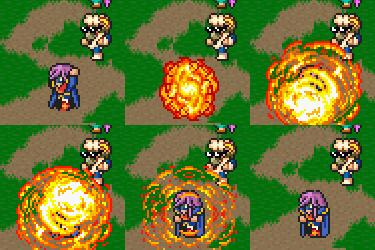
As well as getting rid of certain map items after said cut scene. Here let me get you a screen shot:

And after the even the character needs to the right a bit as well as a character sprite appear in front of the main character (the other sprite is sprite version of the 3rd world object that has an X on it). So is there any way to do that? Plus I need to know how to permanently delete an event, I'm sure where "Self-switch" is on 2003 because it's layout is different somewhat from XP. AS WELL as trigger an event when a certain item or party member is gained when going back to another MAP. I KNOW, A LOT BUT IM REALLY LOST CAUSE, like I've searched up on ends and I have found nothing that helps me and YOU guys always seem to know a lot so, yeah! THANK YOU IN ADVANCE.
As well as getting rid of certain map items after said cut scene. Here let me get you a screen shot:
And after the even the character needs to the right a bit as well as a character sprite appear in front of the main character (the other sprite is sprite version of the 3rd world object that has an X on it). So is there any way to do that? Plus I need to know how to permanently delete an event, I'm sure where "Self-switch" is on 2003 because it's layout is different somewhat from XP. AS WELL as trigger an event when a certain item or party member is gained when going back to another MAP. I KNOW, A LOT BUT IM REALLY LOST CAUSE, like I've searched up on ends and I have found nothing that helps me and YOU guys always seem to know a lot so, yeah! THANK YOU IN ADVANCE.
Corfaisus
"It's frustrating because - as much as Corf is otherwise an irredeemable person - his 2k/3 mapping is on point." ~ psy_wombats
7874
In order to change the hero's location without having the player actually see them move, use the Tint Screen command and set all the values to 0. After this, move the hero's event to where it needs to be after the battle by using the Move Event command to change the location and facing, start the battle, and in the first page of the battle events, set the page to activate after 0 turns and have it change the screen tint back to whatever it was during the cutscene (all 100s for default).
And to "remove" the event, after the event finishes what it is you need it to do, turn on a switch and start a new page in the event that becomes active when that switch is turned on. Keep this page blank with its graphic set to anything transparent (preferably the blank graphic of the tileset) and set its Trigger Condition to Action Key so that it doesn't interfere with other processes later on.
I'd assume you're also asking about how to make an event process if the hero has a certain item or party member in their group, which is part of the Event Preconditions at the upper-left side of the event window. Unless, of course, you mean that an event's processing begins if a hero has a certain item equipped, which will require you to start with either a Common Event that sets a variable to a number if the designated hero has a certain piece of equipment on, or a Parallel Process event on the map that does the same. After this, simply set up another event (or the same one on the map if you so choose by using a new page) that becomes active when this variable equals the number you set it to.
And to "remove" the event, after the event finishes what it is you need it to do, turn on a switch and start a new page in the event that becomes active when that switch is turned on. Keep this page blank with its graphic set to anything transparent (preferably the blank graphic of the tileset) and set its Trigger Condition to Action Key so that it doesn't interfere with other processes later on.
I'd assume you're also asking about how to make an event process if the hero has a certain item or party member in their group, which is part of the Event Preconditions at the upper-left side of the event window. Unless, of course, you mean that an event's processing begins if a hero has a certain item equipped, which will require you to start with either a Common Event that sets a variable to a number if the designated hero has a certain piece of equipment on, or a Parallel Process event on the map that does the same. After this, simply set up another event (or the same one on the map if you so choose by using a new page) that becomes active when this variable equals the number you set it to.

Pages:
1

