



 Full Games List
 Featured Games
 New Games
 Reviews
 Media
Media Images
 Blogs
Blogs Game Updates
 Images Feedback Summary
 Game Design Highlights
 Tutorials
 Articles
 Scripts
 Utilities / Plugins
 Resources
 Engines
 Engine Bulletins
 What is Makerscore?
 Past Events
 Achievements
 Misaos
 Forums
 Post History
 Chat
Chat New to RMN?
 Full Store List
 RMN Music Pack (free)



COLOR SCHEME
Posts
Pages:
1

 bulmabriefs144
 View playlists
 Close
CloseI have four basic systems that I've customized.
But well, nobody much cares for them. I'm thinking about expanding this to 9 systems.
I want to know the basic look for each in terms of background and main.
As in: Pink text on (lighter/darker) Pink BG.
Well, probably not. But come up with something.
...If nobody responds, I'm gonna make ugly camou designs.
But well, nobody much cares for them. I'm thinking about expanding this to 9 systems.
I want to know the basic look for each in terms of background and main.
As in: Pink text on (lighter/darker) Pink BG.
Well, probably not. But come up with something.
...If nobody responds, I'm gonna make ugly camou designs.

More color schemes aren't going to solve your fundamental problem: your system sets are just ugly at the moment (don't take it personally)! My general rule of thumb is that if you want to use a gradient background, use solid color text. If you want a solid background, you can use both solid text or gradient text. Just for the love of god, don't use gradient on gradient. It's a rookie mistake because the default system sets do it.
Next, you need to study color on some basic level. There's a zillion websites you can find that discuss the use of color. Use color schemes that don't clash. You have to stop and think "can I read this without my eyes wanting to fall out of their sockets." Follow your gut. Don't convince yourself you can read it if you really can't. Sometimes, if you've been looking at something for too long, you just have to step back and ask for honest feedback.
Anyway, here's a couple color theory links you can check out:
http://www.colormatters.com/color-and-design/basic-color-theory
http://www.smashingmagazine.com/2010/01/28/color-theory-for-designers-part-1-the-meaning-of-color/ --this one has a TON of examples
http://www.worqx.com/color/
Next, you need to study color on some basic level. There's a zillion websites you can find that discuss the use of color. Use color schemes that don't clash. You have to stop and think "can I read this without my eyes wanting to fall out of their sockets." Follow your gut. Don't convince yourself you can read it if you really can't. Sometimes, if you've been looking at something for too long, you just have to step back and ask for honest feedback.
Anyway, here's a couple color theory links you can check out:
http://www.colormatters.com/color-and-design/basic-color-theory
http://www.smashingmagazine.com/2010/01/28/color-theory-for-designers-part-1-the-meaning-of-color/ --this one has a TON of examples
http://www.worqx.com/color/
Yay, Xmas complementary colors.
I like gradient on gradient! But, any new ones, yea prob not.
I'm going solid text on gradient, then at least things will show up.
Ugh, I don't care for solid. I'm gonna try a third option.
I'm doing mirror gradient (as in the top and botton edges are dark, making the middle medium, to create a better outline). The reason gradient doesn't work is that it fades to a light color, which, guess what, the BG also does in the exact same direction! Solids are too hard for the look of my game (which is soft and very casual, not intense), and simple gradients aren't working, but mirror gradients might give it enough contrast to stand out.

Green on green is one of my earlier systems, and it still stands out without fading to BG after the adjustment. I also fixed the blue on blue, making it light blue vs dark blue. So, now most of the basic ones at least stand out thanks to better contrast (still ugly as shit though).
I'm gonna try a few with complementary colors too, but even using the same color, there's less blend now.
I like gradient on gradient! But, any new ones, yea prob not.
I'm going solid text on gradient, then at least things will show up.
Ugh, I don't care for solid. I'm gonna try a third option.
I'm doing mirror gradient (as in the top and botton edges are dark, making the middle medium, to create a better outline). The reason gradient doesn't work is that it fades to a light color, which, guess what, the BG also does in the exact same direction! Solids are too hard for the look of my game (which is soft and very casual, not intense), and simple gradients aren't working, but mirror gradients might give it enough contrast to stand out.

Green on green is one of my earlier systems, and it still stands out without fading to BG after the adjustment. I also fixed the blue on blue, making it light blue vs dark blue. So, now most of the basic ones at least stand out thanks to better contrast (still ugly as shit though).
I'm gonna try a few with complementary colors too, but even using the same color, there's less blend now.
That's not bad, but you should make the shadow color behind the text much darker to add more contrast.
Here's my point about gradient-on-gradient though. When have you ever seen that in a commercial RPG? There's a reason people don't do it. It's harder to read. Just look at this and decide for yourself:

Here's my point about gradient-on-gradient though. When have you ever seen that in a commercial RPG? There's a reason people don't do it. It's harder to read. Just look at this and decide for yourself:
Wow, that's stupid.
No, not your thing above. I mistakenly thought, that like the BG tile, that they stretched the text to fit the entire tile. What actually is happening is it goes to roughly 8 or 9 out of 16, and wastes the rest of the block. This meant I had a white-to-black font and all it showed was grey and black except for a small amt near the top.
The main reason I'm reluctant to do solids, is that my background to text boxes is translucent, meaning there's often some part of the scene that doesn't work because it randomly is the same color as the text. With some sort of gradient, 2/3 of it works still shows up (provided it contrasts the text box, which is the big if anyway). Also, exceedingly light or dark text fails as solid (I just tested solid vs gradient black on clear solid white, and I could read only the gradient, then I tested gradient white on clear solid white, and I could read the gradient). I could either go ahead and make the BG opaque, but that would annoy me even more.
I guess I'll learn more about contrast/complements, if I'm gonna use gradients like this. Mkay, finished (I think) the main color shows up in all cases, but I'm gonna doublecheck the secondaries.
No, not your thing above. I mistakenly thought, that like the BG tile, that they stretched the text to fit the entire tile. What actually is happening is it goes to roughly 8 or 9 out of 16, and wastes the rest of the block. This meant I had a white-to-black font and all it showed was grey and black except for a small amt near the top.
The main reason I'm reluctant to do solids, is that my background to text boxes is translucent, meaning there's often some part of the scene that doesn't work because it randomly is the same color as the text. With some sort of gradient, 2/3 of it works still shows up (provided it contrasts the text box, which is the big if anyway). Also, exceedingly light or dark text fails as solid (I just tested solid vs gradient black on clear solid white, and I could read only the gradient, then I tested gradient white on clear solid white, and I could read the gradient). I could either go ahead and make the BG opaque, but that would annoy me even more.
I guess I'll learn more about contrast/complements, if I'm gonna use gradients like this. Mkay, finished (I think) the main color shows up in all cases, but I'm gonna doublecheck the secondaries.
author=bulmabriefs144
Wow, that's stupid.
No, not your thing above. I mistakenly thought, that like the BG tile, that they stretched the text to fit the entire tile. What actually is happening is it goes to roughly 8 or 9 out of 16, and wastes the rest of the block. This meant I had a white-to-black font and all it showed was grey and black except for a small amt near the top.
Nobody knows what you're talking about. Why post stuff like this? We don't need to read every little thought of your brain. It's very off-putting.
And why bother making this thread if you refuse to take suggestions? I'm speaking from experience. People are not going to respond well to an ugly game, especially if they can't read the text. Gradient text on top of a gradient background is ugly no matter what. I can't think of a single time it's been used well. Enterbrain even smartened up and got rid of it by default in RMXP/VX/Ace.
Look at this list even:
http://rpgmaker.net/games/?engine=5&status=3&rating=8&commercial=&sort=&portal=None
In the top 20, with the exception of Tiamat Sacrament (default system) and AAGen (gradient text on pattern), all of those games use solid text. There's a reason for that! It's easy to read, and it broadens your audience because people want to play a game that looks good.
(I meant that in a given page with letters on it, I'd expected the text to show top to bottom color. Instead it showed bottom to middle)
Suggestions are opinions, not absolute truth.
They don't work the same way for everyone.
In a given accident, one person can turn around to another and say "doesn't that prove God exists, he saved us" or some such. The other one just became an atheist due to that same accident. If two people can have completely different outlooks there, how can you possibly expect advice to be universal?
What's important is to learn what you can from the criticisms given, and apply it to you're making. I really don't care what other people did, even if said people are successful.
The important thing I learned was that if you're gonna use gradients, do them in such a way as to provide high contrast (either complementary color contrast, light/dark contrast, or both), and avoid colors that blend/match completely with the color. And I'm going over to test just that.
Suggestions are opinions, not absolute truth.
They don't work the same way for everyone.
In a given accident, one person can turn around to another and say "doesn't that prove God exists, he saved us" or some such. The other one just became an atheist due to that same accident. If two people can have completely different outlooks there, how can you possibly expect advice to be universal?
What's important is to learn what you can from the criticisms given, and apply it to you're making. I really don't care what other people did, even if said people are successful.
The important thing I learned was that if you're gonna use gradients, do them in such a way as to provide high contrast (either complementary color contrast, light/dark contrast, or both), and avoid colors that blend/match completely with the color. And I'm going over to test just that.

I'd think the best way to do it is to give all text backgrounds a dark shade, and all the text a very light shade (close to white). If you have to have gradients, put the gradient shades closer together. In that screenshot above it goes from a somewhat light green, to a pretty medium shade of green, which is why it's kinda hard to read on medium green background. The RM2K3 RTP font is easily readable, even though it's a gradient, but it goes from white to a very light shade of blue.
3 Rules of Creating Stuff
1. Making the project (game/comic/whatever) match the context.
That is, I think Kingdom Hearts with its crossover with Disney will occasionally make Mickey Mouse sigils on their text box (when they don't have stuff like straight subtitles, people with conversation style text boxes, or outright adapt style based on the world you visit. The context of the game, is sort of "many realities, one heart" or some such. Sometimes, you also get black BG white text (the whole "light surrounded by darkness" is also a heavy motif).
Final Fantasy traditionally did hard dark blue with grey/white, sort of serious epic style. But I think around FF7 or so, they switched to grey BG white text, still pretty serious though. FFX does largely zero text box. What triggered the shift? Probably voice acting. The shift to more vocal parts make the game more "film"-like, so subtitles makes more sense than text boxes.
Drowtales (a comic) uses different color text depending on the speaker. From the standpoint or multiple protagonists, this works.
So why insist on gradients, where people can't see it as well as other stuff? Because, the game is about things that aren't quite so solid. There aren't cut-and-dry "stealing is wrong" morals to this story, there are shades/gradations to all points. You find a bunch of different religions, with different viewpoints, people who teach several different messages, some of which conflict with earlier things taught. There isn't a consistent message, but a variety, and the hero (and players) have to figure out the truth for themselves. In other words, ideas/concepts aren't "solid" in this game, they're shades of grey (and blue, and white, and etc).
There are perhaps other options I could use to convey this. But I'm going with this, since it's the simplest way. So the important thing is to take the advice about color theory, and apply it to best effect so that stuff stands out.
2. Developing a fanbase, and working to bring things in line with their expectations.
Why is that number two, you ask? Because if you go too much with what other people want, you can risk losing the core part of the game. Pandering To Fanbase. Of course, I have few (rabid) fans, so I mainly have to worry about #1.
So yes, I do have to have gradients in this game. But possibly not in future ones.
3. I don't remember 3, but it's pretty important.
I will see what I can do about making the text-back create a stand-out effect, Millenim. And I'll see what I can do about color theory, Pepsi.
Also, yay, I got my default to show up better. It's now a white-to-black instead of a grey color. I did grey text-back and it stood out both in extreme white and extreme black parallax.
1. Making the project (game/comic/whatever) match the context.
That is, I think Kingdom Hearts with its crossover with Disney will occasionally make Mickey Mouse sigils on their text box (when they don't have stuff like straight subtitles, people with conversation style text boxes, or outright adapt style based on the world you visit. The context of the game, is sort of "many realities, one heart" or some such. Sometimes, you also get black BG white text (the whole "light surrounded by darkness" is also a heavy motif).
Final Fantasy traditionally did hard dark blue with grey/white, sort of serious epic style. But I think around FF7 or so, they switched to grey BG white text, still pretty serious though. FFX does largely zero text box. What triggered the shift? Probably voice acting. The shift to more vocal parts make the game more "film"-like, so subtitles makes more sense than text boxes.
Drowtales (a comic) uses different color text depending on the speaker. From the standpoint or multiple protagonists, this works.
So why insist on gradients, where people can't see it as well as other stuff? Because, the game is about things that aren't quite so solid. There aren't cut-and-dry "stealing is wrong" morals to this story, there are shades/gradations to all points. You find a bunch of different religions, with different viewpoints, people who teach several different messages, some of which conflict with earlier things taught. There isn't a consistent message, but a variety, and the hero (and players) have to figure out the truth for themselves. In other words, ideas/concepts aren't "solid" in this game, they're shades of grey (and blue, and white, and etc).
There are perhaps other options I could use to convey this. But I'm going with this, since it's the simplest way. So the important thing is to take the advice about color theory, and apply it to best effect so that stuff stands out.
2. Developing a fanbase, and working to bring things in line with their expectations.
Why is that number two, you ask? Because if you go too much with what other people want, you can risk losing the core part of the game. Pandering To Fanbase. Of course, I have few (rabid) fans, so I mainly have to worry about #1.
So yes, I do have to have gradients in this game. But possibly not in future ones.
3. I don't remember 3, but it's pretty important.
I will see what I can do about making the text-back create a stand-out effect, Millenim. And I'll see what I can do about color theory, Pepsi.
Also, yay, I got my default to show up better. It's now a white-to-black instead of a grey color. I did grey text-back and it stood out both in extreme white and extreme black parallax.
LockeZ

I'd really like to get rid of LockeZ. His play style is way too unpredictable. He's always like this too. If he ran a country, he'd just kill and imprison people at random until crime stopped.
5958
All I have to say is that I agree gradient on gradient is really hard to read, and I would pick an awful ugly color just to avoid it.
Gradient text is probably just really hard to read even on a solid background though.
Gradient text is probably just really hard to read even on a solid background though.
Made a color test NPC to test everything out at once. I'm getting a much better sense now.
What I found is that Millenin is right, it's pretty much all about the text BG. The most gradiented text imaginable, could be read literally white on white provided the text-back was contrasting enough provide an outline to read it.
Some BGs I'm still working on though. I did a Xmas/Watermelon color theme (to try to get a nice vibrant scheme, but I failed to consider colors of the blue to purple tones (which turn muddy with this set). Nvm, I fixed it by turning the text-back black from red.
Yay, all colors show against the background! And that totally makes up for the fact that some of them are really horrible retina-burning colors that no sane person would use.
What I found is that Millenin is right, it's pretty much all about the text BG. The most gradiented text imaginable, could be read literally white on white provided the text-back was contrasting enough provide an outline to read it.
Some BGs I'm still working on though. I did a Xmas/Watermelon color theme (to try to get a nice vibrant scheme, but I failed to consider colors of the blue to purple tones (which turn muddy with this set). Nvm, I fixed it by turning the text-back black from red.
Yay, all colors show against the background! And that totally makes up for the fact that some of them are really horrible retina-burning colors that no sane person would use.

author=PepsiOtaku
My general rule of thumb is that if you want to use a gradient background, use solid color text. If you want a solid background, you can use both solid text or gradient text. Just for the love of god, don't use gradient on gradient. It's a rookie mistake because the default system sets do it.
Gradient text on top of a gradient background is ugly no matter what. I can't think of a single time it's been used well. Enterbrain even smartened up and got rid of it by default in RMXP/VX/Ace.
I get what you're saying, but I don't think the issue is as "black and white" as you're making it out to be. It's more like a gradient. (Haha! ...bad joke? Ok) As long as the gradients are subtle and there's enough contrast, I don't think you lose any considerable amount of readability. And on the up-side it helps the text gain a little volume... This consideration is not so relevant in rmXP/VX because you have highly customizable text to aid in this effect. Stuff like anti-aliasing, default outlines, etc.
author=Bulmabriefs
What I found is that Millenin is right, it's pretty much all about the text BG. The most gradiented text imaginable, could be read literally white on white provided the text-back was contrasting enough provide an outline to read it.
If rm2k3 could provide a complete outline, then maybe, but even so I would have my reservations. But what you get is an ugly, pixelated "drop shadow" effect that doesn't give you the complete picture of each letter... Don't confuse "I can read this if I'm paying attention" with "I can read this in a split of a second" This relates to how the brain interprets negative and positive space. When you have just the outline of a letter it becomes more difficult to read text as a whole. You don't want that.
author=Bulmabriefs
The main reason I'm reluctant to do solids, is that my background to text boxes is translucent, meaning there's often some part of the scene that doesn't work because it randomly is the same color as the text.
I guess the real question here is why can't you make sure this doesn't happen. Seems like a really easy thing to avoid, even with solids.
Well, for one, I'm not really sure I'd want totally solid text boxes. It obscures 1/3 of the screen, including characters in many cases.
So, yea, making alot more work for myself, because not as many shades of color to work with, making blending a pain.

Tie dye and octarine. Just because. (It doubles as a color-blindness test)
So, yea, making alot more work for myself, because not as many shades of color to work with, making blending a pain.

Tie dye and octarine. Just because. (It doubles as a color-blindness test)

You could make the text box a solid colour and use gradient text. It works the same.
I'd say the yellow (test) looks the best against that colour. It'd look better if it were darker as opposed to lighter in the background, though. Darker window skins with lighter text is good colour design.
The idea is to use colours that don't clash (like the orange, red and pink) or blend (while, brown, green, grey) or get lost (the other colours). Usually complimentary colours. (Google a colour chart of complementary colours if you don't know them.)
Light text on dark backgrounds is nice, too. They pop out better. Of course, you don't want them too dark or they're a pain to read, but yeah.
Personally I'd make the skin a darker green in the middle and use either the yellow or just plain white text. Two gradients is a bit too busy, imo, but I guess if you are subtle it shouldn't cause too much of a pain.
I'd say the yellow (test) looks the best against that colour. It'd look better if it were darker as opposed to lighter in the background, though. Darker window skins with lighter text is good colour design.
The idea is to use colours that don't clash (like the orange, red and pink) or blend (while, brown, green, grey) or get lost (the other colours). Usually complimentary colours. (Google a colour chart of complementary colours if you don't know them.)
Light text on dark backgrounds is nice, too. They pop out better. Of course, you don't want them too dark or they're a pain to read, but yeah.
Personally I'd make the skin a darker green in the middle and use either the yellow or just plain white text. Two gradients is a bit too busy, imo, but I guess if you are subtle it shouldn't cause too much of a pain.

See, that (minus the red ones) is pretty neat. A flat background colour, darker than the text colours, looks really nice. Simple, yet classy. And most importantly - easy to read.
author=Liberty
You could make the text box a solid colour and use gradient text. It works the same.
I'd say the yellow (test) looks the best against that colour. It'd look better if it were darker as opposed to lighter in the background, though. Darker window skins with lighter text is good colour design.
The idea is to use colours that don't clash (like the orange, red and pink) or blend (while, brown, green, grey) or get lost (the other colours). Usually complimentary colours. (Google a colour chart of complementary colours if you don't know them.)
Light text on dark backgrounds is nice, too. They pop out better. Of course, you don't want them too dark or they're a pain to read, but yeah.
Personally I'd make the skin a darker green in the middle and use either the yellow or just plain white text. Two gradients is a bit too busy, imo, but I guess if you are subtle it shouldn't cause too much of a pain.
I thought red (red, red-orange, pink) shades were complementary to the green. Then they talked about analogous (close, but different tone, like red to orange or pink, or blue to green or navy) colors. The worst colors appears to be the navy (it can barely be read), and the light brown (right next, it's mistaken for another orange).
I have 9 color systems:
-Transparent (Placing it at the start, so people skip it immediately, unless they actually want it)
-Green on green (trust me, they're two opposite shades, so it can be read)
-Blue on blue (same deal, light text dark BG, though I could make it even darker)
-Grey and white (new Final Fantasy, the only thing I'm not sure of is the c3 whisper text, which is another shade of grey)
-White with black (white BG, dark text)
-Pink on pink (It's not great, but if you like Barbie or something, it is pretty visible)
-Banana Nut (Yellow and brown.)
-Xmas (The one above)
-Old Final Fantasy (Blue with sorta light grey. Nvm that old final fantasy never had gradients)
Which would people most likely use, and we'll examine/improve that one.
That damn navy, look even on his, it doesn't blend well.
author=Milennin
http://i41.tinypic.com/1z4gw3d.png
As Liberty said, this is fine. The red definitely clashes, but it's at least readable on top of the background. One of my points was that gradients on a solid color is okay.
author=alterego
I get what you're saying, but I don't think the issue is as "black and white" as you're making it out to be. It's more like a gradient. (Haha! ...bad joke? Ok) As long as the gradients are subtle and there's enough contrast, I don't think you lose any considerable amount of readability. And on the up-side it helps the text gain a little volume... This consideration is not so relevant in rmXP/VX because you have highly customizable text to aid in this effect. Stuff like anti-aliasing, default outlines, etc.
You're completely right that contrast is a factor, but I still think it's fairly black and white. The one exception being gradient on pattern (which I didn't think of bringing up before), since the pattern itself can be so many things. I was merely describing a basic guideline. I'm going to bring up your game, Nightfall, as an example, because I think you have a great sense of color, and did gradient text in such a way that it's not distracting. As I said in my first post, if it's gradient on a solid color, it's fine.
It looks like in Nightfall, you have gradient on pattern (alternating lines) much like Alter AILA Genesis, as seen here:
http://rpgmaker.net/games/3064/images/17746/
I think you do a better job at the contrast though. AAG's text is less readable IMO.
Bulma, you should use the above image as a comparison, because the background is dark, the text gradients are bright and legible, the alternating lines in the bg are subtle so the text is still readable. If you absolutely have to use gradient on gradient, you must get the contrast right.
The other cool thing about the system sets is that you're not limited to making all of the colors solid, and all the colors gradient. You can do both if you want. You could make names and other "important text" like locations and things a gradient, while the basic text is a solid color. That would make the important text stand out. Focus on making one really good system set first before making 8 more.
I did gradient for two major reasons.
-I decided against solid text after reading a zillion rather flat 2k game texts (which tend to love this). I generally have the sense if there's the ability to do this, it's meant to be used.
-I have extreme trouble getting the contrast right even with solid, but with gradient, it's just a matter of remixing to be more of this color. Given that there are also background objects that interfere with this process, I rely on the law of averages.
I should make the backgrounds more single tone though, that way it's at least not gradient on gradient. I might try using patterns too. Or other stuff.

This is the problem I run into with translucent solids (man, I've gotta change the main, it's too dark). It looks readable for the text, but the menu is rather flat. This works for FF1 or 2, but come FF7, they started having slight shade differences.
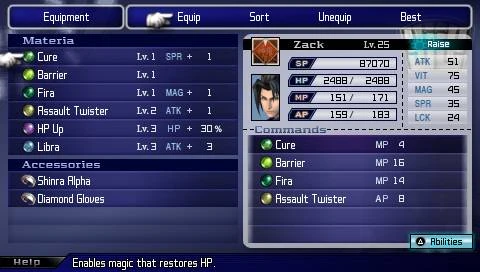
Though, that looks more like horizontal shading than gradient. Hmmm, if I wanted both to have some sort of shading effect, I could make the text and BG have different directions so it's not actively at odds with the text... Just the same, this particularly BG is staying the same.

Hmmm, while that isn't great (this is the default title one, that I switch away from after opening scenes), there might be something to that. Especially since my average text page usually only goes to 2/3 because I'm not always certain if it will run off the page when I have facesets. I think I'll shift the darkest part to the very edge...
-I decided against solid text after reading a zillion rather flat 2k game texts (which tend to love this). I generally have the sense if there's the ability to do this, it's meant to be used.
-I have extreme trouble getting the contrast right even with solid, but with gradient, it's just a matter of remixing to be more of this color. Given that there are also background objects that interfere with this process, I rely on the law of averages.
I should make the backgrounds more single tone though, that way it's at least not gradient on gradient. I might try using patterns too. Or other stuff.

This is the problem I run into with translucent solids (man, I've gotta change the main, it's too dark). It looks readable for the text, but the menu is rather flat. This works for FF1 or 2, but come FF7, they started having slight shade differences.
Though, that looks more like horizontal shading than gradient. Hmmm, if I wanted both to have some sort of shading effect, I could make the text and BG have different directions so it's not actively at odds with the text... Just the same, this particularly BG is staying the same.

Hmmm, while that isn't great (this is the default title one, that I switch away from after opening scenes), there might be something to that. Especially since my average text page usually only goes to 2/3 because I'm not always certain if it will run off the page when I have facesets. I think I'll shift the darkest part to the very edge...
Pages:
1


