



 Full Games List
 Featured Games
 New Games
 Reviews
 Media
Media Images
 Blogs
Blogs Game Updates
 Images Feedback Summary
 Game Design Highlights
 Tutorials
 Articles
 Scripts
 Utilities / Plugins
 Resources
 Engines
 Engine Bulletins
 What is Makerscore?
 Past Events
 Achievements
 Misaos
 Forums
 Post History
 Chat
Chat New to RMN?
 Full Store List
 RMN Music Pack (free)



HELP WITH VX/VX ACE?
Posts
Pages:
1

 Rield
Rield View playlists
 Close
CloseSo I decided to get the trial version of Ace yesterday. It looked fine but when I went to look at things like the database, the database pop up window was too large for the entire screen, and the font was enlarged it looked like too. I tried reinstalling it but it stayed the way it is. So I tried doing something with regular Vx instead, and it somehow ended up doing the same with the Ace all of a sudden. This has never happened before until I installed Ace and now my copy of Vx is all wacky. here is some screenies if this helps with the problem.
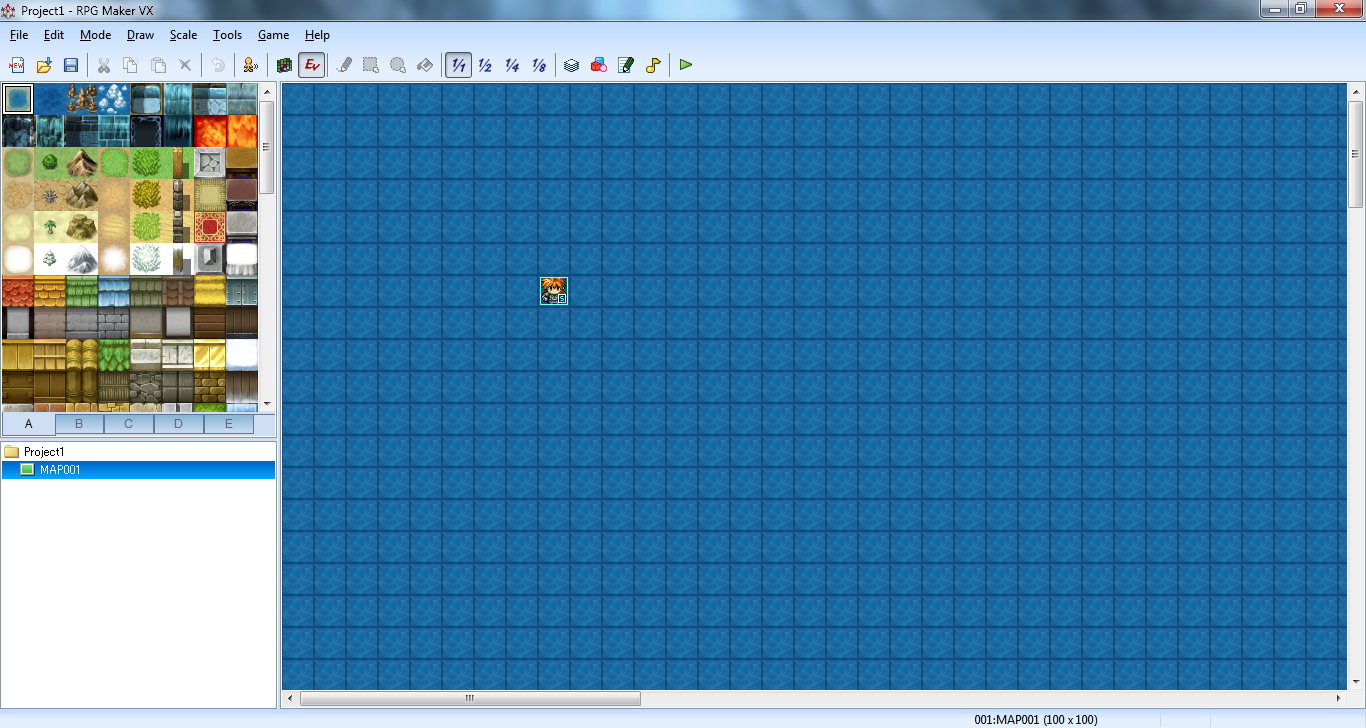
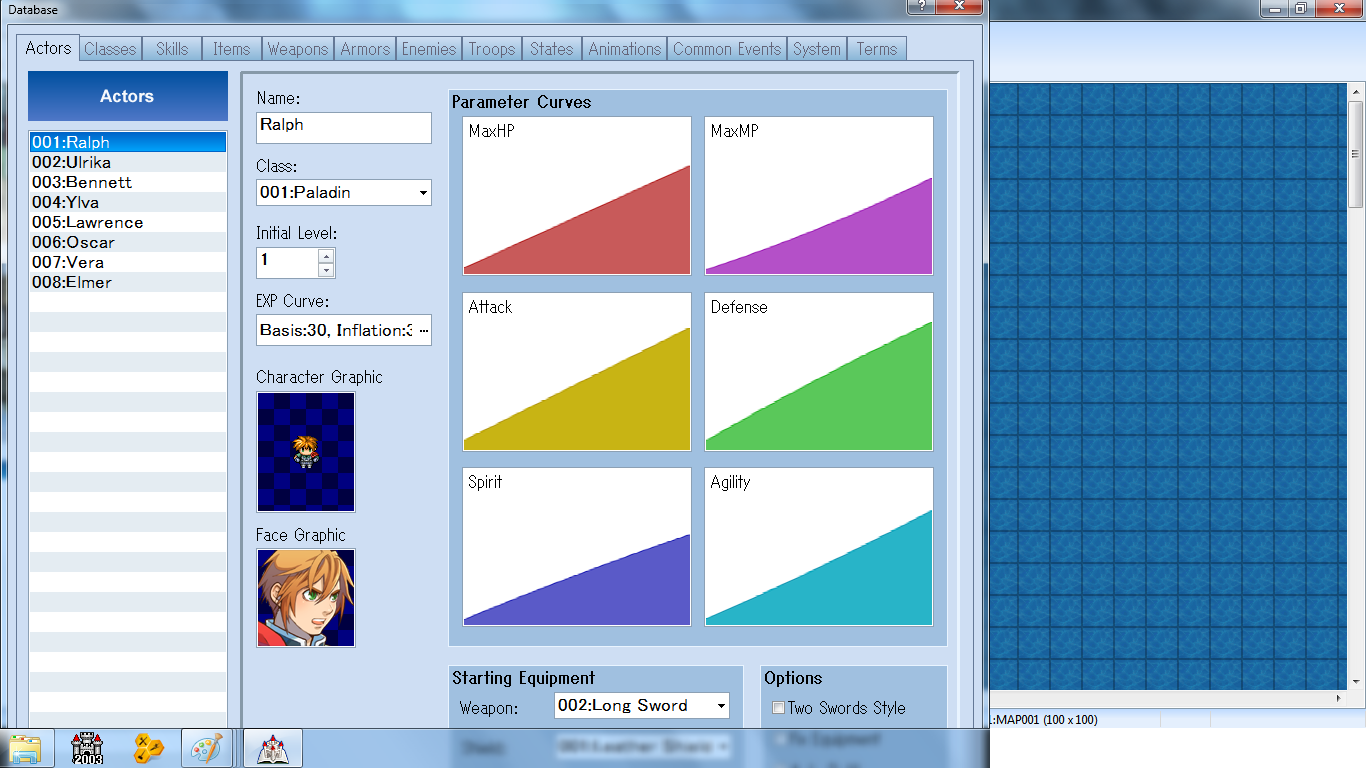
Suggestions on what to do y'all? I'd like to try what Ace has to offer after doing 2k3 for years.
Suggestions on what to do y'all? I'd like to try what Ace has to offer after doing 2k3 for years.

Nah that wasn't the problem. The resolution is already at the highest it can go.
This is on a windows 7 laptop btw if that helps at all.
This is on a windows 7 laptop btw if that helps at all.
It should be. How odd.
It might be an idea to reinstall the program and see if that helps. Also, if that doesn't help and no-one else here offers any suggestions, ask over at RPGMakerweb.com since they're the official forums and should know how to fix the software issue if that's where the issue lies.
Sorry I can't help more, though.
It might be an idea to reinstall the program and see if that helps. Also, if that doesn't help and no-one else here offers any suggestions, ask over at RPGMakerweb.com since they're the official forums and should know how to fix the software issue if that's where the issue lies.
Sorry I can't help more, though.
1024 x 768 is the cut-off point where Ace will refuse to run at all, but as far as I can tell, the database window is a little taller than that. It shouldn't be that bad, though.
It looks to me like it could be something to do with your scaling/DPI settings, although that doesn't explain why the RPG Maker window itself isn't affected. Try (in control panel) going to Appearance and Personalisation > Make text and other items larger or smaller and having a look at the settings there.
It looks to me like it could be something to do with your scaling/DPI settings, although that doesn't explain why the RPG Maker window itself isn't affected. Try (in control panel) going to Appearance and Personalisation > Make text and other items larger or smaller and having a look at the settings there.
The settings say it's at small 100% and the only other option is to make it even bigger. Thanks for the help though. I can see if the other sites know what's up then.

I'd be less worried about why VX Ace looks crazy and more worried about where your start button ran off to. If your laptop screen max's out at 1366x768 and your image is 1366x768...and you haven't got a start button, you are gonna have a harder time navigating windows then you will using VX Ace. Are you sure you aren't running 1920x1080? I just ask because your windows start bar Icons imply your resolution is 1080p, if this isn't the case...Microsoft may be the people to contact, as I'm moderately sure RPG Maker does not mess with the GUI of the windows start bar.
I do have two ideas for a situation like this...
1) It could be a memory issue, try clearing up your memory. Have as few programs running in the background as possible. Image editing takes a lot of memory, so maybe try closing up all those paint programs and see if that helps, have you tried turning it off and back on again?
2) Windows XP Virtual Machine - If you are running Windows 7 then you can get the Windows XP VM direct from the Microsoft website. This is a great way to run programs like Creatoon that no longer work in windows &(at least not on the 64 bit version)
Windows XP Virtual Machine:
3) This has nothing to do with the problem at hand, however if you enjoy doing digital graphics, GIMP is a great program, and it's free...just something to think about.
I do have two ideas for a situation like this...
1) It could be a memory issue, try clearing up your memory. Have as few programs running in the background as possible. Image editing takes a lot of memory, so maybe try closing up all those paint programs and see if that helps, have you tried turning it off and back on again?
2) Windows XP Virtual Machine - If you are running Windows 7 then you can get the Windows XP VM direct from the Microsoft website. This is a great way to run programs like Creatoon that no longer work in windows &(at least not on the 64 bit version)
Windows XP Virtual Machine:
3) This has nothing to do with the problem at hand, however if you enjoy doing digital graphics, GIMP is a great program, and it's free...just something to think about.
Pages:
1

