Full Games List
 Featured Games
 New Games
 Reviews
 Media
Media Images
 Blogs
Blogs Game Updates
 Images Feedback Summary
 Game Design Highlights
 Tutorials
 Articles
 Scripts
 Utilities / Plugins
 Resources
 Engines
 Engine Bulletins
 What is Makerscore?
 Past Events
 Achievements
 Misaos
 Forums
 Post History
 Chat
Chat New to RMN?
 Full Store List
 RMN Music Pack (free)



[PIXEL ART] HELP/ADVICE CREATING HIGH-RES "SNES-STYLE" SPRITES
Posts
Pages:
1

 Kitsune Inferno
 View playlists
 Close
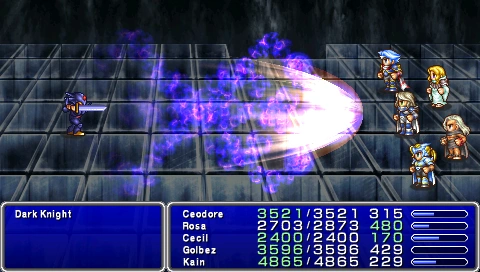
CloseSo I'm working on a game engine for RPGs that runs in 1280x720 resolution, and the main projects I'm working on for the engine are SNES-style RPGs. One of these projects, the "proof of concept" so to speak, is a Final Fantasy fangame, so I want it to look and feel as close to a Final Fantasy game as possible. In my quest to do that, I've been trying to redraw FF6 sprites in a higher resolution (72x96 vs. 24x32). Now despite my general lack of artistic knowledge, I'm pretty competent at spriting in 24x32. What I'm finding difficult is when I'm taking the same techniques I utilize in the higher-res sprites, the artwork doesn't really retain that "feel" that makes 16-bit graphics so appealing to me in the first place. Obviously adding detail and expanding the color palette will do that, but I want to take advantage of the technology I have without losing that "SNES" feeling, and I'm sure there's a compromise there between detail and charm. To that end, I'm drawing inspiration from the FF4 PSP remakes (I know, they weren't exactly HD, but I really love the work done in that and it's the philosophy I'm going for with the FF6 redraws).
But enough talking, here's a WIP of Terra I've been working on using the original colors from the SNES version and using a wider range of shades, while also incorporating more detail from official artwork. It's not the only version I've done but it's the closest to passable I've done. Even so, I can't really put my finger on what's wrong this (besides everything):

I guess what I'm ultimately trying to ask here is: what should my goals here be? Fewer, but more detail oriented colors? A broader range of color in the sprites? Are there any articles out there on high-res sprites that aren't fighting game sprites?
But enough talking, here's a WIP of Terra I've been working on using the original colors from the SNES version and using a wider range of shades, while also incorporating more detail from official artwork. It's not the only version I've done but it's the closest to passable I've done. Even so, I can't really put my finger on what's wrong this (besides everything):
I guess what I'm ultimately trying to ask here is: what should my goals here be? Fewer, but more detail oriented colors? A broader range of color in the sprites? Are there any articles out there on high-res sprites that aren't fighting game sprites?
I think what gives it the SNES feel is the large pixels. Draw at a lower resolution and magnify by x2 or maybe x3 or x4. Just look at Captain Planet's crotch and you can see it getting more SNES as it zooms in :P

For a SNES FF look I'd advise:
-No more than 4 or 5 shades per color for the more detailed objects, but only 1 or 2 otherwise (the less you use, the better).
-A style closer to super deformed than to realism (small, chubby, with either big heads or limited facial traits).
Here are screenshots of Mega Man X on the SNES and for Android:
http://image.gamespotcdn.net/gamespot/images/2005/342/reviews/926372_20051209_screen019.jpg
http://screens.latestscreens.com/iphoneipad/screenshots/megamanx/IMG_0846.JPG
They managed to preserve the style perfectly.
FF4:
http://lparchive.org/Final-Fantasy-IV-Advance/Update%2035/14-ff4-35-51.png
http://static3.wikia.nocookie.net/__cb20120125120354/finalfantasy/images/b/b7/FF4PSP_TAY_Enemy_Ability_Darkness.png
They mostly use 3-4 shades per color on the sprites, which is a little too much in my opinion, but the overall style is still reminiscent of 16-bit art.
-No more than 4 or 5 shades per color for the more detailed objects, but only 1 or 2 otherwise (the less you use, the better).
-A style closer to super deformed than to realism (small, chubby, with either big heads or limited facial traits).
Here are screenshots of Mega Man X on the SNES and for Android:
http://image.gamespotcdn.net/gamespot/images/2005/342/reviews/926372_20051209_screen019.jpg
http://screens.latestscreens.com/iphoneipad/screenshots/megamanx/IMG_0846.JPG
They managed to preserve the style perfectly.
FF4:
http://lparchive.org/Final-Fantasy-IV-Advance/Update%2035/14-ff4-35-51.png
http://static3.wikia.nocookie.net/__cb20120125120354/finalfantasy/images/b/b7/FF4PSP_TAY_Enemy_Ability_Darkness.png
They mostly use 3-4 shades per color on the sprites, which is a little too much in my opinion, but the overall style is still reminiscent of 16-bit art.
The Super Nintendo was restricted to a low resolution. Developers designed the art based on what they could do with that limited real estate. Good, low-resolution pixel art uses color to substitute for minute differences in line, because there is no space to draw extra lines. But if you're working in HD, you aren't facing the same restrictions. It's possible that the charm was in seeing how the restrictions were overcome successfully.
Have you tried a painted version, something that does not involve pixel placement? If you are the one who painted your icon, I don't doubt your ability to do it justice.
Have you tried a painted version, something that does not involve pixel placement? If you are the one who painted your icon, I don't doubt your ability to do it justice.

It's all about the palette and anatomy. By the palette I mean exactly what avee meant, so in sum: avoid redundant colors, and pick colors that compliment eachother. The overall palette will reach out for the tone that you want~
By the anatomy I mean, look at the original sprite anatomy and don't change that. Chubby, SD characters are the way to go - but look at the arm placement, animations and things like that, though if you're working with triple the resolution, I guess you'll need at least twice the frames.
Also, pay attention to the angles! It's of extreme importance, with the incorrect angle in the sprite, it can look completely out of place, making your project seem less like a homage to the SNES and more like a shallow flash game.
SNES rpg sprites tend to have a very annoying perspective to upscale. Your Terra, for example, looks more like a platformer sprite looking at the player (though I do reckon there's a very slight slant on her, it's not enough)
By the anatomy I mean, look at the original sprite anatomy and don't change that. Chubby, SD characters are the way to go - but look at the arm placement, animations and things like that, though if you're working with triple the resolution, I guess you'll need at least twice the frames.
Also, pay attention to the angles! It's of extreme importance, with the incorrect angle in the sprite, it can look completely out of place, making your project seem less like a homage to the SNES and more like a shallow flash game.
SNES rpg sprites tend to have a very annoying perspective to upscale. Your Terra, for example, looks more like a platformer sprite looking at the player (though I do reckon there's a very slight slant on her, it's not enough)
Pages:
1