



 Full Games List
 Featured Games
 New Games
 Reviews
 Media
Media Images
 Blogs
Blogs Game Updates
 Images Feedback Summary
 Game Design Highlights
 Tutorials
 Articles
 Scripts
 Utilities / Plugins
 Resources
 Engines
 Engine Bulletins
 What is Makerscore?
 Past Events
 Achievements
 Misaos
 Forums
 Post History
 Chat
Chat New to RMN?
 Full Store List
 RMN Music Pack (free)



RTP FOR RPG200 OR HERE WE GO AGAIN :)
Posts

 Linkis
 View playlists
 Close
CloseSo, just purchased a new fancy smancy new puter (Dell XPS8700) to help me try and make a game...will, at least try :)
Was trying to download and play a game made with RPG2000 and wonder of wonders..no RTP :(
Of course I no longer have it do to getting a new computer.
Thought I found the rtp on the internet but now it seems that "this system does not support that program.
Sounds like Windows 8.1 will run all RMN programs but not those before RMK3.
Any ideas if this is correct or how I might correct it ????
Was trying to download and play a game made with RPG2000 and wonder of wonders..no RTP :(
Of course I no longer have it do to getting a new computer.
Thought I found the rtp on the internet but now it seems that "this system does not support that program.
Sounds like Windows 8.1 will run all RMN programs but not those before RMK3.
Any ideas if this is correct or how I might correct it ????

That sounds about right. Apparently Windows 8 is a dick to older programs (hence why I'm never updating from Windows 7 - fuck you Microsoft!!!). Not sure what you can do - there's bound to be a way to get them to play but... yeah...
Maybe someone else will have a better idea.
Maybe someone else will have a better idea.

I've not been able to get anything pre-RMXP to run on my Windows 8 machines so best of luck. I did find that my new laptop, which runs Windows 7, also crashes when trying to open 2k/3 games, so maybe it's not a Windows 8 thing and is a hardware thing. RM2k/3 aren't particularly well-programmed and it could just be that newer hardware is phasing out some obscure dependency of it.
Best to just move on to one of the modern makers to be safe.
Best to just move on to one of the modern makers to be safe.

Use some RTP installer from different third parties. I guess some Spanish RTP distribution contains same RTP filenames from Don Miguel but the installer works in Windows 8 yet.
Alternatively, unpack the RTPe.exe with 7-zip, WinRAR and such. Then create the RuntimePackagePath by hand in the Windows Registry or create a .reg file then import it.
Alternatively, unpack the RTPe.exe with 7-zip, WinRAR and such. Then create the RuntimePackagePath by hand in the Windows Registry or create a .reg file then import it.

I don't use Windows 8 so these instructions might not be right but I'll give it a shot. This involves editing the registry of your computer which can be dangerous since it's possible to change a system setting and break Windows. As long as you are careful and follow the instructions there shouldn't be a problem. If my instructions don't match what you can do I would recommend stopping and letting me know.
Copy the RTP files from your old computer to your new one and remember the folder where you put it. For the sake of this example we'll assume it is "C:\Games\RM2k\RTP". Then when in desktop mode hit the Windows key + R to open the run dialog window. In the field you can type next to open type in "regedit" and hit OK. This will prompt an administrator access prompt which you should allow. This will open regedit.
On the left side of regedit is a list of folders called 'HKEY_CLASSES_ROOT', 'HKEY_CURRENT_USER', 'HKEY_LOCAL_MACHINE', etc. . If you only see Computer then click on it to open it up which should show the above. Expand 'HKEY_CURRENT_USER' and then find and open the 'Software' folder. Look for a folder called ASCII.
If you do not have a folder called ASCII:
Right click on the Software folder and go to New->Key. This will create a new folder under Software. Call it ASCII.
Click on ASCII to expand it and look for a folder called RPG2000, it should probably be the only folder.
If you do not have a folder called RPG2000:
Right click on the ASCII folder and go to New->Key. This will create a new folder under ASCII. Call it RPG2000.
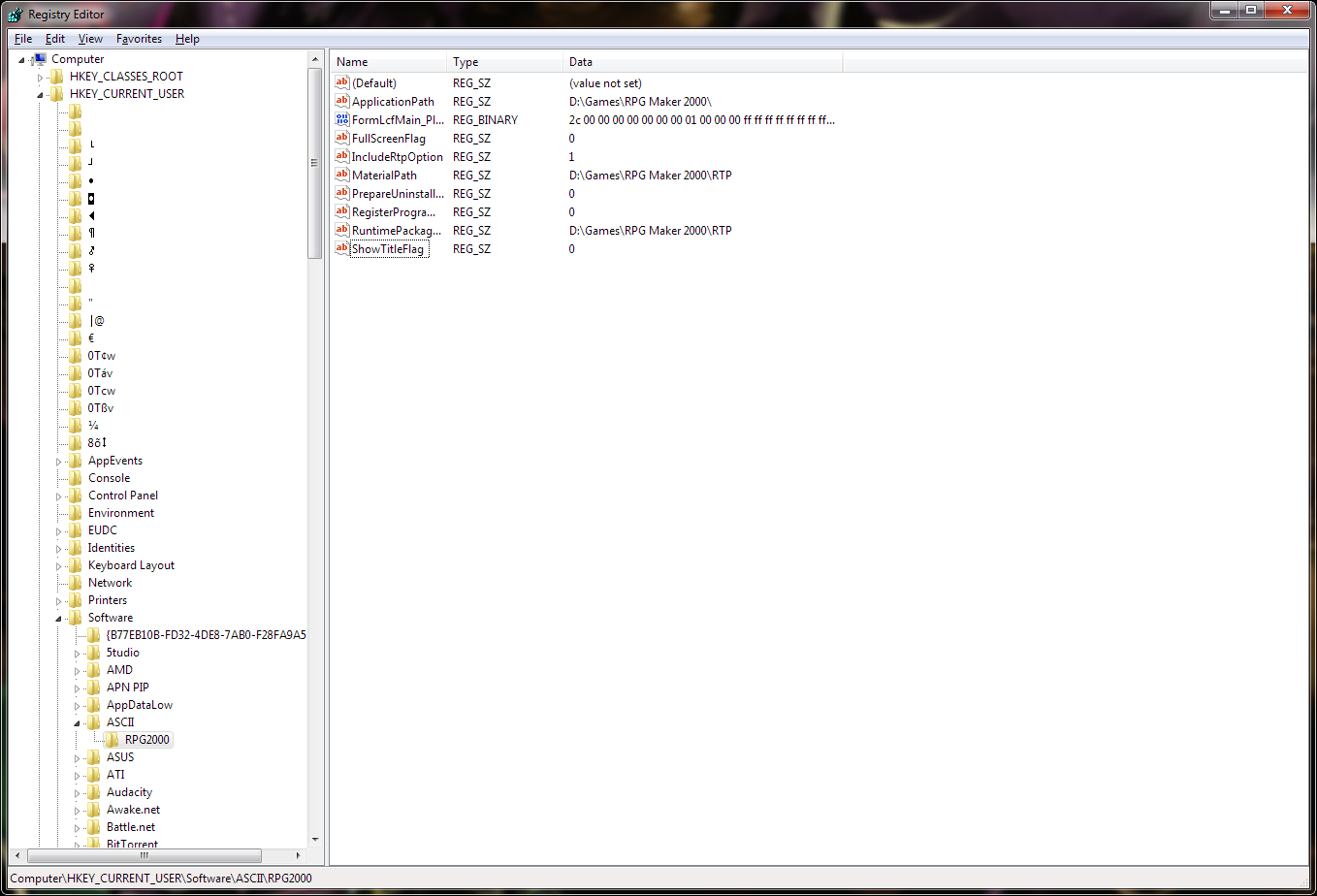
Click on the RPG2000 folder. This should fill the right pane of regedit with some values in a table: A column of some names like ApplicationPath, FullScreenFlag, MaterialPath, etc., a column of REG_SZ, and a data column with various values. Look for the name 'MaterialPath' in the names column.
If you do not have a value named MaterialPath in the names column:
Right click in some white space in the right pane. This will open a menu where the only option is "New->". Hover over new and select "String Value". This will add a new row to the table. In the name type in "MaterialPath". If you lose focus or something and you can't edit the name select the row and hit F2 and you can rename the name.
Double click the row with 'MaterialPath'. This should bring up a new dialog window that has a 'Value Name' with 'MaterialPath' at the top you can't change and below it a 'Value Data' with a white box in it that you can edit. In the white area put in the folder path to the RTP, like "C:\Games\RM2k\RTP" from the start of this. Click OK to close the dialog window.
Try running RM2k / the rm2k game you want to play. Hopefully it'll find the MaterialPath in the registry and work fine. Here's an image of what mine looks like as a reference:
Alternatively you can use a reg key file which windows can import and do the above. Download this file Do not run it and save it to your desktop. Right click and select edit to open it in notepad. If edit isn't there open notepad then open the file. You'll have to change the "Text Documents (*.txt)" to "All Files" in the notepad open window to see the file. The file contents are:
Change that path after "MaterialPath"=" to the path of your RM2k RTP, using double backslashes in place of singles (it's a computer thing). So from our top example the file should now be:
Save the file. Then go back to the desktop and open the file normally. This will prompt an administrator access dialog which you should allow. This will open regedit and it will import the key into your registry and then you can use rm2k / play rm2k games again.
Copy the RTP files from your old computer to your new one and remember the folder where you put it. For the sake of this example we'll assume it is "C:\Games\RM2k\RTP". Then when in desktop mode hit the Windows key + R to open the run dialog window. In the field you can type next to open type in "regedit" and hit OK. This will prompt an administrator access prompt which you should allow. This will open regedit.
On the left side of regedit is a list of folders called 'HKEY_CLASSES_ROOT', 'HKEY_CURRENT_USER', 'HKEY_LOCAL_MACHINE', etc. . If you only see Computer then click on it to open it up which should show the above. Expand 'HKEY_CURRENT_USER' and then find and open the 'Software' folder. Look for a folder called ASCII.
If you do not have a folder called ASCII:
Right click on the Software folder and go to New->Key. This will create a new folder under Software. Call it ASCII.
Click on ASCII to expand it and look for a folder called RPG2000, it should probably be the only folder.
If you do not have a folder called RPG2000:
Right click on the ASCII folder and go to New->Key. This will create a new folder under ASCII. Call it RPG2000.
Click on the RPG2000 folder. This should fill the right pane of regedit with some values in a table: A column of some names like ApplicationPath, FullScreenFlag, MaterialPath, etc., a column of REG_SZ, and a data column with various values. Look for the name 'MaterialPath' in the names column.
If you do not have a value named MaterialPath in the names column:
Right click in some white space in the right pane. This will open a menu where the only option is "New->". Hover over new and select "String Value". This will add a new row to the table. In the name type in "MaterialPath". If you lose focus or something and you can't edit the name select the row and hit F2 and you can rename the name.
Double click the row with 'MaterialPath'. This should bring up a new dialog window that has a 'Value Name' with 'MaterialPath' at the top you can't change and below it a 'Value Data' with a white box in it that you can edit. In the white area put in the folder path to the RTP, like "C:\Games\RM2k\RTP" from the start of this. Click OK to close the dialog window.
Try running RM2k / the rm2k game you want to play. Hopefully it'll find the MaterialPath in the registry and work fine. Here's an image of what mine looks like as a reference:
Alternatively you can use a reg key file which windows can import and do the above. Download this file Do not run it and save it to your desktop. Right click and select edit to open it in notepad. If edit isn't there open notepad then open the file. You'll have to change the "Text Documents (*.txt)" to "All Files" in the notepad open window to see the file. The file contents are:
Windows Registry Editor Version 5.00


[HKEY_CURRENT_USER\Software\ASCII\RPG2000]

"MaterialPath"="D:\\Games\\RPG Maker 2000\\RTP"
Change that path after "MaterialPath"=" to the path of your RM2k RTP, using double backslashes in place of singles (it's a computer thing). So from our top example the file should now be:
Windows Registry Editor Version 5.00


[HKEY_CURRENT_USER\Software\ASCII\RPG2000]

"MaterialPath"="C:\\Games\\RM2k\\RTP"
Save the file. Then go back to the desktop and open the file normally. This will prompt an administrator access dialog which you should allow. This will open regedit and it will import the key into your registry and then you can use rm2k / play rm2k games again.
Well ladies and gentlemen, I have Legends of Illiarion on my DeskTop.
It works just fine and it's an RPK 3000 so I know that is OK.
Thank you all and especially GreatRedSpirit. I can see you went to a LOT of trouble trying to help me. But I got lost when trying to follow your directions as I'm not great with computers and was terrified I would damage some of my files so stopped before I screwed up my computer. Again, thank you for trying to help me.
Guess I will have to stick with 3000 and later :( :)
It works just fine and it's an RPK 3000 so I know that is OK.
Thank you all and especially GreatRedSpirit. I can see you went to a LOT of trouble trying to help me. But I got lost when trying to follow your directions as I'm not great with computers and was terrified I would damage some of my files so stopped before I screwed up my computer. Again, thank you for trying to help me.
Guess I will have to stick with 3000 and later :( :)
That's fair! Not everybody is comfortable with editing the Windows registry. I do have another idea though. You just play Rm2k(3) games, right Linkis? You can tell a game to not use the RTP by editing the RPG_RT.ini file included with every RM2k(3) game. Just add the following to the end of the file:
These will tell the game to not look for the RTP as everything it needs is included in the game itself. Now to prevent errors coming up like "Could not find X" copy and paste the entire RTP into the game folder. That should hopefully do the trick so you can play any RM2k game without the RTP installed. You won't be able to open the editor though, there's no way to tell it to not look for the RTP in the registry.
RunTimePackage=1

FullPackageFlag=1
These will tell the game to not look for the RTP as everything it needs is included in the game itself. Now to prevent errors coming up like "Could not find X" copy and paste the entire RTP into the game folder. That should hopefully do the trick so you can play any RM2k game without the RTP installed. You won't be able to open the editor though, there's no way to tell it to not look for the RTP in the registry.
author=Sailerius
so maybe it's not a Windows 8 thing and is a hardware thing.
Not maybe, definitely. Since many people with Windows 8 have no problems. Myself included.
Thanks Link, now I'm more confused and unhappy :(
You degraded my hardware, but don't tell me how to fix it :(
I can play RPG3000 but not 2000. Have you downloaded 2000 and played them ??
Also, I am using 8.1 not 8. I wonder if that means anything ???
You degraded my hardware, but don't tell me how to fix it :(
I can play RPG3000 but not 2000. Have you downloaded 2000 and played them ??
Also, I am using 8.1 not 8. I wonder if that means anything ???

author=Linkis
Thought I found the rtp on the internet but now it seems that "this system does not support that program.
Sounds like Windows 8.1 will run all RMN programs but not those before RMK3.
1. Right-click RTP setup file.
2. Click "Properties".
3. Click on the "Compatibility" tab.
4. Check "Run this program in compatibility mode for:".
5. Below that, select "Windows XP (Service Pack 3)" or anything older than Windows XP.
6. Click "Apply".
7. Click "OK".
8. Run RTP setup file.
9. ????
10. PROFIT!
Also, I will personally confirm that RM2K and RM2K3, both editors and games, run perfectly fine under Windows 7 and Windows 8 RP. While I have not tested on Windows 8.1 I see no reason RM2K(3) would fail there.

I am running RM2k3 on my Windows 8.1 machine with literally no issue whatsoever (installed, ran, did nothing else). I had heard some horror stories, but it turns out alright! It does run a tiny bit on the choppy side sometimes, but that is my garbage processor and the fact that Windows 8.1 ain't too friendly in that regard.
Well, the mystery gets deeper :)
I downloaded and am playing Final Tear 1 which is rpg2000 and it works fine.
It appears there is something in some of the games that causes the problem.
@Kaempfer, Not sure what RM2k3 is, I have no problem with RMK3000, just some of the games brought back from the archive.
I downloaded and am playing Final Tear 1 which is rpg2000 and it works fine.
It appears there is something in some of the games that causes the problem.
@Kaempfer, Not sure what RM2k3 is, I have no problem with RMK3000, just some of the games brought back from the archive.
author=KingArthurauthor=Linkis1. Right-click RTP setup file.
Thought I found the rtp on the internet but now it seems that "this system does not support that program.
Sounds like Windows 8.1 will run all RMN programs but not those before RMK3.
2. Click "Properties".
3. Click on the "Compatibility" tab.
4. Check "Run this program in compatibility mode for:".
5. Below that, select "Windows XP (Service Pack 3)" or anything older than Windows XP.
6. Click "Apply".
7. Click "OK".
8. Run RTP setup file.
9. ????
10. PROFIT!
Also, I will personally confirm that RM2K and RM2K3, both editors and games, run perfectly fine under Windows 7 and Windows 8 RP. While I have not tested on Windows 8.1 I see no reason RM2K(3) would fail there.
I tried to do what you suggested but I get an error saying the system cannot find the path specified then another window pops up with a bunch of ????????? Any idea what Im missing? I'm using windows 8.1
Have you installed the RTP files in the correct directories? I'm not sure about Windows 8 (though I don't imagine it would be too different) but Windows 7 has them in the Common Files>Enterbrain> RPG Maker 2000/2003 folders and that works a-okay. You could just copy/paste the RTP files into the game folders if need be, I guess. That should get rid of the issue for that particular game, though you'd have to do the same for any other games.
It may also be that the RTP files you've got and the ones that the game uses are different versions. I know there's at least three versions going around. Two of them are the normal RTP files, only with different names for each file (Vehicle vs Vehicles and hero1 vs char1 and so-forth). The third one isn't really the RTP but instead an add-on that a lot of people added to the same folders as the RTP and used from there.
Also, 2k and 2k3 RTP is different, so you'll need to get both if you intend to play both types of games.
Thankfully, though, the RTP for the two engines are quite light (about/less than 30MB each, unlike a certain Ace which is, what? Over 200MB?)
Also, 2k3 is the name for 2003. Both 2k and 2k3 (most people use 2k/3 to indicate both) are quite alike in structure except that 2k3 has a side-view battle system built in and a lot more bugs. (I still like it though ;p )
It may also be that the RTP files you've got and the ones that the game uses are different versions. I know there's at least three versions going around. Two of them are the normal RTP files, only with different names for each file (Vehicle vs Vehicles and hero1 vs char1 and so-forth). The third one isn't really the RTP but instead an add-on that a lot of people added to the same folders as the RTP and used from there.
Also, 2k and 2k3 RTP is different, so you'll need to get both if you intend to play both types of games.
Thankfully, though, the RTP for the two engines are quite light (about/less than 30MB each, unlike a certain Ace which is, what? Over 200MB?)
Also, 2k3 is the name for 2003. Both 2k and 2k3 (most people use 2k/3 to indicate both) are quite alike in structure except that 2k3 has a side-view battle system built in and a lot more bugs. (I still like it though ;p )
author=Liberty
That sounds about right. Apparently Windows 8 is a dick to older programs (hence why I'm never updating from Windows 7 - fuck you Microsoft!!!). Not sure what you can do - there's bound to be a way to get them to play but... yeah...
Maybe someone else will have a better idea.
OH Ms.Princess, is you a Microsoft hater ?? :) I just went through another problem Microsoft caused that made me find a computer outside my home so I could even get back on my computer :( had to do with my password/signon. Rotten Microsoft :*(
Think I might just try downing loading that RMK2 again....
As for your last post :) I don't put any files anywhere. When I download and RMK2, I did the same I do with all the RMK engines, don't have to move any files round....but then if you remember my older posts...I'm a dummie when it comes to understanding anything about files :)

author=Liberty
Have you installed the RTP files in the correct directories? I'm not sure about Windows 8 (though I don't imagine it would be too different) but Windows 7 has them in the Common Files>Enterbrain> RPG Maker 2000/2003 folders and that works a-okay. You could just copy/paste the RTP files into the game folders if need be, I guess. That should get rid of the issue for that particular game, though you'd have to do the same for any other games.
It may also be that the RTP files you've got and the ones that the game uses are different versions. I know there's at least three versions going around. Two of them are the normal RTP files, only with different names for each file (Vehicle vs Vehicles and hero1 vs char1 and so-forth). The third one isn't really the RTP but instead an add-on that a lot of people added to the same folders as the RTP and used from there.
Also, 2k and 2k3 RTP is different, so you'll need to get both if you intend to play both types of games.
Thankfully, though, the RTP for the two engines are quite light (about/less than 30MB each, unlike a certain Ace which is, what? Over 200MB?)
Also, 2k3 is the name for 2003. Both 2k and 2k3 (most people use 2k/3 to indicate both) are quite alike in structure except that 2k3 has a side-view battle system built in and a lot more bugs. (I still like it though ;p )
I'm not sure where to get the RTP files. I just downloaded an installer. The installer says all that nonsense when I try to install it. Nothing else came with the file except the installer. Is there good place to download it?
Installers say "all that nonsense" to inform you what it's doing, if you can't bring yourself to read them and understand what your computer is telling you I'm going to have to venture a guess that the problem lies between the chair and the keyboard.

