



 Full Games List
 Featured Games
 New Games
 Reviews
 Media
Media Images
 Blogs
Blogs Game Updates
 Images Feedback Summary
 Game Design Highlights
 Tutorials
 Articles
 Scripts
 Utilities / Plugins
 Resources
 Engines
 Engine Bulletins
 What is Makerscore?
 Past Events
 Achievements
 Misaos
 Forums
 Post History
 Chat
Chat New to RMN?
 Full Store List
 RMN Music Pack (free)



SCRIPT FOR CONDITIONAL BRANCH
Posts
Pages:
1

 SunflowerGames
 View playlists
 Close
CloseI have a puzzle game where I have moving blocks. Player pushes block and it goes in one direction. When the player pushes the block it subtracts a variable and turns on a self switch. In essence you need to push all the blocks to complete the puzzle. Unfortunately you can get the variable from pushing the block against a wall or another block.
What I think I need! A condition branch that checks the event and its location.
I'm no scripter, but something like $game_event_6 = $game_map_id (I'm not too sure how to write this as you can see. 6 is the event number and if its equal to a certain map id the player won't get the chip. ie. the location of the events starting place.)
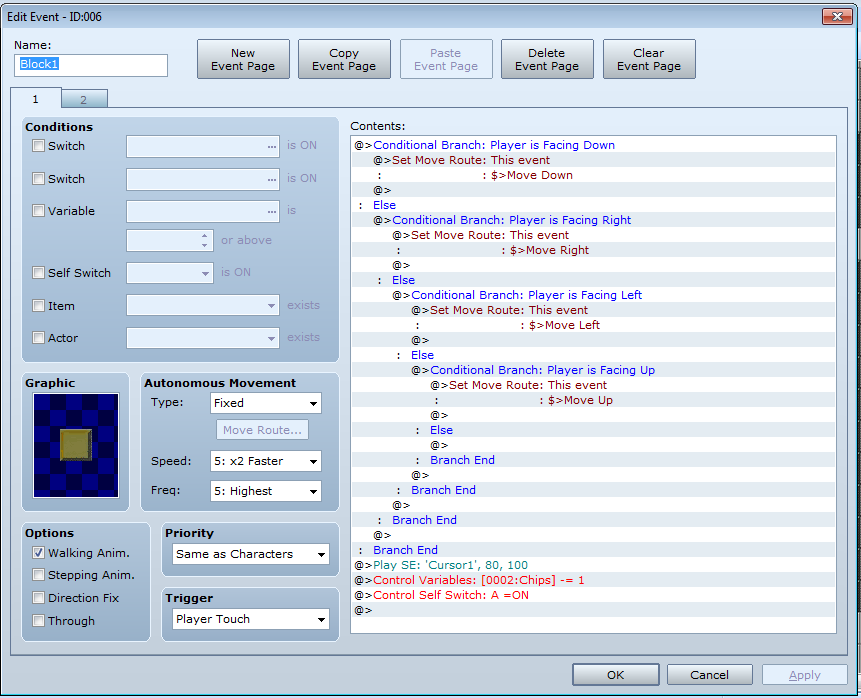
The second page is the same with the exception of the last three lines.
I want to put a conditional branch so that those three thing won't happen unless the map location of the event is different.

Just Map ID the event at the start of the event process. And check if it's changed at the end. If it's different flip the switch/variables.
Just tried something like that, but now I have to move the block twice in order to get the chip variable. (Because the first time it will do nothing no matter what because the event starts at that location - when the player touches it.)
Here's the picture of what I think you were suggesting:
The first picture is at the top of the event and the second one
at the bottom. (Ignore that one control switch, was playing around
with it and that also lead to a dead end.)


Perhaps the only way to do this is have a parallel process check the event location (The problem with this is that the map has so many of these events that I would overwhelm the map with parallel processes.)

I know I did a push-block mechanic in one of my games, but the intent was to push the block onto a switch. So, what I think I did was set two $game_variables to the location of the switch, did the move route code ("1 tile away from hero" should do the trick?), set another two $game_variables to the new location of the block, then did a comparison of coordinates. If they matched, I activated a $game_switch, which opened... part of a path. I'm a bit fuzzy on this point, obviously.
Though, I'm not sure why you're activating a self-switch, and have the code based on that self-switch being active using the same code as this page that you're showing. I mean, the variable would decrement in either case, and you'd activate the self-switch all over again? I'm probably missing something, here.
*Edit: Never mind. I have no idea what the heck you want to do.
Though, I'm not sure why you're activating a self-switch, and have the code based on that self-switch being active using the same code as this page that you're showing. I mean, the variable would decrement in either case, and you'd activate the self-switch all over again? I'm probably missing something, here.
*Edit: Never mind. I have no idea what the heck you want to do.
You move a block, get a variable, but the block still exists. So after pushing the block again you won't get the variable twice (hence the self A switch.) Perhaps the level picture will make the idea clearer. But you could also download the game and play till level 13 :) :)

So, here's my thought...

...only I forgot to change the move-route target to "this event", and I'm subtracting a negative number. Way to fail, Sataro. Way. To. Fail.
Also, Page 2 would have the self-switch active, and is just "move away from player".
That aside, we can probably move these x/y checks into script-variables. I guess it was faster to show it this way.
...only I forgot to change the move-route target to "this event", and I'm subtracting a negative number. Way to fail, Sataro. Way. To. Fail.
Also, Page 2 would have the self-switch active, and is just "move away from player".
That aside, we can probably move these x/y checks into script-variables. I guess it was faster to show it this way.
Marrend... You push the block into a wall or another block wouldn't the variable for 3 and 4 be set (Because this doesn't force the block to have to move.) So of course the variables will be equal no matter what. And if they're set to not be equal there is still the problem with it being a player touch event that checks the current location of the event (I think.)
I'm thinking 2 variables and 1 control switch for each individual block. One parallel process to check all the variable locations and another with conditional branches to check if the location is = to a certain amount. The branch would need to check if the x and y are the same. If not it would check if the control switch is on. If not then it would subtract the variable and hit that specific control switch (Which would need to replace the self A switch in each block.)
This would be a huge undertaking and will take me days to do likely. And I'm not sure if this much event in one process would have the potential to lag the level (which is already kind of slow in some parts.)
If anyone can't think of a better way, this is going to have to be the way to proceed.
I have this kind of puzzle in my game. Like every other event, the block has it's own X, Y coordinates.
When you go to push the block this is what happens:
- talk to event -
1. Store the current X,Y of the block in it's set of variables.
2. Move route event to move the block. If it can move, it will. You don't try and prevent it from moving if it's already against a wall.
3. Check if the X,Y of the block IS NOT EQUAL to what you have stored from step 1.
I use this for a puzzle where pushing one statue moves another one in the opposite direction. If step 3 shows that the X,Y has changed at all, I know that the block was able to move so I turn on a switch which triggers the the other event to move. So it's there where you put whatever code should happen when you successfully move the block.
When you go to push the block this is what happens:
- talk to event -
1. Store the current X,Y of the block in it's set of variables.
2. Move route event to move the block. If it can move, it will. You don't try and prevent it from moving if it's already against a wall.
3. Check if the X,Y of the block IS NOT EQUAL to what you have stored from step 1.
I use this for a puzzle where pushing one statue moves another one in the opposite direction. If step 3 shows that the X,Y has changed at all, I know that the block was able to move so I turn on a switch which triggers the the other event to move. So it's there where you put whatever code should happen when you successfully move the block.
Can you show the event page for that. That sounds similar to what I showed in my second screen shot. (The block moved, didn't give variable, but if you touched it a second time you would get it.)
author=Link_2112
- talk to event -
1. Store the current X,Y of the block in it's set of variables.
2. Move route event to move the block. If it can move, it will. You don't try and prevent it from moving if it's already against a wall.
3. Check if the X,Y of the block IS NOT EQUAL to what you have stored from step 1.
Outside of the event trigger, isn't this exactly what my code is attempting to suggest? Maybe not. I was in a bit of a rush in making it.
Hey Marrend I noticed that if you use the code move away from player, and touch the block against the wall, then move away, the block may move left or right (Because its moving away from the player. So not necassarily in the direction you pushed the block.) So I think the way I'm doing it actually ensures the block goes in the correct direction.
The way I did it in the second post has been the closest to what I have wanted to happen. The problem is that the event doesn't check where the block is after it has moved (Only when you touch it.)
author=kory_toombs
Can you show the event page for that. That sounds similar to what I showed in my second screen shot. (The block moved, didn't give variable, but if you touched it a second time you would get it.)
I tried to find it in my current version of the game but couldn't. It's in the most recent demo. Don't have time to dig it out right now. If you really want to see it you could dl it yourself. It's in a dungeon somewhere.
author=Marrend
Outside of the event trigger, isn't this exactly what my code is attempting to suggest? Maybe not. I was in a bit of a rush in making it.
I didn't really read everything posted here because the look in those editors aren't familiar to me.


Yeah, I think that's right for doing what I suggested. I reread your posts and I understand better what you're trying to do. Here is what I suggest:
Each block is set to Action Key and has a simple bit of code.
Move event: this - away from hero
(like was mentioned, because it can go the wrong way if you move after activating)
Wait of 0.1 ~ 0.3
Variable xxxx add 1
Self Switch A on.
Add a second page to the event, keeping any attributes about the event(gfx, layer)
Check off the Switch Condition for it's Selfie A.
==
Rather than subtract from a variable you should count up and use a conditional branch on parallel process to check when that variable is equal to the number of blocks to be pushed.
Once you create one of these, you should be able to copy paste the event. Just test it out with a small number before deploying them to the entire map. Alter the number of the conditional branch.
There's no need for any of those parallel processes, unless you need to track the movement of the blocks. Sounds like they just need to be pushed once each and that's it.
What I was talking about earlier was detecting if when you attempted to push a block, did it actually move. But you can push the block endlessly, so this check needs to happen every time you push the block. Having it all on Action Key, instead of a parallel P cuts down on lag.
After thinking about it more, I realized that you can use self switches in Ace. My game is in 2k3. So I had to come up with a method using variables.
Each block is set to Action Key and has a simple bit of code.
Move event: this - away from hero
(like was mentioned, because it can go the wrong way if you move after activating)
Wait of 0.1 ~ 0.3
Variable xxxx add 1
Self Switch A on.
Add a second page to the event, keeping any attributes about the event(gfx, layer)
Check off the Switch Condition for it's Selfie A.
==
Rather than subtract from a variable you should count up and use a conditional branch on parallel process to check when that variable is equal to the number of blocks to be pushed.
Once you create one of these, you should be able to copy paste the event. Just test it out with a small number before deploying them to the entire map. Alter the number of the conditional branch.
There's no need for any of those parallel processes, unless you need to track the movement of the blocks. Sounds like they just need to be pushed once each and that's it.
What I was talking about earlier was detecting if when you attempted to push a block, did it actually move. But you can push the block endlessly, so this check needs to happen every time you push the block. Having it all on Action Key, instead of a parallel P cuts down on lag.
After thinking about it more, I realized that you can use self switches in Ace. My game is in 2k3. So I had to come up with a method using variables.
Pages:
1

