



 Full Games List
 Featured Games
 New Games
 Reviews
 Media
Media Images
 Blogs
Blogs Game Updates
 Images Feedback Summary
 Game Design Highlights
 Tutorials
 Articles
 Scripts
 Utilities / Plugins
 Resources
 Engines
 Engine Bulletins
 What is Makerscore?
 Past Events
 Achievements
 Misaos
 Forums
 Post History
 Chat
Chat New to RMN?
 Full Store List
 RMN Music Pack (free)



BOTH UNSUPPORTED PNG FILE AND INVALID COLOR DEPTH IN RM2K3
Posts
Pages:
1

 SeafoodRamen
 View playlists
 Close
CloseI made a charset for a game in rm2k3 and it first said invalid color depth so I looked up tutorials and got Irfanview and followed the tutorials and then it was "unsupported png file" so i looked up help for that too. Nothing has worked so far. I have opened, edited, saved as a png and bmp this charset in several programs. I've tried MS Paint, Irfanview, Gimp, even Paint tool Sai. I have firealpaca, the only program so far on my computer I havent tried. I can get Photoshop if that's what it takes to fix this. I have no clue whats wrong with it, I have indexed the color, RBG-ed the color, I've set it to 256 colors and 16 colors, and I'm at my wits end! Any and all help is so greatly appreciated! I'm still quite new at this but I put a lot of work into it and would hate to waste it! Thank you!

I had to work and stuff, sorry for taking so long!
Here's the file.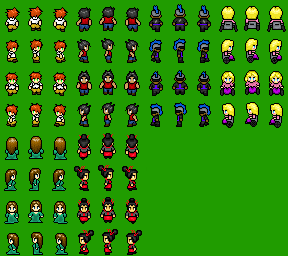 These are the first sprites I've made so they're not great at all... :/
Here's the file.

Open a copy of a supported file in one image editing program. A file that you know works as normal and is NOT an original.
Open the problem file in mspaint as a second window.
Copy from paint into the other program.
Save.
I had that problem before, I think. Or something similar. You might have to alter the palette.
Open the problem file in mspaint as a second window.
Copy from paint into the other program.
Save.
I had that problem before, I think. Or something similar. You might have to alter the palette.

Here's how I usually solve this problem (because it's a pain in the ass, and if there's one thing I've learned working on pianos, if a part won't work no matter what you do, pull the fucker and trade it out for the one at the end of the row):
1. Open one of your standard RTP charsets.
2. Copy and past yours onto the file.
3. Save as (be careful not to just save...but of course, you can always find it again on the net if you have an accident like that.), and make sure you keep the existing format.
Basically, if you can't get your charset to work, use one that you know does work. Copy and pasting won't change format, unless you change format...to that end, I recommend using a program that you absolutely know doesn't change the format just opening a file up. SOME GRAPHIC'S PROGRAMS DO THIS! MGI Photosuite does this, and I can never figure out how to change it back. Thankfully, I figured out I can just open the file back in GraphicsGale and change all the formatting back.
Edit: EEP! I posted at the same time as Link! Great minds think alike!
1. Open one of your standard RTP charsets.
2. Copy and past yours onto the file.
3. Save as (be careful not to just save...but of course, you can always find it again on the net if you have an accident like that.), and make sure you keep the existing format.
Basically, if you can't get your charset to work, use one that you know does work. Copy and pasting won't change format, unless you change format...to that end, I recommend using a program that you absolutely know doesn't change the format just opening a file up. SOME GRAPHIC'S PROGRAMS DO THIS! MGI Photosuite does this, and I can never figure out how to change it back. Thankfully, I figured out I can just open the file back in GraphicsGale and change all the formatting back.
Edit: EEP! I posted at the same time as Link! Great minds think alike!
Pages:
1

