



 Full Games List
 Featured Games
 New Games
 Reviews
 Media
Media Images
 Blogs
Blogs Game Updates
 Images Feedback Summary
 Game Design Highlights
 Tutorials
 Articles
 Scripts
 Utilities / Plugins
 Resources
 Engines
 Engine Bulletins
 What is Makerscore?
 Past Events
 Achievements
 Misaos
 Forums
 Post History
 Chat
Chat New to RMN?
 Full Store List
 RMN Music Pack (free)



HOLY GOD, WHY?! NO "FIXED GRAPHIC" OPTION IN VXACE?
Posts
Pages:
1
Corfaisus
"It's frustrating because - as much as Corf is otherwise an irredeemable person - his 2k/3 mapping is on point." ~ psy_wombats
7874
 Corfaisus
 View playlists
 Close
CloseRemember back in the 2k3 days when you could set an event to look like literally anything regardless of how many switches/variables you messed around with and way these graphics faced with a handy little option called "fixed graphic"? Why does no such thing appear in VX Ace (along with allowing events to have variable activation in anything but "x or above")? I mean, I know it's not going to be a priority to everyone working on games, but for the love of God if you go through the trouble of adding in "damaged character" graphics, wouldn't you think that somewhere along the line you'd have a designer who wants to actually throw in a character collapsing instead of simply being dead/in the process of dying all the time?
Or maybe I missed an incredibly obvious thing and now look like a complete idiot; that's also possible.
Or maybe I missed an incredibly obvious thing and now look like a complete idiot; that's also possible.
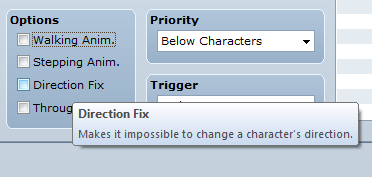
That very last thing you said, that one is actually very true. The Option is just called "Direction Fix" and it is a flag.
Also, for variable activation, just set the variable flag on the options tab^^
Also, for variable activation, just set the variable flag on the options tab^^
LockeZ

I'd really like to get rid of LockeZ. His play style is way too unpredictable. He's always like this too. If he ran a country, he'd just kill and imprison people at random until crime stopped.
5958
Do not dismay! In VX Ace the option you're talking about has actually been split up to give you more control. You can individually turn off the "walking animation", "stepping animation" and "direction fix" checkboxes. If you set both the walking animation and the stepping animation to OFF, and set the direction fix to ON, it will work just like the "fixed graphic" option in RM2K3.
If you turn on stepping animation, the character will walk in place. If you turn on walking animation, the character will be animated while walking. If you turn off direction fix, the character will automatically change which direction it's facing if it moves or if the hero talks to it.
If you turn on stepping animation, the character will walk in place. If you turn on walking animation, the character will be animated while walking. If you turn off direction fix, the character will automatically change which direction it's facing if it moves or if the hero talks to it.

The topic has the words "set graphic", but then you go onto to talk about "fixed graphic". Those are two very different things.

author=Link_2112No kidding! I thought it was going to be about changing event graphics dynamically (ie- tab 2 > Set Move Route > Direction Fix ON + Change Graphics)
The topic has the words "set graphic", but then you go onto to talk about "fixed graphic". Those are two very different things.
Corfaisus
"It's frustrating because - as much as Corf is otherwise an irredeemable person - his 2k/3 mapping is on point." ~ psy_wombats
7874
To illustrate what's going on:

This is the way they face when you approach them and when the event starts.

They turn to you before the battle. This persists until the intended graphic change (I turn on a switch/increase variable to activate page 2).

Then I get this, despite the fact that it should just be the same characters in their halfway-to-the-ground phase (the left skeleton works fine for some reason. this was taken later to show how the knight is affected).
I could use direction fix, but that would disable me from being able to turn them towards the heroes and would still cause problems as they'd have to face their original direction in order for the graphics to not glitch out when they are intended to change.
This is the way they face when you approach them and when the event starts.
They turn to you before the battle. This persists until the intended graphic change (I turn on a switch/increase variable to activate page 2).
Then I get this, despite the fact that it should just be the same characters in their halfway-to-the-ground phase (the left skeleton works fine for some reason. this was taken later to show how the knight is affected).
I could use direction fix, but that would disable me from being able to turn them towards the heroes and would still cause problems as they'd have to face their original direction in order for the graphics to not glitch out when they are intended to change.

@kentona- Off topic, but why can't OPs edit the title?
They can, he just doesn't know about it.
One possibility. Create a separate charset sheet for each direction. Take a single facing and use it for all 4 directions. Then use the change graphic command to change it's direction and do any specific animations.
One possibility. Create a separate charset sheet for each direction. Take a single facing and use it for all 4 directions. Then use the change graphic command to change it's direction and do any specific animations.
LockeZ
I'd really like to get rid of LockeZ. His play style is way too unpredictable. He's always like this too. If he ran a country, he'd just kill and imprison people at random until crime stopped.
5958
Why use multiple pages to change graphics mid cut scene in the first place? Just use the graphics-changing commands inside the "move event" command.
If you need to use multiple pages for some reason, why isn't page 2 just set to the correct graphics you want them to have...?
Can you show the pages on one of the events, and the event commands that are causing them to change to the wrong graphics?
If you need to use multiple pages for some reason, why isn't page 2 just set to the correct graphics you want them to have...?
Can you show the pages on one of the events, and the event commands that are causing them to change to the wrong graphics?
Umm... I don't know what you did to #@$@#%#@ this up?
You should have 1 autorun event to run almost everything going on here.
The sprites should be parallel processes, except the main character.
In the autorun tell the main character to move forward. Then show any text you want to happen. Then if you want the other sprites to move you need to use a control switch. Copy the first page of each parallel process and make a second page that is triggered by the control switch. (in the autorun you will need to wait a certain number of frames for the parallel process to finish moving.) The parallel processes, if moving to a new location (ie. not just standing in different direction) will need a third even page that is triggered by the second event page of each parallel process in turn.
I don't know if other people event like this, but it works out pretty well for me. And I have managed to do some very complex events using this method.
Edit:
I made a video tutorial on what I just described
http://rpgmaker.net/tutorials/1034/
You should have 1 autorun event to run almost everything going on here.
The sprites should be parallel processes, except the main character.
In the autorun tell the main character to move forward. Then show any text you want to happen. Then if you want the other sprites to move you need to use a control switch. Copy the first page of each parallel process and make a second page that is triggered by the control switch. (in the autorun you will need to wait a certain number of frames for the parallel process to finish moving.) The parallel processes, if moving to a new location (ie. not just standing in different direction) will need a third even page that is triggered by the second event page of each parallel process in turn.
I don't know if other people event like this, but it works out pretty well for me. And I have managed to do some very complex events using this method.
Edit:
I made a video tutorial on what I just described
http://rpgmaker.net/tutorials/1034/
Pages:
1

