



 Full Games List
 Featured Games
 New Games
 Reviews
 Media
Media Images
 Blogs
Blogs Game Updates
 Images Feedback Summary
 Game Design Highlights
 Tutorials
 Articles
 Scripts
 Utilities / Plugins
 Resources
 Engines
 Engine Bulletins
 What is Makerscore?
 Past Events
 Achievements
 Misaos
 Forums
 Post History
 Chat
Chat New to RMN?
 Full Store List
 RMN Music Pack (free)



HOW DO I USE MULTIFRAME SPRITES SCRIPT ?
Posts
Pages:
1

 KAD1984
 View playlists
 Close
CloseTitle of this script is MultiFrame Sprites - Ace v1.0
From: FenixFyreX
For: RPG Maker VxAce
To my Problem:
1st off im pretty much a noob when it comes to scripting, but as far as i understand i only have to change the 1st lines (the violet ones within the maker).
The 1st part is the order in which my frames should occur, 2nd which should be
idle and 3rd how many frames i use and i need to name my file as mentioned below.
Now my question is, where exactly do i have to paste this script within the "Script
editor" and what else do i have to set-up within the game to make them recognize that i for example would like to use this script for my main character.
And this is my Character Sheet i made to use with this script, its not transparent yet and its also only the silhouette coze i need to check 1st if the movements are fluent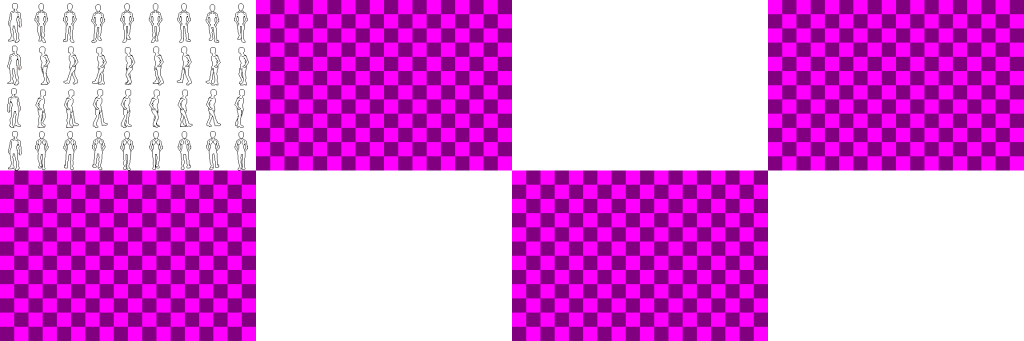
# -=-=-=-=-=-=-=-=-=-=-=-=-=-=-=-=-=-==-=-=-=-=-=-=-=-=-=-=-=-=-=-=-=-=-=-=-=- #
# MultiFrame Sprites - Ace v1.0
# FenixFyreX
# RPG Maker VxAce
# -=-=-=-=-=-=-=-=-=-=-=-=-=-=-=-=-=-==-=-=-=-=-=-=-=-=-=-=-=-=-=-=-=-=-=-=-=- #
# This script allows you to setup a symbol, which returns a
# pattern array, idle_frame index, and frame max. These will be applied to all
# sprites with said symbol in their image name.
#
# The % sprite example belongs to Despain, as he made the sprite. Credit for it
# or feel his wrath.
# -=-=-=-=-=-=-=-=-=-=-=-=-=-=-=-=-=-==-=-=-=-=-=-=-=-=-=-=-=-=-=-=-=-=-=-=-=- #
module FyxA
module CustomSprites
Patterns = {
# Key => ,
#
# pattern_array - the order in which each frame is shown
# idle_frame - the frame the sprite sits on when still
# frame_max - the amount of frames overall in the image
# speeds - how fast the sprite cycles through frames running/walking
# If speeds is not present, the default 1.5,1 will be used.
# RMXP shows frame 0, then 1, then 2, then 3. When the sprite is idle, it
# shows frame 2. There are 4 frames total in an rmxp sprite. We also want
# to display these frames a bit faster, so speeds are set to
"" => [, 2, 4, ],
"" => [, 0, 9 ],
}
end
end
class Game_CharacterBase
attr_reader :pattern_index
alias initialize_pat_ind_fyx_mfs initialize unless $@
def initialize(*a,&bl)
@pattern_index = 0
initialize_pat_ind_fyx_mfs(*a,&bl)
@original_pattern = mfs_sprite? ? mfs_sprite?(true) : 1
end
alias update_anim_speeds_fyx_mfs update_anime_count
def update_anime_count(*a,&bl)
if mfs_sprite?
s1,s2 = *mfs_sprite?(true)
if moving? && @walk_anime
@anime_count += s2
elsif @step_anime || @pattern != @original_pattern
@anime_count += s1
end
else
update_anim_speeds_fyx_mfs(*a,&bl)
end
end
alias update_anim_pat_fyx_mfs update_anime_pattern
def update_anime_pattern(*a,&bl)
if mfs_sprite?
key,pattern_array,@original_pattern,fm = *mfs_sprite?(true)
max_frames = pattern_array.include?(@original_pattern) ? fm : fm-1
if !@step_anime && @stop_count > 0
@pattern_index = -1
@pattern = @original_pattern
else
@pattern_index = (@pattern_index + 1) % max_frames
@pattern = pattern_array
if (@pattern == @original_pattern) && (!pattern_array.include?(@original_pattern))
@pattern_index = (@pattern_index + 1) % max_frames
@pattern = pattern_array
end
end
else
update_anim_pat_fyx_mfs(*a,&bl)
end
end
def mfs_sprite?(ret=false)
FyxA::CustomSprites::Patterns.each_pair do |key,a|
pa,op,fm,sa = *a
if @character_name.include?(key)
sp = sa.nil? ? : sa
return ret ? : true
end
end
return ret ? [nil,,1,3,] : false
end
end
class Game_Player < Game_Character
alias initialize_plyr_ind_mfs initialize unless $@
def initialize(*a,&bl)
initialize_plyr_ind_mfs(*a,&bl)
@original_pattern = mfs_sprite? ? mfs_sprite?(true) : 1
end
alias refresh_mfs refresh
def refresh(*a,&bl)
refresh_mfs
@original_pattern = mfs_sprite? ? mfs_sprite?(true) : 1
@pattern = @original_pattern
end
end
class Game_Event < Game_Character
alias initialize_evnt_ind_mfs initialize unless $@
def initialize(*a,&bl)
initialize_evnt_ind_mfs(*a,&bl)
@original_pattern = mfs_sprite? ? mfs_sprite?(true) : 1
end
alias refresh_mfs refresh
def refresh(*a,&bl)
refresh_mfs
@original_pattern = mfs_sprite? ? mfs_sprite?(true) : 1
@pattern = @original_pattern
end
end
class Sprite_Character < Sprite_Base
alias initialize_player_refresh initialize
def initialize(*a,&bl)
a.refresh if a.is_a?(Game_Player)
initialize_player_refresh(*a,&bl)
end
alias set_char_bmp_mfs set_character_bitmap
def set_character_bitmap(*a,&bl)
if !@character.mfs_sprite?
set_char_bmp_mfs(*a,&bl)
else
key,pattern_array,op,fm = *@character.mfs_sprite?(true)
self.bitmap = Cache.character(@character_name)
sign = @character_name[/^./]
if sign && sign.include?('$')
@cw = bitmap.width / fm
@ch = bitmap.height / 4
else
@cw = bitmap.width / fm*4
@ch = bitmap.height / 8
end
self.ox = @cw / 2
self.oy = @ch
end
end
alias update_src_r_mfs update_src_rect
def update_src_rect(*a,&bl)
if @character.mfs_sprite?
key,pa,op,fm = *@character.mfs_sprite?(true)
max_frames = pa.include?(op) ? fm : fm-1
if @tile_id == 0
index = @character.character_index
pattern = @character.pattern_index < max_frames ? @character.pattern : op
sx = (index % 4 * 3 + pattern) * @cw
sy = (index / 4 * 4 + (@character.direction - 2) / 2) * @ch
self.src_rect.set(sx, sy, @cw, @ch)
end
else
update_src_r_mfs(*a,&bl)
end
end
end
From: FenixFyreX
For: RPG Maker VxAce
To my Problem:
1st off im pretty much a noob when it comes to scripting, but as far as i understand i only have to change the 1st lines (the violet ones within the maker).
The 1st part is the order in which my frames should occur, 2nd which should be
idle and 3rd how many frames i use and i need to name my file as mentioned below.
Now my question is, where exactly do i have to paste this script within the "Script
editor" and what else do i have to set-up within the game to make them recognize that i for example would like to use this script for my main character.
And this is my Character Sheet i made to use with this script, its not transparent yet and its also only the silhouette coze i need to check 1st if the movements are fluent
# -=-=-=-=-=-=-=-=-=-=-=-=-=-=-=-=-=-==-=-=-=-=-=-=-=-=-=-=-=-=-=-=-=-=-=-=-=- #
# MultiFrame Sprites - Ace v1.0
# FenixFyreX
# RPG Maker VxAce
# -=-=-=-=-=-=-=-=-=-=-=-=-=-=-=-=-=-==-=-=-=-=-=-=-=-=-=-=-=-=-=-=-=-=-=-=-=- #
# This script allows you to setup a symbol, which returns a
# pattern array, idle_frame index, and frame max. These will be applied to all
# sprites with said symbol in their image name.
#
# The % sprite example belongs to Despain, as he made the sprite. Credit for it
# or feel his wrath.
# -=-=-=-=-=-=-=-=-=-=-=-=-=-=-=-=-=-==-=-=-=-=-=-=-=-=-=-=-=-=-=-=-=-=-=-=-=- #
module FyxA
module CustomSprites
Patterns = {
# Key => ,
#
# pattern_array - the order in which each frame is shown
# idle_frame - the frame the sprite sits on when still
# frame_max - the amount of frames overall in the image
# speeds - how fast the sprite cycles through frames running/walking
# If speeds is not present, the default 1.5,1 will be used.
# RMXP shows frame 0, then 1, then 2, then 3. When the sprite is idle, it
# shows frame 2. There are 4 frames total in an rmxp sprite. We also want
# to display these frames a bit faster, so speeds are set to
"" => [, 2, 4, ],
"" => [, 0, 9 ],
}
end
end
class Game_CharacterBase
attr_reader :pattern_index
alias initialize_pat_ind_fyx_mfs initialize unless $@
def initialize(*a,&bl)
@pattern_index = 0
initialize_pat_ind_fyx_mfs(*a,&bl)
@original_pattern = mfs_sprite? ? mfs_sprite?(true) : 1
end
alias update_anim_speeds_fyx_mfs update_anime_count
def update_anime_count(*a,&bl)
if mfs_sprite?
s1,s2 = *mfs_sprite?(true)
if moving? && @walk_anime
@anime_count += s2
elsif @step_anime || @pattern != @original_pattern
@anime_count += s1
end
else
update_anim_speeds_fyx_mfs(*a,&bl)
end
end
alias update_anim_pat_fyx_mfs update_anime_pattern
def update_anime_pattern(*a,&bl)
if mfs_sprite?
key,pattern_array,@original_pattern,fm = *mfs_sprite?(true)
max_frames = pattern_array.include?(@original_pattern) ? fm : fm-1
if !@step_anime && @stop_count > 0
@pattern_index = -1
@pattern = @original_pattern
else
@pattern_index = (@pattern_index + 1) % max_frames
@pattern = pattern_array
if (@pattern == @original_pattern) && (!pattern_array.include?(@original_pattern))
@pattern_index = (@pattern_index + 1) % max_frames
@pattern = pattern_array
end
end
else
update_anim_pat_fyx_mfs(*a,&bl)
end
end
def mfs_sprite?(ret=false)
FyxA::CustomSprites::Patterns.each_pair do |key,a|
pa,op,fm,sa = *a
if @character_name.include?(key)
sp = sa.nil? ? : sa
return ret ? : true
end
end
return ret ? [nil,,1,3,] : false
end
end
class Game_Player < Game_Character
alias initialize_plyr_ind_mfs initialize unless $@
def initialize(*a,&bl)
initialize_plyr_ind_mfs(*a,&bl)
@original_pattern = mfs_sprite? ? mfs_sprite?(true) : 1
end
alias refresh_mfs refresh
def refresh(*a,&bl)
refresh_mfs
@original_pattern = mfs_sprite? ? mfs_sprite?(true) : 1
@pattern = @original_pattern
end
end
class Game_Event < Game_Character
alias initialize_evnt_ind_mfs initialize unless $@
def initialize(*a,&bl)
initialize_evnt_ind_mfs(*a,&bl)
@original_pattern = mfs_sprite? ? mfs_sprite?(true) : 1
end
alias refresh_mfs refresh
def refresh(*a,&bl)
refresh_mfs
@original_pattern = mfs_sprite? ? mfs_sprite?(true) : 1
@pattern = @original_pattern
end
end
class Sprite_Character < Sprite_Base
alias initialize_player_refresh initialize
def initialize(*a,&bl)
a.refresh if a.is_a?(Game_Player)
initialize_player_refresh(*a,&bl)
end
alias set_char_bmp_mfs set_character_bitmap
def set_character_bitmap(*a,&bl)
if !@character.mfs_sprite?
set_char_bmp_mfs(*a,&bl)
else
key,pattern_array,op,fm = *@character.mfs_sprite?(true)
self.bitmap = Cache.character(@character_name)
sign = @character_name[/^./]
if sign && sign.include?('$')
@cw = bitmap.width / fm
@ch = bitmap.height / 4
else
@cw = bitmap.width / fm*4
@ch = bitmap.height / 8
end
self.ox = @cw / 2
self.oy = @ch
end
end
alias update_src_r_mfs update_src_rect
def update_src_rect(*a,&bl)
if @character.mfs_sprite?
key,pa,op,fm = *@character.mfs_sprite?(true)
max_frames = pa.include?(op) ? fm : fm-1
if @tile_id == 0
index = @character.character_index
pattern = @character.pattern_index < max_frames ? @character.pattern : op
sx = (index % 4 * 3 + pattern) * @cw
sy = (index / 4 * 4 + (@character.direction - 2) / 2) * @ch
self.src_rect.set(sx, sy, @cw, @ch)
end
else
update_src_r_mfs(*a,&bl)
end
end
end

Haven't used this one myself, but the generic answer to your first question is "somewhere above main but after the default scripts".
Yeah i tried that, i insert it over main within the section "Main Process" which i guess might be right, still how do i get the game to know that i would like to use this script instead of default.
I made a Test sheet of 9 frames named "%" like in the script and i even changed the heroes character by using that sheet but in-game its still on default of 3 frames per animation...
I made a Test sheet of 9 frames named "%" like in the script and i even changed the heroes character by using that sheet but in-game its still on default of 3 frames per animation...
The fact that the script is using the same names for classes and methods as the default scripts but appears after them in the list is enough to say "Hey, RPG Maker, I want to use these classes instead of your default ones please."
Pages:
1

