Full Games List
 Featured Games
 New Games
 Reviews
 Media
Media Images
 Blogs
Blogs Game Updates
 Images Feedback Summary
 Game Design Highlights
 Tutorials
 Articles
 Scripts
 Utilities / Plugins
 Resources
 Engines
 Engine Bulletins
 What is Makerscore?
 Past Events
 Achievements
 Misaos
 Forums
 Post History
 Chat
Chat New to RMN?
 Full Store List
 RMN Music Pack (free)



[RM2K] ERROR DURING RTP INSTALLATION. "INSUFFICIENT FREE DISK SPACE!"
Posts
Pages:
1
 Salvia
 View playlists
 Close
CloseHi. I am trying to install the RPG Maker 2000 RTP and it gives me the error "insufficient free disk space!"
This is because I am trying to install it on a hard disk drive whose capacity is over 2 terrabytes. This installer has a built in free space checker and its flawed and doesn't work with disk drives that have over 2tb capacity.
How can I install the RPG Maker 2000 RTP on a HDD with over 2tb capacity?
----------------------------------
OS: Win 7 ultimate 64 bit
----------------------------------
Thanks.
This is because I am trying to install it on a hard disk drive whose capacity is over 2 terrabytes. This installer has a built in free space checker and its flawed and doesn't work with disk drives that have over 2tb capacity.
How can I install the RPG Maker 2000 RTP on a HDD with over 2tb capacity?
----------------------------------
OS: Win 7 ultimate 64 bit
----------------------------------
Thanks.

That....is a really good question. I never knew this was an issue.
I know this is a bit of a hack, but do you have a thumb drive or SD card you can install it on? Just as a workaround.
Otherwise, maybe someone like PepsiOtaku or Cherry or WolfCoder could weigh in with their thoughts on it.
Are you looking to make a game in RM2k? Because if you are just looking to play games, there are ways to set the game up to not need the RTP installed.
I know this is a bit of a hack, but do you have a thumb drive or SD card you can install it on? Just as a workaround.
Otherwise, maybe someone like PepsiOtaku or Cherry or WolfCoder could weigh in with their thoughts on it.
Are you looking to make a game in RM2k? Because if you are just looking to play games, there are ways to set the game up to not need the RTP installed.

Have you tried running the installer in Windows XP compatibility mode? It's always told me insufficient disk space no matter what I do nor the size of my free disk space until I run it in compatibility mode.
It's also handy to have this so you can view the help file: http://www.microsoft.com/en-us/download/details.aspx?id=91
It's also handy to have this so you can view the help file: http://www.microsoft.com/en-us/download/details.aspx?id=91
Compatibility mode doesn't work.
Also, it reads the OS drive automatically and gives the error so you can't install it anywhere on that computer.
RM2K_105e.exe RTP132e.exe RTPe.exe
All these RTP files give the "Insufficient free disk space" error.
I did install all of these files on another computer with a 500 gb hard disk drive just fine.
Also, it reads the OS drive automatically and gives the error so you can't install it anywhere on that computer.
RM2K_105e.exe RTP132e.exe RTPe.exe
All these RTP files give the "Insufficient free disk space" error.
I did install all of these files on another computer with a 500 gb hard disk drive just fine.

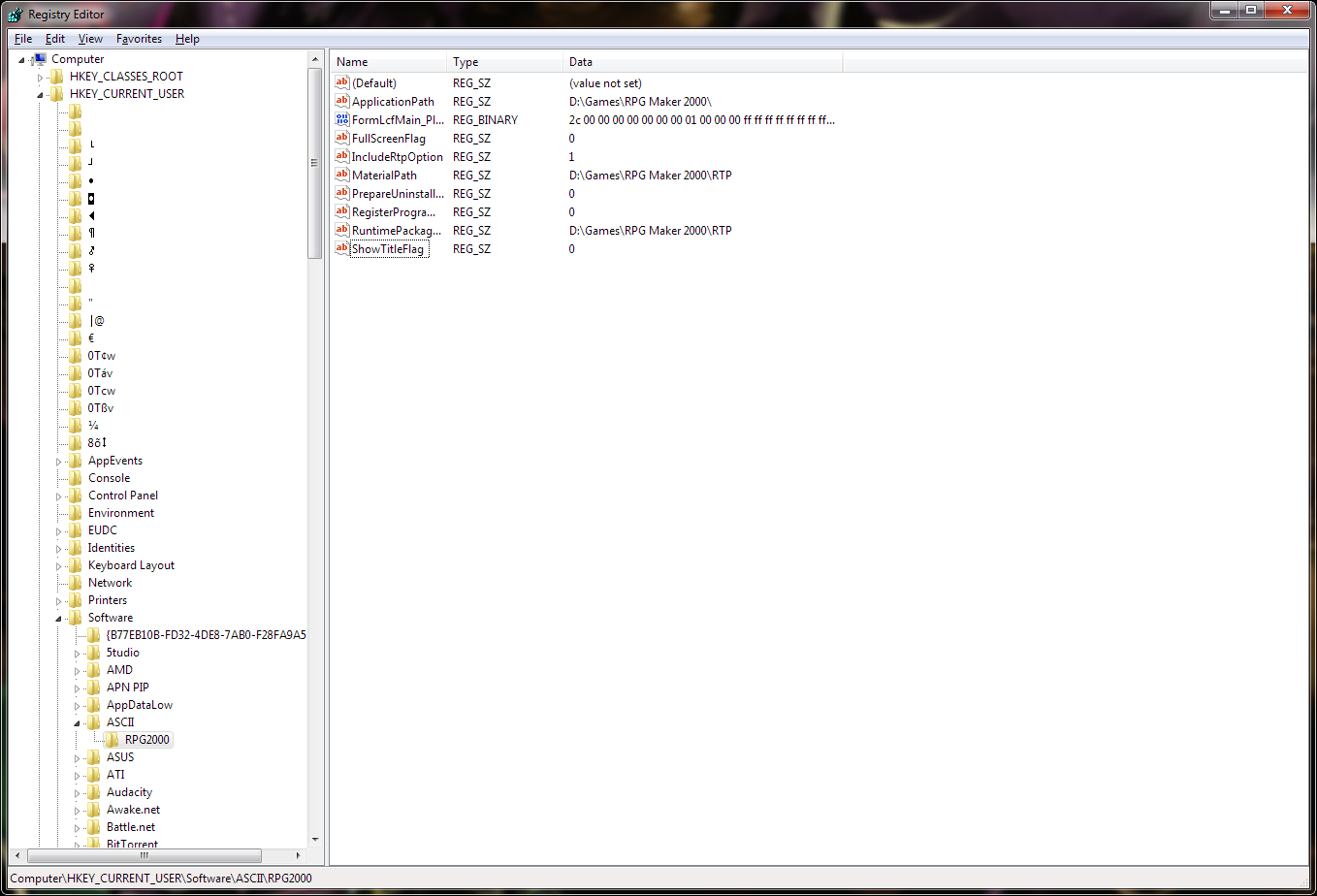
If you have the RTP files themselves somewhere you can just copy+paste them on your computer. Getting games and the editor itself to know where the RTP is takes a bit more work. RM2k and RM2k3 use the Windows registry to tell where the RTP is and you can edit the Windows registry to tell RM2k where to look for the editor. You can use RegEdit to create the entry that RM2k looks for to bypass all this installer nonsense. In RegEdit open the Computer group, then the HKEY_CurrentUser folder, then the Software folder. Look for a folder named ASCII and in that folder should be one called RM2000. Opening the editor, even if it immediately complains about the lack of RTP and closes, should create these for you. In the RM2000 folder you want to create a new string key named RuntimePackagePath and the value is the path to your RTP, like D:\Games\RPG Maker 2000\RTP . Here's an example screenshot, I didn't think of showing the full key names when I took it though but I can update it tonight if needed. Once the RuntimePackagePath key is made RM2k should open without a hitch.
If this is to get a game to play you can copy+paste the RTP files into the game directory and change the RPG_RT.ini file in the game folder so it doesn't try to look for the RTP. I forget what you need to add though. Also mock the game dev for not making a RTP-independent game too
If this is to get a game to play you can copy+paste the RTP files into the game directory and change the RPG_RT.ini file in the game folder so it doesn't try to look for the RTP. I forget what you need to add though. Also mock the game dev for not making a RTP-independent game too
Pages:
1