



 Full Games List
 Featured Games
 New Games
 Reviews
 Media
Media Images
 Blogs
Blogs Game Updates
 Images Feedback Summary
 Game Design Highlights
 Tutorials
 Articles
 Scripts
 Utilities / Plugins
 Resources
 Engines
 Engine Bulletins
 What is Makerscore?
 Past Events
 Achievements
 Misaos
 Forums
 Post History
 Chat
Chat New to RMN?
 Full Store List
 RMN Music Pack (free)



[RMVX ACE] WHY IS CHANGING ACTOR GRAPHIC NOT WORKING?
Posts
Pages:
1
 RionsRPG
 View playlists
 Close
CloseI have a problem, again! My game has 5 players, so I'm changing the actor to another actor, but when I platested it, the actor Dosent change graphic, it remains the same. How do i fix this? I was really raged. If cannot be solved, I needs script for fixing the problems!

It's just hard to tell if you don't show images because we can only guess at best what might be the issue and that's not going to help you much.
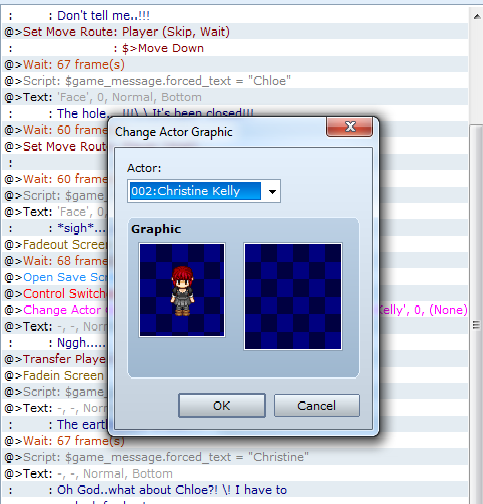
Okay, I will change the actor to this girl.

And this is the event page. I'm really in a fit of rage.

This seems a lot more complicated than it has to be.
Switch 0020 followed by changing the actor graphic is what's catching my eye. Have you tried using that switch to change pages and changing your actor graphic there?
Edit: No, that switch is your problem. You don't need that. You've got the actor in your actor's list, right? Then at the point you want to add your actor, simply use the Change Party Member command on the first page of your event commands in Party, then select the actor you want. If you want your actor to have different sprite, then use your Set Move Event command to Change Graphic.
Switch 0020 followed by changing the actor graphic is what's catching my eye. Have you tried using that switch to change pages and changing your actor graphic there?
Edit: No, that switch is your problem. You don't need that. You've got the actor in your actor's list, right? Then at the point you want to add your actor, simply use the Change Party Member command on the first page of your event commands in Party, then select the actor you want. If you want your actor to have different sprite, then use your Set Move Event command to Change Graphic.
Does the switch turn off this event/change the event page/turn on a new event? Because if that is the case, move it to the end of this event.
Currently I think, with the shown eventing, it's turning off the event before the stuff afterwards works.
Also, try putting a wait of 2 frames after the actor graphic change.
WAIT!
Are you trying to change a certain hero's graphic to something else? Like, say, make them invisible. Or are you trying to add someone to the party? Because for the first you need to choose the character in that command you've shown, then double-click the image and choose a new one.
For the second you need to use the Change Party and add another character.
Look, dumb it down completely. Tell us what, exactly, you are trying to do, please.
Currently I think, with the shown eventing, it's turning off the event before the stuff afterwards works.
Also, try putting a wait of 2 frames after the actor graphic change.
WAIT!
Are you trying to change a certain hero's graphic to something else? Like, say, make them invisible. Or are you trying to add someone to the party? Because for the first you need to choose the character in that command you've shown, then double-click the image and choose a new one.
For the second you need to use the Change Party and add another character.
Look, dumb it down completely. Tell us what, exactly, you are trying to do, please.
Okay, here's an example of actor changing from the game I'm making. There are two leading characters; Jack and Uiyi. Jack is the character you start with. In a scene with Jack and Uiyi, she has a flashback. Now, at this time, Uiyi is not a member of the party. So, since this is a flashback, Jack isn't going to be in it, so I want to remove Jack and add Uiyi. The scene with Jack and Uiyi takes place in a classroom. To start the flashback, I'm going to transfer my character. Once on the new map, I run a parallel process.
(Note: I really need to change that to a self switch. It's just one of those things that it's working so I haven't bothered fixing it.)

So here, I add Uiyi to my party and remove Jack, and I make sure she's properly equipped (she doesn't start with weapons).
This is really all there is to it. What is it specifically that you're trying to do?
(Note: I really need to change that to a self switch. It's just one of those things that it's working so I haven't bothered fixing it.)
So here, I add Uiyi to my party and remove Jack, and I make sure she's properly equipped (she doesn't start with weapons).
This is really all there is to it. What is it specifically that you're trying to do?
The event needs to be running for anything you do to work. Get rid of that switch. (Okay, now I see the problem after a thorough read of your code.)
IF:
The character in question and her best friend are both actors that you have created, then it would be best if you simply changed party members. If you simply change the graphic, then both characters will have identical stats and equipment. Your code should look like this.:
Now, in the room your sending your character to, you need a parallel process that turns transparency off.
I'm going to tell you what was wrong: events can't affect maps that they're not on. All of the instructions that came after Transfer Player aren't going to work right. With a transfer, you don't even really need a switch to turn off the event. As long as it has a new page that will eventually be triggered by another event before you return to that map, you're fine. DO NOT use the fade out option. You don't need it, and if you do use it, make sure you add the fade in to your parallel process on the map to which you're transferring. I had this exact problem making my title screen. I realized the solution was to split my events into separate pages.
IF:
The character in question and her best friend are both actors that you have created, then it would be best if you simply changed party members. If you simply change the graphic, then both characters will have identical stats and equipment. Your code should look like this.:
@>script: $game_message.forced_text = "Chloe"

@>Text:'Face', 0, Normal, Bottom

@>:    :*sigh*...What do I do?

@>Wait: 68 frames

@>Open Save Screen

@>Change Transparency: On

@>Change Party Member: Add [Christine Kelly]

@>Change Party Member: Remove [Chloe]

@>Text:-,-, Normal, Bottom

@>:    :Nggh...

@>Transfer Player:[005:Room](007,015), Down

@>Control Self Switch: A =On
Now, in the room your sending your character to, you need a parallel process that turns transparency off.
I'm going to tell you what was wrong: events can't affect maps that they're not on. All of the instructions that came after Transfer Player aren't going to work right. With a transfer, you don't even really need a switch to turn off the event. As long as it has a new page that will eventually be triggered by another event before you return to that map, you're fine. DO NOT use the fade out option. You don't need it, and if you do use it, make sure you add the fade in to your parallel process on the map to which you're transferring. I had this exact problem making my title screen. I realized the solution was to split my events into separate pages.
Pages:
1

