



 Full Games List
 Featured Games
 New Games
 Reviews
 Media
Media Images
 Blogs
Blogs Game Updates
 Images Feedback Summary
 Game Design Highlights
 Tutorials
 Articles
 Scripts
 Utilities / Plugins
 Resources
 Engines
 Engine Bulletins
 What is Makerscore?
 Past Events
 Achievements
 Misaos
 Forums
 Post History
 Chat
Chat New to RMN?
 Full Store List
 RMN Music Pack (free)



[RMVX ACE] WINDOWSKINS AND FONT COLOURS
Posts
Pages:
1
 Shadski
 View playlists
 Close
CloseI have used a windowskin in my game that changes the colour of all my text to black. Is there any script I could use to turn it back to white for the whole game? (title screen, menu, dialogue, etc..)
Thank you!
Thank you!

I don't think you need a script, you just need to edit the windowskin file. If you look at the default window image, it looks like this:
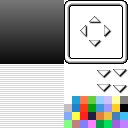
If you look at the bottom right area, there are a bunch of colors. The first color is the color that all of your standard text will be. I'll circle it so it's easier to see.
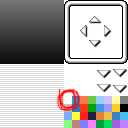
So if you look at your current window file, if you color that first block white, your text should return to being white.
If you look at the bottom right area, there are a bunch of colors. The first color is the color that all of your standard text will be. I'll circle it so it's easier to see.
So if you look at your current window file, if you color that first block white, your text should return to being white.
author=unity
I don't think you need a script, you just need to edit the windowskin file. If you look at the default window image, it looks like this:
If you look at the bottom right area, there are a bunch of colors. The first color is the color that all of your standard text will be. I'll circle it so it's easier to see.
So if you look at your current window file, if you color that first block white, your text should return to being white.
Thank you Unity!
Pages:
1

