



 Full Games List
 Featured Games
 New Games
 Reviews
 Media
Media Images
 Blogs
Blogs Game Updates
 Images Feedback Summary
 Game Design Highlights
 Tutorials
 Articles
 Scripts
 Utilities / Plugins
 Resources
 Engines
 Engine Bulletins
 What is Makerscore?
 Past Events
 Achievements
 Misaos
 Forums
 Post History
 Chat
Chat New to RMN?
 Full Store List
 RMN Music Pack (free)



[RM2K3] DYNRPG/RPG MAKER 2K9 BATTLE ANIMATIONS PROBLEM
Posts
Pages:
1

 Xenomic
 View playlists
 Close
CloseSo, this has caught my attention, and I don't know how many others have had this problem at all. I...wanna say it's 2K9 Ultimate, which I THINK Cherry made?
In any event, it seems that whenever an animation uses anything from sprite #26 onwards, it seems to reverse the spritesheet FOR that animation. So instead of playing the animation the opposite way as it's supposed to do so normally, it'll just....play it but reverse on the spritesheet instead. Am I the only one to have this issue, or has anyone else encountered this problem?
This is what I'm referring to, around 5:50:
And the spritesheet in question:
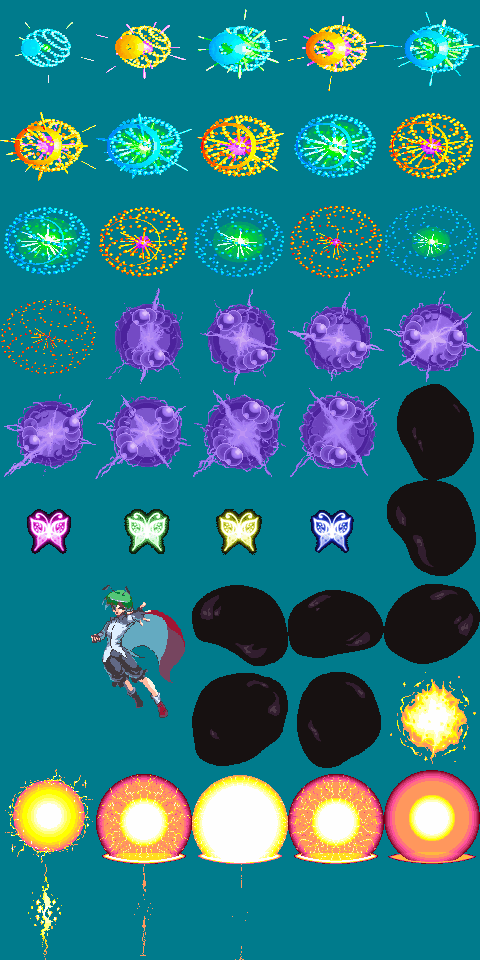
In any event, it seems that whenever an animation uses anything from sprite #26 onwards, it seems to reverse the spritesheet FOR that animation. So instead of playing the animation the opposite way as it's supposed to do so normally, it'll just....play it but reverse on the spritesheet instead. Am I the only one to have this issue, or has anyone else encountered this problem?
This is what I'm referring to, around 5:50:
And the spritesheet in question:
Ah, I need to clarify that this ONLY happens when enemies use said abilities that contain sprites after sprite #25 in them. If the player uses them, it works perfectly fine. I haven't tested this to see if this happens when the player is on the left side instead (may try that to see if it bugs up. If it does, then that just means something isn't flipping it correctly at all).

Isn't 25 frames the maximum you can have in a single animation (even for Battle2 animations)? It's all I've ever seen, but I can't say I've ever tried adding more though...
For normal 2k3/DynRPG perhaps, but 2k9 lets you go upwards to 150/125 IIRC. And IIRC Cherry's the one that also made 2k9.

Yeah that's a known problem. Unfortunately this behavior is in the engine itself, so we would need to patch it there (not only in the editor). I haven't found yet though where a patch would be needed, maybe bugmenot can help you out there.
Huh, so it's 2k3 itself that has that issue? That's weird, wonder why it does that past sprite #25 then. Maybe it's just not coded in there to do it like all the others due to it not existing?
Yes, I guess it is looping over the sprites to rotate them and the loop goes only until 25 (because there are only 25 sprites supposed to be there).
Hm...make sense. Except that's even more complicated since it only does it when enemies use the skills, not the players (though again, haven't tested this if the player is on the left instead of the rigth). @_@;
UPDATE: So I had LockeZ test out a Back Attack (player on left and enemy on right), and lo and behold, what I thought was a problem. Anything past sprite #25 will do this glitch ONLY if it's on the left side, whether it's done by the enemy or player. This is probably already known to you, Cherry, but if not well...that's that there. Just making sure this is known in case it's not is all, even if it's probably obvious! ^^;

author=XenomicCan you elaborate a bit on this? My english is failing me and i think this is really important since i'm making a few attack animations that i plan on getting past 25 frames.
UPDATE: So I had LockeZ test out a Back Attack (player on left and enemy on right), and lo and behold, what I thought was a problem. Anything past sprite #25 will do this glitch ONLY if it's on the left side, whether it's done by the enemy or player. This is probably already known to you, Cherry, but if not well...that's that there. Just making sure this is known in case it's not is all, even if it's probably obvious! ^^;
Ok, here's what I've noticed:
Say you have a spritesheet that has 50 slots for animations. Sprites #1-25 are what vanilla RPG Maker 2k3 can handle, those will play fine regardless of if it's played on the left or right side. However, sprites #26 and onwards, if used, will be flipped in the animation to the OTHER side of the spritesheet (so if your animation contain sprite #26, it will instead use sprite #30. Or if it uses sprite #30, it will instead use sprite #26).
Does that help?
Say you have a spritesheet that has 50 slots for animations. Sprites #1-25 are what vanilla RPG Maker 2k3 can handle, those will play fine regardless of if it's played on the left or right side. However, sprites #26 and onwards, if used, will be flipped in the animation to the OTHER side of the spritesheet (so if your animation contain sprite #26, it will instead use sprite #30. Or if it uses sprite #30, it will instead use sprite #26).
Does that help?
I don't think i'm understanding it correctly.
When you say "sprite #26" you're referring to the location of the sprite animation in the grid of the actual image, or you're referring to the frame count of the battle animation window in the engine?
When you say "sprite #26" you're referring to the location of the sprite animation in the grid of the actual image, or you're referring to the frame count of the battle animation window in the engine?
Referring to the sprite animation in the grid of the actual image. For instance, in the provided image above, sprite #26 is the pink butterfly. Everything from that butterfly afterwards would be reversed in the battle animation if played from the left side of the screen (i.e. enemies or players during back attacks or what have you).
Oh okay, i understand now.
Pages:
1

