



 Full Games List
 Featured Games
 New Games
 Reviews
 Media
Media Images
 Blogs
Blogs Game Updates
 Images Feedback Summary
 Game Design Highlights
 Tutorials
 Articles
 Scripts
 Utilities / Plugins
 Resources
 Engines
 Engine Bulletins
 What is Makerscore?
 Past Events
 Achievements
 Misaos
 Forums
 Post History
 Chat
Chat New to RMN?
 Full Store List
 RMN Music Pack (free)



DO MUGEN SPRITES WORK
Posts
Pages:
1

 CrazyUncleBlair
 View playlists
 Close
CloseI was wondering if Mugen fighter sprites worked in XP or 2K3 as battle sprites? I'm much better off editing larger models than I am with smaller sized characters. Yes, I know it doesn't make sense but I feel as though I have better sense of detail with something that is bigger. Also, the Mugen fighters already have their combat animations down. All I need to do is get permission to edit. Anyone have any advice? Please advise.

You could probably get it to work out. Have them as battle animaations that play during certain attacks, use a preset battle background with them on it in a normal stance and then change the background to have the character attacking not on it during the attack in question. It's plausible.
Thanks for the quick reply Libery! I'm new to the RPGMaker universe so some of the things you mentioned just went over my head. I was thinking their was a side view battle system and the story I've been wanting to work into a game involves martial arts and magic with very little weapon usage. This is the reason why I thought MUGEN fighters would work. Would they be to large to fit in the battle system? Or would I have to scale them down?
Thing is, 2k3 is too small sized for the battlers, I think. And XP doesn't have a native side-view battle system - you'd have to look for a script. You could try VX Ace, it has a few side-view battle system scripts and I know there's at least one or two out there that allow for different sized sprites, too, so that might be your best bet. I do recommend a little digging around to see what is out there, before making your choice, though, but in the case of nothing turning up, you can use the example I gave in 2k3 at least - I've done so before, though it was many, many years ago.
Thanks again Liberty. I just don't feel like pouring the money into VX Ace at the moment in that I'm poor sooo I'm trying to find a work around that will help with learning the systems and what not.
I made this a long time ago with 2k3 and SNES sprites
As long as the sprites fit on screen, you can do it.
As long as the sprites fit on screen, you can do it.
Link_2112 is there any chance you can message me with a short, down and dirty on how you did that? Also is there anyway to have the monster animate like your Goku as well? And can you fit more than one "hero" character on the screen at a time? You guys have been so great! Thank you so much for all the replies thus far!

You basically use battle animations instead of the BattleCharsets. In the Animations2 tab you make one using the 'Animation Type' -> 'Battle Animation' instead of 'Character Pose'. You'll have to splice your mugen charactersheets to the 2k3 battle animation format. Here's an example:
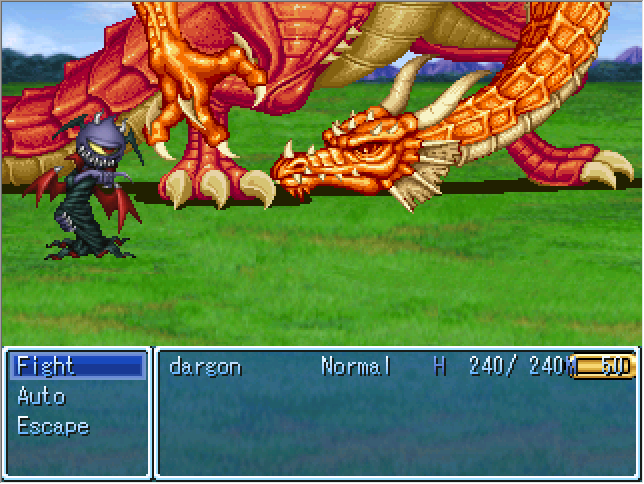
and used this as the battle characterset:
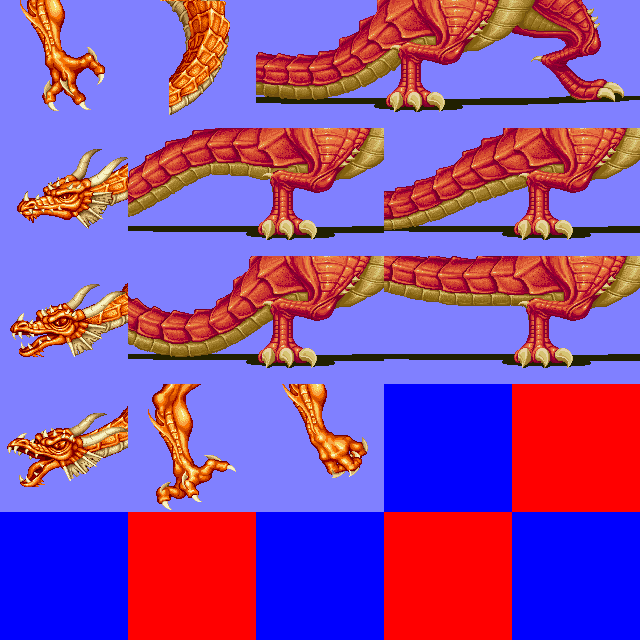
e: As battle animations you're free to animation shit and add flashes or sound effects or w/e too! I animated the above dragon so the tail cycles and goes thump with a sound (but I'm too lazy to make a gif/video of it).
and used this as the battle characterset:
e: As battle animations you're free to animation shit and add flashes or sound effects or w/e too! I animated the above dragon so the tail cycles and goes thump with a sound (but I'm too lazy to make a gif/video of it).
Sweet mother of god, thanks for another example Red! I have to say, I'm so happy I stumbled onto this site! You guys are so helpful and forthcoming with your own experiments and trials! Thank you so much!
Also, many people seem to forget that RPG Maker 2003 supports two types of battle animations: regular animations and "large animations". The large animations go in the Battle2 folder, and support larger "squares". Unfortunately I can't remember the exact dimensions these animations support, but if you find that the sprites you wish to use won't fit on a regular battle animation sheet, it's something to consider.
Pages:
1

