Full Games List
 Featured Games
 New Games
 Reviews
 Media
Media Images
 Blogs
Blogs Game Updates
 Images Feedback Summary
 Game Design Highlights
 Tutorials
 Articles
 Scripts
 Utilities / Plugins
 Resources
 Engines
 Engine Bulletins
 What is Makerscore?
 Past Events
 Achievements
 Misaos
 Forums
 Post History
 Chat
Chat New to RMN?
 Full Store List
 RMN Music Pack (free)



[RM2K3] CAN SOMEONE HELP ME WITH THESE SPRITES?
Posts
Pages:
1

 Synthmalicious
 View playlists
 Close
CloseListen. As much as I hate having to ask this, I really have to. I've been making this rpg game on my freetime, and I know how to make it 256 colors and all that, but it's not working. Yeah, I tried resizing it.
The sprite in question is this one:
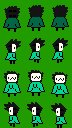
If you can fix that one, that would be good, but it would be a lot more helpful if someone actually did the charsets. I'll design the sprite, but I really need more help with the just the charsets.
The sprite in question is this one:
If you can fix that one, that would be good, but it would be a lot more helpful if someone actually did the charsets. I'll design the sprite, but I really need more help with the just the charsets.

Never save sprites as a jpg, jpgs use lossy compression designed for photos but they introduce all kinds of horrible noise on sprites. I can see all kinds of different greens around your sprite for example. You should make sure it's saved as a PNG which is a lossless compression and won't introduce noise.
I also have no idea what your exact problem is with it. It looks like it's for RPG Maker 2000/2003 and you're having trouble importing it due to the 256-color restriction? Also no RPG Maker takes JPGs, so definitely make sure you're saving it as a PNG.
I also have no idea what your exact problem is with it. It looks like it's for RPG Maker 2000/2003 and you're having trouble importing it due to the 256-color restriction? Also no RPG Maker takes JPGs, so definitely make sure you're saving it as a PNG.

Also, if you have it in a full template (8 character slots), it'll make your life a little easier.
Though, as GRS said, .PNG save file will be your main or only real issue. If you zoom in on .jpg, you can see all the 'noise' in the green. So when you import it, there's nothing to be made invisible by the engine.
Great character, btw!
Though, as GRS said, .PNG save file will be your main or only real issue. If you zoom in on .jpg, you can see all the 'noise' in the green. So when you import it, there's nothing to be made invisible by the engine.
Great character, btw!
author=GreatRedSpiritIt's a png
Never save sprites as a jpg, jpgs use lossy compression designed for photos but they introduce all kinds of horrible noise on sprites. I can see all kinds of different greens around your sprite for example. You should make sure it's saved as a PNG which is a lossless compression and won't introduce noise.
I also have no idea what your exact problem is with it. It looks like it's for RPG Maker 2000/2003 and you're having trouble importing it due to the 256-color restriction? Also no RPG Maker takes JPGs, so definitely make sure you're saving it as a PNG.
author=GreatRedSpiritit's also 256 colors.
Never save sprites as a jpg, jpgs use lossy compression designed for photos but they introduce all kinds of horrible noise on sprites. I can see all kinds of different greens around your sprite for example. You should make sure it's saved as a PNG which is a lossless compression and won't introduce noise.
I also have no idea what your exact problem is with it. It looks like it's for RPG Maker 2000/2003 and you're having trouble importing it due to the 256-color restriction? Also no RPG Maker takes JPGs, so definitely make sure you're saving it as a PNG.

author=SynthmaliciousNope, it's a jpg. Take a closer look. Either you made a mistake when saving the file or you don't know what a png is, since that file i am looking at right now is a jpg. I saved it and opened it with fireworks, still a jpg.
It's a png
Your spritesheet is all kinds of wacked, not only it's a jpg which introduces lots of pixel noise that completely bonks the quality, you also have it on the wrong size. You also positioned the left and right sprites wrong. The sprite with both feet on the ground goes in the middle, not on the left/right.
This is how a rpg2003 charset looks like:

You need to use this size, even if it's just one character, and place each sprite in it's corresponding place. So you take your character sprite and place it like so:

Then you remove the blocks and leave the characters with a background color that the sprites don't use.

Then you need to save it in PNG-8 - 256 Exact Colors, not "Adaptive", they must be exact. Otherwise rpgmaker2003 will not accept it. Another thing you can do is save as BMP, there's less trouble when importing graphics in bmp because bmp has not much variation in the way it handles bitmaps unlike PNG.

This is what we see when we download that file in your OP:

Get a free image program and convert it to png. Make sure that all files are PNG or at least BMP - nothing else will be read by the engine.
I'd really like to help but the data loss in that is unreal. Could you post a version where you haven't saved it as jpg or didn't decrease the colour depth? This is what it looks like after I downloaded and zoomed in. As you can see, there's a lot of cleaning up that needs doing to get it back to workable shape.

That said, I cleaned it up (just used some base colours, you'll have to add shading and whatever back) and added it to a full sheet (just save new sprites in those spots).
Here's a full-colour version: http://i.imgur.com/K4PRwEt.png
And a 256-colour version: http://i.imgur.com/529KAOj.png
Use the full colour version for adding extra characters, and then decrease the colours afterwards and SAVE AS PNG!
Get a free image program and convert it to png. Make sure that all files are PNG or at least BMP - nothing else will be read by the engine.
I'd really like to help but the data loss in that is unreal. Could you post a version where you haven't saved it as jpg or didn't decrease the colour depth? This is what it looks like after I downloaded and zoomed in. As you can see, there's a lot of cleaning up that needs doing to get it back to workable shape.
That said, I cleaned it up (just used some base colours, you'll have to add shading and whatever back) and added it to a full sheet (just save new sprites in those spots).
Here's a full-colour version: http://i.imgur.com/K4PRwEt.png
And a 256-colour version: http://i.imgur.com/529KAOj.png
Use the full colour version for adding extra characters, and then decrease the colours afterwards and SAVE AS PNG!
I don't know what kind of messed up hosting service you're using or what in heavens you're using to draw your sprites, but either the image hosting site where you uploaded that picture automatically changes it to a jpg or your drawing program doesn't save to png.
Try using imgur to upload your image instead of whatever it is you're using.
Try using imgur to upload your image instead of whatever it is you're using.
Twitter converted it to jpg (I don't usually link images), but whatever. I put the ORIGINAL PNG FILE onto the sprite sheet, and it still didn't work.
Check the links in my post above. I already fixed it for you, though it might need some editing to be back to how it should, shading-wise.
Don't use twitter to upload - use imgur like mirak said. It's a lot better.
Please read ALL the posts in a thread - you would have seen that what you asked for has already been done.
Don't use twitter to upload - use imgur like mirak said. It's a lot better.
Please read ALL the posts in a thread - you would have seen that what you asked for has already been done.
Pages:
1