



 Full Games List
 Featured Games
 New Games
 Reviews
 Media
Media Images
 Blogs
Blogs Game Updates
 Images Feedback Summary
 Game Design Highlights
 Tutorials
 Articles
 Scripts
 Utilities / Plugins
 Resources
 Engines
 Engine Bulletins
 What is Makerscore?
 Past Events
 Achievements
 Misaos
 Forums
 Post History
 Chat
Chat New to RMN?
 Full Store List
 RMN Music Pack (free)



RM2K(3) BUGFIX PATCH/IPS: CONSISTENT Z-ORDER OF EVENTS WHICH ARE ON THE SAME TILE, FINALLY!
Posts
Pages:
1

 Cherry
 View playlists
 Close
CloseHello guys! I came across a problem user Tor_Heyerdal had, about events which are on the same tile and "randomly" switched their priority/z-order when panning the screen.
It looks like this problem always existed in RM! In particular, it works like this: When you move events (which are on the same layer, e.g. same-layer-as-hero) onto the same tile, weird things happen. The RM will use a comparison method based on Y position, whether it is the hero or not, and X position, in that order, to determine the order in which the events are drawn. However, if all of these are the same, the actual order depends partly on the event ID, but partly on the other events in the visible area and maybe the moon phase and the size of your shoes, because it is actually undefined behavior.
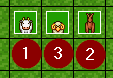
For example, I have these events (below you can see the event IDs):
Now, I move the outer two events onto the middle one. What happens is this mess:
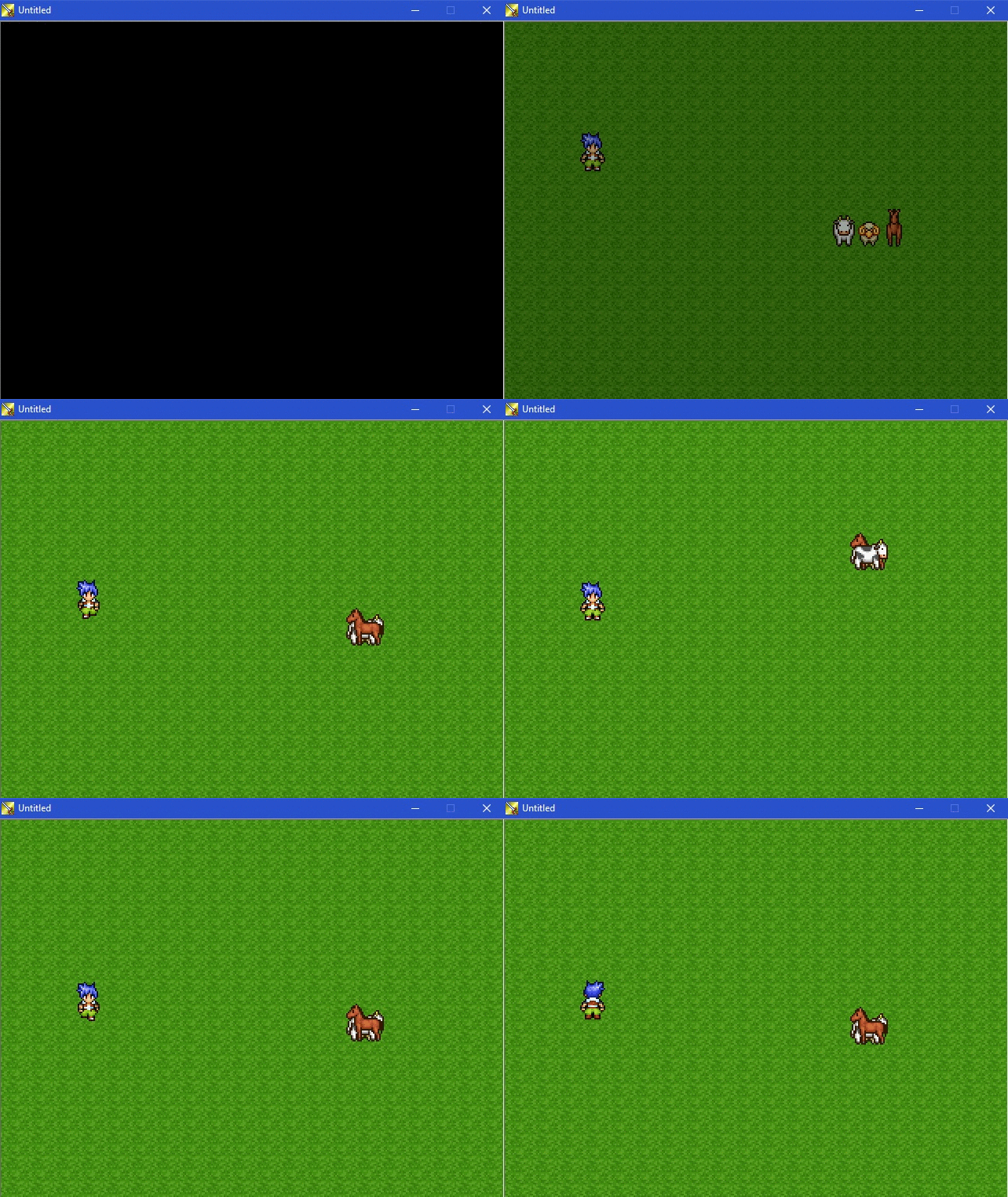
Note how the order changes when the hero walks past them! >_<
(In this simple example, only the vertical position caused the events to switch their priority, but in more complicated scenarios like the one Tor_Heyerdal had, also the horizontal position caused weird changes like that.)
My solution to bring order into this mess is to add another step in the comparison of events to determine their order: The event ID. Higher IDs are drawn on top of lower IDs (as you would expect, e.g. from pictures). So, the comparison is now Y, hero-or-not, X, event ID.
The result looks like this, and stays this way regardless of where the hero or the map are positioned:
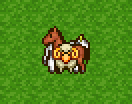
That's much nicer, I think!
I built a patch for RM2k3 v1.08 to achieve this (works also with DynRPG). To apply the patch, download this IPS file and patch your RPG_RT.exe with it (or put it into the DynPatches folder if you use DynRPG version 0.20+): http://share.cherrytree.at/showfile-25860/rpg_rt_with_event_id_fix.ips
EDIT: Here also for RM2k v1.07: http://share.cherrytree.at/showfile-25862/rpg_rt_2k_with_event_id_fix.ips
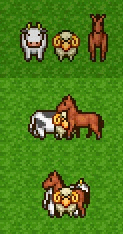
EDIT2: On second thought, though, I'm not sure if the solution is ideal. Maybe it should use the event ID in the check instead of the X position check? Because now, with the current solution, the order will change when the event is walking around horizontally, in an unexpected way (e.g. when an event walks behind a box). However, some people may depends on the X position order in some way, when events are wider than 16 pixels... What do you think? This is what I mean:
EDIT3: Since Tor_Heyerdal actually needed it without the X check as it turns out, here is the version with only Y, hero-or-not and event ID in the comparison (no X), for RM2k3 v1.08 only: http://share.cherrytree.at/showfile-25872/rpg_rt_108_fixed_without_x.ips
(I will also add this in the next official update of RM2k3.)
Enjoy your new nice and tidy event order!
Cherry
It looks like this problem always existed in RM! In particular, it works like this: When you move events (which are on the same layer, e.g. same-layer-as-hero) onto the same tile, weird things happen. The RM will use a comparison method based on Y position, whether it is the hero or not, and X position, in that order, to determine the order in which the events are drawn. However, if all of these are the same, the actual order depends partly on the event ID, but partly on the other events in the visible area and maybe the moon phase and the size of your shoes, because it is actually undefined behavior.
For example, I have these events (below you can see the event IDs):
Now, I move the outer two events onto the middle one. What happens is this mess:
Note how the order changes when the hero walks past them! >_<
(In this simple example, only the vertical position caused the events to switch their priority, but in more complicated scenarios like the one Tor_Heyerdal had, also the horizontal position caused weird changes like that.)
My solution to bring order into this mess is to add another step in the comparison of events to determine their order: The event ID. Higher IDs are drawn on top of lower IDs (as you would expect, e.g. from pictures). So, the comparison is now Y, hero-or-not, X, event ID.
The result looks like this, and stays this way regardless of where the hero or the map are positioned:
That's much nicer, I think!
I built a patch for RM2k3 v1.08 to achieve this (works also with DynRPG). To apply the patch, download this IPS file and patch your RPG_RT.exe with it (or put it into the DynPatches folder if you use DynRPG version 0.20+): http://share.cherrytree.at/showfile-25860/rpg_rt_with_event_id_fix.ips
EDIT: Here also for RM2k v1.07: http://share.cherrytree.at/showfile-25862/rpg_rt_2k_with_event_id_fix.ips
EDIT2: On second thought, though, I'm not sure if the solution is ideal. Maybe it should use the event ID in the check instead of the X position check? Because now, with the current solution, the order will change when the event is walking around horizontally, in an unexpected way (e.g. when an event walks behind a box). However, some people may depends on the X position order in some way, when events are wider than 16 pixels... What do you think? This is what I mean:
EDIT3: Since Tor_Heyerdal actually needed it without the X check as it turns out, here is the version with only Y, hero-or-not and event ID in the comparison (no X), for RM2k3 v1.08 only: http://share.cherrytree.at/showfile-25872/rpg_rt_108_fixed_without_x.ips
(I will also add this in the next official update of RM2k3.)
Enjoy your new nice and tidy event order!
Cherry

Nice work, as always. I've had this thing happen in my own game. Good to see there's finally a fix for it.
(Official RM2K3 still not compatible with DynRPG, though? Or is that something that will never happen?)
(Official RM2K3 still not compatible with DynRPG, though? Or is that something that will never happen?)
Dear Cherry,
Thank you very much for fixing this quirk.
I think the original developers allowed it to be like this, because, if they determined a final layer priority using Event ID, then when random events walked around, some would always be on top of the others. Even when, say, an event was higher on the map than another event; it might make its feet appear on top of a lower event's head, even though it should be "behind" that event.
You should set it to determine only by Event ID, then play around with it and see if it causes any strange-looking graphics. Because I do like that it could be determined by Event ID... it makes it predictable, what is going to obscure what.
Thank you very much for fixing this quirk.
I think the original developers allowed it to be like this, because, if they determined a final layer priority using Event ID, then when random events walked around, some would always be on top of the others. Even when, say, an event was higher on the map than another event; it might make its feet appear on top of a lower event's head, even though it should be "behind" that event.
You should set it to determine only by Event ID, then play around with it and see if it causes any strange-looking graphics. Because I do like that it could be determined by Event ID... it makes it predictable, what is going to obscure what.

Very good! This has been an issue for Ara Fell where birds will sometimes fly "under" other above-hero prioritized events. Awesome that won't be an issue any more.
Keep up the good work, Cherry!
Keep up the good work, Cherry!

Cool to see a fix for this! If I ever noticed it in the past, it was one of those "ugh wtf 2k3" type of things.
@Zachary_Braun: but the comparison function still has Y position before X and now ID... So an event can never have its feet on the head of another event...
Hi Cherry,
I apologize for missing that. Other than that, I don't know what to say about the X check possibly causing issues for sprites wider than 16 pixels. ...Perhaps you can have the X check function like the Y check—a sprite more to the left will always be on top of a sprite to the right...?
I apologize for missing that. Other than that, I don't know what to say about the X check possibly causing issues for sprites wider than 16 pixels. ...Perhaps you can have the X check function like the Y check—a sprite more to the left will always be on top of a sprite to the right...?
It is like that, but if they are exactly the same, event ID is new final check. And that's why the horse suddenly pops below the sheep in my last example.

Pages:
1

