



 Full Games List
 Featured Games
 New Games
 Reviews
 Media
Media Images
 Blogs
Blogs Game Updates
 Images Feedback Summary
 Game Design Highlights
 Tutorials
 Articles
 Scripts
 Utilities / Plugins
 Resources
 Engines
 Engine Bulletins
 What is Makerscore?
 Past Events
 Achievements
 Misaos
 Forums
 Post History
 Chat
Chat New to RMN?
 Full Store List
 RMN Music Pack (free)



[RMMV] SAVE MENU IMAGES (48 X 96 TALL SPRITES APPEARING WEIRD)
Posts
Pages:
1

 wzackw
 View playlists
 Close
CloseI use character sprites that are two tiles tall in my game, so the spritesheets have unusual dimensions and appear weird in the save file images on the save/load screen. How can I adjust the size of the image it uses so that you don't see cut-off characters like this?
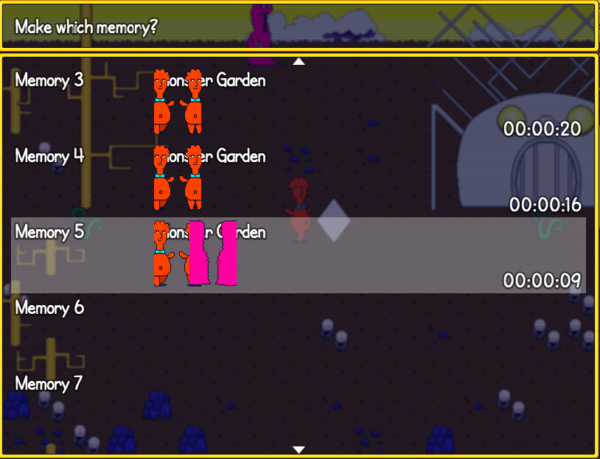
Thanks for any help!
Thanks for any help!

You want to edit this function of rpg_windows.js:
pw and ph are the ones that determine the "slice" sizes of the bitmaps.
Window_Base.prototype.drawCharacter = function(characterName, characterIndex, x, y) {
    var bitmap = ImageManager.loadCharacter(characterName);
    var big = ImageManager.isBigCharacter(characterName);
    var pw = bitmap.width / (big ? 3 : 12);
    var ph = bitmap.height / (big ? 4 : 8);
    var n = characterIndex;
    var sx = (n % 4 * 3 + 1) * pw;
    var sy = (Math.floor(n / 4) * 4) * ph;
    this.contents.blt(bitmap, sx, sy, pw, ph, x - pw / 2, y - ph);
};
pw and ph are the ones that determine the "slice" sizes of the bitmaps.
author=Trihan
You want to edit this function of rpg_windows.js:
Window_Base.prototype.drawCharacter = function(characterName, characterIndex, x, y) {
    var bitmap = ImageManager.loadCharacter(characterName);
    var big = ImageManager.isBigCharacter(characterName);
    var pw = bitmap.width / (big ? 3 : 12);
    var ph = bitmap.height / (big ? 4 : 8);
    var n = characterIndex;
    var sx = (n % 4 * 3 + 1) * pw;
    var sy = (Math.floor(n / 4) * 4) * ph;
    this.contents.blt(bitmap, sx, sy, pw, ph, x - pw / 2, y - ph);
};
pw and ph are the ones that determine the "slice" sizes of the bitmaps.
Thank you so much, Trihan! That's exactly what I needed!
Giving people exactly what they need is the reason I come here. :)
author=TrihanThanks a lot for the help! @Trihan
Giving people exactly what they need is the reason I come here. :)
Now I'm wondering how to set which frame of the character's animation is displayed. It seems to be showing the second forward-facing frame, but I would like it to show the first forward-facing frame.
In the screenshot you can see how the first and third characters are awkwardly in the middle of their walking/spinning animations:
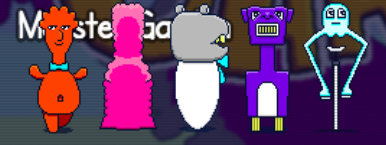
Sorry to bump this, but I'd really like to know how to get the save menu to display the first frame of each character's animation sequence instead of the second (which as you can see is from the back for a few characters).
Thanks for any help! @Trihan
Thanks for any help! @Trihan

Pages:
1

