



 Full Games List
 Featured Games
 New Games
 Reviews
 Media
Media Images
 Blogs
Blogs Game Updates
 Images Feedback Summary
 Game Design Highlights
 Tutorials
 Articles
 Scripts
 Utilities / Plugins
 Resources
 Engines
 Engine Bulletins
 What is Makerscore?
 Past Events
 Achievements
 Misaos
 Forums
 Post History
 Chat
Chat New to RMN?
 Full Store List
 RMN Music Pack (free)



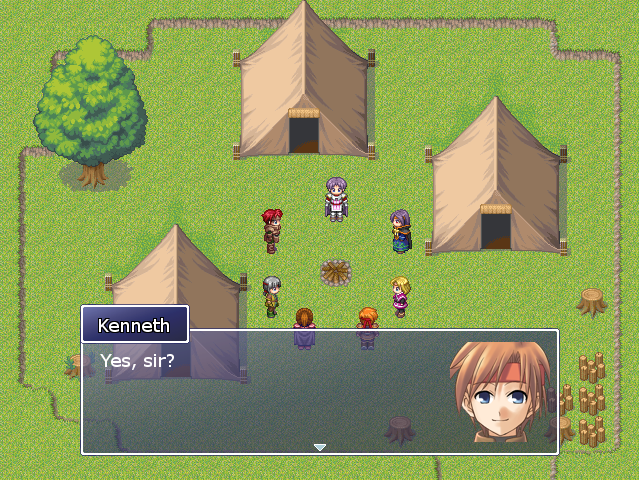
DISPLAYING FACES WITH TEXT
Posts
Pages:
1

 TooManyToasters
 View playlists
 Close
CloseIs there any way to do this in XP? I've seen it done before, and it'd be much better than just using the speaker's name.

Just make it a picture, and then make a common event that makes it appear with the message box.

You need to use a script I recommend the Universal Message System script. Along with able to do facesets it has a wide variety of options as well.
http://www.rpgrevolution.com/forums/index.php?showtopic=7692
http://www.rpgrevolution.com/forums/index.php?showtopic=7692

author=NoblemanNick link=topic=2268.msg38849#msg38849 date=1224378904
You need to use a script I recommend the Universal Message System script. Along with able to do facesets it has a wide variety of options as well.
http://www.rpgrevolution.com/forums/index.php?showtopic=7692
Do this.
author=NoblemanNick link=topic=2268.msg38849#msg38849 date=1224378904...Whew. Here we go.
You need to use a script I recommend the Universal Message System script. Along with able to do facesets it has a wide variety of options as well.
http://www.rpgrevolution.com/forums/index.php?showtopic=7692
I downloaded the demo, copied Scripts.rxdata and pasted it in the Catastrophe folder (since the demo itself works fine like that), tried to use a face graphic, and I get this.
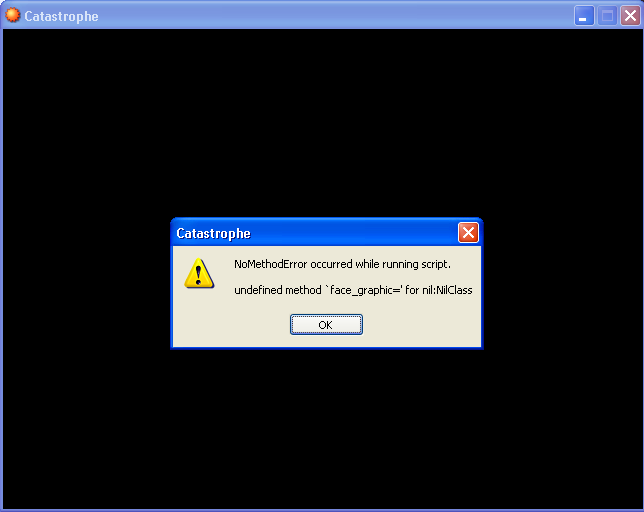
Also, \ignr doesn't work. It still only gives me three lines to type.
I must be doing something horribly, horribly wrong. I really want to get this to work, though, the screenshots look awesome.
EDIT:
...Oh fuck.
Oh FUCK.
I took scripts.rxdata, moved it into the Data folder, and replaced the old Scripts.rxdata. Now I can't even load the game.
Oh crap.

I don't mess around with scripts as of yet, but correct me if I'm wrong in that this "scripts.rxdata" is just scripts for that game. Wouldn't making a new game and just copying the new "scripts.rxdata" let you give it a clean slate again?
Just trying to help and learn :)
Just trying to help and learn :)
author=TooManyToasters link=topic=2268.msg38863#msg38863 date=1224386258author=NoblemanNick link=topic=2268.msg38849#msg38849 date=1224378904...Whew. Here we go.
You need to use a script I recommend the Universal Message System script. Along with able to do facesets it has a wide variety of options as well.
http://www.rpgrevolution.com/forums/index.php?showtopic=7692
I downloaded the demo, copied Scripts.rxdata and pasted it in the Catastrophe folder (since the demo itself works fine like that), tried to use a face graphic, and I get this.
Also, \ignr doesn't work. It still only gives me three lines to type.
I must be doing something horribly, horribly wrong. I really want to get this to work, though, the screenshots look awesome.
EDIT:
...Oh fuck.
Oh FUCK.
I took scripts.rxdata, moved it into the Data folder, and replaced the old Scripts.rxdata. Now I can't even load the game.
Oh crap.
Look there isn't a prolem that scriptrx.data for UMS still contains the ones you need to do it, every script does as for your error I believe it's because you haen't put the face grahpics into the picture folder.
author=NoblemanNick link=topic=2268.msg38879#msg38879 date=1224423135Yeah, they're in there and I'm telling it to show the right one. I took a VEEEERY basic Ruby tutorial that I never finished, and what it's telling me is that it doesn't know what to do with "face_graphic=". So yeah, it's a problem with the script.author=TooManyToasters link=topic=2268.msg38863#msg38863 date=1224386258author=NoblemanNick link=topic=2268.msg38849#msg38849 date=1224378904...Whew. Here we go.
You need to use a script I recommend the Universal Message System script. Along with able to do facesets it has a wide variety of options as well.
http://www.rpgrevolution.com/forums/index.php?showtopic=7692
I downloaded the demo, copied Scripts.rxdata and pasted it in the Catastrophe folder (since the demo itself works fine like that), tried to use a face graphic, and I get this.
Also, \ignr doesn't work. It still only gives me three lines to type.
I must be doing something horribly, horribly wrong. I really want to get this to work, though, the screenshots look awesome.
EDIT:
...Oh fuck.
Oh FUCK.
I took scripts.rxdata, moved it into the Data folder, and replaced the old Scripts.rxdata. Now I can't even load the game.
Oh crap.
Look there isn't a prolem that scriptrx.data for UMS still contains the ones you need to do it, every script does as for your error I believe it's because you haen't put the face grahpics into the picture folder.
author=Karsuman link=topic=2268.msg38865#msg38865 date=1224395714Meh, all I had to do was make a new project and take the scripts.rxdata out of that. I probably should have thought that through a little more anyway...
...What made you think that was a good idea without making a backup?

You aren't initializing the variable that you're calling the face_graphic= method, so its a nil object that has no methods. Open up the script editor after the game closes to the error and it should take you to the script where the error occured.
author=GreatRedSpirit link=topic=2268.msg38897#msg38897 date=1224439259It didn't.
You aren't initializing the variable that you're calling the face_graphic= method, so its a nil object that has no methods. Open up the script editor after the game closes to the error and it should take you to the script where the error occured.
author=GreatRedSpirit link=topic=2268.msg38930#msg38930 date=1224460123
I assume the error is triggered by an event then. Is the event using the Script command at all?
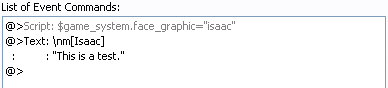
The picture's filename is "isaac.png".
Something doesn't add up here.
please is the filename "Issac" and it's in PNG format or is it "Issac.png" as a filename.
author=NoblemanNick link=topic=2268.msg38933#msg38933 date=1224462362Err... I'm not sure what you mean. The filename is isaac.png, and the UMS demo uses $game_system.face_graphic="t1_11" to show t1_11.jpg in the pictures folder. I have no clue what I'm doing wrong here.
please is the filename "Issac" and it's in PNG format or is it "Issac.png" as a filename.
The problem is with $game_system then. Its a nil object so you can't do anything with it. Most likley its not being initialized. In the default RMXP scripts its initialized in Scene_Title. Is there a "$game_system = Game_System.new" in the main method at all? If not add it... somewhere. Probably after the Load Database segment.
Yeah, there is. Obviously we're going too far here. The problem has to be in what I did with the file I downloaded.
I took the scripts.rxdata lying in the UMS folder and put it in the Catastrophe\Scripts folder. No dice. I made a new project and replaced Scripts.rxdata with a fresh one. Then I took UMS' Scripts.rxdata again and placed it on its own in the Catastrophe folder. Then I went into UMS\Scripts and copied that Scripts.rxdata, then placed it in Catastrophe\Scripts. The game was able to load, but I got that error.
The instructions only tell me what the demo tells me, which is how to use the script once it's been implemented... but it never tells me how to do just that. Remember, I'm new to this, so I just had to take some wild guesses, and that's likely where I went wrong.
I took the scripts.rxdata lying in the UMS folder and put it in the Catastrophe\Scripts folder. No dice. I made a new project and replaced Scripts.rxdata with a fresh one. Then I took UMS' Scripts.rxdata again and placed it on its own in the Catastrophe folder. Then I went into UMS\Scripts and copied that Scripts.rxdata, then placed it in Catastrophe\Scripts. The game was able to load, but I got that error.
The instructions only tell me what the demo tells me, which is how to use the script once it's been implemented... but it never tells me how to do just that. Remember, I'm new to this, so I just had to take some wild guesses, and that's likely where I went wrong.
I'm curious to why $game_system is floating around as a null object but its not that important. Replace your current Scripts.rxdata with a clean one and open up the script editor and open up your game in RMXP. Now open up RMXP again (you'll have two RMXPs running) and open up the demo with the other window. Open up the script editor in that one and find the script labelled UMS in the left column. Highlight it in the left column and copy it (Ctrl C) then go back to the RMXP that has your game open, open up the script editor, and highlight Main on the left column and paste the script (Ctrl V). This'll insert the code into your game into its own area right above main.
This should do the trick.
This should do the trick.
Pages:
1

