



 Full Games List
 Featured Games
 New Games
 Reviews
 Media
Media Images
 Blogs
Blogs Game Updates
 Images Feedback Summary
 Game Design Highlights
 Tutorials
 Articles
 Scripts
 Utilities / Plugins
 Resources
 Engines
 Engine Bulletins
 What is Makerscore?
 Past Events
 Achievements
 Misaos
 Forums
 Post History
 Chat
Chat New to RMN?
 Full Store List
 RMN Music Pack (free)



[RMVX ACE] SUPER SIMPLE MAP-BATTLE?
Posts
Pages:
1

 Kanatakkun
 View playlists
 Close
CloseI'm currently having trouble with this unique battle-system thing in RPG Maker VX Ace...
First, I want to use this kind of battle system in my game:
Or...
Or maybe something like XAS ABS. (But that's not exactly I'm looking for because I need to let the character move freely, not 'stuck' in a battle mode...)
However, what I am looking for is a SIMPLER battle system, but still similar with the previous examples: On-the-map fight. ALL I need is these commands:
1. Attack, and
2. Defend.
The planned playtime-duration of my project is only around 30-50 minutes) AND I don't want the player to have difficulty in understanding the complex (or unique) battle system for too long.
So in short, I'm looking for a battle system which is:
- Executed / happens in the map
- Let the player to move around, and actually only move left and right because my game is somewhat has a sideway view.
- Let the player swing around weapon + animation(attack)
- The same with defending
- No TP bar (if possible, only display HP)
- No extra skills / item option (I'm not using them)
- Don't require too many scripts (cause lag)
- Single character (more is OK if there is an option to disable it)
That's all, basically. Adding more s fine as long as it's not too many, maybe?
So if there is anyone who could help me... I would be grateful. It don't have to be a script. Some eventing is fine, too. I don't plan to use the scripts in the examples above because they are too big for my project and cause lag in my PC.
Thank you :)
First, I want to use this kind of battle system in my game:

Or...
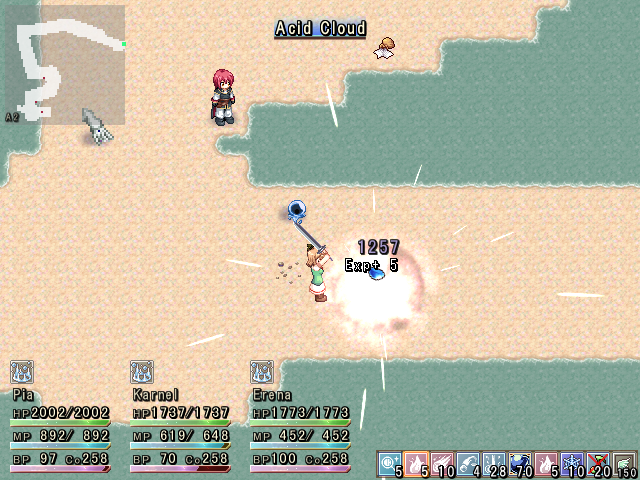
Or maybe something like XAS ABS. (But that's not exactly I'm looking for because I need to let the character move freely, not 'stuck' in a battle mode...)
However, what I am looking for is a SIMPLER battle system, but still similar with the previous examples: On-the-map fight. ALL I need is these commands:
1. Attack, and
2. Defend.
The planned playtime-duration of my project is only around 30-50 minutes) AND I don't want the player to have difficulty in understanding the complex (or unique) battle system for too long.
So in short, I'm looking for a battle system which is:
- Executed / happens in the map
- Let the player to move around, and actually only move left and right because my game is somewhat has a sideway view.
- Let the player swing around weapon + animation(attack)
- The same with defending
- No TP bar (if possible, only display HP)
- No extra skills / item option (I'm not using them)
- Don't require too many scripts (cause lag)
- Single character (more is OK if there is an option to disable it)
That's all, basically. Adding more s fine as long as it's not too many, maybe?
So if there is anyone who could help me... I would be grateful. It don't have to be a script. Some eventing is fine, too. I don't plan to use the scripts in the examples above because they are too big for my project and cause lag in my PC.
Thank you :)

So basically you want a simple, ENTIRE, ABS script? Ummm... okay... I'm not sure anyone will fufill this so I'd reccomend just using the basics given by an existing system and just playing around with that.
author=Kloe
So basically you want a simple, ENTIRE, ABS script? Ummm... okay... I'm not sure anyone will fufill this so I'd reccomend just using the basics given by an existing system and just playing around with that.
It doesn't have to be a script, if there is another way, like eventing, that would be alright too. After all, it actually only need 'Attack' and 'Defend' command... But I'm not really good at making these 'cause I'm still a noob ._.

If you really can't use Falco's ANS then that's a shame. Because you could just edit thay script down to only display what you need.
The basic concept is this
Have a parallel process or common event using parallel to check for the coordinates of anyone involved. Hero and monster.
So use variable command and name the variable "hero x", and instead of setting it to a number you would use one of the other options for "Hero X Coordinate".
Do the same for "hero y".
So with 2 lines of code on repeat you are tracking the hero's coordinates.
Make sure you put a small wait of 0.0 or 0.1 at the end of that parallel process, to avoid lag. So several times a second, 2 variables are updated with the position of the hero.
Add 2 more lines of code, and 2 more variable for any other events you need to track. Put them in the same event.
So that event is always running and always keep track of where events are. That is the first step.
Now, you create another event that checks when the player pressing the attack button. I only know how to set this up in 2003, but I would imagine there are tutorials on it for ACE. When the player presses the attack button you would first use code to find out what is occupying the space directly in front of the hero, which is his range of attack. You do this by creating a branch for all four directions.
If the hero is facing up, subtract 1 from "hero y".
If hero down, add 1 to "hero y"
If hero left, subtract 1 from "hero x"
If hero right, add 1 to hero x.
That alters the heros coordinates momentarily. So instead of his coordinates being where he is, it's what's in front.
Then you use conditional branches to check if "enemy x" is equal to "hero x", and also if enemy y is equal to hero y. Then that means, the enemy is directly in front of the hero and you run code for what happens on hit. Sound, visual effect, hp variable decrease, anything you want.
I can't exactly write out all the code for you, but for very basic ABS that is all you need. Of course you would need to either make enemies events do damage on touch, or do similar code for the enemies. That can be tough.
I usually use a second set of variables called "in front of hero x" and y, because you have an event constantly updating hero x and y, so for calculations you want to use a different set of variables(or stop the other event from rechecking for hero coordinates).
If you are beginner, this might seem really hard at first, but it would be a good lesson for you to try and do what I described on your own to understand how to track the coordinates of an event. Once you understand how to track variables of the hero and get him to attack an event, it's easier to add onto it. You may also find tutorials for creating event based ABS systems. Even if they are for a different engine you should be able to do most of them in ACE to understand how it works.
Have a parallel process or common event using parallel to check for the coordinates of anyone involved. Hero and monster.
So use variable command and name the variable "hero x", and instead of setting it to a number you would use one of the other options for "Hero X Coordinate".
Do the same for "hero y".
So with 2 lines of code on repeat you are tracking the hero's coordinates.
Make sure you put a small wait of 0.0 or 0.1 at the end of that parallel process, to avoid lag. So several times a second, 2 variables are updated with the position of the hero.
Add 2 more lines of code, and 2 more variable for any other events you need to track. Put them in the same event.
So that event is always running and always keep track of where events are. That is the first step.
Now, you create another event that checks when the player pressing the attack button. I only know how to set this up in 2003, but I would imagine there are tutorials on it for ACE. When the player presses the attack button you would first use code to find out what is occupying the space directly in front of the hero, which is his range of attack. You do this by creating a branch for all four directions.
If the hero is facing up, subtract 1 from "hero y".
If hero down, add 1 to "hero y"
If hero left, subtract 1 from "hero x"
If hero right, add 1 to hero x.
That alters the heros coordinates momentarily. So instead of his coordinates being where he is, it's what's in front.
Then you use conditional branches to check if "enemy x" is equal to "hero x", and also if enemy y is equal to hero y. Then that means, the enemy is directly in front of the hero and you run code for what happens on hit. Sound, visual effect, hp variable decrease, anything you want.
I can't exactly write out all the code for you, but for very basic ABS that is all you need. Of course you would need to either make enemies events do damage on touch, or do similar code for the enemies. That can be tough.
I usually use a second set of variables called "in front of hero x" and y, because you have an event constantly updating hero x and y, so for calculations you want to use a different set of variables(or stop the other event from rechecking for hero coordinates).
If you are beginner, this might seem really hard at first, but it would be a good lesson for you to try and do what I described on your own to understand how to track the coordinates of an event. Once you understand how to track variables of the hero and get him to attack an event, it's easier to add onto it. You may also find tutorials for creating event based ABS systems. Even if they are for a different engine you should be able to do most of them in ACE to understand how it works.
author=InfectionFiles
If you really can't use Falco's ANS then that's a shame. Because you could just edit thay script down to only display what you need.
Uhh... I never tried the script. I thought that Falco's ABS could not changed as much as I describe... Well I'll check it and see if it's suitable or 'too large' for my game 'w')/
author=Link_2112If you are beginner, this might seem really hard at first, but it would be a good lesson for you to try and do what I described on your own to understand how to track the coordinates of an event. Once you understand how to track variables of the hero and get him to attack an event, it's easier to add onto it. You may also find tutorials for creating event based ABS systems. Even if they are for a different engine you should be able to do most of them in ACE to understand how it works.The basic concept is this
Have a parallel process or common event using parallel to check for the coordinates of anyone involved. Hero and monster.
So use variable command and name the variable "hero x", and instead of setting it to a number you would use one of the other options for "Hero X Coordinate".
Do the same for "hero y".
So with 2 lines of code on repeat you are tracking the hero's coordinates.
Make sure you put a small wait of 0.0 or 0.1 at the end of that parallel process, to avoid lag. So several times a second, 2 variables are updated with the position of the hero.
Add 2 more lines of code, and 2 more variable for any other events you need to track. Put them in the same event.
So that event is always running and always keep track of where events are. That is the first step.
Now, you create another event that checks when the player pressing the attack button. I only know how to set this up in 2003, but I would imagine there are tutorials on it for ACE. When the player presses the attack button you would first use code to find out what is occupying the space directly in front of the hero, which is his range of attack. You do this by creating a branch for all four directions.
If the hero is facing up, subtract 1 from "hero y".
If hero down, add 1 to "hero y"
If hero left, subtract 1 from "hero x"
If hero right, add 1 to hero x.
That alters the heros coordinates momentarily. So instead of his coordinates being where he is, it's what's in front.
Then you use conditional branches to check if "enemy x" is equal to "hero x", and also if enemy y is equal to hero y. Then that means, the enemy is directly in front of the hero and you run code for what happens on hit. Sound, visual effect, hp variable decrease, anything you want.
I can't exactly write out all the code for you, but for very basic ABS that is all you need. Of course you would need to either make enemies events do damage on touch, or do similar code for the enemies. That can be tough.
I usually use a second set of variables called "in front of hero x" and y, because you have an event constantly updating hero x and y, so for calculations you want to use a different set of variables(or stop the other event from rechecking for hero coordinates).
Thanks! I'll also try it, it could be a really good eventing training for me :D
Pages:
1

