



 Full Games List
 Featured Games
 New Games
 Reviews
 Media
Media Images
 Blogs
Blogs Game Updates
 Images Feedback Summary
 Game Design Highlights
 Tutorials
 Articles
 Scripts
 Utilities / Plugins
 Resources
 Engines
 Engine Bulletins
 What is Makerscore?
 Past Events
 Achievements
 Misaos
 Forums
 Post History
 Chat
Chat New to RMN?
 Full Store List
 RMN Music Pack (free)



[RMVX ACE] ATTEMPTING A SIMPLE DAY/NIGHT CYCLE
Posts
Pages:
1
 ZeroRaven87
 View playlists
 Close
CloseWhile working on a test demo, I'm attempting to implement a simple Day/Night transition system.
while searching through the tutorials here, I found an idea for RM2k3 similar to what I wanted, and modified it as needed (i.e 2 transitions instead of the 5 in the example).
However after running the engine, 3 minutes and 6 minutes pass, but none of the transitions occur.
presently using variable to add seconds and then turn to minutes, triggering the transitions. the Common event is listed below.
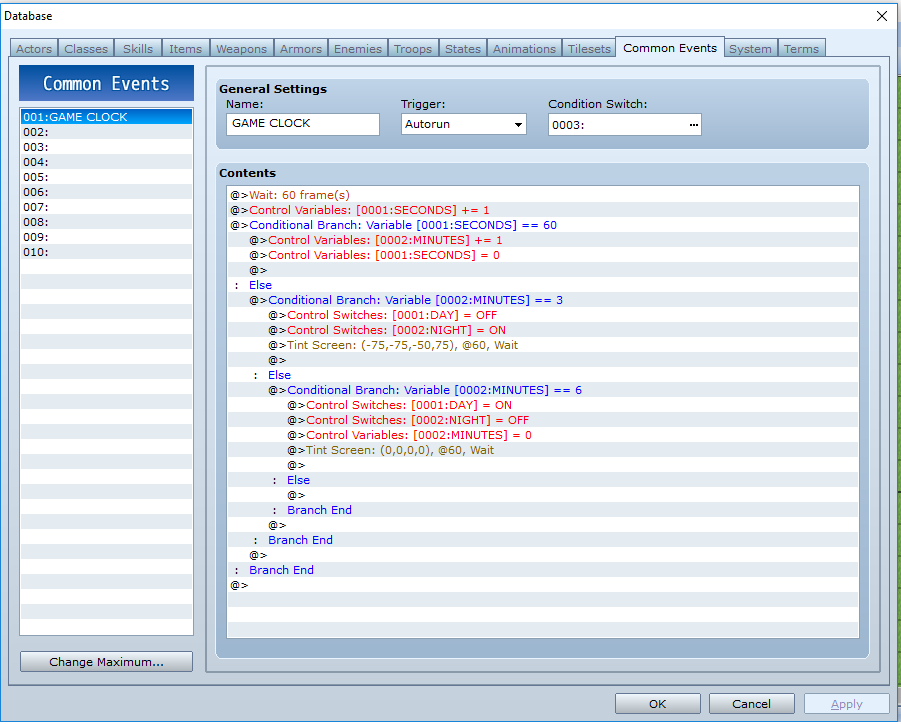
The original tutorial I used as the basis is located at the link below:
https://rpgmaker.net/tutorials/352/
while searching through the tutorials here, I found an idea for RM2k3 similar to what I wanted, and modified it as needed (i.e 2 transitions instead of the 5 in the example).
However after running the engine, 3 minutes and 6 minutes pass, but none of the transitions occur.
presently using variable to add seconds and then turn to minutes, triggering the transitions. the Common event is listed below.
The original tutorial I used as the basis is located at the link below:
https://rpgmaker.net/tutorials/352/

Change it from an autorun to a parallel process--also, make sure that your condition switch has been triggered. Also, it's going to run the transition to night over and over again with how you currently have it set up. I'd simplify it by getting rid of the minute variable, e.g.:
-Wait 60 frames
-seconds+1
-Condition: seconds = 180
--day off
--night on
--tint screen
-else: seconds = 360
--day on
--night off
--tint screen
--seconds = 0
Also, test it with less time so you'll go less crazy while waiting. Too, I think that if you put the whole thing in a loop, it might run during dialogue as well, but I would test that.
-Wait 60 frames
-seconds+1
-Condition: seconds = 180
--day off
--night on
--tint screen
-else: seconds = 360
--day on
--night off
--tint screen
--seconds = 0
Also, test it with less time so you'll go less crazy while waiting. Too, I think that if you put the whole thing in a loop, it might run during dialogue as well, but I would test that.
It will work as long as that switch is on, so as long as you activate that switch at the very start of your game somehow, it will work throughout the entire game, if that's what you're asking. If you don't have any events at the beginning, just place an autorun event at the starting position that clicks on that switch, then runs a self switch, then has a blank second page that is placed on "below character" and is anything other than a parallel process or autorun with the condition that the page is only active when that self-switch is.
Thank you so much.
It is working like a charm, though there is a small delay in triggering the transitions.
Sitting at roughly 3:15 per shift, so 6:30 for full day/night.
I'm attributing the additional time to the text print I added in just before the actual 2 second transition effect.
Again, thank you very much.
It is working like a charm, though there is a small delay in triggering the transitions.
Sitting at roughly 3:15 per shift, so 6:30 for full day/night.
I'm attributing the additional time to the text print I added in just before the actual 2 second transition effect.
Again, thank you very much.
Another question, same topic.
I know since this day/night cycle is only active when the trigger switch is "ON", that I can put a toggle in the events for entering and exiting a building or dungeon to effectively "pauss" the cycle.
The question is, since the cycle runs on a variable, i.e seconds, will that variable be saved when the trigger switch is turned off, and will it resume from that point when turned back on, or will it reset to 0?
I know since this day/night cycle is only active when the trigger switch is "ON", that I can put a toggle in the events for entering and exiting a building or dungeon to effectively "pauss" the cycle.
The question is, since the cycle runs on a variable, i.e seconds, will that variable be saved when the trigger switch is turned off, and will it resume from that point when turned back on, or will it reset to 0?

Is it possible to have a variable in an enemy that modifies the HP based on if the Day/Night trigger is active?
By that I mean can I have say, a werewolf, have 2x the HP if the night switch is on, versus having standard HP during the day?
By that I mean can I have say, a werewolf, have 2x the HP if the night switch is on, versus having standard HP during the day?

At the start of a battle, you could run an event at turn 0 that checks the current time and adds/takes away stats accordingly through changing the enemy. The stat change could be done by transforming the enemy into an identical looking one with the altered stats at the start of the battle (turn 0 event in troops). An example is having the version of the werewolf appear with 500 health initially, but if the battle starts while it's daytime, an event in turn 0 transforms the werewolf into a enemy that looks and is named exactly the same but with 250 health, essentially meaning that it has twice as much health at night. It'd be a seamless transition and the player wouldn't notice(unless you want them to, in which case you can add some fancy animation/text in the turn 0 event), except that the werewolf would be significantly easier to kill.
I'm not sure if the time changes in the middle of a battle, but if it does, you can add a "when end of turn & turn 1 + 1*X" event as well that also checks the time and transforms the enemy accordingly. This wouldn't halve the werewolf's health, however, as it will just change a 500 health wolf that is damaged to 400/500 health to have a maximum health of 250, which won't half it but damage it to that point.
This is the solution that I've used for similar ideas, i'm sure there's cleaner and more flexible methods as well.
I'm not sure if the time changes in the middle of a battle, but if it does, you can add a "when end of turn & turn 1 + 1*X" event as well that also checks the time and transforms the enemy accordingly. This wouldn't halve the werewolf's health, however, as it will just change a 500 health wolf that is damaged to 400/500 health to have a maximum health of 250, which won't half it but damage it to that point.
This is the solution that I've used for similar ideas, i'm sure there's cleaner and more flexible methods as well.
You could do the same thing with a state that modifies max hp (or any stat) if you want to avoid doubling several monsters. Make sure to recover the enemy's health if you use either method, though, as if you double the health of a monster or transform it, it will keep the same current hp.
I could in theory also use add a similar toggle to that event as I'm intending for the buildings, that disables and re-enables the trigger event for the day/night cycle right?
Yeah, you could do that, but parallel processes don't run during battles normally, anyway, so you won't need to turn it off and on as a matter of habit.
So, another question, same topic.
I'm attempting the use the Day/Night cycle to trigger enemy sprites to appear on the map.
Now I have tested it where the enemy is stationary during day cycles, and actively moves during night cycles, and if it touches the player it triggers the battle (with double hp and rewards during night cycles), however I cannot seem to get it to properly generate during night cycles, and disappear during day cycles.
Also can the enemy be removed from the map when defeated in battle, only to respawn during the next night cycle?
Below is how I have my testing actor set up.


I'm attempting the use the Day/Night cycle to trigger enemy sprites to appear on the map.
Now I have tested it where the enemy is stationary during day cycles, and actively moves during night cycles, and if it touches the player it triggers the battle (with double hp and rewards during night cycles), however I cannot seem to get it to properly generate during night cycles, and disappear during day cycles.
Also can the enemy be removed from the map when defeated in battle, only to respawn during the next night cycle?
Below is how I have my testing actor set up.

I've used "Erase Event" to remove enemies on the map, but, that does so until the player re-enters said map.
Saying that, the thought in my mind is, let the battle processing occur on Page 1. There should be an option-box in the battle-processing event that says "Can Escape". Enable that, and in the "If Win" case, enable Self-Switch A there instead. Then, on the event-page that requires Self-Switch A to be active, erase the graphic. Set it to a parallel process trigger. The only contents of that page would be a conditional branch, checking if "DAY" is off, or if the "NIGHT" is on. I'm mostly assuming the two correlate. Either way, if that condition is true, deactivate Self-Switch A.
*Edit:
Something like...
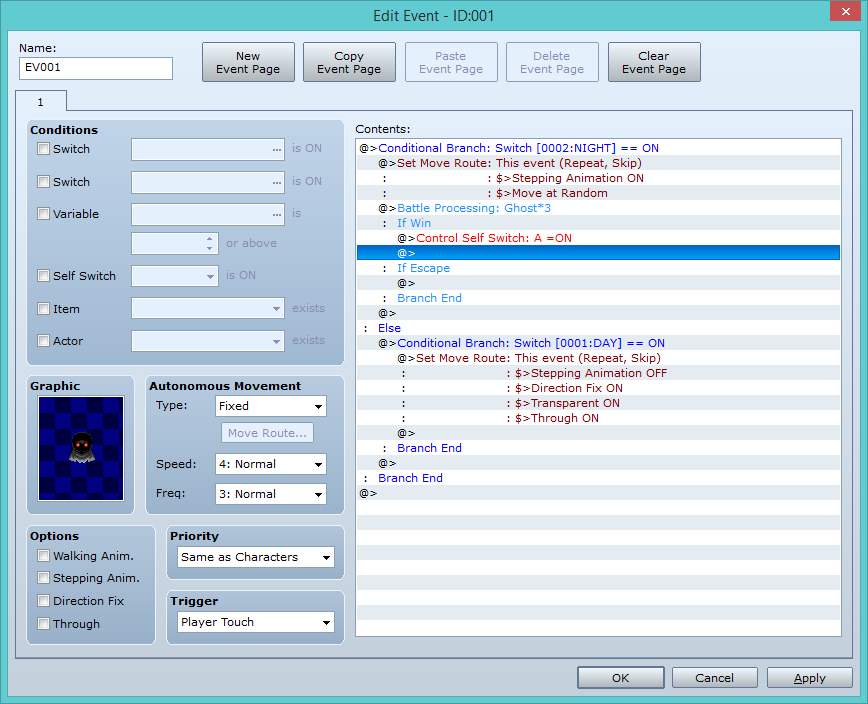

...this.
*Edit2:
Crap, Page1 needs to be a Parallel Process, doesn't it?
*shrugs*
Saying that, the thought in my mind is, let the battle processing occur on Page 1. There should be an option-box in the battle-processing event that says "Can Escape". Enable that, and in the "If Win" case, enable Self-Switch A there instead. Then, on the event-page that requires Self-Switch A to be active, erase the graphic. Set it to a parallel process trigger. The only contents of that page would be a conditional branch, checking if "DAY" is off, or if the "NIGHT" is on. I'm mostly assuming the two correlate. Either way, if that condition is true, deactivate Self-Switch A.
*Edit:
Something like...
...this.
*Edit2:
Crap, Page1 needs to be a Parallel Process, doesn't it?
*shrugs*
Pages:
1

