



 Full Games List
 Featured Games
 New Games
 Reviews
 Media
Media Images
 Blogs
Blogs Game Updates
 Images Feedback Summary
 Game Design Highlights
 Tutorials
 Articles
 Scripts
 Utilities / Plugins
 Resources
 Engines
 Engine Bulletins
 What is Makerscore?
 Past Events
 Achievements
 Misaos
 Forums
 Post History
 Chat
Chat New to RMN?
 Full Store List
 RMN Music Pack (free)



[RMVX ACE] CHANGES TO MAIN MENU APPEARANCE
Posts
Pages:
1

 Tw0Face
 View playlists
 Close
CloseHi, folks.
I want my RPG Vx Ace main menu changed to appear like this.
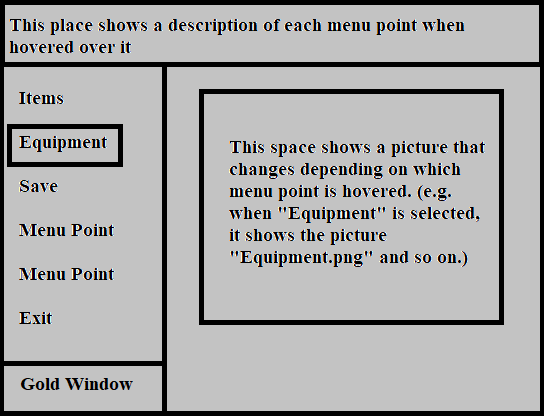
This example (terribly made with MS paint) should help you to get a feeling for what I'm looking for. The menu window should cover the whole screen. As for the blank picture space on the right: You don't have to do any graphic-related stuff like doing pictures for me. I just want the functionality included to show several pictures in that space depending on which menu point is hovered.
Unfortunately, I didn't progress far enough in scripting to do stuff like that, but for someone else who is able to do this, I think it shouldn't be a tough challenge.
Would someone like to help? :)
Greetings,
Tw0Face
I want my RPG Vx Ace main menu changed to appear like this.
This example (terribly made with MS paint) should help you to get a feeling for what I'm looking for. The menu window should cover the whole screen. As for the blank picture space on the right: You don't have to do any graphic-related stuff like doing pictures for me. I just want the functionality included to show several pictures in that space depending on which menu point is hovered.
Unfortunately, I didn't progress far enough in scripting to do stuff like that, but for someone else who is able to do this, I think it shouldn't be a tough challenge.
Would someone like to help? :)
Greetings,
Tw0Face
Hi. I updated the topic to hopefully make a little bit clearer what I'm looking for. I hope I could explain it in a proper way to you.
Greetings,
Tw0Face
Greetings,
Tw0Face

I think what you're describing is something I did for Mechanima...

...though, I'm not 100% sure if that scene made it into the current version.
Though, I suppose the army-battle system of Baclyae Revolution...
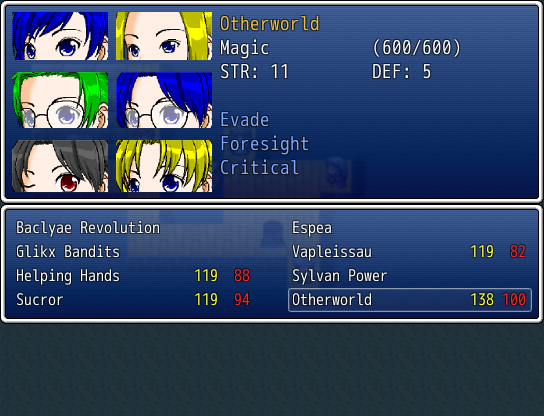
...might include similar concepts.
...though, I'm not 100% sure if that scene made it into the current version.
Though, I suppose the army-battle system of Baclyae Revolution...
...might include similar concepts.

Do you want the menu to be colorless? That's something that you can do without coding.
The other stuff I'm not sure about.
author=Tw0Face
Well, ok. Thanks for the pictures then.
I'm... not sure how to respond to this comment. I mean, I could probably reference what I did in those projects to cobble together something. However, I'm not 100% sure if you'd be interested in that?
Also, what with that signature at the end of your posts?
*Edit: Meh, what the hell. Why not.
class Scene_Menu < Scene_MenuBase
  def start
    super
    create_help_window
    create_command_window
    create_gold_window
    create_status_window
  end

  def create_help_window
    @help_window = Window_Help.new
  end

  def create_command_window
    @command_window = Window_MenuCommand.new
    @command_window.set_handler(:item,      method(:command_item))
    #@command_window.set_handler(:skill,     method(:command_personal))
    @command_window.set_handler(:equip,     method(:command_personal))
    #@command_window.set_handler(:status,    method(:command_personal))
    #@command_window.set_handler(:formation, method(:command_formation))
    @command_window.set_handler(:save,      method(:command_save))
    @command_window.set_handler(:game_end,  method(:command_game_end))
    @command_window.set_handler(:cancel,    method(:return_scene))
  end

  def create_status_window
    #@status_window = Window_MenuStatus.new(@command_window.width, 0)
    @status_window = Window_MenuPicture.new(@command_window.width)
  end

  def update
    super
    @help_window.clear
    case @command_window.current_symbol
    when :item
      @help_window.set_text("Accesses Items screen.")
      @status_window.set_pic("Items.png")
    when :equip
      @help_window.set_text("Accesses Equipment screen.")
      @status_window.set_pic("Equipment.png")
    when :save
      @help_window.set_text("Saves the game.")
      @status_window.set_pic("Save.png")
    when :game_end
      @help_window.set_text("Quits the game, or sends you to the title screen.")
      @status_window.set_pic("Exit.png")
    else
      @help_window.set_text("UNKNOWN")
      @status_window.set_pic("Menu.png")
    end
  end
end

class Window_MenuCommand < Window_Command
  def initialize
    super(0, fitting_height(2))
    select_last
  end

  def make_command_list
    add_main_commands
    #add_formation_command
    #add_original_commands
    add_save_command
    add_command("Menu Point", :menu, false)
    add_command("Menu Point", :menu, false)
    add_game_end_command
  end

  def add_main_commands
    add_command(Vocab::item,   :item,   main_commands_enabled)
    #add_command(Vocab::skill,  :skill,  main_commands_enabled)
    add_command(Vocab::equip,  :equip,  main_commands_enabled)
    #add_command(Vocab::status, :status, main_commands_enabled)
  end
end

class Window_MenuPicture < Window_Base
  def initialize(x)
    super(x, fitting_height(2), Graphics.width - x, Graphics.height - fitting_height(2))
    @picture = nil
  end

  def set_pic(file)
    contents.clear
    @picture = Cache.picture(file)
    contents.blt(0,0,@picture,@picture.rect)
  end
end
*Edit2: To be fair, I was going off the picture in the OP, and took the "Menu Point" displayed in it as yet-to-be-determined functions. If those are supposed to be something else that actually does something, or not supposed to be there at all, there would be some changes.
Pages:
1

