



 Full Games List
 Featured Games
 New Games
 Reviews
 Media
Media Images
 Blogs
Blogs Game Updates
 Images Feedback Summary
 Game Design Highlights
 Tutorials
 Articles
 Scripts
 Utilities / Plugins
 Resources
 Engines
 Engine Bulletins
 What is Makerscore?
 Past Events
 Achievements
 Misaos
 Forums
 Post History
 Chat
Chat New to RMN?
 Full Store List
 RMN Music Pack (free)



HELP WITH PLAY TIME IN DIALOG BOX RPG MAKER VX
Posts
Pages:
1
 CalicoChloe22
 View playlists
 Close
CloseHi there! I'm still using the original RPG Maker VX to finish a game I'm making for my b-i-l. I'm at the end of the game and I'd really like to be able to put the total play time in a dialog box after he's done everything. I've been trying to figure out how and I can't make it work. I have Modern Algebra's Advanced Text System Version: 3.0c, but I can't figure out what the code would be to get the play time to show in the dialog. Or if there's another way that I can get the total end game play time to show on the screen when I want it to. I tried using variables, which works with the text script in a dialog box, but the play time shows up as seconds and I want it in hours, minutes, seconds, or at least in minutes instead of seconds....
What would I enter for a command for "$game_system."...? I've tried "$game_system.play_time" but it just comes up as a blank text box.
I know it's an older software, but can anyone help me? Please! <3
Thank you!!!
What would I enter for a command for "$game_system."...? I've tried "$game_system.play_time" but it just comes up as a blank text box.
I know it's an older software, but can anyone help me? Please! <3
Thank you!!!

For what it's worth, the function call from Ace is $game_system.playtime_s. I no longer have access to VX to be certain that it's the same function there. I do feel like you have the right idea by looking at the Game_System class, which $game_system is an instance of.
*Edit: What I've done on many of my games is allow a last save opportunity after the game is done for the express purpose of letting players know how long they've played. Loading the file typically jumps right back to the title menu, so, it's not like it's used for a New Game+yet.
*Edit: What I've done on many of my games is allow a last save opportunity after the game is done for the express purpose of letting players know how long they've played. Loading the file typically jumps right back to the title menu, so, it's not like it's used for a New Game+

Assuming your dialogue is an event, you can use the "control variables" event command to set a variable equal to the play time, and display variables using .
Script way (taken directly from Game_SaveFile:
\v[number]
Script way (taken directly from Game_SaveFile:
total_sec = Graphics.frame_count / Graphics.frame_rate
    hour = total_sec / 60 / 60
    min = total_sec / 60 % 60
    sec = total_sec % 60
    time_string = sprintf("%02d:%02d:%02d", hour, min, sec)
Thank you both for your replies. For an update, I still can't get it to work by using $game_system.playtime_s, it just shows up as a blank spot in my message box. For the Modern Algebra's Advanced Text System script code I’m using: \#{$game_system.playtime_s }#
For the Variable, I can get that to work, but I still don't know how to get it to read in hours:minutes:seconds it just reads in seconds.... My game_savefile (or window_savefile) has the script you posted in it coelocanth. Am I suppose to insert that somewhere to get the variable to show in hours:minutes:seconds format?
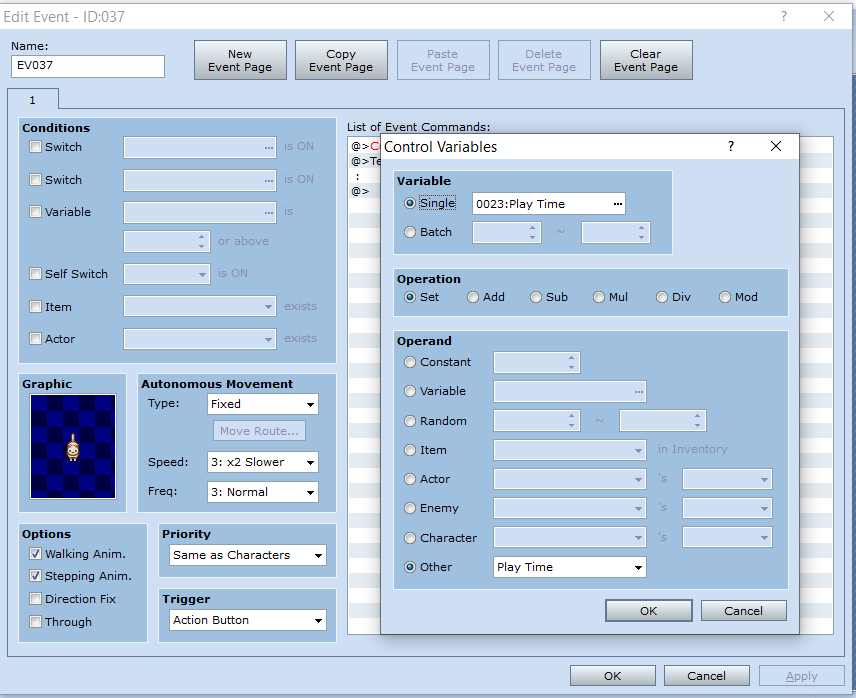
This is how I have it set up and a pic with the time as seconds. It doesn't matter if I put the variable in a different event, it just always shows only in seconds.


Thanks again!
For the Variable, I can get that to work, but I still don't know how to get it to read in hours:minutes:seconds it just reads in seconds.... My game_savefile (or window_savefile) has the script you posted in it coelocanth. Am I suppose to insert that somewhere to get the variable to show in hours:minutes:seconds format?
This is how I have it set up and a pic with the time as seconds. It doesn't matter if I put the variable in a different event, it just always shows only in seconds.
Thanks again!
Hi. I haven't received any replies since I posted pictures. Does anyone know if I can get the playtime to read in hours:minutes:seconds, instead of just in seconds? See the "181" in the screenshot is the total seconds played, but I want it to read "00:03:01".
Anyone?
Anyone?
Using the variable, you can use those "div" and "mod" options in the control variables command.
The "mod" option divides and returns the remainder.
The "div" option divides and rounds down
So,
The "mod" option divides and returns the remainder.
The "div" option divides and rounds down
So,
control variables: [0025 seconds] = 0023 play time MOD 60

control variables [0023 play time] = 0023 play time / 60

# play time is now in minutes

control variables: [0024 minutes] = 0023 play time MOD 60

control variables [0023 play time] = 0023 play time / 60

# play time is now in hours

show text "\v[23]:\v[24]:\v[25]"
Pages:
1

