



 Full Games List
 Featured Games
 New Games
 Reviews
 Media
Media Images
 Blogs
Blogs Game Updates
 Images Feedback Summary
 Game Design Highlights
 Tutorials
 Articles
 Scripts
 Utilities / Plugins
 Resources
 Engines
 Engine Bulletins
 What is Makerscore?
 Past Events
 Achievements
 Misaos
 Forums
 Post History
 Chat
Chat New to RMN?
 Full Store List
 RMN Music Pack (free)



HOW DO YOU DRAW YOUR PIXEL CHARACTER SPRITES?
Posts
Pages:
1

 CorbanWolf
 View playlists
 Close
CloseHey
Recently been thinking about drawing some sprites, but not only walking in 4 directions but some advanced actions like striking with a sword or other weapons and it turns out I am crap at drawing characters in action. I have no problem with drawing them in idle state, however when I need to show some movement or some action the character doing the result is always mediocre.
So here's my question. How do you draw your sprites for attack and other actions? Do you look at a picture and try to redraw it? Or just intuitively from imagination? Is it bad to look at reference picture and draw what you see? I was thinking of grabbing some long item and record myself, my movement and then redraw myself in pixel as character sprite. What are your advices for that?
Recently been thinking about drawing some sprites, but not only walking in 4 directions but some advanced actions like striking with a sword or other weapons and it turns out I am crap at drawing characters in action. I have no problem with drawing them in idle state, however when I need to show some movement or some action the character doing the result is always mediocre.
So here's my question. How do you draw your sprites for attack and other actions? Do you look at a picture and try to redraw it? Or just intuitively from imagination? Is it bad to look at reference picture and draw what you see? I was thinking of grabbing some long item and record myself, my movement and then redraw myself in pixel as character sprite. What are your advices for that?

Use reference always. Though when working with RPG chibi sprites (assuming this anyway) You do typically have little space to work with, it takes practice to know how to render a hand into a 4x4 blob so it's also handy to look at how existing game sprites do it without totally copying them.
As for animations keep it simple. Are you animating every single step or you having just the sprite "dash" towards the enemy? Does the character just teleport in front of the enemy and does the move? There are different degrees of detail that you want to show. SNES FF games literally have characters doing this and it works fine for showing that. But even in detailed animations it's still crucial to simplify it as much as possible. Fire emblem GBA games are praised for their detailed animations, but it's actually really simple if you slow it down and point out the important frames. This animation for instance really doesn't have much movement in the actual slash, it's like 2 frames (or two poses even) for when he actually swings the sword. There's a lot of wind up and pausing but when the attack happens it's quick, the battler is invisible for some of it too (less drawing!). Break it down into steps, what's the most simple way to relay the information?
There's also rotoscoping which is basically tracing the movements from video to sprites which has been done for years. It's a perfectly valid thing to do as long as you are clear about it being done, there's a tool for it as well.
As for animations keep it simple. Are you animating every single step or you having just the sprite "dash" towards the enemy? Does the character just teleport in front of the enemy and does the move? There are different degrees of detail that you want to show. SNES FF games literally have characters doing this and it works fine for showing that. But even in detailed animations it's still crucial to simplify it as much as possible. Fire emblem GBA games are praised for their detailed animations, but it's actually really simple if you slow it down and point out the important frames. This animation for instance really doesn't have much movement in the actual slash, it's like 2 frames (or two poses even) for when he actually swings the sword. There's a lot of wind up and pausing but when the attack happens it's quick, the battler is invisible for some of it too (less drawing!). Break it down into steps, what's the most simple way to relay the information?
There's also rotoscoping which is basically tracing the movements from video to sprites which has been done for years. It's a perfectly valid thing to do as long as you are clear about it being done, there's a tool for it as well.
Sooz

They told me I was mad when I said I was going to create a spidertable. Who’s laughing now!!!
5354
OK I'ma give you way too much detail on this, since I come from a pro artist background and do pixel stuff as a hobby.
1) Research, research, research!
You're gonna want to study the poses themselves, plus you're gonna want to study other sprites of similar size and see how their artists pulled it off.
There's a lot of difference in how sprites can work: Early Final Fantasy sprites focused on the face over anything else, whereas sprites in Phantasy Star IV and Symphony of the Night focus on the entire body. The former tends to give a very cute, personable look, while the latter is a bit closer to realism, and allows a lot more room for movement.
You'll of course need a general idea of how the movement looks IRL (with the caveat that realistic movement looks much less cool than cinematic, dramatic movement). I like to look up videos on youtube of specific martial arts weapon strikes, go through them frame by frame, and just study how all the body parts work. You can also do the same kind of study of fight scenes in movies, if you want a more dramatic-looking approach. (Bear in mind that you won't have the benefit of camera angles to make it look extra cool!)
Since you're presumably working in RPG Maker, bear in mind that you'll have size and frame limitations, so things are going to need to err on the side of exaggerated poses and quick, simple actions. This is not a good format for subtlety, much to my dismay!
If you're really trying hard, you can also look up animation tutorials (especially pixel art sprite animation) to get some pointers. (Learning about Line of Action as a kid was a big revelation to me!)
2) Actually drawing the damn thing
During your research process, you should hopefully have chosen what kind of proportions you want to focus on (or else you're forced into certain proportions because of preexisting sprites). I find it helps to have a base reference handy, whether it's just whatever base sprite you're working from, a quick sketch of your proportions in stick figure form, or just simple blocks of color defining what parts are what size.
I always start out with a basic stick figure, so I can get the movement down quickly and easily. I draw the whole animation out, focusing on line of action and on movement only. I check the animation sequence and go back until I'm satisfied. (Which is something you should be doing often!)
After that, I go over each frame with pretty basic, blobby shapes to define the major parts of the body. Things like colors don't matter a whole lot at this stage- you're getting the silhouette down, first and foremost. I'll go back in and refine things down so all the shapes look about right, then get to the detail part.
Details are fairly simple at this point, since I'm starting with the structure. Two things you'll want to remember: 1) the more detail something has, the harder it is for your audience to follow; 2) it's a really effective technique to have some smear frames for the really big actions.
3) A final bit of advice
Don't fret too much about getting everything exactly right as a beginner. You're going to start out having really crap-looking stuff, and that's absolutely OK. It's all part of the learning process. Even the greats didn't start out with super-awesome work.
1) Research, research, research!
You're gonna want to study the poses themselves, plus you're gonna want to study other sprites of similar size and see how their artists pulled it off.
There's a lot of difference in how sprites can work: Early Final Fantasy sprites focused on the face over anything else, whereas sprites in Phantasy Star IV and Symphony of the Night focus on the entire body. The former tends to give a very cute, personable look, while the latter is a bit closer to realism, and allows a lot more room for movement.
You'll of course need a general idea of how the movement looks IRL (with the caveat that realistic movement looks much less cool than cinematic, dramatic movement). I like to look up videos on youtube of specific martial arts weapon strikes, go through them frame by frame, and just study how all the body parts work. You can also do the same kind of study of fight scenes in movies, if you want a more dramatic-looking approach. (Bear in mind that you won't have the benefit of camera angles to make it look extra cool!)
Since you're presumably working in RPG Maker, bear in mind that you'll have size and frame limitations, so things are going to need to err on the side of exaggerated poses and quick, simple actions. This is not a good format for subtlety, much to my dismay!
If you're really trying hard, you can also look up animation tutorials (especially pixel art sprite animation) to get some pointers. (Learning about Line of Action as a kid was a big revelation to me!)
2) Actually drawing the damn thing
During your research process, you should hopefully have chosen what kind of proportions you want to focus on (or else you're forced into certain proportions because of preexisting sprites). I find it helps to have a base reference handy, whether it's just whatever base sprite you're working from, a quick sketch of your proportions in stick figure form, or just simple blocks of color defining what parts are what size.
I always start out with a basic stick figure, so I can get the movement down quickly and easily. I draw the whole animation out, focusing on line of action and on movement only. I check the animation sequence and go back until I'm satisfied. (Which is something you should be doing often!)
After that, I go over each frame with pretty basic, blobby shapes to define the major parts of the body. Things like colors don't matter a whole lot at this stage- you're getting the silhouette down, first and foremost. I'll go back in and refine things down so all the shapes look about right, then get to the detail part.
Details are fairly simple at this point, since I'm starting with the structure. Two things you'll want to remember: 1) the more detail something has, the harder it is for your audience to follow; 2) it's a really effective technique to have some smear frames for the really big actions.
3) A final bit of advice
Don't fret too much about getting everything exactly right as a beginner. You're going to start out having really crap-looking stuff, and that's absolutely OK. It's all part of the learning process. Even the greats didn't start out with super-awesome work.
Hello, thank you both for a reply. I am not using RPG Maker software anymore. I used to but at this moment I am studying programming languages plus there are some nice engines like Godot or Stencyl so sprite frame and other things are not a limitation. Also I know the thing with chibi. I tried to recreate that style in my art however I could never achieve that. Whenever I copy someone's style it never looks the way it supposed to, so I stick my style which is realism proportions of head to the rest of the body.
I was worried while creating this topic because I drew one frame of an animation looking at a reference image and I was actually very satisfied with the result, but after drawing the rest of the frames out of my imagination (because the reference image was only image so I was unable to find other pictures or videos to reference to) was comparably much worse and not very represented the movement.
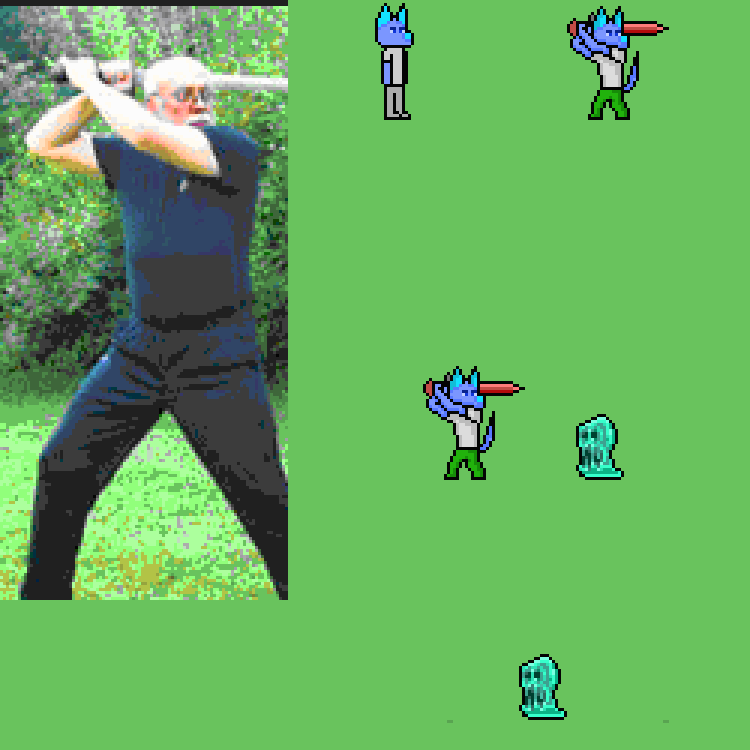
I was also thinking to myself "am I actually bad because I need a reference image and cannot use my imagination to imagine the pose that I need to draw?". Here I sent an imagine I referenced to and what I tried to accomplish. My main question was boiled into "Is using reference image making me a bad artist?". And how is your approach to drawing from reference image? I was seriously considering recording myself with a phone and then looking at the frames and trying to draw them. I would look goofy but it is the best way to create your custom reference image the way you need. As there is not that much animations or videos to find if you don't know where to look for (like me, I started from image and I am in a dead end because there is no reference image/video to look at. Oh and I am trying to make a smooth animation like here: https://youtu.be/Qx4nZJ5UPUQ
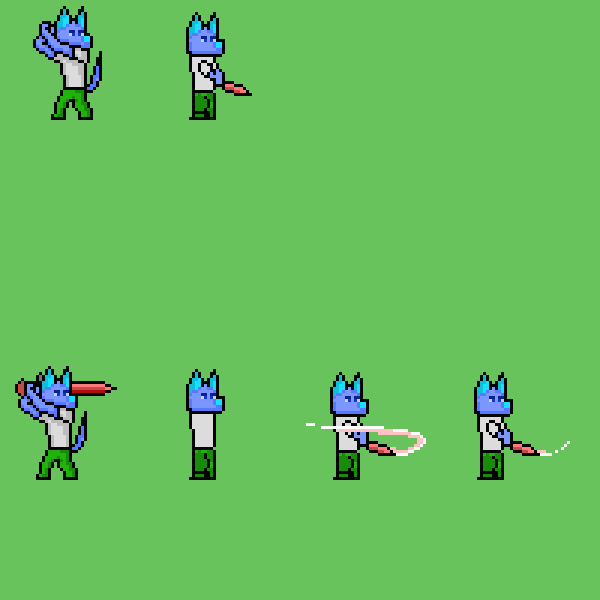
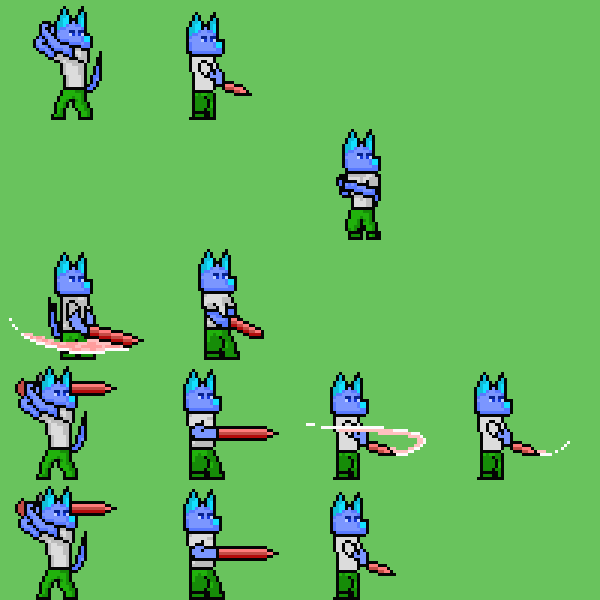
I like how smooth it looks, and how it looks like an action game. It seems very responsive. That's what I will try to achieve but not with chibi art style. I understand that the larger sprites the more difficult but my sprites aren't that large. Any tips?:
Also, I love Jake <3
I was worried while creating this topic because I drew one frame of an animation looking at a reference image and I was actually very satisfied with the result, but after drawing the rest of the frames out of my imagination (because the reference image was only image so I was unable to find other pictures or videos to reference to) was comparably much worse and not very represented the movement.
I was also thinking to myself "am I actually bad because I need a reference image and cannot use my imagination to imagine the pose that I need to draw?". Here I sent an imagine I referenced to and what I tried to accomplish. My main question was boiled into "Is using reference image making me a bad artist?". And how is your approach to drawing from reference image? I was seriously considering recording myself with a phone and then looking at the frames and trying to draw them. I would look goofy but it is the best way to create your custom reference image the way you need. As there is not that much animations or videos to find if you don't know where to look for (like me, I started from image and I am in a dead end because there is no reference image/video to look at. Oh and I am trying to make a smooth animation like here: https://youtu.be/Qx4nZJ5UPUQ
I like how smooth it looks, and how it looks like an action game. It seems very responsive. That's what I will try to achieve but not with chibi art style. I understand that the larger sprites the more difficult but my sprites aren't that large. Any tips?:
Also, I love Jake <3
Sooz
They told me I was mad when I said I was going to create a spidertable. Who’s laughing now!!!
5354
author=CorbanWolf
I was also thinking to myself "am I actually bad because I need a reference image and cannot use my imagination to imagine the pose that I need to draw?". Here I sent an imagine I referenced to and what I tried to accomplish. My main question was boiled into "Is using reference image making me a bad artist?".
Pretty much everyone at the pro level, and all the great masters, use reference. Anyone who thinks you should never use real life or photos to help you figure stuff out has no idea what they're talking about and can safely be ignored.
I'll address the rest of your post later, but yeah, use reference as often as you need. The whole "drawing from imagination" thing only works after you've used enough reference to memorize what certain stuff looks like.
Sooz
They told me I was mad when I said I was going to create a spidertable. Who’s laughing now!!!
5354
OK! More detailed reply!
Well, not quite realism- your style isn't the level of cute chibi, but it's still proportionally not realistic. This isn't a problem, I'm just a big fan of precise language :V
Recording yourself is 100% an excellent idea, and is something that pretty much everyone has done since cameras and video recording have been available. It was good enough for Disney, it's good enough for you!
As for finding reference video, that's actually pretty easy! Youtube has so many videos demonstrating all kinds of motions, and already has a feature where you can go frame by frame to really get a good idea of what the motion looks like (pause the video, then use the comma and period keys to step forward and back).
I got some really good videos just searching "swinging bat." If you want just bats in combat, "bat self defense" will get you what you want.
Like, really, do not underestimate how many martial arts demonstration videos there are on there. If I could find a wealth of vids demonstrating an obscure Italian style of knife fighting, you can easily find what you're looking for. ;)
OK, what's going on there isn't actually a drawn animation. Note that the sword swings independently from the character, no arms attached- it's a separate element, handled entirely by the computer. That's why it looks so smooth. You're not going to be able to achieve that level of smoothness, nor would you want to try- that would be like a jillion frames.
For reference, Street Fighter has some of the best animation available in games, and here's the kind of frame count it works with. Think about drawing that many individual images, for every character, for every movement. That's the kind of thing you really want to work up to after years and years of practice, not as a beginner. And that's not nearly as smooth as the computer-generated sword swing in your video!
So that's my advice/warning. Good luck, whatever you decide!
author=CorbanWolf
Also I know the thing with chibi. I tried to recreate that style in my art however I could never achieve that. Whenever I copy someone's style it never looks the way it supposed to, so I stick my style which is realism proportions of head to the rest of the body.
Well, not quite realism- your style isn't the level of cute chibi, but it's still proportionally not realistic. This isn't a problem, I'm just a big fan of precise language :V
I was worried while creating this topic because I drew one frame of an animation looking at a reference image and I was actually very satisfied with the result, but after drawing the rest of the frames out of my imagination (because the reference image was only image so I was unable to find other pictures or videos to reference to) was comparably much worse and not very represented the movement.
. . . .
I was seriously considering recording myself with a phone and then looking at the frames and trying to draw them. I would look goofy but it is the best way to create your custom reference image the way you need. As there is not that much animations or videos to find if you don't know where to look for (like me, I started from image and I am in a dead end because there is no reference image/video to look at.
Recording yourself is 100% an excellent idea, and is something that pretty much everyone has done since cameras and video recording have been available. It was good enough for Disney, it's good enough for you!
As for finding reference video, that's actually pretty easy! Youtube has so many videos demonstrating all kinds of motions, and already has a feature where you can go frame by frame to really get a good idea of what the motion looks like (pause the video, then use the comma and period keys to step forward and back).
I got some really good videos just searching "swinging bat." If you want just bats in combat, "bat self defense" will get you what you want.
Like, really, do not underestimate how many martial arts demonstration videos there are on there. If I could find a wealth of vids demonstrating an obscure Italian style of knife fighting, you can easily find what you're looking for. ;)
Oh and I am trying to make a smooth animation like here: https://youtu.be/Qx4nZJ5UPUQ
OK, what's going on there isn't actually a drawn animation. Note that the sword swings independently from the character, no arms attached- it's a separate element, handled entirely by the computer. That's why it looks so smooth. You're not going to be able to achieve that level of smoothness, nor would you want to try- that would be like a jillion frames.
For reference, Street Fighter has some of the best animation available in games, and here's the kind of frame count it works with. Think about drawing that many individual images, for every character, for every movement. That's the kind of thing you really want to work up to after years and years of practice, not as a beginner. And that's not nearly as smooth as the computer-generated sword swing in your video!
So that's my advice/warning. Good luck, whatever you decide!

If I were to critique the biggest flaw in one of the animations, it's that there's barely a line of action on the first pose and none at all in the actual attack pose. This ends up looking really stiff. The first pose is a good start but it helps for the final pose to have maybe an opposite curve to create a contrast. As long as your character isn't flat as a board, it's more than enough to make it feel dynamic.
The first pose I can't tell if that's the idle or the anticipation, in any case the swing trail shows it swinging at an angle that doesn't hook up well with the first pose. You have them swinging from overhead but swinging in a very awkward downward angle that looks like it was swung from the waist. It'd be easier to simplify (starting out) if the swing was entirely done in profile meaning you don't have to worry about perspective and it's completely sideview. If you can get the slash to resemble a clear crescent it'll be easier to show where the action came from.
You want the anticipation to let the viewer know the action is about to happen, then a follow through (and then an overlap if you're feeling fancy but don't worry about that).
To add on to what Sooz said the reason why you'd want to find real life reference is that the world is full of natural curves and circles. You need to bend a lot to create a lot of force. Even walking around in real life, just observe and look for interesting shapes.

There's way too much to go over but hopefully this touches the surface. But yeah look for references and do your best to transcribe the "feel" of the poses.
Pages:
1


