



 Full Games List
 Featured Games
 New Games
 Reviews
 Media
Media Images
 Blogs
Blogs Game Updates
 Images Feedback Summary
 Game Design Highlights
 Tutorials
 Articles
 Scripts
 Utilities / Plugins
 Resources
 Engines
 Engine Bulletins
 What is Makerscore?
 Past Events
 Achievements
 Misaos
 Forums
 Post History
 Chat
Chat New to RMN?
 Full Store List
 RMN Music Pack (free)



[RMMZ] REFERENCING VARIABLES IN PLUGIN COMMAND
Posts
Pages:
1
Red_Nova

Sir Redd of Novus: He who made Prayer of the Faithless that one time, and that was pretty dang rad! :D
9192
 Red_Nova
 View playlists
 Close
CloseSo I'm learning RMMZ and am trying out VisuStella's Visual Novel Busts plugin. When trying to reference a specific bust, I want to be able to append a variable value at the end of a file name. Something like this:
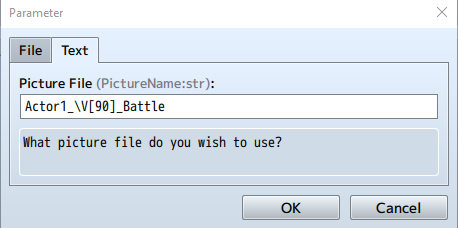
\V[90] isn't being evaluated into a variable value like I want, and I can't change the code itself since the plugin is obfuscated. Am I missing the correct syntax for this? Or is there really no way to reference a variable when calling a bust?
I'm not even sure if this is a VisuStella issue, a RMMZ one, or just operator error. Any assistance on this would be appreciated.
\V[90] isn't being evaluated into a variable value like I want, and I can't change the code itself since the plugin is obfuscated. Am I missing the correct syntax for this? Or is there really no way to reference a variable when calling a bust?
I'm not even sure if this is a VisuStella issue, a RMMZ one, or just operator error. Any assistance on this would be appreciated.

From what little experience I have with plug-in variables, the string that you inputted will convert to the string of "Actor1_\v[90]_Battle", rather than replace `\v[90]` to output the value of game-variable #90. I know the function that converts escape characters exists within an instance of `Window_Base`...
...but I can't really say for sure how to apply that knowledge to this situation.
Window_Base.prototype.convertEscapeCharacters = function(text) {
    /* eslint no-control-regex: 0 */
    text = text.replace(/\\/g, "\x1b");
    text = text.replace(/\x1b\x1b/g, "\\");
    text = text.replace(/\x1bV\[(\d+)\]/gi, (_, p1) =>
        $gameVariables.value(parseInt(p1))
    );
    text = text.replace(/\x1bV\[(\d+)\]/gi, (_, p1) =>
        $gameVariables.value(parseInt(p1))
    );
    text = text.replace(/\x1bN\[(\d+)\]/gi, (_, p1) =>
        this.actorName(parseInt(p1))
    );
    text = text.replace(/\x1bP\[(\d+)\]/gi, (_, p1) =>
        this.partyMemberName(parseInt(p1))
    );
    text = text.replace(/\x1bG/gi, TextManager.currencyUnit);
    return text;
};
...but I can't really say for sure how to apply that knowledge to this situation.
Red_Nova
Sir Redd of Novus: He who made Prayer of the Faithless that one time, and that was pretty dang rad! :D
9192
The more I look into it, the less sure I am that message window text is handled the same as plugin command text. Setting up variable calls in both plugin commands and the message window...
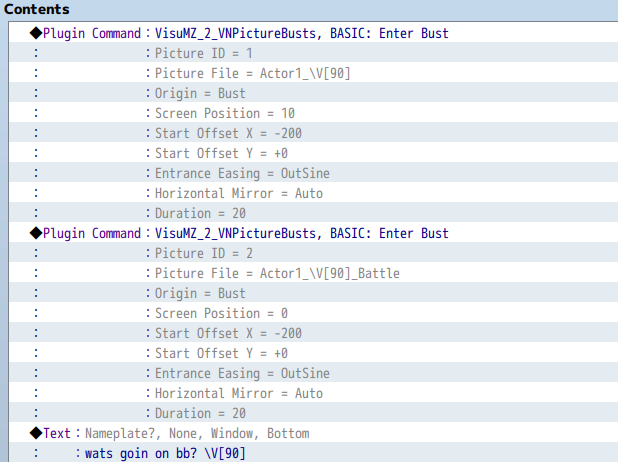
...results in the value being accepted correctly in the message box but not in the plugin command:
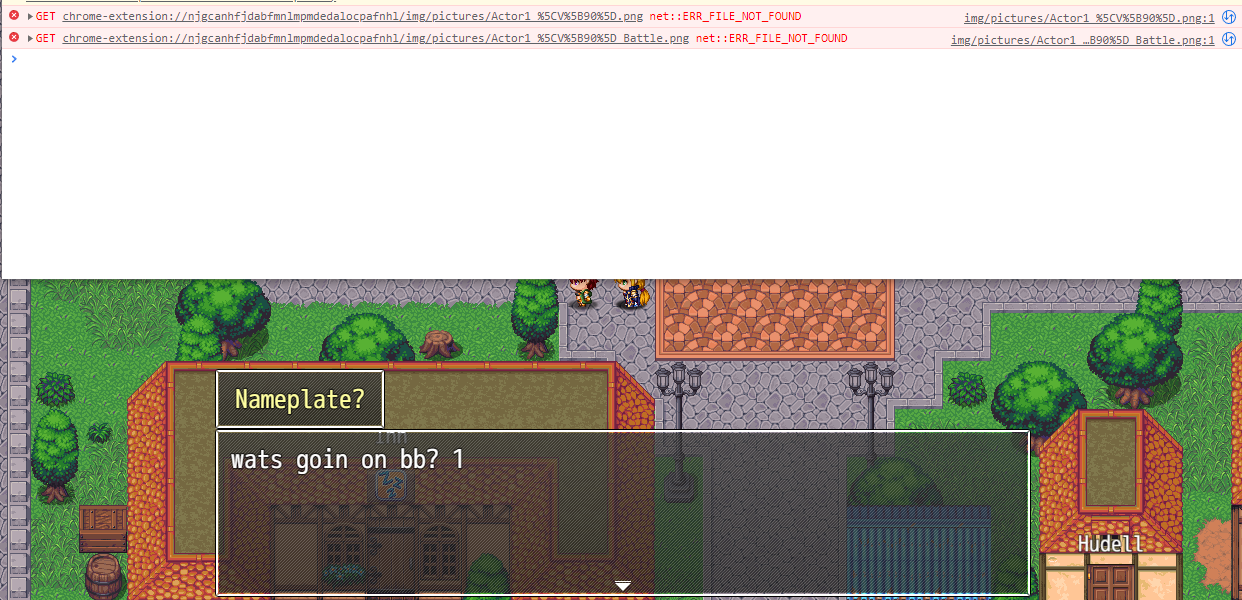
I get the same result for all the different escape characters I can think of. Even referencing $GameVariables doesn't work. I see other plugin commands that accept an eval text rather than a string, so that makes me think the plugin itself won't accept any references. Since the failure to reference a portrait actually causes the game to crash, I've submitted a report to VisuStella team and will report back with what I learn.
...results in the value being accepted correctly in the message box but not in the plugin command:
I get the same result for all the different escape characters I can think of. Even referencing $GameVariables doesn't work. I see other plugin commands that accept an eval text rather than a string, so that makes me think the plugin itself won't accept any references. Since the failure to reference a portrait actually causes the game to crash, I've submitted a report to VisuStella team and will report back with what I learn.
Like, I feel, in order for this to work the way you think it should, you might need to do something like...
...this, and put `test` into the "Picture File" field of the PluginCommand. I think? Not 100% sure here.
value = $gameVariables.value(90);
text = "Actor1_" + value + "_Battle";
...this, and put `test` into the "Picture File" field of the PluginCommand. I think? Not 100% sure here.
Red_Nova
Sir Redd of Novus: He who made Prayer of the Faithless that one time, and that was pretty dang rad! :D
9192
Marrend, while your suggestions didn't quite work, I did find a solution thanks to it.
Turns out, while you can't exactly edit the plugin code itself, you CAN edit the argument definitions. I opened up the plugin and found the argument for PictureName. After changing it from "str" to "eval", the input parameter won't be considered a whole String:
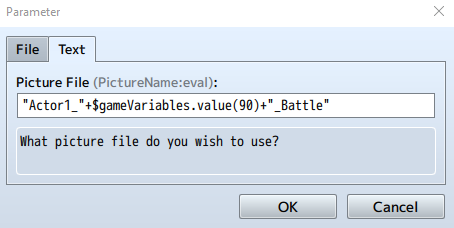
And now, so long as I surround all the string values with double quotes like you have in your example (even when I DON'T want to reference a variable), I can finally reference variables in the plugin command!


I'll have to do some more testing to make sure this doesn't screw up anything else, but I think we have a solution now. Hopefully VisuStella team can get back to me on a solution that doesn't require messing with the plugin parameter itself.
Thanks for all your help, Marrend!
EDIT: PSA for anyone else looking to try this in their own project: changing the argument type will erase all values you've entered in PictureName in your current project. Please make a backup of your project before trying this yourself!
Turns out, while you can't exactly edit the plugin code itself, you CAN edit the argument definitions. I opened up the plugin and found the argument for PictureName. After changing it from "str" to "eval", the input parameter won't be considered a whole String:
And now, so long as I surround all the string values with double quotes like you have in your example (even when I DON'T want to reference a variable), I can finally reference variables in the plugin command!
I'll have to do some more testing to make sure this doesn't screw up anything else, but I think we have a solution now. Hopefully VisuStella team can get back to me on a solution that doesn't require messing with the plugin parameter itself.
Thanks for all your help, Marrend!
EDIT: PSA for anyone else looking to try this in their own project: changing the argument type will erase all values you've entered in PictureName in your current project. Please make a backup of your project before trying this yourself!
Red_Nova
Sir Redd of Novus: He who made Prayer of the Faithless that one time, and that was pretty dang rad! :D
9192
I heard back from VisuStella team. Turns out there is no way to legitimately reference variables from the plugin command with the plugin as is. If you want to reference variables, you'll have to "hack" it with the above method.
Here are the issues I've noticed so far (this list will be updated if I find more):
* While it doesn't seem to automatically revert all existing values for pictureName to the Default value, you will have to reenter the value if you ever want to edit the plugin command. Be careful if you make this change in an existing project.
* You'll have to go through the extra effort to surround all String values with double quotes since the plugin command no longer accepts a String value. Combine this with the above point, and you'll likely have a lot of work to do replacing all the old picture name values with new ones.
Here are the issues I've noticed so far (this list will be updated if I find more):
* While it doesn't seem to automatically revert all existing values for pictureName to the Default value, you will have to reenter the value if you ever want to edit the plugin command. Be careful if you make this change in an existing project.
* You'll have to go through the extra effort to surround all String values with double quotes since the plugin command no longer accepts a String value. Combine this with the above point, and you'll likely have a lot of work to do replacing all the old picture name values with new ones.
Pages:
1

