



 Full Games List
 Featured Games
 New Games
 Reviews
 Media
Media Images
 Blogs
Blogs Game Updates
 Images Feedback Summary
 Game Design Highlights
 Tutorials
 Articles
 Scripts
 Utilities / Plugins
 Resources
 Engines
 Engine Bulletins
 What is Makerscore?
 Past Events
 Achievements
 Misaos
 Forums
 Post History
 Chat
Chat New to RMN?
 Full Store List
 RMN Music Pack (free)



GAME MAKER - CLOWN TUTORIAL ERROR?
Posts
Pages:
1

 Sam
Sam View playlists
 Close
CloseI just got Game Maker 7 Pro for making Fenrir II with and started with the tutorials on YoYo Games' website. Problem is, in my Catch the Clown game, my clown won't move!
I reread the tutorial and I'm positive I did everything right, but it just won't budge...
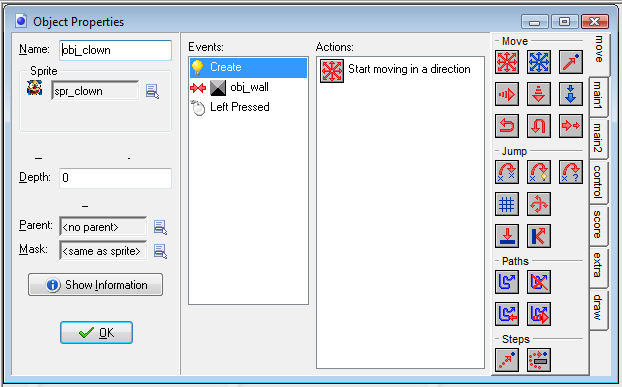
Here's hoping someone can give me a hand with this soon so you're not all waiting too long for Fenrir II
I reread the tutorial and I'm positive I did everything right, but it just won't budge...
Here's hoping someone can give me a hand with this soon so you're not all waiting too long for Fenrir II

author=Sam link=topic=3131.msg61429#msg61429 date=1234442606
I just got Game Maker 7 Pro for making Fenrir II with and started with the tutorials on YoYo Games' website. Problem is, in my Catch the Clown game, my clown won't move!
I reread the tutorial and I'm positive I did everything right, but it just won't budge...
Here's hoping someone can give me a hand with this soon so you're not all waiting too long for Fenrir II
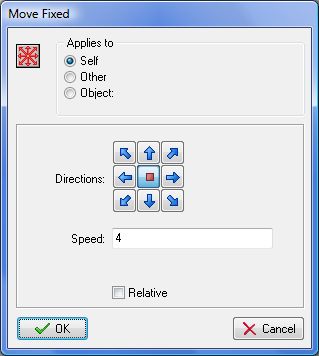
Actually what's happening there is that you're setting them to move in no direction (no arrow selected) at a speed of 4 when they are created. So they move no-direction at 4 speed (stay in place) upon creation.
If you wanted to make them move in one direction only pick an arrow and it should go.
If you're trying to make a controllable object here's a few examples:

What's happening here:
If the "left" arrow is pressed the clown is moved by -3 pixels (left) each frame.
(This is repeated in each direction input)
Note we use relative since we want it to "move by -3 pixels from where it is."
GM is event-based, so each frame the system reads certain things and updates all the objects with those events, so each frame GM is telling all object "The Left Key is pressed in right now." and if the object has a "Keyboard > <left>" event it will perform what's in that event each frame that update is sent.
Since "Create" is only sent to that object when it's created "Hey Event, you were just created, run your create event" it's only run once (might be what you were intending if you wanted the object to start moving as soon as it's set.)

Here we're using the set speed like you did but we set a direction based on what the player is pressing. When using speed once it's set the object continues at that speed until:
1. It collides with an Object you define
2. It's friction slows it down (if you set a friction, if not it will move forever)
Note: We DON'T use relative here because that would set the 'speed to +4 relative to where it is right now,' or in other words every frame the "left" key is in your speed would increase by 4 (4 pixels per frame, 8 ppf, 12 ppf, 16 ppf, by the time 4 frames had passed you'd be moving really, really fast.)
If you want to catch a keyboard stroke only ONCE you can use the "Keyboard Press" or "Keyboard Release" events.
It's a little confusing to get used to the break between RM which is one-time and cyclical, and GM which is event-based.
You can think of each Object as a parallel process that responds to the "Events" you tell it, since all objects are always 'actively' listening for any event you add to them, and they repeat each time it happens too.
(This is tricky to get used to, for example if you set a collision so that when a player touches an Object they get hurt by it, if you don't destroy one object or the other, or set some kind of variable flag and check it, they will get hurt EVERY FRAME until that 'bullet' leaves the player object's hit-box.)
Pages:
1

