



 Full Games List
 Featured Games
 New Games
 Reviews
 Media
Media Images
 Blogs
Blogs Game Updates
 Images Feedback Summary
 Game Design Highlights
 Tutorials
 Articles
 Scripts
 Utilities / Plugins
 Resources
 Engines
 Engine Bulletins
 What is Makerscore?
 Past Events
 Achievements
 Misaos
 Forums
 Post History
 Chat
Chat New to RMN?
 Full Store List
 RMN Music Pack (free)



QUESTION ABOUT TILESETS.
Posts
Pages:
1
 tjhiry29
 View playlists
 Close
CloseQuick Question. When I'm making the game. I used some tiles on the tilesets with white backgrounds. Now when I play the game... The white background... turns black, and it's making my game VERY ugly... If anyone knows a solution, or if it automatically changes itself could you please tell me? Also I'm using RPG Maker XP...

Re-import the tileset and click on the background colour when you do so. This will make that colour transparent.
Be warned that if there is any of that colour anywhere in the chips it will become transparent also.
Be warned that if there is any of that colour anywhere in the chips it will become transparent also.
post=123023
Re-import the tileset and click on the background colour when you do so. This will make that colour transparent.
Yeah so I did as you said... and it still does not work... Is there something else I've missed?

Ok... I hope you see this then.. or at least get the link.
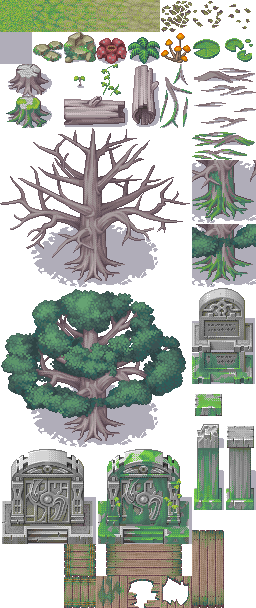
This is one of the tilesets I want to have changed... the white background for the tiles becomes black, as you may have read in the first post.... I was hoping it would be transparent....
This is one of the tilesets I want to have changed... the white background for the tiles becomes black, as you may have read in the first post.... I was hoping it would be transparent....

That white background is the transparent parts of the chipset. The reason they turn black is because the map has nothing below those transparent (white) parts to draw, and thus filling it in with black. Give the map a panorama or some chips of some sort and the white will instead be whatever is drawn beneath it on the map.

the default background color is black your probably not using the layers right
Pages:
1

