



 Full Games List
 Featured Games
 New Games
 Reviews
 Media
Media Images
 Blogs
Blogs Game Updates
 Images Feedback Summary
 Game Design Highlights
 Tutorials
 Articles
 Scripts
 Utilities / Plugins
 Resources
 Engines
 Engine Bulletins
 What is Makerscore?
 Past Events
 Achievements
 Misaos
 Forums
 Post History
 Chat
Chat New to RMN?
 Full Store List
 RMN Music Pack (free)



TRANSLATING TUTORIALS?
Posts
Pages:
1
 bleepbloopbleep
 View playlists
 Close
CloseHey guys. Brand new to RPG maker 2003. I'm actually planning on translating a game from Japanese to English. I've gotten as far as to go in and find the Japanese dialog, but unfortunately it comes up as pure gibberish. Does anyone know how to view Japanese characteristics in RPG maker 2003? Or even better link to a step by step translation tutorial if one happens to exist?
Thanks a lot for the help, and I apologize if this topic has already been discussed.
Thanks a lot for the help, and I apologize if this topic has already been discussed.

I don't know about the specific steps for adding support for Japanese character sets to your OS/copy of RM2k3, but there's this tool that rips all of the text from rm2k/2k3 games and puts it into a text file, then can replace all of the text in the game with the text file if you leave it in that format.
Might speed you up some, I'll see if I can find a link. Unfortunately, the topic for it was in the category that got culled from RMN2->RMN3, so considering that I don't remember the name of it that could be difficult!
Edit: Here you go.
I haven't actually tried it, but it looks like the download link has gone through a couple of version updates this past year.
Just tried it, and managed to extract all of the dialogue from Hellion, and reinsert the dialogue back into the maps. Works perfectly as far as I can tell.
Might speed you up some, I'll see if I can find a link. Unfortunately, the topic for it was in the category that got culled from RMN2->RMN3, so considering that I don't remember the name of it that could be difficult!
Edit: Here you go.
author=King Kadelfek
Hello !
I'm King Kadelfek, a french programmer.
I'm here to show you one of my project, DreaMaker.
----
DreaMaker (DMK) is a software developped for RM2K, RM2K3 and RMXP.
With DMK, you can extract all dialogs from your game.
After, you can edit them on a txt file. You can also use Word to correct mistakes.
You can translate your game, and so on.
And, finally, DMK inserts the string table back into your game.
----
DMK is working with French, English, German, Italian, Spanish and Finnish (all tested).
The software is available with three languages, French, English and Italian.
Don't worry, I don't made the translations. :p
Trebor777 made the translation, it's grammatical correct English. :)
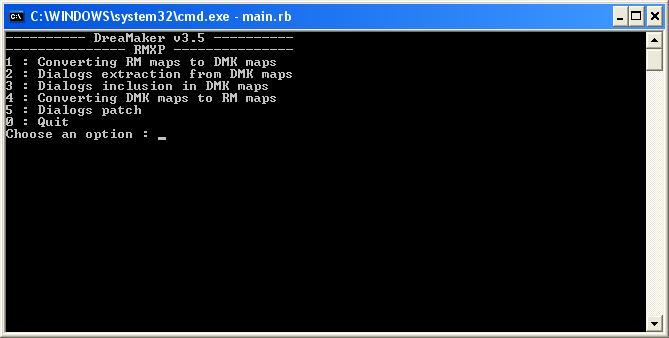
Screenshot
There will be a graphical interface soon. :D
Download
You can download DreaMaker v3.8 here (0.4 Mo) :
http://www.mediafire.com/download.php?ityyohzjzmn
Installation
RM2K / RM2K3 : put DreaMaker.exe in your Project folder, with the lmu files.
RMXP : put DreaMaker.exe in your Project folder, with Game.exe
You can edit both Language.txt and DreaMaker.ini to use other languages for DreaMaker. :)
Documentation
I'm sorry, only french documentation is yet available.
But you just have to follow 1-2-3-4 steps in order to edit your dialogs, it's easy. ;)
Some recommendations
- dialogs does have 4 lines maximum on RM, so on DMK too
- in a choice, don't add or remove a line
- There are 4 steps in DMK.
Don't make step 3 twice. You need to make step 2 before you make step 3 a second time.
Because after step 3, the files have changed, so you need to reextract the dialogs to keep the correspondance between your files and the dialogs files.
The step 5 is for advanced users, it can make a patch between 2 versions of your dialog's file.
The step 6 will be a statistic tool (this step will be soon in english).
DMK has been tested on more than 9,000 maps, so I think now there is no bug anymore.
DMK doesn't edit the dialogs in the Database (not yet).
Just tried it, and managed to extract all of the dialogue from Hellion, and reinsert the dialogue back into the maps. Works perfectly as far as I can tell.
Yes. That sounds like it would be an AWESOME tool to have once we can figure out how to turn the "wtf am I reading" text into Japanese. Thanks.
-
And Thanks again for tracking it down! This will be a great help once we're on that step. Maybe we'll get lucky and it will display the Japanese characters in the notepad.
-
And Thanks again for tracking it down! This will be a great help once we're on that step. Maybe we'll get lucky and it will display the Japanese characters in the notepad.
I hate for you to mollycoddle us like his, but it appears we have no idea how to use it. I've browsed the forums, which were linked, but I can't find any instructions on how! It'd be grand if you could give us some general directions? We're a bit noob at the whole RPG Maker thing. Thanks in advance, and sorry!
If your asking about the text ripper?
Pretty much just go in order.
Then you should be able to play the game normally with new text in all the show message and show choice commands. You have to do the database stuff by hand in RM2k3 though.
- Press 1 then enter. Press 1 then enter. It will make a copy of the maps in a format it can read.
Press 2 then enter, then press enter whenever it pauses. It will extract the text to "dialogues.txt" where you can edit it. Make sure to leave it in the same format! Don't change the lines the text appears on or anything (if you have to adjust the text to make sure it fits in the textboxes, you'll have to do that normally, inside the editor.)
Once you have edited the "dialogues.txt" to your liking, press 3, then press enter whenever it pauses. It will update the text in it's copy of the map files.
Then press 4, and it will convert it's files to the rpgmaker map format and overwrite *Warning*Backup the original map files ahead of time*Warning* the game's map files with the ones that have had their text edited.
Pretty much just go in order.
Then you should be able to play the game normally with new text in all the show message and show choice commands. You have to do the database stuff by hand in RM2k3 though.

This is the problem we come across, just at step 1. It's what we don't get. We don't understand the error.
Sorry for wasting your time like this.
Oh, you have to stick it in the same folder as the game. Or, this is probably the better option, copy all the files that end in .lmu and .lmt into the same folder as the text ripper's executable.

HotDAMN this is the most useful tool for rpgmaker ever invented. (Or at least its up there with the rest)

I wish more RM games were translated because I feel a huge disconnect between the English/German/French/Japan communities and there are probably a few potentially good RM games out there with the obstacle of having a foreign language. ):
On behalf of both of us, I would like to thank you guys again for hooking us up with this amazing little tool. It's really allowing for some great work.
Our current goal is to translate the "Towel Again" series. If anyone has heard of, and is interested in playing these games upon their completion let us know and we'll be sure to keep in touch.
Thanks again guys!
Also anyone who has any more tips or useful tools feel free to contribute for the benefit of ourselves and other people who wish to translate.
Our current goal is to translate the "Towel Again" series. If anyone has heard of, and is interested in playing these games upon their completion let us know and we'll be sure to keep in touch.
Thanks again guys!
Also anyone who has any more tips or useful tools feel free to contribute for the benefit of ourselves and other people who wish to translate.

I know this topic is old, but I would like to share an (easier) alternative to turn the gibberish text within RM2k/2k3 into Japanese text. And that's NJ Star Communicator. This is the tool that I currently use to help me in my translation of Seraphic Blue :)
Just install it and once open, all the Japanese texts within RPG Maker will be displayed. :)
Just install it and once open, all the Japanese texts within RPG Maker will be displayed. :)
Pages:
1

