



 Full Games List
 Featured Games
 New Games
 Reviews
 Media
Media Images
 Blogs
Blogs Game Updates
 Images Feedback Summary
 Game Design Highlights
 Tutorials
 Articles
 Scripts
 Utilities / Plugins
 Resources
 Engines
 Engine Bulletins
 What is Makerscore?
 Past Events
 Achievements
 Misaos
 Forums
 Post History
 Chat
Chat New to RMN?
 Full Store List
 RMN Music Pack (free)



RM2K3- KEYINPUT PROBLEM
Posts
Pages:
1

 jc984
jc984 View playlists
 Close
CloseFor some reason I can not for the life of me get the shift key to work, I was following a ABS tutorial and followed the steps to use it as an attack key, but for some reason the shift key will not work at all, I tried it with enter and it seemed to work fine. I am currently running rm2k3 1.08 if that helps at all.
Below is a quick screen shot of my code.
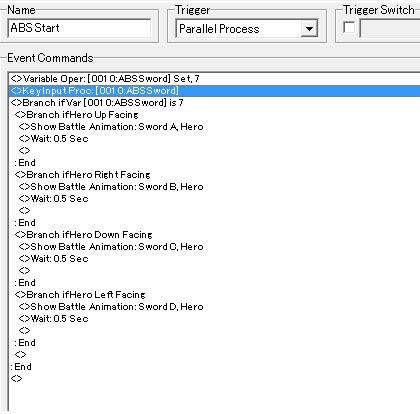
Below is a quick screen shot of my code.

remove that first variable. there's no need for it. if that doesn't work then try downloading rpg maker off another site.
I did what both of you said and my key input processing settings are like this:
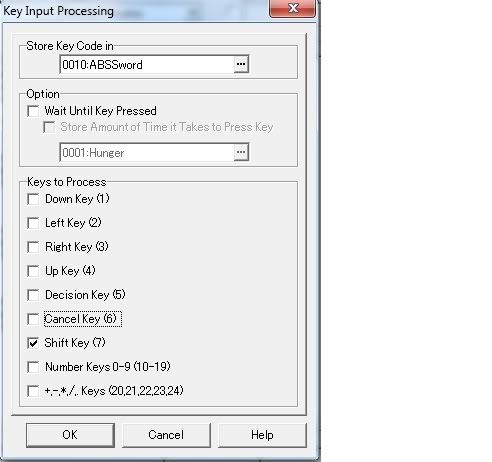
And the shift key still won't show the animation, but the enter key still does when I change it to that.
Btw, I have no patches or extra installed with rm2k3...just the fresh install of rm2k3 1.08
And the shift key still won't show the animation, but the enter key still does when I change it to that.
Btw, I have no patches or extra installed with rm2k3...just the fresh install of rm2k3 1.08
Lol, i was about to say the same thing. Try both shift keys also. If that still doesn't work than i recommend downloading another rpg maker just to see if it helps.
nope, both shift keys work fine. I even tried reinstalling rm2k3, first 1.04 then used the 1.08 patch. didn't work...so i uninstalled and installed using the full 1.08 version, still nothing. I am running Win 7 if that makes a difference.
Well I switched my keyboards and it still wouldn't work, I tried the other key inputs and they all seem to work fine. It's just that damn shift key! lol.
I will try installing from a different site. Google'd and found one. Any suggestions on a known good download? wouldn't ask by my net limits my bandwidth a month and if I go over they charge me by the mb...it's that or get 56k bleh.
I will try installing from a different site. Google'd and found one. Any suggestions on a known good download? wouldn't ask by my net limits my bandwidth a month and if I go over they charge me by the mb...it's that or get 56k bleh.
Well if you've swapped keyboards then it's defiantly due to your current maker. I had the same problem years ago and it got fixed when i installed a different one.
Here is my install of RPG Maker, can't remember where I got it though but it works fine. Enjoy.
(Link removed)
Here is my install of RPG Maker, can't remember where I got it though but it works fine. Enjoy.
(Link removed)
it's not the maker. It's the rpg_rt.exe. Make a NEW project with a 1.08 version of rpgmaker, then open the new project and copy the RPG_RT.exe file and paste it in your project, overwriting your own.
Chances are, you made your project with an old (1.05) maker and THEN switched to 1.08. You have to manually update the exe like I said.
@p3k10: it's illegal to post links to rpg maker downloads on the forum. WIP won't be pleased.
Chances are, you made your project with an old (1.05) maker and THEN switched to 1.08. You have to manually update the exe like I said.
@p3k10: it's illegal to post links to rpg maker downloads on the forum. WIP won't be pleased.
@Aten I did not know that, but I guess it makes sense. And I really couldn't care less who will be pleased or not. It's the internet mate, not real life.

Uh... check wait until key pressed? You don't need to set the variable to anything or use a branch to check if it's 7 or not.
post=148857
@Aten I did not know that, but I guess it makes sense. And I really couldn't care less who will be pleased or not. It's the internet mate, not real life.
Yeah it is, Buuuut seeing as how this forum doesn't have a "warn" system, I guess you're ok :D
Aznchipmunk is also right. Just check the wait until key pressed, and then you can take out the redundant "if var = 7" branch.
Nope, look again, this code is just for attacking. And since it's a PP event in a CE, the hero will continue moving even while attacking, (which probably won't look good, you need to stop the hero while the "slash" is in effect, but that's another story).
I'm not just running my mouth either, I made the entire ABS for Night of Marian for Nessiah, so I know what's up.
I'm not just running my mouth either, I made the entire ABS for Night of Marian for Nessiah, so I know what's up.
post=148866
If you use "Wait Until Key Pressed" then it does just that... it waits. You won't be able to do anything else. I am assuming that, since this is an attack system, you need to be able to walk around as well.
http://rpgmaker.net/games/905/
http://rpgmaker.net/games/935/
=P I know what I'm talking about.
post=148856
it's not the maker. It's the rpg_rt.exe. Make a NEW project with a 1.08 version of rpgmaker, then open the new project and copy the RPG_RT.exe file and paste it in your project, overwriting your own.
Chances are, you made your project with an old (1.05) maker and THEN switched to 1.08. You have to manually update the exe like I said.
replacing the RPG_RT.exe helped, it now works. Yea I did start it in an older version and just recently upgraded a couple days ago. Thanks Aten! Wouldn't of thought of that.
Pages:
1

