I've been doing frontend work for the last couple weeks. (So I get to post a blog that doesn't start with "Core"!) The highlights of what's been added in that time:
- Menus changed so you can hold down a button to keep moving the menu cursor.
- Procedural autotiling. There's some terrain manipulation, so I wanted a way to have mud and ash and water and all look decent if they needed to be next to one another (preferably without grass borders between everything).
- Testing the autotiling, I got tired of ash under red zone-of-control always looking like mud, so I tweaked the ZOC rendering.
- More streamlined unit help. It came up in the
"Whatchu Workin' On" thread, but basically most abilities and status effects need explanation, and I needed a way of showing that without wall-of-text. So I added a pointer you can move up and down the unit stats menu for smaller individual descriptions of abilities and statuses. I may extend this so it offers some help on the stats, too.
- Added a guide to keys available in the current mode in the lower right. Largely this is to remind people both when unit help is available, and what keys do in the undo queue menu; if it were always confirm/cancel I'd skip this.
Then I decided to get as much as possible of this on the screen at once to show it off:
Stuff that's going on:
- Grayed-out characters are friendlies I've already moved this turn. The plus sign on Barry (blue with green hair) indicates a friendly unit has ended its turn under him, so I need to either move him somewhere or undo that action before I end the turn.
- The tile to Barry's left is a deploy tile for the player's faction.
- A few units have health bars, showing they're at less than full health, or a small red arrow that's a general debuff indicator. One friendly has a small star, indicating he's a mage with 1 mana. The more heavily armored enemy also has an "X" marker, indicating the engaged status (an important status for movement and ZOC). Enemy characters tend toward a lot of black so far...
- The game is currently in stats-help mode for that same black-armored unit, Soldier 1A, showing the help text for the debuff that's causing his red arrow.
- A green translucent slash over a tile indicates friendly ZOC, while a red translucent slash over a tile indicates enemy ZOC. These animate a bit. The tiles one up from and one left from Soldier 1A have ZOC from both factions.
- The tile Soldier 1A is standing on is ash, next to grass, mud, and other ash tiles. The tile-stats panel indicates this is normal ground (passable with no movement penalty, and no stat effects on a unit standing there).
- Under the tile-stats panel is the undo queue. This displays a list of actions taken; the player has the ability to enter the queue to cancel and/or rearrange them.
- Under that in the very lower right is the key-action guide.
I want to improve how status duration is shown still, but barring suggestions, I will probably leave this as more or less the battle UI layout.
 Full Games List
 Featured Games
 New Games
 Reviews
 Images
 Blogs
Blogs Game Updates
 Images Feedback Summary
 Game Design Highlights
 Tutorials
 Articles
 Scripts
 Utilities / Plugins
 Resources
 Engines
 Engine Bulletins
 What is Makerscore?
 Past Events
 Achievements
 Forums
 Chat
Chat New to RMN?
 Full Store List
 RMN Music Pack (free)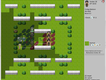

 Add Review
 Subscribe
 Nominate
 Submit Media
 RSS
RSS DFalcon


 View playlists
 Close
Close



 It lives... AGAIN!
