New account registration is temporarily disabled.
  • Add Review
  • Subscribe
  • Nominate
  • Submit Media
  • RSS
Have you ever been a red ball? Well, if you're oversized and you use to wear red shirts, that may be the case. Otherwise, this game will allow you to become the Chosen One; the Red Ball, by the name of Popopow.
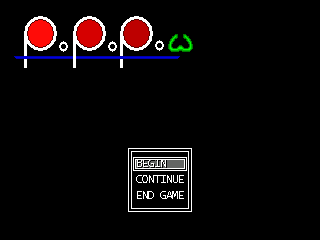


Impersonate an adorable Red Ball all along five passionating worlds constituted by levels against time which will try your nerve and your patience!


  • Game design: In each level, you must collect all the green balls, and then return to the green area.

  • File format:.rar

  • Size:863 KB

  • Life expectancy:Between one and three hours, depending on your dexterity.

  • Screenshots:


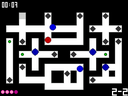
Level 1-2.


Level 2-2.


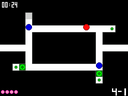
Level 4-1.

There are four difficulty modes:
  • Casual mode: 8 lives per level, save between levels

  • Easy mode: 4 lives per level, save between levels

  • Hard mode: 4 lives per level, save between worlds

  • Arcade: 4 lives per level. No save option


Extra data:
  • There are a few minor bugs, which I don't know how to correct... They are not specially annoying (in non-arcade modes, in any case), and shouldn't be particularly penalizing.

  • All the engines are self-made.

Latest Blog

How is the score determined ?

Let X,Y be two integers in [1,5] and [1,4] respectively.

To determine the score for each level, there are three intervening factors:

  • The number of lives you had when you finished the X-Y level, named a.

  • The remaining time at the moment when you finished the X-Y level, named b.

  • The difficulty mode you chose.


Depending on your difficulty mode, different values will be assigned to the so-called "life multiplier" L and "time multiplier" T. The higher the difficulty, the higher the multipliers.

These are the explicit multipliers:
  • Casual mode: L=2, T=10

  • Easy mode: L=10, T=25

  • Hard mode: L=20, T=50

  • Arcade mode: L=50, T=75


Finally, there is a last multiplier, that depends on the objective difficulty of the X-Y level, that we could call D, as in Difficulty. D increases regularly, according to the following pattern:
D = X + (Y mod 2) * (Y/2)
The only exception to this rule is the last level, where D=10.

Finally, the level score S is obtained thanks to the following formula:

S = a * L * D + b * T
  • Completed
  • Zod
  • RPG Tsukuru 2000
  • Puzzle
  • 07/23/2014 07:02 PM
  • 08/29/2014 01:29 AM
  • 07/21/2014
  • 16605
  • 2
  • 64

Tags

Posts

Pages: 1
By the way, I strongly recommend you to play the game once in Casual mode before trying anything reckless, unless you are an arcade hardcore freak. Otherwise, due to the high difficulty, you might not be entirely satisfied by the game experience.
Hello, ThunderManU!

TungerManU
So this is the game you were talkin' about? Seems cool.

You should upload the download in their respective section. Go to the Submissions tab at the top, then find your game and choose "Edit", then go to Downloads and click on "Add Download". You can use a file host, or you can upload the game file directly to RMN. The reason why this is important is because we can't review a game with no downloads, and also so that you can see how many people have downloaded your game.

OK, done. I've put two links, just in case.

TungerManU
By the way, length is not measured in KBs. You probably meant "size"?

Yes, indeed. Edited. It was a hispanism.
It looks cool, but I can't start it. I turn it on, my screen turns black, and the game minimizes.
author=EdgeOfChaos
It looks cool, but I can't start it. I turn it on, my screen turns black, and the game minimizes.


How strange. I'm upset. As far as I know, the game is conveniently independized, and should be playable without RM2k's RTP or other stuff. Plus, no patch is used... The game minimizes, and then I guess you can't re-open it, can you? Or is it that the window closes? Which OS do you use?
It works perfectly fine for me, though. I only have a little bit trouble with the font.
@Zod I'm only having problems with the font. And the difficulty ow
For the font, it's a common problem. You have to disable the ClearType mode.
To do so, in Windows 7, you must go to Control Panel >> Appearance and Personalization >> Display and select 'Adjust ClearType Text'.
Then, untick 'Turn On ClearType', click 'Next' for the remaining steps and click finish. Then everything should be alright.
It's an antialiasing mode, so you might want to enable it after playing (although I usually don't, since it's annoying)
author=TungerManU
Frankly, I'm also having trouble starting the game. I get a "No se puede abrir el archivo Tнtulo" message, probably referring to the Título file in the Title folder. Perhaps it's something about the AppLocale/Unicode stuff? I don't much about it, but I'll see what I can do.

Edit: Okay, forget that. It's because the system's default language is Russian, so the Spanish characters weren't recognized. All I had to do was to change that -í- character to -н- in the Titulo file's name.


Oh, I'm sorry that you're going through all that trouble.
In fact, since it's a Spanish game translation, all I did was changing the contents of the images, texts, etc., but I didn't change the files names, since it would've implied rebuilding everything from the ashes... I never thought that that would've posed a problem. Excuse me for that.
author=Zod
author=EdgeOfChaos
It looks cool, but I can't start it. I turn it on, my screen turns black, and the game minimizes.
How strange. I'm upset. As far as I know, the game is conveniently independized, and should be playable without RM2k's RTP or other stuff. Plus, no patch is used... The game minimizes, and then I guess you can't re-open it, can you? Or is it that the window closes? Which OS do you use?


I am using Windows 8.

How it goes is I open the file, I get a black screen for a few seconds like it's going to start, then it minimizes. If I try to maximize it, the same sequence repeats: black screen, minimize.

Is there a problem with a specific resolution?
author=EdgeOfChaos
I am using Windows 8.

How it goes is I open the file, I get a black screen for a few seconds like it's going to start, then it minimizes. If I try to maximize it, the same sequence repeats: black screen, minimize.

Is there a problem with a specific resolution?


Well, actually, I had never heard about this kind of error in RM2k... You're right, it might be due to the resolution. Try to go into your nVidia control panel and disable your secondary display, and set your resolution to the lowest available. If it doesn't work, I don't really know what to do. I'm asking around ~maybe someone knows what to do...
Hm, unfortunately that did not fix it.
Windows 8 has issues with directdraw, which is what 2k3 uses to go fullscreen. Or something like that. It's a hardware issue though, as plenty of people on Win8 can play in fullscreen. Myself included, with this game even. As a dev there is nothing you can do(except use the new engines). As the person with the problem, look on RMN for other Windows 8/2k3 topics for possible solutions, or play in windowed mode.

I just beat the game on easy and am submitting a review and my video playthrough. It will be up in a day or two.

I don't know if I actually had fun playing it but I know that I wouldn't recommend it to anyone because of the control issues.
@Link_2112,
Congratulations! I'll await your review with eager anticipation, to better understand how I can make the whole better.

As for the error, thank you for the information. I'll keep that in mind, at any rate.
How exactly do you start the game in windowed mode? I tried using "C:\Users\Zach\Desktop\rpgmaker\Popopow\RPG_RT.exe -window" with cmd, but it did not work.

(Edit) Got it by messing around with arguments. Thank you for the advice, game works now!
alt+enter is for windowed/fullscreen.

Zod, I recommend not forcing fullscreen mode because some people can't run games in fullscreen.
Pages: 1