



 Full Games List
 Featured Games
 New Games
 Reviews
 Media
Media Images
 Blogs
Blogs Game Updates
 Images Feedback Summary
 Game Design Highlights
 Tutorials
 Articles
 Scripts
 Utilities / Plugins
 Resources
 Engines
 Engine Bulletins
 What is Makerscore?
 Past Events
 Achievements
 Misaos
 Forums
 Post History
 Chat
Chat New to RMN?
 Full Store List
 RMN Music Pack (free)



TUTORIAL HOW TO RECEIVE A SKILL AND HAVE IT MATURE.
Receive a skill and have it mature based on player's level.
 dnel57
- 04/27/2024 10:49 PM
- 53 views
This is a tutorial of how you can acquire a skill from an elemental lord or other
character and have it mature later in the game using only a few events.
First, make sure that the skills you want to mature are not in your character's Class Skill Set.
I am using Fire in this tutorial that will mature to Fire II at a certain level.
The player will approach the Fire Elemental and ask for a spell to help her in battle.
He agrees and gives her "Fire"
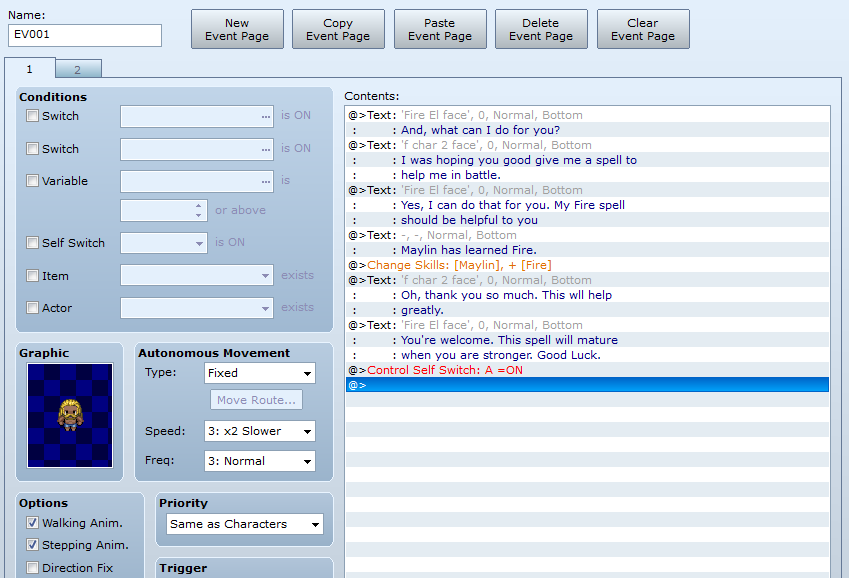
Below is the conversation that you can use as a model.I have kept everything to a minimum. You can craft your own dialogues as you see fit.

After the initial dialogue, the next line will be where you actually get the Fire spell.
Click the very next line, then click on Change Skills.
Set it to the character's name and click Learn and Fire from the list.

Now add the rest of the dialogue. when you are done, on the next line, Control Self Switch A is On.
Add a new page and Click Self Switch A On. I just made a dialogue of "Good Luck"
Should look like this.
Page 2 should look like this.

Now, that part is over. Now for a couple events to make it work.
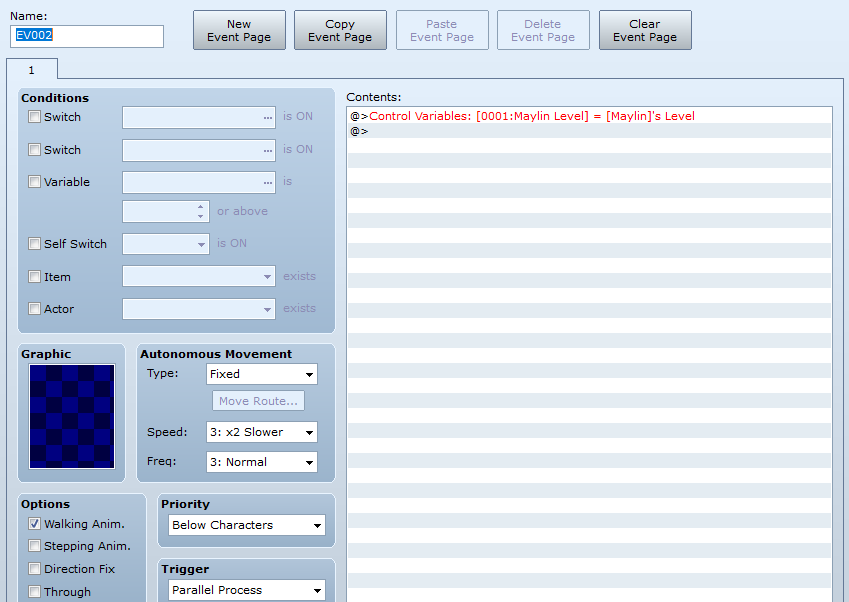
Open a new event and name it Variables. Then, click Parallel Process for the Trigger.

On the first line, click on Control Variables. Click on Single. Create the Variable Character's Level.
Click on Game Data the click on the three dots. Click on Actor
and make sure it shows the character's name and Level in the other box. Then click OK. Don't forget to click apply.
Now, just one more page.Open a new event and click Parallel Process for the Trigger
On the first line, click Conditional Branch. On the second tab, select Actor NAME and Skill -Fire -Learned.
Uncheck Set Handling. Click OK
On the next line, click Conditional Branch. On the first tab, click Variable Equal to
Put the number of the level you want for the spell to mature. I used two for the purpose of testing. Uncheck Set Handling.
It should look like this.

The finished page.

Now,=when the character reaches the desired level, a text will pop up saying that the spell has matured.
Make a new page and click Self switch A
I usually put these kinds of events in impassable areas somewhere near so I can always find them if they need work.
Mountain ranges and forests are good for that.
***You may opt to receive the stronger spell and keep both, If so, just change the dialogue to receive a stronger spell when you are stronger. Then omit the line Forget Fire.
All comments welcome. I check often in case of any problems.
Thanks
character and have it mature later in the game using only a few events.
First, make sure that the skills you want to mature are not in your character's Class Skill Set.
I am using Fire in this tutorial that will mature to Fire II at a certain level.
The player will approach the Fire Elemental and ask for a spell to help her in battle.
He agrees and gives her "Fire"
Below is the conversation that you can use as a model.I have kept everything to a minimum. You can craft your own dialogues as you see fit.
After the initial dialogue, the next line will be where you actually get the Fire spell.
Click the very next line, then click on Change Skills.
Set it to the character's name and click Learn and Fire from the list.
Now add the rest of the dialogue. when you are done, on the next line, Control Self Switch A is On.
Add a new page and Click Self Switch A On. I just made a dialogue of "Good Luck"
Should look like this.
Page 2 should look like this.
Now, that part is over. Now for a couple events to make it work.
Open a new event and name it Variables. Then, click Parallel Process for the Trigger.
On the first line, click on Control Variables. Click on Single. Create the Variable Character's Level.
Click on Game Data the click on the three dots. Click on Actor
and make sure it shows the character's name and Level in the other box. Then click OK. Don't forget to click apply.
Now, just one more page.Open a new event and click Parallel Process for the Trigger
On the first line, click Conditional Branch. On the second tab, select Actor NAME and Skill -Fire -Learned.
Uncheck Set Handling. Click OK
On the next line, click Conditional Branch. On the first tab, click Variable Equal to
Put the number of the level you want for the spell to mature. I used two for the purpose of testing. Uncheck Set Handling.
It should look like this.
The finished page.
Now,=when the character reaches the desired level, a text will pop up saying that the spell has matured.
Make a new page and click Self switch A
I usually put these kinds of events in impassable areas somewhere near so I can always find them if they need work.
Mountain ranges and forests are good for that.
***You may opt to receive the stronger spell and keep both, If so, just change the dialogue to receive a stronger spell when you are stronger. Then omit the line Forget Fire.
All comments welcome. I check often in case of any problems.
Thanks

