



 Full Games List
 Featured Games
 New Games
 Reviews
 Media
Media Images
 Blogs
Blogs Game Updates
 Images Feedback Summary
 Game Design Highlights
 Tutorials
 Articles
 Scripts
 Utilities / Plugins
 Resources
 Engines
 Engine Bulletins
 What is Makerscore?
 Past Events
 Achievements
 Misaos
 Forums
 Chat
Chat New to RMN?
 Full Store List
 RMN Music Pack (free)



 Profile
 Locker
 Play Lists
SNOWPIN'S PROFILE
SnowPin
0
 Close
CloseSearch
Filter
 All
All Game Pages
 User Statuses
 FFDShow?
author=GameOverGames Productions
Open command prompt and run this:
%SystemRoot%\system32\rundll32.exe "Path to ffdshow.ax" configureAudio
example:
%SystemRoot%\system32\rundll32.exe "C:\Program Files\FFDShow\ffdshow.ax" configureAudio
Then under DirectShow > Multiple ffdshow instances select "only one - check previous filter only"
If that still doesn't work, under the same tab add the name of the program executable to the "Don't use ffdshow in:" list, and check the box beside it if it is not already.
edit:
not sure if that's were rundll32.exe is still in Windows 7 if you have that though, so you might have to change that path too
I love you. Thanks everyone for the help :) Finally got it to stop. I think I'm going to become a regular here, you guys were really helpful. I used to use RPG maker a LONG LONG time ago... Like back in 2000 or something. I'll have to get it again and make something was really fun :D
FFDShow?
Oh wow, as if I didn't see "its" lmao. I don't even know what Codecs I have lmao. I think its kLite but no clue how to find the cp for it.. tried searching.
FFDShow?
W7 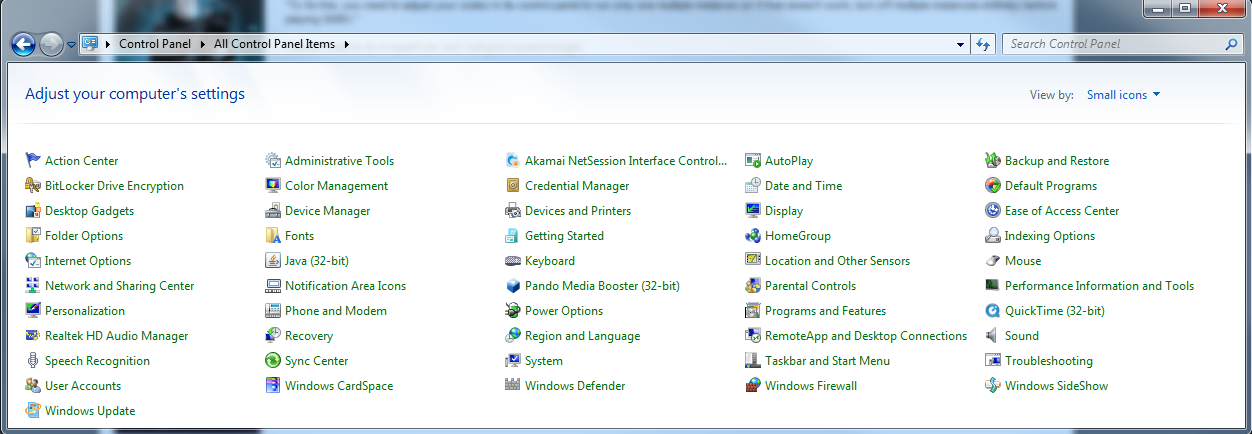
I've searched through - Sound, Realtek, Quicktime, Task and Start Menu and System. None have anything regarding codecs.
I've searched through - Sound, Realtek, Quicktime, Task and Start Menu and System. None have anything regarding codecs.
FFDShow?
I saw that on Talking Time also, but all it says is in Control panel... but doesn't tell you where in the control panel.
FFDShow?
FFDShow?
FFDShow?
Pages:
1
 Games - Tester
 Games - Other
