



 Full Games List
 Featured Games
 New Games
 Reviews
 Media
Media Images
 Blogs
Blogs Game Updates
 Images Feedback Summary
 Game Design Highlights
 Tutorials
 Articles
 Scripts
 Utilities / Plugins
 Resources
 Engines
 Engine Bulletins
 What is Makerscore?
 Past Events
 Achievements
 Misaos
 Forums
 Chat
Chat New to RMN?
 Full Store List
 RMN Music Pack (free)



 Profile
 Locker
 Play Lists
VARON1999'S PROFILE
 Close
Close
I love drawing, playing piano and making stories (sometime games come from this habits lol)
Search
Filter
 All
All Game Pages
 User Statuses
 Need help with reviving skills!
author=GreatRedSpirit
I poked around and maybe found a quick hack fix for not showing animations on dead targets. Add this script after YF's Battle Engine:class Sprite_Battler < Sprite_Base def setup_new_effect #if !@battler_visible && @battler.alive? if !@battler_visible start_effect(:appear) elsif @battler_visible && @battler.hidden? start_effect(:disappear) end if @battler_visible && @battler.sprite_effect_type start_effect(@battler.sprite_effect_type) @battler.sprite_effect_type = nil end # YF addition setup_popups end end
It checks out in my two second demo project, but it's a two second demo project. I haven't seen any animation skip the start of the animation though so I'm not sure what's happening there.
e: Is there a follow up for your skill that goes into White World 2? If the animation was a screen-wide animation it won't play if the first character in your party was dead. So with the animation bug it would not play the White World animation in that scenario but then play White World 2's animation since everybody was alive at that point. Just speculation at this point though.
White World 2 is a substitute skill after White World 1's common event, due to not be able to target both living and dead, that's why I used White World 2, but after got it fixed through your script, I don't need White World 2 anymore.
And as for the script you provided me, after I put it under YF's Battle Engine, the animation bug is gone! :)
Thanks! My problem is solved!
Need help with reviving skills!
author=GreatRedSpirit
Sorry for the delay, here's a fixed version that works with Yanfly's battle system. Download the demo project here. I changed items so they used a tag in the notebox that made items that didn't target dead characters do so rather than my original attempt that made items that target dead characters also target alive ones. The whole thing of how RM handles targeting dead/alive characters is just fucked up.
There is an issue where the animation to revive a character doesn't play under certain circumstances (like a character dying in battle), but after some testing it's a bug in the Ace's animation system or YF's battle system and I really don't want to delve into either to find out what's causing it.
Here's a dump of the scripts too:$imported = {} if $imported.nil? if($imported["YEA-BattleEngine"]) class Window_BattleActor < Window_BattleStatus #KKKKKKKKKKKKKKEEEEEEEEEEEEEEEEEEEEEEEEEEEEEEEEEEPPP def create_flags set_select_flag(:any) select(0) return if $game_temp.battle_aid.nil? if $game_temp.battle_aid.need_selection? select(0) set_select_flag(:dead) if $game_temp.battle_aid.for_dead_friend? # GRS elsif $game_temp.battle_aid.for_user? battler = BattleManager.actor id = battler.nil? ? 0 : $game_party.battle_members.index(battler) select(id) set_select_flag(:user) elsif $game_temp.battle_aid.for_all? select(0) set_select_flag(:all) set_select_flag(:all_dead) if $game_temp.battle_aid.for_dead_friend? # GRS elsif $game_temp.battle_aid.for_random? select(0) set_select_flag(:random) if $game_temp.battle_aid.for_random? end end #KKKKKKKKKKKKKKEEEEEEEEEEEEEEEEEEEEEEEEEEEEEEEEEEPPP def current_item_enabled? return true if $game_temp.battle_aid.nil? if $game_temp.battle_aid.need_selection? member = $game_party.battle_members[@index] return member.dead? if $game_temp.battle_aid.for_dead_friend? elsif $game_temp.battle_aid.for_dead_friend? for member in $game_party.battle_members return true if member.dead? end return false end return true end end # Window_BattleActor class Window_BattleEnemy < Window_Selectable #KKKKKKKKKKKKKKEEEEEEEEEEEEEEEEEEEEEEEEEEEEEEEEEEPPP def current_item_enabled? return true if $game_temp.battle_aid.nil? if $game_temp.battle_aid.need_selection? member = $game_party.battle_members[@index] #return member.dead? if $game_temp.battle_aid.for_dead_friend? #GRS if $game_temp.battle_aid.for_dead_friend? and not $game_temp.battle_aid.ignore_dead? return member.dead? end elsif $game_temp.battle_aid.for_dead_friend? # GRS for member in $game_party.battle_members return true if member.dead? end return false end return true end end class Window_BattleHelp < Window_Help #KKKKKKKKKKKKKKEEEEEEEEEEEEEEEEEEEEEEEEEEEEEEEEEEPPP def refresh_special_case(battler) if $game_temp.battle_aid.for_opponent? if $game_temp.battle_aid.for_all? text = YEA::BATTLE::HELP_TEXT_ALL_FOES else case $game_temp.battle_aid.number_of_targets when 1 text = YEA::BATTLE::HELP_TEXT_ONE_RANDOM_FOE else number = $game_temp.battle_aid.number_of_targets text = sprintf(YEA::BATTLE::HELP_TEXT_MANY_RANDOM_FOE, number) end end else # $game_temp.battle_aid.for_friend? if $game_temp.battle_aid.for_dead_friend? # GRS text = YEA::BATTLE::HELP_TEXT_ALL_DEAD_ALLIES elsif $game_temp.battle_aid.for_random? case $game_temp.battle_aid.number_of_targets when 1 text = YEA::BATTLE::HELP_TEXT_ONE_RANDOM_ALLY else number = $game_temp.battle_aid.number_of_targets text = sprintf(YEA::BATTLE::HELP_TEXT_RANDOM_ALLIES, number) end else text = YEA::BATTLE::HELP_TEXT_ALL_ALLIES end end return if text == @text @text = text contents.clear reset_font_settings draw_text(0, 0, contents.width, line_height*2, @text, 1) end end class Scene_Battle < Scene_Base #alias scene_battle_invoke_item_abe invoke_item #don't realias def invoke_item(target, item) show_animation([target], item.animation_id) if separate_ani?(target, item) #if target.dead? != item.for_dead_friend? if target.dead? != item.for_dead_friend? and not item.ignore_dead? @subject.last_target_index = target.index return end scene_battle_invoke_item_abe(target, item) end def separate_ani?(target, item) return false if item.one_animation return false if $data_animations[item.animation_id].nil? return false if $data_animations[item.animation_id].to_screen? return true if item.ignore_dead? #grs - new addition return target.dead? == item.for_dead_friend? end end end class RPG::UsableItem < RPG::BaseItem IgnoreDeadRegex = /<ignore[\s_]?dead>/i def ignore_dead? return @ignore_dead unless @ignore_dead.nil? return @ignore_dead = true if @note =~ IgnoreDeadRegex return @ignore_dead = false end end # Change the item_test so ignore dead items don't trip the dead check class Game_Battler < Game_BattlerBase # Let battlers not care if an item is for dead friends def item_test(user, item) #return false if item.for_dead_friend? != dead? return false if item.for_dead_friend? != dead? and not item.ignore_dead? return true if $game_party.in_battle return true if item.for_opponent? return true if item.damage.recover? && item.damage.to_hp? && hp < mhp return true if item.damage.recover? && item.damage.to_mp? && mp < mmp return true if item_has_any_valid_effects?(user, item) return false end end # Change the target for friends so it uses the ignore_dead flag class Game_Action def targets_for_friends if item.for_user? [subject] #GRS-change here elsif item.ignore_dead? if item.for_one? [friends_unit.smooth_ignore_dead_target(@target_index)] else friends_unit.members end #GRS-end changes elsif item.for_dead_friend? if item.for_one? [friends_unit.smooth_dead_target(@target_index)] else friends_unit.dead_members end elsif item.for_friend? if item.for_one? [friends_unit.smooth_target(@target_index)] else friends_unit.alive_members end end end end # Add a new method that "smooths" ignore_dead target (aka don't do any dead checks) class Game_Unit def smooth_ignore_dead_target(index) return members[index] end end
This helps alot, thank you!
Even tho the animation of the skill is not shown properly (It shown only the end of the animation instead of whole thing)
Need help with reviving skills!
author=GreatRedSpirit
I found a quick and dirty script I did for this. Test project here. Items that are targeted for Dead Characters can also target living characters. Because it's a quick hack fix there's no way to have items/skills only target dead characters again. If you need that functionality or find any bugs please let me know and I'll try to actually do it right next time.
Script, punch this into a new script above main and below materials. Because there is no aliasing since the dead checks are hardcoded in make sure it's near the top of your scripts list so it works correctly with any other script that aliases it.class Game_Unit # This is to make sure targetting random dead (is this possible in vanilla?) # include allies def random_dead_target members.empty? ? nil : dead_members[rand(dead_members.size)] end # When selecting a single dead target, target anybody! def smooth_dead_target(index) member = members[index] (member) ? member : members[0] end end class Game_Action # This is to make sure the target list for dead-only items includes everybody def targets_for_friends if item.for_user? [subject] elsif item.for_dead_friend? if item.for_one? [friends_unit.smooth_dead_target(@target_index)] else friends_unit.members end elsif item.for_friend? if item.for_one? [friends_unit.smooth_target(@target_index)] else friends_unit.alive_members end end end end class Game_Battler < Game_BattlerBase # Let battlers not care if an item is for dead friends def item_test(user, item) #return false if item.for_dead_friend? != dead? return true if $game_party.in_battle return true if item.for_opponent? return true if item.damage.recover? && item.damage.to_hp? && hp < mhp return true if item.damage.recover? && item.damage.to_mp? && mp < mmp return true if item_has_any_valid_effects?(user, item) return false end end
e: actually I think I found a better and less dumb way to do this, gimme a bit
e2: n/m, it wouldn't work because rpg maker hates anything that crosses the divide between dead or alive targets
When I tested on your project, 2 of them died got revived and healed and the other 2 alive also got healed
But when I tested it on my project, it's still the same.
Seriously, RPG maker VX Ace should really do something about targeting lol
Edit: Yes, I have the skill to have same settings as yours, like All Allies (Dead)
Edit 2: I found the solution, the script was conflicted with Yanfly's battle Engine, when I took it off, your script actually worked.
Need help with reviving skills!
author=GreatRedSpirit
RPG Maker has always been stupid when it comes to targeting allies: There's a divide between dead and not-dead allies. Try using Yanfly's Target Manager script and adding this to the skill's tag:<targets: target all allies>
and see if that does the trick. I haven't tested it but hopefully it'll ignore the Dead state when targeting all allies. If that doesn't work I'll whip up a script to do it instead.
I added the script, and inputted the command in the skill
it still doesn't work (only heal the living allies). I had "Remove State: Death 100% in effect
I also tried Scope: All Allies (Dead) with the script attached as well but it only revived dead allie and not healing the living ones.

Need help with reviving skills!
author=MarrendI want the skill to not only revive the dead allies and heal to full
What do those note-tags do?
*Edit: As an aside, I'm pretty sure the only status you need to remove for a skill like this is <Death>.
but also heal the living allies to full as well
Like targeting both dead and alive allies.
Need help with reviving skills!
I have a skill that can revive dead allies and also heals to full, but when I tested it out, it only heals the living allies but not reviving the dead.
I want it to revive dead allies + heal to full and then heal other living allies to full as well, is there a script for this?
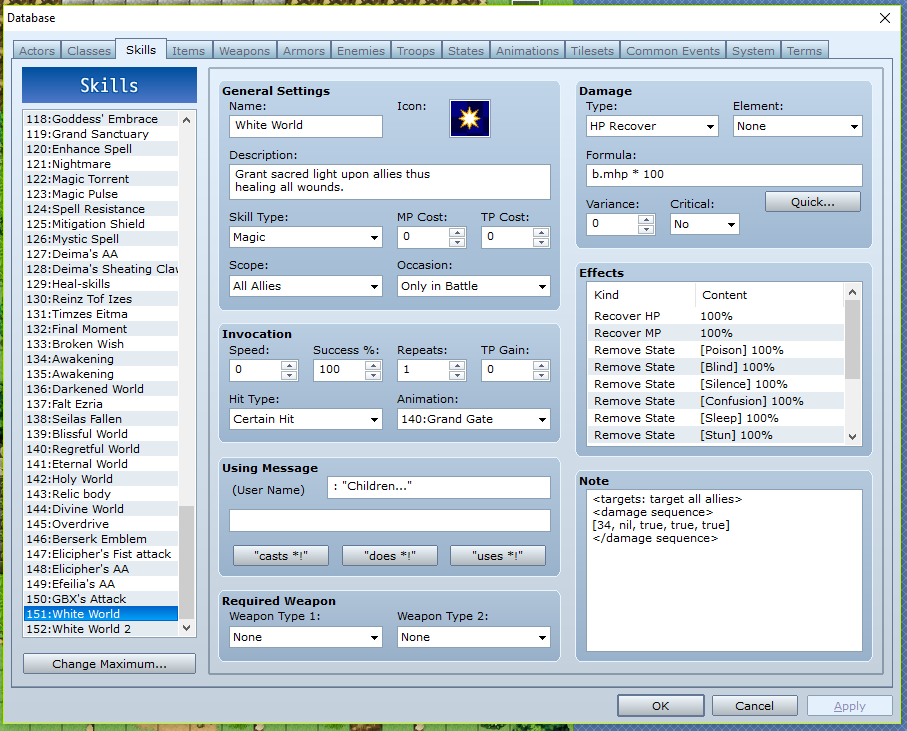
I want it to revive dead allies + heal to full and then heal other living allies to full as well, is there a script for this?
Need help with displaying turn counter
Hi, I am having issues of making turn-counter displaying during battles, how do I make the turns-counter so the player can look at what turn are they on?
I tried Yanfly's combat log script but it only display when you click it, I want it to display when you are selecting skills to attack (basically less hassle)
If there's a script I can use to display that during selecting skills and knowing what turn you are in, that would be cool!
Thanks!
I tried Yanfly's combat log script but it only display when you click it, I want it to display when you are selecting skills to attack (basically less hassle)
If there's a script I can use to display that during selecting skills and knowing what turn you are in, that would be cool!
Thanks!
Hi everyone!
Hello everyone!
My name is Varon, I am pretty new to this community (I actually posted 2 questions before introduction because I was in hurry of doing a big project)
I am also pretty new to RPG Maker VX Ace, I love this program a lot, I learnt a lot of new things from this community (eventings and switching)
Right now, I am working on a project called "Fallen Petals", it's a romance/comedy RPG about love story of a goddess and a human boy, the story set in when the human boy was the prince of Elusia, he has a best friend as the Goddess of Elusia, she is indeed a Goddess sent by the Creator to assist the human but the drawback is limited power and she may not create any love relationship (best friend is ok) with human unless some conditions.
The prince is named Elicipher and his best friend is Efeilia, the young girl who just turned 14.
The game is pretty much like 1.7% completed due to I am the only one who work on this game, but I received some other useful stuffs like graphic from the program and other assets of other sources as well, right now I am working on customized animations for skills and attacking.
The aspects of this game are grinding, strategies, riddles and has only 1 ending (maybe?), I might post the demo-version of the game but don't know where yet...
This game will be completely free after it's completed, but there will be donation options if you wish to donate 1$ to support me to make sequel of this version (I am really hyped when someone actually do that lol). There might be 2 sequels of this game but I don't know yet.
Right now, the items/weapon/armors are mostly finished, now I need to work on the town and 1st actual map (like the journey begins), and more!
This is currently in testing-mode, so that means you start as lv 50 with final-gears and skills, just for testing only, but you can walk around, battle or proceed the story (it's short as hell now lol)
I might be searching for spriter but maybe not yet...
So...Hi people! :)


My name is Varon, I am pretty new to this community (I actually posted 2 questions before introduction because I was in hurry of doing a big project)
I am also pretty new to RPG Maker VX Ace, I love this program a lot, I learnt a lot of new things from this community (eventings and switching)
Right now, I am working on a project called "Fallen Petals", it's a romance/comedy RPG about love story of a goddess and a human boy, the story set in when the human boy was the prince of Elusia, he has a best friend as the Goddess of Elusia, she is indeed a Goddess sent by the Creator to assist the human but the drawback is limited power and she may not create any love relationship (best friend is ok) with human unless some conditions.
The prince is named Elicipher and his best friend is Efeilia, the young girl who just turned 14.
The game is pretty much like 1.7% completed due to I am the only one who work on this game, but I received some other useful stuffs like graphic from the program and other assets of other sources as well, right now I am working on customized animations for skills and attacking.
The aspects of this game are grinding, strategies, riddles and has only 1 ending (maybe?), I might post the demo-version of the game but don't know where yet...
This game will be completely free after it's completed, but there will be donation options if you wish to donate 1$ to support me to make sequel of this version (I am really hyped when someone actually do that lol). There might be 2 sequels of this game but I don't know yet.
Right now, the items/weapon/armors are mostly finished, now I need to work on the town and 1st actual map (like the journey begins), and more!
This is currently in testing-mode, so that means you start as lv 50 with final-gears and skills, just for testing only, but you can walk around, battle or proceed the story (it's short as hell now lol)
I might be searching for spriter but maybe not yet...
So...Hi people! :)
[RMVX ACE] Need help on making prologue cutscene!
[RMVX ACE] Need help on making prologue cutscene!
I am having trouble on making cutscene for prologue, when you start new game, it's suppose to be blacked out and then some dialogue pops up.
I tried fadeout event but when I started the game, it shows the map where the player
is and then fadeout and doing cutscene.
I wanted it to blackout when pressed New Game.
Any instructions will save my day!
I tried fadeout event but when I started the game, it shows the map where the player
is and then fadeout and doing cutscene.
I wanted it to blackout when pressed New Game.
Any instructions will save my day!
 Games - Tester
 Games - Other
