



 Full Games List
 Featured Games
 New Games
 Reviews
 Media
Media Images
 Blogs
Blogs Game Updates
 Images Feedback Summary
 Game Design Highlights
 Tutorials
 Articles
 Scripts
 Utilities / Plugins
 Resources
 Engines
 Engine Bulletins
 What is Makerscore?
 Past Events
 Achievements
 Misaos
 Forums
 Post History
 Chat
Chat New to RMN?
 Full Store List
 RMN Music Pack (free)



TILESETS IN 23K
Posts
Pages:
1
 synanon
 View playlists
 Close
CloseHey there.
I'm incredibly new to game creation/developing in general (I literally picked up RPG Maker two days ago) and having been through a multitude of tutorials I feel like I can finally navigate the program with relative ease.
After having experimented with basic map building and character set creation, I decided my next goal would be to create a very simple interactive room with my own unique tileset(s), which I would build from scratch... however this has proved to be a lot more difficult than building a character set. I've scoured the internet for guides and I've been over the criteria but I still run into errors and issues in trying to test it and I'm starting to feel really dumb.
I know that each tile should be 16x16px and thus the entire set should total at 480x256px. is there a palette restriction? I'm really at the end of my rope, can someone walk me through this??
*2k3 LOL
I'm incredibly new to game creation/developing in general (I literally picked up RPG Maker two days ago) and having been through a multitude of tutorials I feel like I can finally navigate the program with relative ease.
After having experimented with basic map building and character set creation, I decided my next goal would be to create a very simple interactive room with my own unique tileset(s), which I would build from scratch... however this has proved to be a lot more difficult than building a character set. I've scoured the internet for guides and I've been over the criteria but I still run into errors and issues in trying to test it and I'm starting to feel really dumb.
I know that each tile should be 16x16px and thus the entire set should total at 480x256px. is there a palette restriction? I'm really at the end of my rope, can someone walk me through this??
*2k3 LOL

The chipsets have to be 256 colors (aka 8 bit) for RM to read them. You can convert them with irfranview or photoshop, or a lot of other image editing programs.

When you are importing don't forget to always set the transparent color and place it under the correct category.
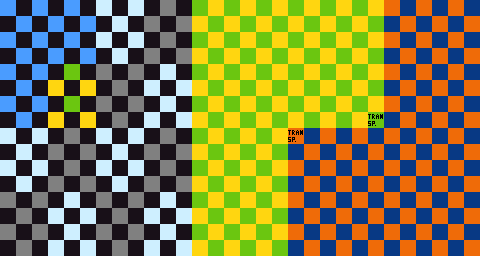
The blue/orange squares are for upper level tiles and require a transparent background color. All other colors are for the lower level and don't use transparency.
The blue squares are for water tiles. The gray/light gray squares are for grounds that tile. The green/yellow and the blue/orange squares for single tiles.
The squares marked tranps is where your transparent color goes.
The blue/orange squares are for upper level tiles and require a transparent background color. All other colors are for the lower level and don't use transparency.
The blue squares are for water tiles. The gray/light gray squares are for grounds that tile. The green/yellow and the blue/orange squares for single tiles.
The squares marked tranps is where your transparent color goes.
author=King of Games
The chipsets have to be 256 colors (aka 8 bit) for RM to read them. You can convert them with irfranview or photoshop, or a lot of other image editing programs.
i made doubly sure that when i saved the .png in photoshop the palette consisted of >256 colors... is there an application more suitable for this kind of stuff?
author=arcan
When you are importing don't forget to always set the transparent color and place it under the correct category.
http://i376.photobucket.com/albums/oo208/cmorellato7/temp-2k3-chipset.png
The blue/orange squares are for upper level tiles and require a transparent background color. All other colors are for the lower level and don't use transparency.
The blue squares are for water tiles. The gray/light gray squares are for grounds that tile. The green/yellow and the blue/orange squares for single tiles.
The squares marked tranps is where your transparent color goes.
using this template i no longer get an error, but when i go to load the set it comes out black! where am i botching up?
EDIT: nevermind, i think ive got it. really appreciate the assistance, guys.
LockeZ

I'd really like to get rid of LockeZ. His play style is way too unpredictable. He's always like this too. If he ran a country, he'd just kill and imprison people at random until crime stopped.
5958
RPG MAKER FROM THE YEAR TWENTY THREE THOUSAND A.D.

author=arcanThe squares marked tranps is where your transparent color goes.
Actually, any tile in the of the two layers can be used for transparent color holder.
For the lower layer: you are not required to always have a blank tile.
For the upper layer: the marked tile is the default that gets placed.

Pages:
1

