



 Full Games List
 Featured Games
 New Games
 Reviews
 Media
Media Images
 Blogs
Blogs Game Updates
 Images Feedback Summary
 Game Design Highlights
 Tutorials
 Articles
 Scripts
 Utilities / Plugins
 Resources
 Engines
 Engine Bulletins
 What is Makerscore?
 Past Events
 Achievements
 Misaos
 Forums
 Post History
 Chat
Chat New to RMN?
 Full Store List
 RMN Music Pack (free)



UPRC'S DILEMMA: COMPUTER HAS TURNED INTO A GIANT PAPERWEIGHT!
Posts
Pages:
1
 UPRC
UPRC View playlists
 Close
CloseDidn't know where else I could post something like this, but I figure that there's probably a few people on RMN who are savvy in the way of Windows fuck ups, so here we go.
Yesterday morning I was having a grand ol' time playing Skyrim. I did absolutely nothing else and shut my computer down around noon. I came back two hours later, turned it on, and waited. Windows 7 was loading up as it usually does but... then something happened! The loading process finished and, just before the computer actually went into Windows, it just rebooted suddenly. I was a few feet from the computer so I didn't know what was wrong at first. I sat in front of the computer and waited for it to boot back up again. This time it didn't even reach the loading screen for Windows, and I was halted by THIS:
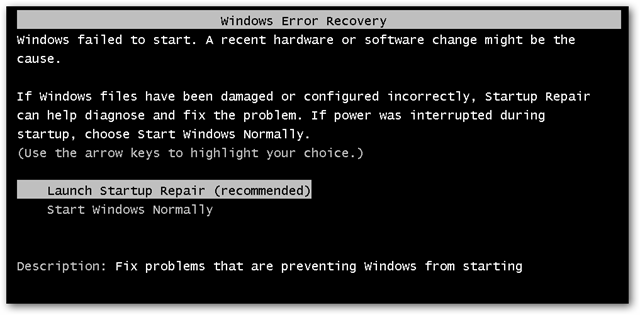
Now, I didn't make any changes to the computer at all. I played Skyrim for an hour and a half or so and that was it. The computer had turned on normally, it operated properly, there were no indications of any problems.
Anyway, I first tried the second option (Start Windows Normally) and it did the whole Windows 7 loading screen again before rebooting without entering Windows. After getting back to the Windows Error Recovery again, I chose the top option (Launch Startup Repair). I received this:

The progress bar filled almost IMMEDIATELY and then I was on a black screen with a mouse cursor. It remained like this for a good 30 minutes doing absolutely nothing before I just shut the computer off.
I've tried to open the disc drive so that I can toss my Windows CD in and boot from that in an effort to resolve what's going on, but the drive isn't opening outside of Windows for whatever reason.
Anyone ever deal with a problem like this or have any idea how to proceed? I've done some research and I've read a lot of topics that end in absolutely no resolutions. It's always just people saying that it's probably this or that. I've seen people say bad memory, faulty video cards, and general Windows screw ups. I know that my memory is fine because I did a memory test in the BIOS. The video cards (I do SLI) have never caused me any issues and looked fairly clean for three and a half year old cards when I cleaned the computer a month ago.
So... anyone know what the heck might be going on?
Yesterday morning I was having a grand ol' time playing Skyrim. I did absolutely nothing else and shut my computer down around noon. I came back two hours later, turned it on, and waited. Windows 7 was loading up as it usually does but... then something happened! The loading process finished and, just before the computer actually went into Windows, it just rebooted suddenly. I was a few feet from the computer so I didn't know what was wrong at first. I sat in front of the computer and waited for it to boot back up again. This time it didn't even reach the loading screen for Windows, and I was halted by THIS:
Now, I didn't make any changes to the computer at all. I played Skyrim for an hour and a half or so and that was it. The computer had turned on normally, it operated properly, there were no indications of any problems.
Anyway, I first tried the second option (Start Windows Normally) and it did the whole Windows 7 loading screen again before rebooting without entering Windows. After getting back to the Windows Error Recovery again, I chose the top option (Launch Startup Repair). I received this:
The progress bar filled almost IMMEDIATELY and then I was on a black screen with a mouse cursor. It remained like this for a good 30 minutes doing absolutely nothing before I just shut the computer off.
I've tried to open the disc drive so that I can toss my Windows CD in and boot from that in an effort to resolve what's going on, but the drive isn't opening outside of Windows for whatever reason.
Anyone ever deal with a problem like this or have any idea how to proceed? I've done some research and I've read a lot of topics that end in absolutely no resolutions. It's always just people saying that it's probably this or that. I've seen people say bad memory, faulty video cards, and general Windows screw ups. I know that my memory is fine because I did a memory test in the BIOS. The video cards (I do SLI) have never caused me any issues and looked fairly clean for three and a half year old cards when I cleaned the computer a month ago.
So... anyone know what the heck might be going on?
LockeZ

I'd really like to get rid of LockeZ. His play style is way too unpredictable. He's always like this too. If he ran a country, he'd just kill and imprison people at random until crime stopped.
5958
"Computer won't start up" is about the most common problem you can get. Need more diagnostic info. Will it start into safe mode? (Press F8 repeatedly as it's starting up until it gives you the choice to start into safe mode.) If so, this'll help.
Step 1 would be to run a check on the hard drive for bad sectors. If you didn't alter anything on the computer, this is the most likely cause.
If you can get into safe mode, you can do this choosing Computer from the start menu, right clicking on your hard drive, choosing Properties, and then going to Tools > Error Checking. It'll warn you that the disk can't be checked while it's in use, and ask if you want to run the check next time you start the computer. Choose yes.
If you can't get into safe mode, your BIOS might have a hard drive error checking routine in the same place where you did the memory test. If it doesn't, your Windows CD will have the option to do so - you can definitely open the CD drive when you're in the BIOS, unless your CD drive is physically broken. If you can't use the CD drive, you might have to take the hard drive out of your computer and plug it into another computer as a secondary or external drive.
Second most likely cause is that Windows Update got interrupted and system files are now corrupted. Third most likely cause is a virus. Easiest solution to both of these problems is the same - use System Restore to roll back Windows to a week or two ago. But if Launch Startup Repair isn't working, that's gonna be hard. Windows will also prompt you to use System Restore each time you boot the computer into safe mode - if you can get into safe mode, try using System Restore. Launch Startup Repair usually only fails when the hard drive is bad, but it could possibly fail for other reasons. If repairing the hard drive doesn't let you into it, describe details of what happens after the HD repair and we'll go from there.
Step 1 would be to run a check on the hard drive for bad sectors. If you didn't alter anything on the computer, this is the most likely cause.
If you can get into safe mode, you can do this choosing Computer from the start menu, right clicking on your hard drive, choosing Properties, and then going to Tools > Error Checking. It'll warn you that the disk can't be checked while it's in use, and ask if you want to run the check next time you start the computer. Choose yes.
If you can't get into safe mode, your BIOS might have a hard drive error checking routine in the same place where you did the memory test. If it doesn't, your Windows CD will have the option to do so - you can definitely open the CD drive when you're in the BIOS, unless your CD drive is physically broken. If you can't use the CD drive, you might have to take the hard drive out of your computer and plug it into another computer as a secondary or external drive.
Second most likely cause is that Windows Update got interrupted and system files are now corrupted. Third most likely cause is a virus. Easiest solution to both of these problems is the same - use System Restore to roll back Windows to a week or two ago. But if Launch Startup Repair isn't working, that's gonna be hard. Windows will also prompt you to use System Restore each time you boot the computer into safe mode - if you can get into safe mode, try using System Restore. Launch Startup Repair usually only fails when the hard drive is bad, but it could possibly fail for other reasons. If repairing the hard drive doesn't let you into it, describe details of what happens after the HD repair and we'll go from there.

The BIOS memory test doesn't test for faulty memory, the best it is good for is "Can I communicate with it Y/N". It's been ages since I've done this so I'm pretty rusty. My guess is either somehow your Windows install got corrupted or there's a hardware problem (which can cause the first problem).
Since your DVD drive is busted for all intents and purposes of the problem you'll need a program to make bootable USB drives. This looks like it can do the trick. Make a disk image of your Windows 7 DVD using Imgburn or your favorite ISO making tool and put it on a USB stick using the tool to make it bootable. iirc the Windows 7 DVD has some diagnostic tools including MemTest86 which can test for faulty memory. You can also do a repair instalation that should try to fix your Windows 7 installation but that should be done after the diagnostics.
There's also the Ultimate Boot CD for Windows which has a ton of tools including some diagnostic but I don't remember where exactly. Make sure you run the diagnostic on your hard drives too, them or your memory would be my guess to the cause of the problem.
Since your DVD drive is busted for all intents and purposes of the problem you'll need a program to make bootable USB drives. This looks like it can do the trick. Make a disk image of your Windows 7 DVD using Imgburn or your favorite ISO making tool and put it on a USB stick using the tool to make it bootable. iirc the Windows 7 DVD has some diagnostic tools including MemTest86 which can test for faulty memory. You can also do a repair instalation that should try to fix your Windows 7 installation but that should be done after the diagnostics.
There's also the Ultimate Boot CD for Windows which has a ton of tools including some diagnostic but I don't remember where exactly. Make sure you run the diagnostic on your hard drives too, them or your memory would be my guess to the cause of the problem.
It doesn't go into safe mode. It literally cannot boot Windows at all.
I'm not home, but a roommate is looking into it now. Found out that I accidentally unplugged the CD-ROM when I did my last cleaning of the computer, so that's working now. He says that even with the Windows 7 disc in the computer is just hanging up on him. I'll know more when I check it out when I get off work.
I'm not home, but a roommate is looking into it now. Found out that I accidentally unplugged the CD-ROM when I did my last cleaning of the computer, so that's working now. He says that even with the Windows 7 disc in the computer is just hanging up on him. I'll know more when I check it out when I get off work.
LockeZ
I'd really like to get rid of LockeZ. His play style is way too unpredictable. He's always like this too. If he ran a country, he'd just kill and imprison people at random until crime stopped.
5958
Ultimate Boot CD is what I use, yes. It has a good memory test which you should let run for about an hour. It will also give you a choice to go into a dos prompt, from which you can easily repair any errors on the hard drive by typing chkdsk /r c: (this'll probably take a couple hours).

Looks like a number of files necessary for Windows to start are missing or corrupted, do you still have those floppy disc where you have the basic files? otherwise, you could format the hard drive and reinstall Windows, but I suppose you don't want to do that; just my 2 cents...
author=chana
Looks like a number of files necessary for Windows to start are missing or corrupted, do you still have those floppy disc where you have the basic files?

Will poke around my BIOS after work to see what else I can find that might be helpful. One of my roommate's friends who is a literal computer god is probably coming by Friday so he might be able to figure out what's up if I don't before then.
At least I still have my year old laptop to use as backup!
LockeZ
I'd really like to get rid of LockeZ. His play style is way too unpredictable. He's always like this too. If he ran a country, he'd just kill and imprison people at random until crime stopped.
5958
Hahahaha. If your computer can read floppy disks, it's not not worth fixing.
If you have another computer, though, seriously burn a copy of that ultimate boot cd. I work at a computer repair shop and deal with this kind of shit all the time, so I at least halfway know what I'm talking about. That doesn't mean I know the solutions to ALL THE PROBLEMS, especially with something like this that can be caused by hundreds of different possible causes, but I know a few tricks and I know which problems are more likely than others. I can say that a bad hard drive is almost always the reason why startup repair fails.
If you have another computer, though, seriously burn a copy of that ultimate boot cd. I work at a computer repair shop and deal with this kind of shit all the time, so I at least halfway know what I'm talking about. That doesn't mean I know the solutions to ALL THE PROBLEMS, especially with something like this that can be caused by hundreds of different possible causes, but I know a few tricks and I know which problems are more likely than others. I can say that a bad hard drive is almost always the reason why startup repair fails.
Which sucks because there are a good number of files I'd love to keep. Documents, pictures, RPG Maker stuff, and so forth.
I'll give that Ultimate Boot CD a try if I can find any blank discs laying around.
I'll give that Ultimate Boot CD a try if I can find any blank discs laying around.
ok, ok, so those floppy discs don't exist anymore, there were pretty useful, could feed anything to the computer, too much high tech often leaves you powerless in case of problems, whatever, hope things work out for you.

oh God Chana I am dying here
I had a similiar problem a while ago and booting Safe Mode off a Windows 7 CD (F8 F8 F8) did the trick. You'd have to change around the Boot settings to load the CD before anything else, though.
EDIT: Whoops you've already done that my bad :(
I had a similiar problem a while ago and booting Safe Mode off a Windows 7 CD (F8 F8 F8) did the trick. You'd have to change around the Boot settings to load the CD before anything else, though.
EDIT: Whoops you've already done that my bad :(
I don't know if it's the same in the newer Windows OS's, but if you want to boot from a CD you can hold down the "C" key on your keyboard while it's booting up. Just sayin'.
I still have a bunch of my old floppy disks. They're awesome! I want to see them make a comeback. I like the sound it makes when you put one in :3
I still have a bunch of my old floppy disks. They're awesome! I want to see them make a comeback. I like the sound it makes when you put one in :3
souvenirs, souvenirs : Windows 98! yes, and it's permanent flow of errors, spending nights and days, weeks, months sometimes feverishly trying to solve the problem, dreaming about it, waking up with a new idea and always (almost) getting it to work again, it was a PASSION! and you know, when I got XP and the whole thing just worked and solved itself, when suddenly my computer became just a consumerist thing, I just stood there and... didn't know what to do with it anymore.
LockeZ
I'd really like to get rid of LockeZ. His play style is way too unpredictable. He's always like this too. If he ran a country, he'd just kill and imprison people at random until crime stopped.
5958
chana you have issues

No, chana is awesome. I am imagining her as some kind of rambling Gollum right now and outdated computer technology is her precious.
Pages:
1

