



 Full Games List
 Featured Games
 New Games
 Reviews
 Media
Media Images
 Blogs
Blogs Game Updates
 Images Feedback Summary
 Game Design Highlights
 Tutorials
 Articles
 Scripts
 Utilities / Plugins
 Resources
 Engines
 Engine Bulletins
 What is Makerscore?
 Past Events
 Achievements
 Misaos
 Forums
 Post History
 Chat
Chat New to RMN?
 Full Store List
 RMN Music Pack (free)



[RMVXACE SCRIPT REQUEST] - EVENTS TRIGGER WHEN NEAR OTHER EVENTS
Posts
Pages:
1
 Ratty524
 View playlists
 Close
CloseHello, coding geniuses. I decided as of two days ago that I wanted to make a simplistic puzzle game with RPG Maker VX Ace. The concept is that the player must push color-coded blocks against other blocks of the same color to clear the way towards the exit of a level. While it sounds like a pretty basic idea, I recently discovered that it's hard, or maybe even impossible to pull off with RMVXA's default features... Unless someone can prove me wrong.
So here is my script request: I want a way for events to trigger when one event is directly next to other event with similar values.
In the context of my game, if you move a green block to a position where it is right next to another green block, an event will trigger to make both green blocks disappear.
Here is a video example of a game called Shi Kin Jou. The concept of my name is mostly identical to this game. You push one tile to another tile of the same type and they disappear, or you push a tile towards a certain "black" tile and the tile you are moving becomes something else. It provides a pretty clear visual of what I want:
If anyone manages to pull this off, I will deem you a savior. Thanks for your time.
So here is my script request: I want a way for events to trigger when one event is directly next to other event with similar values.
In the context of my game, if you move a green block to a position where it is right next to another green block, an event will trigger to make both green blocks disappear.
Here is a video example of a game called Shi Kin Jou. The concept of my name is mostly identical to this game. You push one tile to another tile of the same type and they disappear, or you push a tile towards a certain "black" tile and the tile you are moving becomes something else. It provides a pretty clear visual of what I want:
If anyone manages to pull this off, I will deem you a savior. Thanks for your time.


author=Ratty524
YES What is that!? O_o
What happens when I mix forum script request reading with a giant slushy and Star Sailor/Dream Theater music.
I like to call it "Event Containers". It allows you create small segments of event code within an event to run at will rather than using running the whole event.
I'm not that good with events so you will probably be able to use it better, but here is the event code I use.

The important part is what is between the conditional branch "Script: set_container_commands(:box_contact)". :box_contact is going to be the ID of the commands inside that conditional branch and when called it will run everything inside the conditional branch.
The "run_cross_contact_event_containers(c)" is the script call that will check within a cross formation to see if there are any events and then it runs the :box_contact container code within it.
Let me know if the explanation is not clear and I'll see if I can make a demo.
Here is the script:
#==============================================================================
# ** Game_Event
#------------------------------------------------------------------------------
#  This class handles events. Functions include event page switching via
# condition determinants and running parallel process events. Used within the
# Game_Map class.
#==============================================================================

class Game_Event < Game_Character
  #--------------------------------------------------------------------------
  # * Public Instance Variables
  #--------------------------------------------------------------------------
  attr_reader :command_container_list               # Commands Container List
  #--------------------------------------------------------------------------
  # * Alias Listing
  #--------------------------------------------------------------------------
  alias tds_event_container_command_list_game_event_setup_page_settings setup_page_settings
  alias tds_event_container_command_list_game_event_clear_page_settings clear_page_settings
  alias tds_event_container_command_list_game_event_update              update
  #--------------------------------------------------------------------------
  # * Set Up Event Page Settings
  #--------------------------------------------------------------------------
  def setup_page_settings(*args, &block)
    # Set Container Interpreter to nil
    @container_interpreter = nil
    # Run Original Method
    tds_event_container_command_list_game_event_setup_page_settings(*args, &block)
    # Initialize Page Container command List
    @page.init_container_command_list
  end
  #--------------------------------------------------------------------------
  # * Clear Event Page Settings
  #--------------------------------------------------------------------------
  def clear_page_settings(*args, &block)
    # Run Original Method
    tds_event_container_command_list_game_event_clear_page_settings(*args, &block)
    # Set Container Interpreter to nil
    @container_interpreter = nil
  end
  #--------------------------------------------------------------------------
  # * Frame Update
  #--------------------------------------------------------------------------
  def update(*args, &block)
    # Update Container Interpreter
    update_container_interpreter
    # Run Original Method
    tds_event_container_command_list_game_event_update(*args, &block)
  end
  #--------------------------------------------------------------------------
  # * Determine if Event has container
  #     name : container command name (As a symbol)
  #--------------------------------------------------------------------------
  def has_container?(name)
    # Return false if page is nil
    return false if @page.nil?
    return @page.container_command_list.has_key?(name)
  end
  #--------------------------------------------------------------------------
  # * Determine if Event Container Interpreter is running
  #--------------------------------------------------------------------------
  def container_interpreter_running? ; !@container_interpreter.nil? end
  #--------------------------------------------------------------------------
  # * Run Container Command
  #     name : container command name (As a symbol)
  #--------------------------------------------------------------------------
  def run_container_command(name)
    # Return if Page is nil
    return if @page.nil?
    # Get Container Command List
    list = @page.container_command_list[name]
    # Return if list is nil
    return if list.nil?
    # Create & Setup Container Interpreter
    @container_interpreter = Game_Interpreter.new ; @container_interpreter.setup(list, @event.id)
  end
  #--------------------------------------------------------------------------
  # * Update Container Interpreter
  #--------------------------------------------------------------------------
  def update_container_interpreter
    # Return if Container Interpreter is nil
    return if @container_interpreter.nil?
    # Update Container Interpreter
    @container_interpreter.update
    # Set Container Interpreter to nil if Container Interpreter is not running
    @container_interpreter = nil if !@container_interpreter.nil? and !@container_interpreter.running?
  end
end


#==============================================================================
# ** Game_Interpreter
#------------------------------------------------------------------------------
#  An interpreter for executing event commands. This class is used within the
# Game_Map, Game_Troop, and Game_Event classes.
#==============================================================================

class Game_Interpreter
  #--------------------------------------------------------------------------
  # * Set Container Commands (Only here to prevents running errors)
  #--------------------------------------------------------------------------
  def set_container_commands(name = :new_page) ; end
  #--------------------------------------------------------------------------
  # * Determine if running event can be pushed forward
  #--------------------------------------------------------------------------
  def can_push_forward?(id = @event_id)
    # Get Even Running Interpreter
    event = get_character(@event_id)
    # Check if Passable
    return event.passable?(event.x, event.y, $game_player.direction)
  end
  #--------------------------------------------------------------------------
  # * Run Event Containers at cross position
  #--------------------------------------------------------------------------
  def run_cross_contact_event_containers(container, wait = true)
    # Get Even Running Interpreter
    event = get_character(@event_id)
    # Create Cross Array
    cross = []
    cross << [event.x, event.y - 1] ; cross << [event.x, event.y + 1]
    cross << [event.x - 1, event.y] ; cross << [event.x + 1, event.y]
    # Get Cross Events Array
    events = $game_map.events_cross_xy(cross)
    # Delete Events that do not have container
    events.delete_if {|e| !e.has_container?(container) }
    events << event if events.size > 0
    events.each {|e| e.run_container_command(container)}
    # If Wait flag is true
    if wait
      # Wait until events are done running interpreter
      self.wait(1) while events.any? {|e| e.container_interpreter_running?}
    end
  end
end


#==============================================================================
# ** Game_Map
#------------------------------------------------------------------------------
#  This class handles maps. It includes scrolling and passage determination
# functions. The instance of this class is referenced by $game_map.
#==============================================================================

class Game_Map
  #--------------------------------------------------------------------------
  # * Get Array of Events at the Designated Cross Coordinates
  #--------------------------------------------------------------------------
  def events_cross_xy(cross) ; events.values.select {|event| cross.any? {|c| event.pos?(*c)} }  end
end


#==============================================================================
# ** RPG::Event::Page
#------------------------------------------------------------------------------
#  The data class for the event page.
#==============================================================================

class RPG::Event::Page
  #--------------------------------------------------------------------------
  # * Public Instance Variables
  #--------------------------------------------------------------------------
  attr_accessor :container_command_list
  #--------------------------------------------------------------------------
  # * Initialize Container Command List
  #--------------------------------------------------------------------------
  def init_container_command_list
    # If Container Command list is nil
    if @container_command_list.nil?
      # Initialize Container Command List
      @container_command_list = {}
      # List Name
      list_name = nil
      # Go Through Commands in list
      @list.each {|c|
        # If Command Code is 111 (Condtional Branch) and it's a script check
        if c.code == 111 and c.parameters.at(0) == 12
          # Match Text for List Name
          c.parameters.at(1)[/set_container_commands\((.+)\)/i]
          # Set List Name if not nil
          list_name = $1[1..-1].to_sym if !$1.nil?
          # Create Container Command List Array for List Name
          @container_command_list[list_name] = [] if !list_name.nil?
          next if !list_name.nil?
        end
        # Add command to list if List Name is not nil
        @container_command_list[list_name] << c if !list_name.nil?
        # Set List Name to nil If at the end of container
        list_name = nil if c.code == 412 and c.indent == 0
      }
    end
  end
end
Let me know if it works out for you and if you want anything changed.
Have a nice day.
Hey TDS, this is a FANTASTIC start. I really appreciate your help.
However, the only problem I have with this is that it doesn't seem to discern events, like if I push an event that looks like a box to one that looks like a pot both will disappear regardless of whether they are the "same" object or not, unless there is something I'm missing? (In your gif you seem to show that pushable pot not interacting with the crates).
The script definitely works in the aspect of triggering events once another event is adjacent to something else, but now I need it to what event commands to call depending on what the event is adjacent to.
For an example as to exactly how I want this game to play, I drew a crude example in case there is something you don't understand:
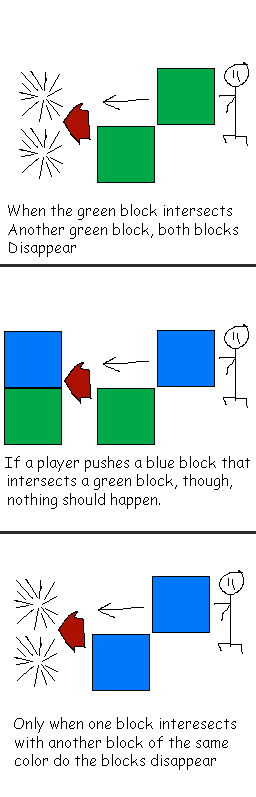
I hope this is possible for you. You've made my day so far.
However, the only problem I have with this is that it doesn't seem to discern events, like if I push an event that looks like a box to one that looks like a pot both will disappear regardless of whether they are the "same" object or not, unless there is something I'm missing? (In your gif you seem to show that pushable pot not interacting with the crates).
The script definitely works in the aspect of triggering events once another event is adjacent to something else, but now I need it to what event commands to call depending on what the event is adjacent to.
For an example as to exactly how I want this game to play, I drew a crude example in case there is something you don't understand:
I hope this is possible for you. You've made my day so far.
I knew I forgot to mention something. Just use a different ID for containers, instead of :box_contact call it something else. Like :green_contact, :blue_contact. That is the ID that is going to be searched for when you push the event.
You can also have multiple event containers per event, in case you want to make a box that makes both :green_contact and :blue_contact disappear.
You can also have multiple event containers per event, in case you want to make a box that makes both :green_contact and :blue_contact disappear.
Thanks for clearing that up, TDS. This game of mine is now possible. :D
This request is officially solved, thanks for your help!
This request is officially solved, thanks for your help!
Glad to see it worked for you. I like the idea of the game and the gameplay mechanic (Already made a few levels myself), so let me know if it's a serious project and I could probably do a few more scripts from the video like the ability to undo moves and an event cloner (All boxes are clones of a single event, so you only need to change one instead of all of them when editing.)
author=TDS
Glad to see it worked for you. I like the idea of the game and the gameplay mechanic (Already made a few levels myself), so let me know if it's a serious project and I could probably do a few more scripts from the video like the ability to undo moves and an event cloner (All boxes are clones of a single event, so you only need to change one instead of all of them when editing.)
This is indeed a serious project. I've already made graphics and some minor planning for it. The issue with events recognizing adjacency was a major issue, though, and now that hurdle's been jumped over.
I'll definitely stay in touch with you if I encounter any more issues, though. :)
Pages:
1

