



 Full Games List
 Featured Games
 New Games
 Reviews
 Media
Media Images
 Blogs
Blogs Game Updates
 Images Feedback Summary
 Game Design Highlights
 Tutorials
 Articles
 Scripts
 Utilities / Plugins
 Resources
 Engines
 Engine Bulletins
 What is Makerscore?
 Past Events
 Achievements
 Misaos
 Forums
 Post History
 Chat
Chat New to RMN?
 Full Store List
 RMN Music Pack (free)



NEED HELP FROM SOMEONE WHO IS GOOD AT PHOTOSHOP.
Posts
Pages:
1

 Mr_Detective
 View playlists
 Close
CloseHi guys, :)
I am making a custom shirt with this logo.
Since this is an old logo, so I would like to change the number "15th" into "25th". I am not sure if that's possible, as I am not an expert in artistic programs so I have no idea how to edit it. If someone can help me out, I'll really appreciate it.
Thanks. ;)
I am making a custom shirt with this logo.

Since this is an old logo, so I would like to change the number "15th" into "25th". I am not sure if that's possible, as I am not an expert in artistic programs so I have no idea how to edit it. If someone can help me out, I'll really appreciate it.
Thanks. ;)

Forget Photoshop. It's expensive, and let's face it kinda worthless.
Take iDraw, choose the Select Colors (looks like an eyedrop), and select the colors you don't need, dragging across the screen so everything but the numbers (or just do the numbers, but if you goof, you're screwed) and then goto I think Edit and Invert Selection. Goto the Dot button and rightclick on the color you want to select. Basically, you're gonna erase this and make your own.
So light blue it out. Select None. Go to the Text option choose a big size for blue and reselect and paste inside with a smaller size with gold.
You can also do this in Paint, using different processes.
Take iDraw, choose the Select Colors (looks like an eyedrop), and select the colors you don't need, dragging across the screen so everything but the numbers (or just do the numbers, but if you goof, you're screwed) and then goto I think Edit and Invert Selection. Goto the Dot button and rightclick on the color you want to select. Basically, you're gonna erase this and make your own.
So light blue it out. Select None. Go to the Text option choose a big size for blue and reselect and paste inside with a smaller size with gold.
You can also do this in Paint, using different processes.

The following version of iDraw works on PCs: rpgmaker.net/users/Link_2112/locker/idraw.zip
I tried to open the picture file but it gave me some weird errors. I pasted the picture in but the colors were horribly distorted. I don't think this is the same iDraw version on Mac and iPad, it looks so worse. :O
author=Readme
Not guaranteed to work with Windows 98, Windows 2000, Windows NT and Windows XP.
Right, the image had to be converted from RGB to Indexed to support 256 colors only. Here's it is now: http://rpgmaker.net/media/content/users/15964/locker/mma_indexed.png
It opens fine in iDraw now. It is way too big and detailed for me to try and edit it though.
It opens fine in iDraw now. It is way too big and detailed for me to try and edit it though.
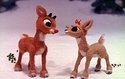
Mr. D, I gave it a try and this is what came of it (it's not quite what you asked, but that's probably the best I can do). I hope you can use it:
Megaman
I used Powerpoint to get the "2" (I think I got the gold color right!).
Megaman
I used Powerpoint to get the "2" (I think I got the gold color right!).
Thanks a lot for your help, guys. :D I gave it a try myself and couldn't do any better than edchuy's.
I'll just go with the original one. :)
I'll just go with the original one. :)
This should be an easy job in photoshop if you have access to the font.
Yeah, iDraw works just fine, it's just that the error messages are gibberish. There's really only one anyways, and it's something like "whoa, there are too many colors. I can't handle that". Like Avee said, you just need to convert it to 256 colors.
If you open a file in paint, and copy it, that usually allows you to paste into iDraw. But when you paste somthing into iDraw, it uses the colors currently in the file's palette. If there is only a few shades of a color, it will look all crappy or use wrong colors. You can open it in Gimp, then transform it from RGB to to Indexed, and open with iDraw and it will have the correct palette, because Gimp created a proper palette based on the colors used in the image.
I would suggest Gimp as a substitute for Photoshop. It's free and has very similar functionality. I haven't figured out how to use it well yet, but it's good to have.
If you open a file in paint, and copy it, that usually allows you to paste into iDraw. But when you paste somthing into iDraw, it uses the colors currently in the file's palette. If there is only a few shades of a color, it will look all crappy or use wrong colors. You can open it in Gimp, then transform it from RGB to to Indexed, and open with iDraw and it will have the correct palette, because Gimp created a proper palette based on the colors used in the image.
I would suggest Gimp as a substitute for Photoshop. It's free and has very similar functionality. I haven't figured out how to use it well yet, but it's good to have.
20 mins in photoshop and I didn't even have to get out of bed. If you can find a better font it will be even better. Btw you can get photoshop cs2 for free and it's better than gimp.

That's really great, arcan! Thanks a lot for your help! One thing is, the number 5 doesn't look very good. Maybe if you can fix it up a little, and leave the background transparent, it'd look much better.
But in any case, I already ordered the shirt with the original logo. Too bad, I can't cancel it at this point. :O
And I tried PS before, but I just couldn't get to it. I use Fireworks because I was taught the basics of it in school. :D
But in any case, I already ordered the shirt with the original logo. Too bad, I can't cancel it at this point. :O
And I tried PS before, but I just couldn't get to it. I use Fireworks because I was taught the basics of it in school. :D
Pages:
1


