



 Full Games List
 Featured Games
 New Games
 Reviews
 Media
Media Images
 Blogs
Blogs Game Updates
 Images Feedback Summary
 Game Design Highlights
 Tutorials
 Articles
 Scripts
 Utilities / Plugins
 Resources
 Engines
 Engine Bulletins
 What is Makerscore?
 Past Events
 Achievements
 Misaos
 Forums
 Post History
 Chat
Chat New to RMN?
 Full Store List
 RMN Music Pack (free)



TRYING TO REDUCE CPU USAGE ON COMPUTER
Posts
Pages:
1

 Xenomic
 View playlists
 Close
CloseSo, this is a pressing issue that I need to resolve, as even with ONLY Skype, Task Manager, and Foobar open, there's about 69-72 processes running, and CPU Usage tends to jump from 10% up to 100%, and oftentimes stays around the 70%+ mark. I am trying to figure out what could be causing it, but I'm not sure and require assistance in trying to tackle this problem.
Whenever I record videos, sometimes the computer will stutter a bit, and even then there are times where when I'm just browsing the net or whatever, the computer SOMETIMES stutters a little, as though it's about to lock up. Tonight, while recording just a 6 second clip from MUGEN, the computer locked up and stuttered for about 5 seconds...which it's never done before so yeah...can anyone help a bro out? : S
Whenever I record videos, sometimes the computer will stutter a bit, and even then there are times where when I'm just browsing the net or whatever, the computer SOMETIMES stutters a little, as though it's about to lock up. Tonight, while recording just a 6 second clip from MUGEN, the computer locked up and stuttered for about 5 seconds...which it's never done before so yeah...can anyone help a bro out? : S
Check anti-virus software. That was what was causing a huge performance drop on my father's computer.
Additionally, analyze which processes are the worst offenders in the Process Manager and try stopping that process, or even tracking down its executable and deleting it.
Additionally, analyze which processes are the worst offenders in the Process Manager and try stopping that process, or even tracking down its executable and deleting it.

author=Zachary_Braun
Additionally, analyze which processes are the worst offenders in the Process Manager and try stopping that process, or even tracking down its executable and deleting it.
^That
Also, don't forget to click the "Show Processes From All Users" button; your system may have a bunch of crap running it doesn't need to be.
Though in the end it may just be the CPU
Processor is AMD Athlom 64 X2 Dual Core Processor 4800+ with 2.50 GHz with Vista OS. Forgot to mention that. I've ran Microsoft Security Essentials several times (in fact, there are times I need to anyways) and it never catches anything so...don't think it's a virus or malware or anything. Would doubling my virtual memory help at all?
author=Xenomic
I've ran Microsoft Security Essentials several times (in fact, there are times I need to anyways) and it never catches anything so...don't think it's a virus or malware or anything.
Hmm, have you tried running something such as Malwarebytes and the like? I find that it tends to pick up the little malware bits whilst MSSE eats the virus now and then (not saying it's malware or viruses at work here)
author=Xenomic
Would doubling my virtual memory help at all?
As far as virtual memory goes, I wouldn't push it too far over the actual amount of RAM you have as it then starts to use your (super-slow-compared-to-RAM) hard drive for the extra memory once you run over the actual amount you've got. However, I doubt it would do anything to offload any workload from the CPU (according to my research, anyhow)
Also, it appears the CPU was released around December 2005. My guess would be that if there are no viruses or malware present, no extra and non-critical processes to be killed, and no extra non-critical services to be terminated that the CPU might just not be able to handle the workload any more
I'm still leaning towards something in those 69-72 processes being the issue, though. Especially since you say that the lockups have only recently started happening
The lag in video recording is to be expected (unless you've got a pretty decent CPU) as most bits of software that do that (be it FRAPS, DxTory, etc) are usually CPU intensive, some even more so.

Disclaimer: I haven't done this shit professionally for ages because the job is awful so some of my suggestions may be out of date or have better solutions.
MSE is, while lightweight and has few false positives, has an abysmal detection rate. AV Comparatives tests the various anti-viruses around and scores them and MSE has the worst detection rate of the lot. You can try one of the alternative free AVs or try Malware Bytes which doesn't have live detection is what I personally use.
There's also Combofix which runs a series of scripts intended to clean up ingrained malware. I've used it in the past on some trouble computers and it helped a lot but more for bad behaviour ("for some reason I keep getting IE to open ads and the antivirus doesn't catch anything!") than performance.
You can use 'msconfig' (you can start it via the run prompt) which lists all of the services and programs started at bootup. You can take a look through those and see if there's anything suspicious and try to see if one of those is the problem through the process of elimination. Don't mess with Microsoft services, there's a checkbox that'll hide them and I recommend doing so. If you aren't certain what an application is for you can google search the name, some applications with weird names just might be a proper program that shouldn't be mucked with. This is probably the biggest step after running an AV better than MSE.
There's also CCleaner which can remove excess and broken items from your Windows registry and empty temp folders and a few other handy options but I'm not sure if it would significantly help with performance though.
Have you looked at the process that is using up all your CPU? You can use Process Explorer for more details on all the shit running on your system, more than the default task manager at least.
Also Vista is a resource intense OS, especially back when it came out and it was put on all kinds of machines that couldn't handle it. I once put it on a parents computer hand-me-down when I was rebuilding it and it ran like ass. Flatten, install Windows 7 and it took it like a champ. I don't remember the exact specs though so I don't have much to compare it against but Vista is really bad.
MSE is, while lightweight and has few false positives, has an abysmal detection rate. AV Comparatives tests the various anti-viruses around and scores them and MSE has the worst detection rate of the lot. You can try one of the alternative free AVs or try Malware Bytes which doesn't have live detection is what I personally use.
There's also Combofix which runs a series of scripts intended to clean up ingrained malware. I've used it in the past on some trouble computers and it helped a lot but more for bad behaviour ("for some reason I keep getting IE to open ads and the antivirus doesn't catch anything!") than performance.
You can use 'msconfig' (you can start it via the run prompt) which lists all of the services and programs started at bootup. You can take a look through those and see if there's anything suspicious and try to see if one of those is the problem through the process of elimination. Don't mess with Microsoft services, there's a checkbox that'll hide them and I recommend doing so. If you aren't certain what an application is for you can google search the name, some applications with weird names just might be a proper program that shouldn't be mucked with. This is probably the biggest step after running an AV better than MSE.
There's also CCleaner which can remove excess and broken items from your Windows registry and empty temp folders and a few other handy options but I'm not sure if it would significantly help with performance though.
Have you looked at the process that is using up all your CPU? You can use Process Explorer for more details on all the shit running on your system, more than the default task manager at least.
Also Vista is a resource intense OS, especially back when it came out and it was put on all kinds of machines that couldn't handle it. I once put it on a parents computer hand-me-down when I was rebuilding it and it ran like ass. Flatten, install Windows 7 and it took it like a champ. I don't remember the exact specs though so I don't have much to compare it against but Vista is really bad.
I just tried MalwareBytes (takes it about 15 minutes to fully get done) and it caught nothing at all. Currently defragging my C drive as I haven't done that in ages and I'd assume that'd help a bit (maybe not with the CPU usage though...).
As it stands right now, top 5 things (which seems to be the norm of what's using up memory) are: Firefox (456k in commit size, roughly tends to be about 240k in Memory Usage), svchost.sexe (likes to be around 10-35k in memory), Skype, System, and audiodg.exe. Even without Firefox, those other 4 tend to be up there at almost all times. Sometimes switches out for other things like MsMpEng.exe or other miscellaneous things).
@TehGuy: Yeah, this computer is at least 6-7 years old itself so I shouldn't be surprised it's having issues. I got this as a hand-me-down from my dad when my XP computer died on me (probably was a power switch as it wouldn't turn on anymore, but that was last year that I lost that), and this was already brought into the shop once before due to bluescreens (which apparently was usbohci or something like that. Something that I already turned off way back in September or October of last year). Though the sudden lockup that happened last night was the very first time it's done that since then...every other type of "lockup" is just the computer stuttering for about a second or so before resuming, and it does THAT at complete random, despite if I have Firefox up or not (it sometimes does it while recording too with Dxtory or Bandicam as well...though you'd think recording a GBA game wouldn't do that...).
@GreatRedSpirit: Ah yes, I looked at msconfig and saw I had like 21 startup items on bootup, but none that I saw that could really be disabled. CCleaner I've used plenty of times too but it still has that issue of stuttering/high CPU. I'm assuming it's just either Vista as you say, or some hardware problem like the CPU itself just being really old as TehGuy says...
As it stands right now, top 5 things (which seems to be the norm of what's using up memory) are: Firefox (456k in commit size, roughly tends to be about 240k in Memory Usage), svchost.sexe (likes to be around 10-35k in memory), Skype, System, and audiodg.exe. Even without Firefox, those other 4 tend to be up there at almost all times. Sometimes switches out for other things like MsMpEng.exe or other miscellaneous things).
@TehGuy: Yeah, this computer is at least 6-7 years old itself so I shouldn't be surprised it's having issues. I got this as a hand-me-down from my dad when my XP computer died on me (probably was a power switch as it wouldn't turn on anymore, but that was last year that I lost that), and this was already brought into the shop once before due to bluescreens (which apparently was usbohci or something like that. Something that I already turned off way back in September or October of last year). Though the sudden lockup that happened last night was the very first time it's done that since then...every other type of "lockup" is just the computer stuttering for about a second or so before resuming, and it does THAT at complete random, despite if I have Firefox up or not (it sometimes does it while recording too with Dxtory or Bandicam as well...though you'd think recording a GBA game wouldn't do that...).
@GreatRedSpirit: Ah yes, I looked at msconfig and saw I had like 21 startup items on bootup, but none that I saw that could really be disabled. CCleaner I've used plenty of times too but it still has that issue of stuttering/high CPU. I'm assuming it's just either Vista as you say, or some hardware problem like the CPU itself just being really old as TehGuy says...
Backup your files and reinstall Windows. Save the headache at the cost of an OS disc, if you don't have one. It's pretty much commonplace for a PC to get slower over time. You can spend days trying to fix things and it may never go back to normal. I really hated dealing with that question in tech support and it comes up A LOT. Some people just buy a new PC!
Memory usage isn't really the problem (besides Vista being awful with its minimum requirements). Generally with RAM it's fine until you run out and have to hit slower memory like virtual memory. The best way to tell if you're running out of memory is to look at your available physical memory in the performance tab of the task manager. If it's low at all times then you are definitely hurting for RAM. Ignore free RAM, it's largely a bogus metric*.
Do you know what processes are spiking your CPU? Keep task manager open when you hit these spikes and try to see what's doing it. Process Explorer has a CPU usage graph for individual processes you can look at too.
* Free RAM is basically RAM that's doing nothing which is generally no good. Cached RAM is stuff the OS has preloaded into memory in an attempt to avoid a page fault (accessing the hard drive because it isn't in memory) based on usage statistics. Writing free or cached memory takes the same time so there's no performance loss (or at best no real performance loss) in putting something into unused RAM against the potential time loss of a page fault. Or at least that's my understanding.
Do you know what processes are spiking your CPU? Keep task manager open when you hit these spikes and try to see what's doing it. Process Explorer has a CPU usage graph for individual processes you can look at too.
* Free RAM is basically RAM that's doing nothing which is generally no good. Cached RAM is stuff the OS has preloaded into memory in an attempt to avoid a page fault (accessing the hard drive because it isn't in memory) based on usage statistics. Writing free or cached memory takes the same time so there's no performance loss (or at best no real performance loss) in putting something into unused RAM against the potential time loss of a page fault. Or at least that's my understanding.
Well, physical memory for me tends to run around 20-30% so...here's a screenshot of Process Explorer.
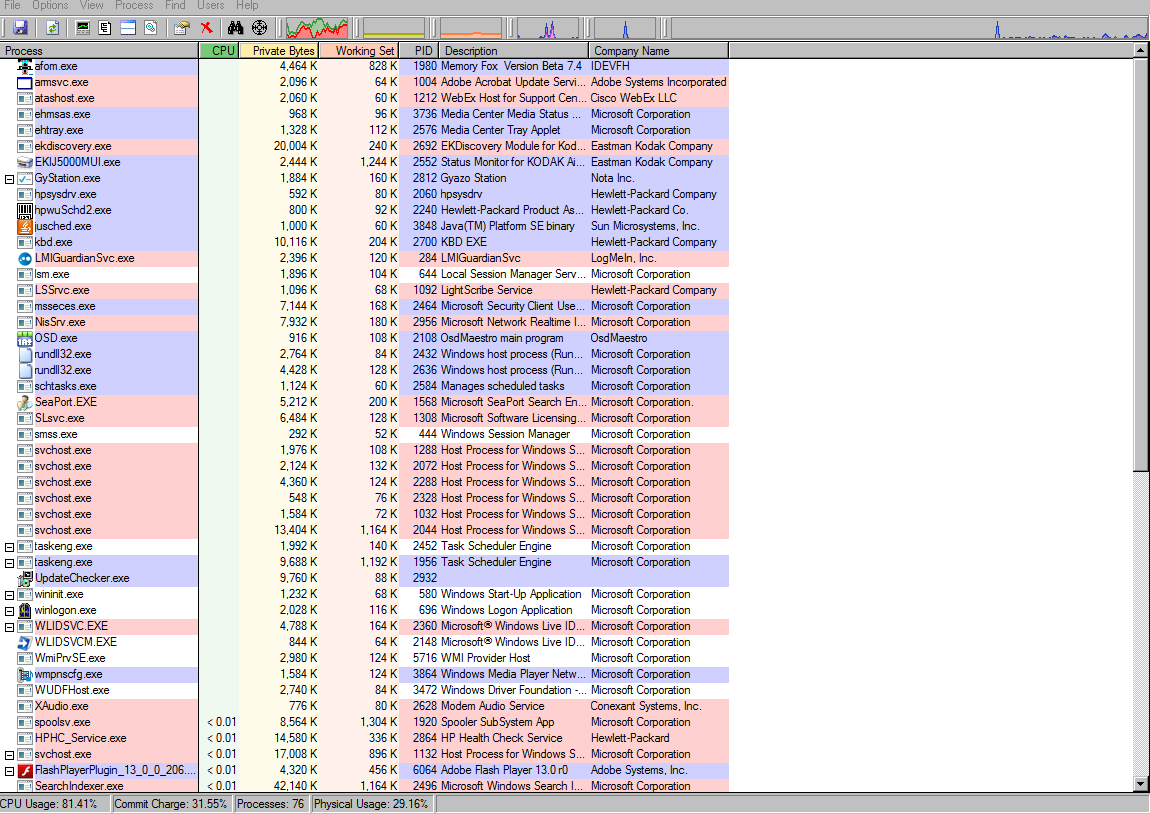
As for what processes? It's hard to tell because some don't seem like they're even that high. Again, with or without Firefox which I'd assume would be a big culprit in itself, it spikes at complete random (I always have Task Manager running and check it periodically), and usually whatever's at the top in terms of CPU usage is roughly about 20-50k, never more...
As for what processes? It's hard to tell because some don't seem like they're even that high. Again, with or without Firefox which I'd assume would be a big culprit in itself, it spikes at complete random (I always have Task Manager running and check it periodically), and usually whatever's at the top in terms of CPU usage is roughly about 20-50k, never more...
Jesus lots of shit is going on in the kernel side of the OS (the red part of the CPU chart, first graph on the left on top). That's definitely not right (and what it is isn't reported either AFAIK). I'm not sure how to find out what it is, maybe running combofix is worth it at this point because something is messed up with your machine. Besides combofix or a flatten+reinstall (of something better than Vista too) I'm not sure what the next step to take would be.
e: Maybe it's a driver issue? Did you update any drivers recently?
e: Maybe it's a driver issue? Did you update any drivers recently?
I have not. I know back in September or so, I had to completely disable a driver (usbohci or something to that extent) due to it constantly bluescreening my computer for no reason.
I couldn't reinstall Windows due to having no Windows CD (and no money to afford it). At this point, I feel like I should just get a new computer since this one is pretty old as it is. It was already brought into the shop years ago and had ram replaced so...
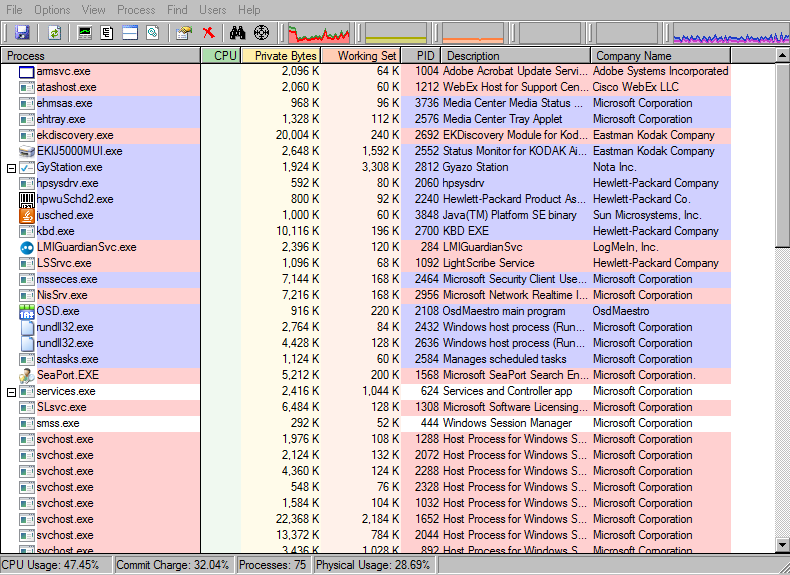
And one more screenshot just to show you how wild the thing is:
I couldn't reinstall Windows due to having no Windows CD (and no money to afford it). At this point, I feel like I should just get a new computer since this one is pretty old as it is. It was already brought into the shop years ago and had ram replaced so...
And one more screenshot just to show you how wild the thing is:

You could try overclocking it. I overclocked my 3.3 ghz processor to 3.6 (Amd X3 Rana 455)on stock and its been working good for about a year, the only problem was it took me awhile to get a stable overclock.
Another thing you could try doing, make a new user and just access your old stuff through a file shortcut. I don't know if it works but it seems to help me when I get cluttered. I think it doesn't run all the same processes(Kind-ish a fresh start). It could be just a placebo.
Also for recording videos, I like Bandicam. On its default settings it has amazing compression and to me seemed to work faster then others. Anyway, thats just my suggestion, is to try alternate programs.
And last, if its system idle that's making it go up, it is then a normal situation.
Also, if you have power options, set it to maximum. Maybe that will fix if its sytem idle. ( I think... I think having the min state of the proces at 100% would work)
Another thing you could try doing, make a new user and just access your old stuff through a file shortcut. I don't know if it works but it seems to help me when I get cluttered. I think it doesn't run all the same processes(Kind-ish a fresh start). It could be just a placebo.
Also for recording videos, I like Bandicam. On its default settings it has amazing compression and to me seemed to work faster then others. Anyway, thats just my suggestion, is to try alternate programs.
And last, if its system idle that's making it go up, it is then a normal situation.
Also, if you have power options, set it to maximum. Maybe that will fix if its sytem idle. ( I think... I think having the min state of the proces at 100% would work)
Pages:
1

