



 Full Games List
 Featured Games
 New Games
 Reviews
 Media
Media Images
 Blogs
Blogs Game Updates
 Images Feedback Summary
 Game Design Highlights
 Tutorials
 Articles
 Scripts
 Utilities / Plugins
 Resources
 Engines
 Engine Bulletins
 What is Makerscore?
 Past Events
 Achievements
 Misaos
 Forums
 Post History
 Chat
Chat New to RMN?
 Full Store List
 RMN Music Pack (free)



HOW TO CREATE LARGER PICTURES IN TEXT BOX
Posts
Pages:
1

 charblar
 View playlists
 Close
CloseI was wondering how you go about making the characters in the bottom left/right hand corners in RPG Maker VX Ace??? Do you use show picture and position in corner or is their a code or something to use?
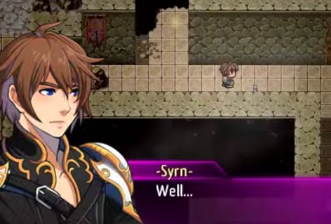

If you can find the appropriate script you can do that but the quick and dirty way is to use show pictures. iirc pictures appear below the window+text so you need to use a windowskin that is transparent for messages, use show picture to show the text backdrop, use another show picture to show your character bust (with a higher ID# than the window backdrop picture so it appears on top), and add spaces in front of the text in your ShowMessage command so it is offset and doesn't appear on top of your character's bust.

GRD is right, though it should be easy to modify pictures to be rendered over message box (or rather making message box be rendered under pictures). All you need is z-order of lowest image and then change z-order of window_message to be under it.
But still, easier it is to use pictures IMO.
BTW, what game this is from? Seems cool.
But still, easier it is to use pictures IMO.
BTW, what game this is from? Seems cool.
author=GreatRedSpiritJust to check I'm following along correctly, basically edit the system window file to be transparent and then show a text box picture and then the sprite? The only thing I'm wondering is how you would position the text as they do in that picture so it works correctly. How would I edit the script though so the window is smaller so it allows the text to not overlap the sprite like in the picture?
If you can find the appropriate script you can do that but the quick and dirty way is to use show pictures. iirc pictures appear below the window+text so you need to use a windowskin that is transparent for messages, use show picture to show the text backdrop, use another show picture to show your character bust (with a higher ID# than the window backdrop picture so it appears on top), and add spaces in front of the text in your ShowMessage command so it is offset and doesn't appear on top of your character's bust.
author=RaveIt's from the VX Ace Trailer so I honestly don't know sorry!
BTW, what game this is from? Seems cool.
Pages:
1

