



 Full Games List
 Featured Games
 New Games
 Reviews
 Media
Media Images
 Blogs
Blogs Game Updates
 Images Feedback Summary
 Game Design Highlights
 Tutorials
 Articles
 Scripts
 Utilities / Plugins
 Resources
 Engines
 Engine Bulletins
 What is Makerscore?
 Past Events
 Achievements
 Misaos
 Forums
 Post History
 Chat
Chat New to RMN?
 Full Store List
 RMN Music Pack (free)



HOW DO I FIT BIGGER SPRITES IN RPG MAKER VX ACE?
Posts
Pages:
1
 fffgh
fffgh View playlists
 Close
CloseOne way is to make a single grouping of a sprite and put a $ in front of the file name.
So instead of this:
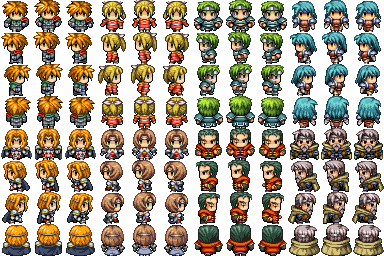
Do this:

It has to have the symbol in front of the filename. So it would be $sephirothsucks.png. The engine will automacally know the right size for the character and it will be huge.
There must be a better way than this, though. Someone?
So instead of this:
Do this:
It has to have the symbol in front of the filename. So it would be $sephirothsucks.png. The engine will automacally know the right size for the character and it will be huge.
There must be a better way than this, though. Someone?

Just make the tileset as big as the characters are. So for example if your character is 64x64 each individual frame should be 64x64 instead of 32x32 like in the first picture Link posted.

Like this.
Like this.

Mack chcaracters are just 48x32 aren't they?
Use them along with !Door3 and most height related issues are fixed, and just scale your maps up a little if you feel it's necessary.
You aren't very clear in what you're asking, though.
Use them along with !Door3 and most height related issues are fixed, and just scale your maps up a little if you feel it's necessary.
You aren't very clear in what you're asking, though.

:sigh:
The Mack sprite sheets should just work if you add them to your sprite folder. They're already set up to work. If they aren't the default set (that is, if you've made custom sprites) just take a normal sprite sheet from the Mack set (like the above shown - 4 columns and 2 rows of characters), delete one of the characters and paste your one in. Then save as a different name and viola.
For a more technical explanation: Ace (and VX) reads sprite sheets without an $ in front of their name as two lines of four animation sets. That is, instead of telling itself 'this is 32 x 32' is says 'this sprite sheet, when divided into four across and two down, becomes a 32 x 32 grid of animations'. It's a subtle difference, but it makes things a hell of a lot easier. What this means is that it's not about the width or height of the cells but that of the sheet. It takes the width and says 'break this into 12 equal parts' then takes the height and says 'break this into 8 equal parts' and that's what gives the cell heights/widths. Thus, if you want to make a sheet of sprites that are a different size than the norm, just make sure to have four instances of animation across and two instances down. The engine will then change the sheet to fit the 4x2 layout. Just be sure to make it exactly the size or you'll get animations not working properly.
The Mack sprite sheets should just work if you add them to your sprite folder. They're already set up to work. If they aren't the default set (that is, if you've made custom sprites) just take a normal sprite sheet from the Mack set (like the above shown - 4 columns and 2 rows of characters), delete one of the characters and paste your one in. Then save as a different name and viola.
For a more technical explanation: Ace (and VX) reads sprite sheets without an $ in front of their name as two lines of four animation sets. That is, instead of telling itself 'this is 32 x 32' is says 'this sprite sheet, when divided into four across and two down, becomes a 32 x 32 grid of animations'. It's a subtle difference, but it makes things a hell of a lot easier. What this means is that it's not about the width or height of the cells but that of the sheet. It takes the width and says 'break this into 12 equal parts' then takes the height and says 'break this into 8 equal parts' and that's what gives the cell heights/widths. Thus, if you want to make a sheet of sprites that are a different size than the norm, just make sure to have four instances of animation across and two instances down. The engine will then change the sheet to fit the 4x2 layout. Just be sure to make it exactly the size or you'll get animations not working properly.
So by default you can import a huge charset and it automatically detects it's size? When it's 4x2 sets of equal frame size.
LockeZ

I'd really like to get rid of LockeZ. His play style is way too unpredictable. He's always like this too. If he ran a country, he'd just kill and imprison people at random until crime stopped.
5958
This is not the correct section to ask for help using RPG Maker. One of the other sections is called "Help me!" and that is where you can ask for help.
Try spending a few hours figuring each thing out on your first before asking though. If I copy and paste the topic name into google, there are like ten correct answers on the first page of the google results.
Try spending a few hours figuring each thing out on your first before asking though. If I copy and paste the topic name into google, there are like ten correct answers on the first page of the google results.
author=Link_2112Yup! Ain't that grand? And if you have a single character, just whacking a $ in front of their name forces the engine to set it as a 3x4 frame set instead. ^.^ Use this information to great affect, my friends.
So by default you can import a huge charset and it automatically detects it's size? When it's 4x2 sets of equal frame size.
Also, fffgh, read the Help Section rules and create proper threads please. The next thread that is like this will result in a warning and locking of the thread. You don't want that.
Pages:
1

