



 Full Games List
 Featured Games
 New Games
 Reviews
 Media
Media Images
 Blogs
Blogs Game Updates
 Images Feedback Summary
 Game Design Highlights
 Tutorials
 Articles
 Scripts
 Utilities / Plugins
 Resources
 Engines
 Engine Bulletins
 What is Makerscore?
 Past Events
 Achievements
 Misaos
 Forums
 Post History
 Chat
Chat New to RMN?
 Full Store List
 RMN Music Pack (free)



HOW CAN I ADD A STATE WHEN ANOTHER STATE GOES AWAY
Posts
Pages:
1
 andreasaspenberg
 View playlists
 Close
Closein one of my project i have a series of connected states. what i want them to do is that when one of them goes away another one takes its place. i also need a system that reduce a variable by one for each step. please help me out.

Hm, you sure ask for help a lot. May I suggest you explain what exactly you want more precisely? Describe what RPG Maker you are using, what you want these states to do, under what conditions they should appear and disappear etc.
Anyway, I might be able to give you an option on how to do this, but it depends on what kinds of states you're talking about. If they are states that wear off over time (that is, they disappear after a few turns), I know how to do it. If they are states that are removed by attacks or certain skills, it might be more difficult.
Anyway, I might be able to give you an option on how to do this, but it depends on what kinds of states you're talking about. If they are states that wear off over time (that is, they disappear after a few turns), I know how to do it. If they are states that are removed by attacks or certain skills, it might be more difficult.
LockeZ

I'd really like to get rid of LockeZ. His play style is way too unpredictable. He's always like this too. If he ran a country, he'd just kill and imprison people at random until crime stopped.
5958
For starters, you're probably going to want to get a script that lets you create stackable states. There's at least one such script for each of the RPG Maker engines.
Once you have that, things become a lot easier. When applying a state, you can apply two stacks of it, and make it max out at two stacks. Then you can make it so that the skills that remove it only remove one stack. Then you can run a battle event that constantly checks to see if anyone only has one stack of the effect. If someone has only one stack of the effect, you know that the effect was just removed from them - so you can remove the second stack and add the new effect you want.
Once you have that, things become a lot easier. When applying a state, you can apply two stacks of it, and make it max out at two stacks. Then you can make it so that the skills that remove it only remove one stack. Then you can run a battle event that constantly checks to see if anyone only has one stack of the effect. If someone has only one stack of the effect, you know that the effect was just removed from them - so you can remove the second stack and add the new effect you want.

It's stated that the new state would be applied after the old one falls off. If the old state has a "timer", and can only be removed by that "timer", that could be a battle-based event. Though, you might also need a variable to keep track of how many turns the state has been active before applying the new one. Since we have to assume multiple battlers being in the state, you'd need multiple variables, and therefore, multiple event-pages. However, they would all essentially have the same processing.
To setup an event that decrements a variable by one on each step taken, I believe that would be setup as a common event. Each map that the variable is relevant would call that event. I imagine it would be a parallel process. Anyway, it make take some variable shenanigans (two for the position of the player before the move, and two more for the position of the player after the move), and some conditional branch shenanigans (since we want to check if the player actually did move), not to mention the part about the player attempting to move, but I'm pretty sure you can do all that via eventing.
If you want more specific instructions, I don't have the time to check out this might look right now. If I think of it later on, though...
To setup an event that decrements a variable by one on each step taken, I believe that would be setup as a common event. Each map that the variable is relevant would call that event. I imagine it would be a parallel process. Anyway, it make take some variable shenanigans (two for the position of the player before the move, and two more for the position of the player after the move), and some conditional branch shenanigans (since we want to check if the player actually did move), not to mention the part about the player attempting to move, but I'm pretty sure you can do all that via eventing.
If you want more specific instructions, I don't have the time to check out this might look right now. If I think of it later on, though...
the states are currently set to wear off after a certain amount of steps. i am however flexible so it doesnt have to remain that way if there is a better solution. i am using rpg maker vc ace by the way. i am willing to learn scripting and my project might also require me to script stuff myself.(calling up specific character animation would be required.)

Hmm... I think this might do the job:
Have a Parallel Process event that checks if the actor has X state inflicted. In the conditional branch, have a remove Y state and an add X state commands under Else.
Here, X state is applied when Y state is no longer active.
If you need more clarification, just ask :)
Have a Parallel Process event that checks if the actor has X state inflicted. In the conditional branch, have a remove Y state and an add X state commands under Else.
Here, X state is applied when Y state is no longer active.
If you need more clarification, just ask :)
that would just cause the state at all times and that just doesnt cut it. i am open for scripting it though and it seems to be the only way. pleaee teach me.
Look, if these states are supposed not to change during battles but only after moving on the map, you can simply do it by using a Common Event set on parallel process which counts down a variable for each character. The base of this is using the Step Count as a variable. You don't need any scripting for that, and I'm not sure why you seem to be so fixated on doing it that way if you can just solve your problem with some clever eventing. Don't be afraid to experiment a bit more.
In case you want something different than what I described, you'll have to give more information about what effects you want your system to have. Nobody will be able to help you if they don't know what exactly it is you want to do.
In case you want something different than what I described, you'll have to give more information about what effects you want your system to have. Nobody will be able to help you if they don't know what exactly it is you want to do.
i need to learn scripting anyway because scripting is the only way to trigger specific animations. i cant figure out how to to make movement change a variable though.
Okay, how to make movement change a variabe is something I can easily explain to you. First of all, create a Common Event that is set on Parallel Process and triggered by a switch that is activated right at the beginning of the game. In that Common Event you put a Control Variables command that sets a variable (I call it "Steps 1") equal to the "Step Count". You can find that in the Options for variables under the tag "Other". Then, add a Conditional Branch that checks whether the variable "Steps 1" is not equal to another variable I'll just call "Steps 2". Inside that Conditional Branch, set two Control Variables commands. The first one adds the amount of 1 to the variable you want to have changed by movement (I call it "Goal Variable" for now). The second command sets variable "Steps 2" to be equal to "Steps 1".
What this does is that every time the player takes a step, the variable "Steps 1" will record this and thus be not equal to "Steps 2". Whenever that happens, your "Goal Variable" is increased by 1, and you can do with that value whatever you want.
There you have it, a variable ("Goal Variable") that changes with movement. I hope this helps.
What this does is that every time the player takes a step, the variable "Steps 1" will record this and thus be not equal to "Steps 2". Whenever that happens, your "Goal Variable" is increased by 1, and you can do with that value whatever you want.
There you have it, a variable ("Goal Variable") that changes with movement. I hope this helps.
adding 1 to a variable instead adds 32 or some other random number and it adds the exact same number as what is in the first variable. there appears to be mean bug in the event editor and as such my only choice would be to use script. isnt my fault that rpg maker vx ace is so glitchy though. i know that you are going to snap but please dont.
What makes you think I'm going to snap? I'm just trying to understand what it is you want and then help you. Don't worry, please.
Either way, that's weird. Give me a few minutes and I'll make a screenshot for you which shows the setup for the Common Event I had in mind. Maybe I described it wrong earlier. It will taken from RPG Maker XP, but the event commands should have the same names. Just wait a moment.
If that doesn't work either, I guess I won't be able to help you. I don't know a thing about scripting, unfortunately, and good scripters are rare and valuable.
Edit: Here you go. I hope this works.
By the way, != stands for "not equal to".
Either way, that's weird. Give me a few minutes and I'll make a screenshot for you which shows the setup for the Common Event I had in mind. Maybe I described it wrong earlier. It will taken from RPG Maker XP, but the event commands should have the same names. Just wait a moment.
If that doesn't work either, I guess I won't be able to help you. I don't know a thing about scripting, unfortunately, and good scripters are rare and valuable.
Edit: Here you go. I hope this works.
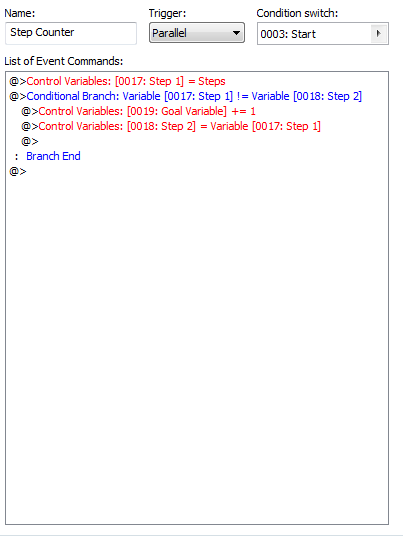
By the way, != stands for "not equal to".
Pages:
1

