



 Full Games List
 Featured Games
 New Games
 Reviews
 Media
Media Images
 Blogs
Blogs Game Updates
 Images Feedback Summary
 Game Design Highlights
 Tutorials
 Articles
 Scripts
 Utilities / Plugins
 Resources
 Engines
 Engine Bulletins
 What is Makerscore?
 Past Events
 Achievements
 Misaos
 Forums
 Post History
 Chat
Chat New to RMN?
 Full Store List
 RMN Music Pack (free)



GETTING A NEW GRAPHICS CARD?
Posts

 Redd
Redd View playlists
 Close
CloseThe only thing I've ever done inside of a PC is replace RAM, and I've replaced a laptop hard drive. Both extremely easy tasks.
However, I am aware that getting a new graphics card may not be so easy.
I have a really old PC, like, really old. It has Windows XP on it but is "Vista Ready" (nothing is ready for Vista).
Here are the specs it currently has:
Model: Emachines T6532
RAM: Two DDR RAM sticks of 512 MB each, running at 200 MHz, although I just bought four 1 GB sticks that each run at 400 MHz
HDD: 200 GB (which is enough for me, quite honestly, although I am considering buying a bigger one).
Processor: AMD Athlon 64 3500+ running at 2.2 GHz (not overclocked).
Video Card: NVIDIA GeForce 6100 revision A2 running at 400 MHz, and a memory size of 512 MB.
I also did the little speed up trick with page files (I think that's what they're called) with a 16 GB flash drive.
Terrible specs, I know, but it actually runs pretty well for what I've used it for so far (streaming videos, playing N64 and lower games, composing and producing music, and RPG Maker of course), and while doing most tasks my CPU hovers around only 7% usage.
However, I want to get into playing some 3D games and such, because I have never, ever been able to. I can't watch 720p on YouTube without it lagging like crazy because of my graphics card (no, it isn't my internet, our connection speed through ethernet is 50Mbps, thus making mine around 23 usually, and we can watch full 1080p on every other device in the home, even phones).
I really don't know what it takes to get a new video card, but I'd like to have something around the $200-$250 range. Apparently, you also need to figure out how much power in watts you are currently putting out, and buy a new cable if you have to, because an intensive video card might require more power than the power cord you currently have. I don't have a clue how much power I'm capable of producing at the moment, and even if I did, I wouldn't know how to go about getting a new cable, which I'm sure I need.
If you guys can help me out, that would be fantastic! If you need anything else, let me know, and I'll throw it up on here.
Also, as a sidenote, how do I go about overclocking? I tried a program to do it once and overclocked it to the max, but it seems it didn't work, since the core speed is still exactly the same as the stock core speed.
I used CPU-Z to find all of these specs.
I also posted this same thing on RMW; I'm trying to get answers fast ;)
However, I am aware that getting a new graphics card may not be so easy.
I have a really old PC, like, really old. It has Windows XP on it but is "Vista Ready" (nothing is ready for Vista).
Here are the specs it currently has:
Model: Emachines T6532
RAM: Two DDR RAM sticks of 512 MB each, running at 200 MHz, although I just bought four 1 GB sticks that each run at 400 MHz
HDD: 200 GB (which is enough for me, quite honestly, although I am considering buying a bigger one).
Processor: AMD Athlon 64 3500+ running at 2.2 GHz (not overclocked).
Video Card: NVIDIA GeForce 6100 revision A2 running at 400 MHz, and a memory size of 512 MB.
I also did the little speed up trick with page files (I think that's what they're called) with a 16 GB flash drive.
Terrible specs, I know, but it actually runs pretty well for what I've used it for so far (streaming videos, playing N64 and lower games, composing and producing music, and RPG Maker of course), and while doing most tasks my CPU hovers around only 7% usage.
However, I want to get into playing some 3D games and such, because I have never, ever been able to. I can't watch 720p on YouTube without it lagging like crazy because of my graphics card (no, it isn't my internet, our connection speed through ethernet is 50Mbps, thus making mine around 23 usually, and we can watch full 1080p on every other device in the home, even phones).
I really don't know what it takes to get a new video card, but I'd like to have something around the $200-$250 range. Apparently, you also need to figure out how much power in watts you are currently putting out, and buy a new cable if you have to, because an intensive video card might require more power than the power cord you currently have. I don't have a clue how much power I'm capable of producing at the moment, and even if I did, I wouldn't know how to go about getting a new cable, which I'm sure I need.
If you guys can help me out, that would be fantastic! If you need anything else, let me know, and I'll throw it up on here.
Also, as a sidenote, how do I go about overclocking? I tried a program to do it once and overclocked it to the max, but it seems it didn't work, since the core speed is still exactly the same as the stock core speed.
I used CPU-Z to find all of these specs.
I also posted this same thing on RMW; I'm trying to get answers fast ;)
LockeZ

I'd really like to get rid of LockeZ. His play style is way too unpredictable. He's always like this too. If he ran a country, he'd just kill and imprison people at random until crime stopped.
5958
Nvidia does a weird thing with how it numbers its graphic cards. They have names like GTX 660 and GT 740. The middle digit is actually the important part. For example, 660 is better than 740 because 6 is higher than 4. The first digit is the "generation", and the second is the "quality". So 760 is better than 660, but 670 is better than either of those. 670 is their higher-end model from the sixth generation and 760 is their mid-range model from the seventh generation.
Do not ask me why they number them that way. Some engineer came up with it and didn't consult the marketing department, and ten years later they still haven't come up with a more intuitive scheme. If you just walk into a store and try to figure out which one to buy, you will not have a good time.

They also have some cards with four-digit numbers, like yours, which are their cheap models. Don't get those.
-------
Your graphics card is only barely used to play Youtube videos though. I promise it's not what's causing the videos to lag, since even your old-ass video card is superior to the Intel graphics chip that's in 95% of modern laptops.
The problem with watching Youtube videos is definitely your RAM. You should return the RAM you bought and get a pair of 4 GB sticks of RAM, or at least a pair of 2 GB sticks. That will get you more performance than a video card will, for a small fraction of the price. 1 GB of RAM is not even enough to run an antivirus program smoothly, and 2 GB of RAM still isn't enough to play games that are less than a decade old.
You should also seriously consider upgrading your processor! Processors are one of the harder things to replace, so you will want to get someone to help you. But older processors are really really cheap. Just glancing at the first page of search results on Amazon for processors that fit into the same socket type as your computer's CPU (in other words, ones that will work in your computer), I can see that this one would be a nice upgrade for you and only costs $18. Even if you have to pay a local shop forty bucks to put it in for you, that's still a good deal! Cheaper than a new video card, for sure.
Do not ask me why they number them that way. Some engineer came up with it and didn't consult the marketing department, and ten years later they still haven't come up with a more intuitive scheme. If you just walk into a store and try to figure out which one to buy, you will not have a good time.
They also have some cards with four-digit numbers, like yours, which are their cheap models. Don't get those.
-------
Your graphics card is only barely used to play Youtube videos though. I promise it's not what's causing the videos to lag, since even your old-ass video card is superior to the Intel graphics chip that's in 95% of modern laptops.
The problem with watching Youtube videos is definitely your RAM. You should return the RAM you bought and get a pair of 4 GB sticks of RAM, or at least a pair of 2 GB sticks. That will get you more performance than a video card will, for a small fraction of the price. 1 GB of RAM is not even enough to run an antivirus program smoothly, and 2 GB of RAM still isn't enough to play games that are less than a decade old.
You should also seriously consider upgrading your processor! Processors are one of the harder things to replace, so you will want to get someone to help you. But older processors are really really cheap. Just glancing at the first page of search results on Amazon for processors that fit into the same socket type as your computer's CPU (in other words, ones that will work in your computer), I can see that this one would be a nice upgrade for you and only costs $18. Even if you have to pay a local shop forty bucks to put it in for you, that's still a good deal! Cheaper than a new video card, for sure.
Hey LockeZ, thanks for your help!!
Like I said, I did just barely buy 4 GB worth of DDR RAM, and that should be coming within the next week, so I guess that will help out streaming (and everything else) a lot!
If I did end up buying the product you mentioned along with this video card, would I still be able to use the standard DDR ram I just bought? The processor says something about DDR2 memory, while the video card mentions something about DDR3. Is that just the speed at what the products go at, and has nothing to do with my RAM?
Also, what about the power supply? And the overclocking.
Sorry I'm such a complete noob at this. I've never really had the need to do much on my PC other than music, which runs perfectly fine. Even making a video (with Corel) goes pretty quickly, other than the publishing of the actual file which takes around 45 minutes for a video that's just a couple of minutes.
Like I said, I did just barely buy 4 GB worth of DDR RAM, and that should be coming within the next week, so I guess that will help out streaming (and everything else) a lot!
If I did end up buying the product you mentioned along with this video card, would I still be able to use the standard DDR ram I just bought? The processor says something about DDR2 memory, while the video card mentions something about DDR3. Is that just the speed at what the products go at, and has nothing to do with my RAM?
Also, what about the power supply? And the overclocking.
Sorry I'm such a complete noob at this. I've never really had the need to do much on my PC other than music, which runs perfectly fine. Even making a video (with Corel) goes pretty quickly, other than the publishing of the actual file which takes around 45 minutes for a video that's just a couple of minutes.
LockeZ
I'd really like to get rid of LockeZ. His play style is way too unpredictable. He's always like this too. If he ran a country, he'd just kill and imprison people at random until crime stopped.
5958
That's okay, you're allowed to be a noob.
Sorry I misread a bit of your OP, I thought you were just upgrading the two existing RAM sticks, not adding another two alongside them. 4 GB is enough to play games, just not at the highest settings.
The memory mentioned in the descriptions of the processor and graphics card is separate from what you bought, it's unrelated to the type of RAM sticks the computer uses. These components have their own internal memory that's unrelated to what you bought. The big ol' RAM sticks you bought need to be the same type that was already in your computer, original DDR style, otherwise they won't actually fit in the slots.
I'm not even slightly convinced that graphics is better than the one you have. It could very easily be worse. It's newer than yours, but it's a really really low end budget model for non-gaming computers. For comparison, my own graphics card is a 520, so it's very slightly better than the one you linked, and it can play 90% of games, but I have to put them on the lowest possible settings and they still lag sometimes. A few games like Witcher 2 and Call of Duty will not run on my 520. SMBX lags slightly every time an enemy comes on screen. You want something better than mine, not worse.
Check out this very reasonably priced GTX 640. It's not brilliant, but it's gonna play any game you want it to play. The 650 would be better but costs twice as much.
I know nothing about overclocking, sorry. I don't know how to tell what kind of power supply you need, but you're probably fine unless you're getting an insane beast of a graphics card. The only way I know how to tell how strong the one you have right now is is to open up the computer and look at the sticker on the side of the power supply in there.
Sorry I misread a bit of your OP, I thought you were just upgrading the two existing RAM sticks, not adding another two alongside them. 4 GB is enough to play games, just not at the highest settings.
The memory mentioned in the descriptions of the processor and graphics card is separate from what you bought, it's unrelated to the type of RAM sticks the computer uses. These components have their own internal memory that's unrelated to what you bought. The big ol' RAM sticks you bought need to be the same type that was already in your computer, original DDR style, otherwise they won't actually fit in the slots.
I'm not even slightly convinced that graphics is better than the one you have. It could very easily be worse. It's newer than yours, but it's a really really low end budget model for non-gaming computers. For comparison, my own graphics card is a 520, so it's very slightly better than the one you linked, and it can play 90% of games, but I have to put them on the lowest possible settings and they still lag sometimes. A few games like Witcher 2 and Call of Duty will not run on my 520. SMBX lags slightly every time an enemy comes on screen. You want something better than mine, not worse.
Check out this very reasonably priced GTX 640. It's not brilliant, but it's gonna play any game you want it to play. The 650 would be better but costs twice as much.
I know nothing about overclocking, sorry. I don't know how to tell what kind of power supply you need, but you're probably fine unless you're getting an insane beast of a graphics card. The only way I know how to tell how strong the one you have right now is is to open up the computer and look at the sticker on the side of the power supply in there.
Whoa, awesome!
I'll figure out how to overclock it eventually. I may not even need to after I get a new processor.
Thank you very much for your help, LockeZ. I'm going to have my friend come over and help me install everything, since he's built a few rigs himself.
I really appreciate it!
I'll figure out how to overclock it eventually. I may not even need to after I get a new processor.
Thank you very much for your help, LockeZ. I'm going to have my friend come over and help me install everything, since he's built a few rigs himself.
I really appreciate it!

Your system is obsolete. Draw up a budget for buying a new computer and what you want out of it. Any money on upgrading this machine is throwing your money away because the performance gain you get will be garbage compared to a new machine. Here's why:
1) 32-bit Windows XP has a maximum amount of addressable memory of 4GB total. This is shared across all hardware including inside the motherboard and the GPU. If you got that gpu LockeZ posted (don't, it's garbage too) your total available RAM would be ~2.75GB. 1GB for the gpu, about 250MB for general hardware on the motherboard, and the rest of the addressable memory is RAM. The only way to get around this is to install a 64-bit operating system and Windows XP 64-bit got a token amount of support from third parties at its height and nothing now will have support for it. Hell, I seriously doubt there's even 32-bit XP drivers for current hardware. XP is done, past end of life, and nobody is going to continue supporting it for consumers who aren't going to pay them money to do so. You need an up to date operating system.
Also I don't think XP even supports hardware accelerated video decoding (which flash will use to decode h264 videos which high res youtube videos are encoded as if available).
(also fuck vista)
2) Your system is nearly a decade old. Hardware won't last forever, especially hard drives and power supplies. If the PSU goes (it will!) it will very likely take other hardware components with it. Increasing its power draw with a new GPU or overclocking will only accelerate this time bomb. All the core hardware has gone through multiple generations and upgrading in the same generation will only give meager gains instead of jumping all the way to the latest. Spend a bit more now will get you a computer that will last a lot longer than a bandaid fix on something that could fail next month.
3) Even if you eliminate one bottleneck your hardware is so old it'll hit another one right away. Your RAM is slow and limited but even if that was fixed then you need to deal with your CPU being a single core architecture that's over a decade old. Software now uses parallelization to take advantage of multiple cores and your instructions per cycle is tiny compared to what modern processors can do. This is why you also don't compare clock speeds across cpu architectures or generations, it's like trying to compare how far a midget and a giant walk if they both take the same number of steps per minute. Upgrading your GPU will just make games lag because they need more CPU horsepower which your system can't deliver.
There's more but those are the big ones. Depending on your budget you might want a prebuilt computer that you can expand on (and spend a few hours running clean up tools to get rid of garbage like Norton and various malware) or try building one yourself.
In either case, if you want a new GPU I recommend the NVidia 750 Ti. NewEgg link for various models. It uses the newest Maxwell architecture from Nvidia and it blows the last generation comparable model out of the water. It takes all of its power from the pci-e slot and not an additional 12v rail but you'll still want to look at the 12V output your PSU can output (it should be on a sticker on the PSU itself) because the PSU might not be able to handle its demands.
(but I 100% recommend looking at getting a whole new computer)
1) 32-bit Windows XP has a maximum amount of addressable memory of 4GB total. This is shared across all hardware including inside the motherboard and the GPU. If you got that gpu LockeZ posted (don't, it's garbage too) your total available RAM would be ~2.75GB. 1GB for the gpu, about 250MB for general hardware on the motherboard, and the rest of the addressable memory is RAM. The only way to get around this is to install a 64-bit operating system and Windows XP 64-bit got a token amount of support from third parties at its height and nothing now will have support for it. Hell, I seriously doubt there's even 32-bit XP drivers for current hardware. XP is done, past end of life, and nobody is going to continue supporting it for consumers who aren't going to pay them money to do so. You need an up to date operating system.
Also I don't think XP even supports hardware accelerated video decoding (which flash will use to decode h264 videos which high res youtube videos are encoded as if available).
(also fuck vista)
2) Your system is nearly a decade old. Hardware won't last forever, especially hard drives and power supplies. If the PSU goes (it will!) it will very likely take other hardware components with it. Increasing its power draw with a new GPU or overclocking will only accelerate this time bomb. All the core hardware has gone through multiple generations and upgrading in the same generation will only give meager gains instead of jumping all the way to the latest. Spend a bit more now will get you a computer that will last a lot longer than a bandaid fix on something that could fail next month.
3) Even if you eliminate one bottleneck your hardware is so old it'll hit another one right away. Your RAM is slow and limited but even if that was fixed then you need to deal with your CPU being a single core architecture that's over a decade old. Software now uses parallelization to take advantage of multiple cores and your instructions per cycle is tiny compared to what modern processors can do. This is why you also don't compare clock speeds across cpu architectures or generations, it's like trying to compare how far a midget and a giant walk if they both take the same number of steps per minute. Upgrading your GPU will just make games lag because they need more CPU horsepower which your system can't deliver.
There's more but those are the big ones. Depending on your budget you might want a prebuilt computer that you can expand on (and spend a few hours running clean up tools to get rid of garbage like Norton and various malware) or try building one yourself.
In either case, if you want a new GPU I recommend the NVidia 750 Ti. NewEgg link for various models. It uses the newest Maxwell architecture from Nvidia and it blows the last generation comparable model out of the water. It takes all of its power from the pci-e slot and not an additional 12v rail but you'll still want to look at the 12V output your PSU can output (it should be on a sticker on the PSU itself) because the PSU might not be able to handle its demands.
(but I 100% recommend looking at getting a whole new computer)
Thanks for your comments, GreatRedSpirit.
I was contemplating getting a new PC altogether, but it is not in my budget, and I am also leaving on a religious tour for two years in a couple of months, so all I really need is a band aid for now.
When I get home, a true gamer's PC is on the top of my list, for sure.
I was contemplating getting a new PC altogether, but it is not in my budget, and I am also leaving on a religious tour for two years in a couple of months, so all I really need is a band aid for now.
When I get home, a true gamer's PC is on the top of my list, for sure.
LockeZ
I'd really like to get rid of LockeZ. His play style is way too unpredictable. He's always like this too. If he ran a country, he'd just kill and imprison people at random until crime stopped.
5958
My Windows XP machine with 4GB of RAM, an early dual core processor, and a GTX 520 can run games like Arkham Asylum, Diablo 3, League of Legends, Dragon Age 1 and 2, Bioshock, and 90% of most games. I obviously agree he will still end up with a crummy computer, but it will be a crummy gaming computer for under $150, which seems to be what he wants.
I agree his system is trash which is why I suggested upgrading multiple components with mediocre upgrades instead of spending his whole budget on a nice graphics card. obviously though, yeah, upgrading instead of replacing is a questionable use of cash.
I agree his system is trash which is why I suggested upgrading multiple components with mediocre upgrades instead of spending his whole budget on a nice graphics card. obviously though, yeah, upgrading instead of replacing is a questionable use of cash.


Second that. I built mine for less than 400 bucks years ago buying pieces off alternate and still can run everything on it. Perhaps not the maximum anti-aliasing, but I can't see a goddamn difference after a certain degree anyway (had someone help me put it together, but it actually isn't that hard)
Just don't dump it all on the CPU. Graphic cards and RAM are more important for gaming.
Still, if it's a bandaid he wants, that's fine.
Just don't dump it all on the CPU. Graphic cards and RAM are more important for gaming.
Still, if it's a bandaid he wants, that's fine.
I've just gotta save up as much money as I can right now, but I still want a PC I can play games on. I don't care how good it looks, I mostly just want to play LoL with my friends xD
Thanks though guys. I appreciate all your help and I'll take it into account in the future x)
Thanks though guys. I appreciate all your help and I'll take it into account in the future x)
Hi new problem!
I installed the 4gb of ram and that worked flawlessly.
After installing the cpu (and reverting and reinstalling just to make sure) the pc won't start up. It acts like it's going to start up, but then doesn't. The led blinks continuously after that and doesn't stop until you pull the plug.
I'm thinking this is most likely psu. I have 280 max. Not good.
Can you recommend me a psu to get, LockeZ, or anyone for that matter? I'm currently without a pc. Doesn't feel to great.
I installed the 4gb of ram and that worked flawlessly.
After installing the cpu (and reverting and reinstalling just to make sure) the pc won't start up. It acts like it's going to start up, but then doesn't. The led blinks continuously after that and doesn't stop until you pull the plug.
I'm thinking this is most likely psu. I have 280 max. Not good.
Can you recommend me a psu to get, LockeZ, or anyone for that matter? I'm currently without a pc. Doesn't feel to great.
LockeZ
I'd really like to get rid of LockeZ. His play style is way too unpredictable. He's always like this too. If he ran a country, he'd just kill and imprison people at random until crime stopped.
5958
Power supplies are all the same regardless of brand, the only thing that differs is the type of connectors on the end and the amount of power they can put out. They don't really die over time or anything, they only die if something happens to them, which means that it's best to get a used one.
Anyway, there are basically two types, ones with SATA connectors and ones with IDE connectors. Those are the two different types of plugs that can go into the backs of hard drives and disc drives.
IDE connectors look like the one on the left, and SATA connectors look like the one on the right:
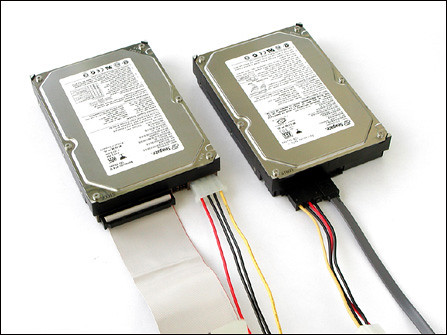
Figure out which type your computer uses - based on the age of your computer I would assume IDE, but it might be using both. And then get a cheap used power supply off ebay or Amazon. You can probably find one for about ten to fifteen bucks if you look around a bit.
Just make sure it puts out more watts than the one you have now. Your old one was 280W? The more watts the better, but I wouldn't go lower than 400W.
Fair warning, although you're right that the power supply is the most likely cause, it's possible that some of the ram got toasted somehow. Ram has a tendency to die if a moth sneezes on it, and the symptoms are the same as a bad power supply. Definitely rule this out before you buy any more parts. You can test the ram by taking out the ram sticks one by one and see if the computer starts with only some of them in there. It's a little annoying but worth the effort. If some of the new ram sticks you bought got fried somehow, you can just return them and say they don't work, and ask for an exchange for working ones.
Anyway, there are basically two types, ones with SATA connectors and ones with IDE connectors. Those are the two different types of plugs that can go into the backs of hard drives and disc drives.
IDE connectors look like the one on the left, and SATA connectors look like the one on the right:
Figure out which type your computer uses - based on the age of your computer I would assume IDE, but it might be using both. And then get a cheap used power supply off ebay or Amazon. You can probably find one for about ten to fifteen bucks if you look around a bit.
Just make sure it puts out more watts than the one you have now. Your old one was 280W? The more watts the better, but I wouldn't go lower than 400W.
Fair warning, although you're right that the power supply is the most likely cause, it's possible that some of the ram got toasted somehow. Ram has a tendency to die if a moth sneezes on it, and the symptoms are the same as a bad power supply. Definitely rule this out before you buy any more parts. You can test the ram by taking out the ram sticks one by one and see if the computer starts with only some of them in there. It's a little annoying but worth the effort. If some of the new ram sticks you bought got fried somehow, you can just return them and say they don't work, and ask for an exchange for working ones.
Thanks Locke Z. My friend has some extra pcu's lying about so we're going to test that out. We already ruled out the ram, hard drive, and cd drive.
LockeZ
I'd really like to get rid of LockeZ. His play style is way too unpredictable. He's always like this too. If he ran a country, he'd just kill and imprison people at random until crime stopped.
5958
If all it does when you press the power button is flash the LED, the possibilities are:
- Processor
- Motherboard
- RAM
- Power Supply
- Processor
- Motherboard
- RAM
- Power Supply
The fans start up for a split second as well, but then stop, the led just flashes.
Would this do the trick? http://m.ebay.com/itm?itemId=390922524575
I still want to test his psu out before I buy anything.
Would this do the trick? http://m.ebay.com/itm?itemId=390922524575
I still want to test his psu out before I buy anything.
LockeZ
I'd really like to get rid of LockeZ. His play style is way too unpredictable. He's always like this too. If he ran a country, he'd just kill and imprison people at random until crime stopped.
5958
That is a SATA power supply, so make sure your hard drive and cd drive are connected with that type of cable and not IDE cables. And then find a cheaper one.
I can't find any ide ones for some reason o.0
The psu that I linked to says ide/SATA... And it has all of the cables that my current one does. My PSU doesn't have any of the white flat looking cables, they're all just multi colored ones.
My hard drive and cd drive, on the other have, so have those kind of cables.
The psu that I linked to says ide/SATA... And it has all of the cables that my current one does. My PSU doesn't have any of the white flat looking cables, they're all just multi colored ones.
My hard drive and cd drive, on the other have, so have those kind of cables.
LockeZ
I'd really like to get rid of LockeZ. His play style is way too unpredictable. He's always like this too. If he ran a country, he'd just kill and imprison people at random until crime stopped.
5958
If you really are stuck, here's a converter, you would need one for each drive that is IDE but two bucks seems reasonable.
Here's the cheapest IDE power supply on Amazon though. It actually has one SATA connector and several IDE connectors.
Here's the cheapest IDE power supply on Amazon though. It actually has one SATA connector and several IDE connectors.

