



 Full Games List
 Featured Games
 New Games
 Reviews
 Media
Media Images
 Blogs
Blogs Game Updates
 Images Feedback Summary
 Game Design Highlights
 Tutorials
 Articles
 Scripts
 Utilities / Plugins
 Resources
 Engines
 Engine Bulletins
 What is Makerscore?
 Past Events
 Achievements
 Misaos
 Forums
 Post History
 Chat
Chat New to RMN?
 Full Store List
 RMN Music Pack (free)



A NEW COMPUTER ISSUE(S)...
Posts

 Xenomic
 View playlists
 Close
CloseSo here is a new issue that's popped up outside of the RAM issue that I know that I have (I wouldn't think this is the cause of this though). This is the second time I've had this happen to me.
So while booting up the computer 3 days ago, I go take care of my usual business, come back, and I noticed that the screen is frozen despite me being able to move my mouse. I remember this from the first time this happened, and tried to open Task Manager (Cntrl + Alt + Delete). However, the screen goes black and refuses to move at all, so I reboot the computer, and it tries to load the Windows files. Says it cannot (I think there was something about I/O error or another on this screen, and it was talking about possibly faulty hardware or something, like external USB or CD-Rom). However, I turned the computer completely off, turn it back on, and it loads just fine. During this time, I noticed that my CD-Rom's light was green, but when I turned it off and turned it back on, the light never came on.
After rebooting, the next day it happened again, but after rebooting the computer it never did the "Windows cannot load files" issue and worked fine. Today, it did the same thing, freezing up after booting up the first time that day. However, I decided to look at the EventViewer, since this is the 3rd day in a row that I had to restart my computer after the initial bootup (it's loading the Windows files now, but it freezes up after a couple minutes of booting up. Even trying to bring up Task Manager won't work, and nothing responds). In the Event Viewer, it states this:
"The driver detected a controller error on \Device\Ide\IdePort1"
And not just once, but many, MANY times. And around the same times too, only seconds apart. I believe for today alone there was about 50-100 of this error. What does this mean? Upon looking for this, I tried to find the port this is, but I don't see which one it could be??
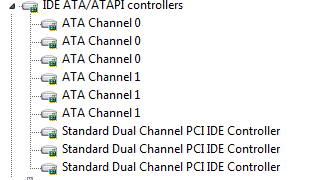
So yeah, what could be the issue? Is it the HDD dying? Is the CD-Rom actually starting to make the computer freak out? I don't know @_@;
So while booting up the computer 3 days ago, I go take care of my usual business, come back, and I noticed that the screen is frozen despite me being able to move my mouse. I remember this from the first time this happened, and tried to open Task Manager (Cntrl + Alt + Delete). However, the screen goes black and refuses to move at all, so I reboot the computer, and it tries to load the Windows files. Says it cannot (I think there was something about I/O error or another on this screen, and it was talking about possibly faulty hardware or something, like external USB or CD-Rom). However, I turned the computer completely off, turn it back on, and it loads just fine. During this time, I noticed that my CD-Rom's light was green, but when I turned it off and turned it back on, the light never came on.
After rebooting, the next day it happened again, but after rebooting the computer it never did the "Windows cannot load files" issue and worked fine. Today, it did the same thing, freezing up after booting up the first time that day. However, I decided to look at the EventViewer, since this is the 3rd day in a row that I had to restart my computer after the initial bootup (it's loading the Windows files now, but it freezes up after a couple minutes of booting up. Even trying to bring up Task Manager won't work, and nothing responds). In the Event Viewer, it states this:
"The driver detected a controller error on \Device\Ide\IdePort1"
And not just once, but many, MANY times. And around the same times too, only seconds apart. I believe for today alone there was about 50-100 of this error. What does this mean? Upon looking for this, I tried to find the port this is, but I don't see which one it could be??
So yeah, what could be the issue? Is it the HDD dying? Is the CD-Rom actually starting to make the computer freak out? I don't know @_@;
LockeZ

I'd really like to get rid of LockeZ. His play style is way too unpredictable. He's always like this too. If he ran a country, he'd just kill and imprison people at random until crime stopped.
5958
Hard drive is failing.
Though I don't know what your "RAM issue" is, but if you have a failing RAM stick, you should replace it first, because bad RAM can cause literally anything.
Though I don't know what your "RAM issue" is, but if you have a failing RAM stick, you should replace it first, because bad RAM can cause literally anything.
I'm assuming the blue screens I've had involving Memory_Management (the most common ones I've had, though they haven't happened very often) are due to the RAM. I'm told to do CHKDSK (which I'll do when I go to bed) to check this HDD, so I guess I'll see what happens then. I'm also suggested in getting a SDD instead of a HDD, but I know literally nothing about SDD (it's new to me), and a 500GB Western Digital HDD is like $50 from what I looked up...

Xenomic, you said you've had issues before this but also that this is a new computer.
Why hasn't anyone mentioned warranty ???
If it's new enough, call the manufacturer and have them check it online, realtime for you.
Otherwise, I ain't got no idea :)
Why hasn't anyone mentioned warranty ???
If it's new enough, call the manufacturer and have them check it online, realtime for you.
Otherwise, I ain't got no idea :)
It's new to me, but it's a 8-10 year old computer that was built from scratch, and wasn't used for a couple years too. I probably should've mentioned that, if I didn't already.
LockeZ
I'd really like to get rid of LockeZ. His play style is way too unpredictable. He's always like this too. If he ran a country, he'd just kill and imprison people at random until crime stopped.
5958
The average life span of a hard drive is eight years, for what that's worth.

So I just ran CheckDisk/Error-checking, and it apparently found no bad sectors on the main Win7 HDD. So...unless it didn't actually fail at finding anything wrong, dunno if it is HDD or not. I don't know how reliable CHKDSK is sadly...
LockeZ
I'd really like to get rid of LockeZ. His play style is way too unpredictable. He's always like this too. If he ran a country, he'd just kill and imprison people at random until crime stopped.
5958
If the hard drive were bad, chkdsk /r (or the Windows error-checking that checks for bad sectors, which is the same thing) would probably tell you that there was a problem, unless something strange was happening.
Step 1: Back up all your files. Do not restart or turn off the computer until you do so.
Step 2: Open up your box and try unplugging and replugging the hard drive cables (from both the hard drive and the motherboard). Actually you may also try replacing them. If the cables are what went bad this is actually great news, since they are basically free. Go in basically any computer repair shop and just be like "do you guys have an IDE cable I can have, I'll give you a dollar" and they'll be like "yeah sure". (I'm assuming your computer uses IDE cables since it's so old, but maybe it uses SATA. IDE cables are the big flat gray ones.)
Step 3: You may also try plugging your hard drive into a different port in your motherboard. Usually there are at least four IDE/SATA ports on the motherboard, sometimes more. Sometimes a single port on the board will go bad.
Step 4: There are steps you can take to figure out which drive is at IdePort1, such as going into your BIOS and finding a list of drives. IdePort1 would be the second one in the list - just make sure you're not looking at the Boot Order list, because the order there isn't the real order. If Windows failed to load then, uh, it's probably your main system hard drive. But maybe not! Maybe it's the DVD drive, which is much better, because then you can just unplug the DVD drive and leave it unplugged forever instead of worrying about figuring the problem out. I mean, heck, modern laptops don't even have DVD drives any more.
Step 1: Back up all your files. Do not restart or turn off the computer until you do so.
Step 2: Open up your box and try unplugging and replugging the hard drive cables (from both the hard drive and the motherboard). Actually you may also try replacing them. If the cables are what went bad this is actually great news, since they are basically free. Go in basically any computer repair shop and just be like "do you guys have an IDE cable I can have, I'll give you a dollar" and they'll be like "yeah sure". (I'm assuming your computer uses IDE cables since it's so old, but maybe it uses SATA. IDE cables are the big flat gray ones.)
Step 3: You may also try plugging your hard drive into a different port in your motherboard. Usually there are at least four IDE/SATA ports on the motherboard, sometimes more. Sometimes a single port on the board will go bad.
Step 4: There are steps you can take to figure out which drive is at IdePort1, such as going into your BIOS and finding a list of drives. IdePort1 would be the second one in the list - just make sure you're not looking at the Boot Order list, because the order there isn't the real order. If Windows failed to load then, uh, it's probably your main system hard drive. But maybe not! Maybe it's the DVD drive, which is much better, because then you can just unplug the DVD drive and leave it unplugged forever instead of worrying about figuring the problem out. I mean, heck, modern laptops don't even have DVD drives any more.
Well, this comp is a desktop so I'd assume those still have those, right? Heh. In any case, I'll probably deal with that at some point (I'm not comfortable going inside the computer myself). I'll also have to remember how to get to my BIOS since it's been a while. >_<
Buddy who gave me this comp DID say the DVD drive was utter garbage and it used to give him problems too so there's that...
On that note, upon booting up the computer today, it automatically couldn't find the files again, but turning the comp off fully and then turning it back on, it worked fine.
Buddy who gave me this comp DID say the DVD drive was utter garbage and it used to give him problems too so there's that...
On that note, upon booting up the computer today, it automatically couldn't find the files again, but turning the comp off fully and then turning it back on, it worked fine.
LockeZ
I'd really like to get rid of LockeZ. His play style is way too unpredictable. He's always like this too. If he ran a country, he'd just kill and imprison people at random until crime stopped.
5958
So the motherboard can't read the hard drive (sometimes), but you tested and confirmed that the hard drive is fine.
That seemingly narrows it down to four things:
1) Bad cable going from the hard drive to the motherboard.
2) Bad port on the motherboard that the cable is plugged into.
3) Bad motherboard.
4) Bad RAM (failing ram can cause literally any error, but causing dozens of hard drive read errors and nothing else does seem pretty unlikely)
The bad port is easy to test without any equipment. Just plug the IDE or SATA cable into a different port on the motherboard. Usually there are four or six of them all in a row.
Bad RAM is also easy to test. Your computer has at least two RAM sticks, but only needs one to work. Remove the first ram stick, see if problems are solved. If not, put it back in and remove the next one, and see if problems are solved.
To test the cable you probably need a new cable.
Testing the motherboard is mostly impossible. Of course, so is fixing or replacing it. (A used motherboard costs more than a used computer.) Just hope that's not the problem.
That seemingly narrows it down to four things:
1) Bad cable going from the hard drive to the motherboard.
2) Bad port on the motherboard that the cable is plugged into.
3) Bad motherboard.
4) Bad RAM (failing ram can cause literally any error, but causing dozens of hard drive read errors and nothing else does seem pretty unlikely)
The bad port is easy to test without any equipment. Just plug the IDE or SATA cable into a different port on the motherboard. Usually there are four or six of them all in a row.
Bad RAM is also easy to test. Your computer has at least two RAM sticks, but only needs one to work. Remove the first ram stick, see if problems are solved. If not, put it back in and remove the next one, and see if problems are solved.
To test the cable you probably need a new cable.
Testing the motherboard is mostly impossible. Of course, so is fixing or replacing it. (A used motherboard costs more than a used computer.) Just hope that's not the problem.
Hmm...I've tested RAM before with Memtest (granted, I had all 3 in and it found 1000+ errors). This comp has 3 2GB RAM sticks in it, so it'd take quite a while to test all of those.
The thing that bothers me the most though is it only happens the very FIRST time I boot up, and never after that. Like even restarting comp afterwards when it's working it doesn't act up (last night I restarted comp 3 times and it was perfectly fine). Like...I don't understand why it does it only that very first time at all...
But yeah, using CheckDisk, it stated that there were no problems detected and no bad sectors. So if that couldn't find anything, it's more than likely not that then. If it's the port, would have to figure out which one it is as I've never really messed with inside comps myself. If it's the RAM, well...the RAM as stated before HAS acted up I believe (again, 1000+ errors found with Memtest, and sometimes bluescreens with Memory_Management), so it COULD be the RAM. It could also be the DVD Drive too which I have no idea what to do with it.
Really, it could be just about anything which sucks. @_@;
The thing that bothers me the most though is it only happens the very FIRST time I boot up, and never after that. Like even restarting comp afterwards when it's working it doesn't act up (last night I restarted comp 3 times and it was perfectly fine). Like...I don't understand why it does it only that very first time at all...
But yeah, using CheckDisk, it stated that there were no problems detected and no bad sectors. So if that couldn't find anything, it's more than likely not that then. If it's the port, would have to figure out which one it is as I've never really messed with inside comps myself. If it's the RAM, well...the RAM as stated before HAS acted up I believe (again, 1000+ errors found with Memtest, and sometimes bluescreens with Memory_Management), so it COULD be the RAM. It could also be the DVD Drive too which I have no idea what to do with it.
Really, it could be just about anything which sucks. @_@;
LockeZ
I'd really like to get rid of LockeZ. His play style is way too unpredictable. He's always like this too. If he ran a country, he'd just kill and imprison people at random until crime stopped.
5958
If memtest found errors then figure out which of your ram sticks is bad and THROW IT IN THE TRASH IMMEDIATELY

Xenomic, it's easy. You do have to go into your computer to clean it, right, and I know from the last thread that you do that. When actually reaching in and grabbing onto to things, you just need to be firm but gentle, because the parts are delicate but they're also pretty firmly connected to each other, and you need to keep yourself grounded. You can buy a grounding bracelet, but it's just as easy to keep your left hand on the case, which will also ground you. (I'm just assuming you're right-handed and will be using it to fiddle around inside if you take LockeZ' advice. No offense intended if you are left-handed.) Press plugs into their sockets. Make sure your power cables are nice and tight. If you're computer is 8-years-old, I guess it could be SATA but it's probably IDE. In that case, your HDD plug will be the biggest one in there. Really easy to see. Just make sure that if you unplug it, release the tab first.
...Because I accidentally forgot to do that once and broke the socket on the hard drive end.
...I fixed it with electrical tape.
...It's been four years now and it still works fine.
...Because I accidentally forgot to do that once and broke the socket on the hard drive end.
...I fixed it with electrical tape.
...It's been four years now and it still works fine.
Aye, I have done that (it's been a little while too). Bud says that this computer only takes SATA (well, that's what he recommends me for HDDs because it's what it'll only take).
I did try to get into the boot/BIOS menu to see what IdePort1 is (which as Locke said is the second drive), but curses that I don't know how to get into the boot menu on this computer! I've done it ONCE I think...I think anyways. But I just can't seem to remember what the key is or how to do it.
...And because I couldn't get in it once, the Windows Task Manager kept crashing over and over on one bootup. And then after booting up the system hanged again. And after fully restarting it's now ok and not giving that error now. Ugh...
I did try to get into the boot/BIOS menu to see what IdePort1 is (which as Locke said is the second drive), but curses that I don't know how to get into the boot menu on this computer! I've done it ONCE I think...I think anyways. But I just can't seem to remember what the key is or how to do it.
...And because I couldn't get in it once, the Windows Task Manager kept crashing over and over on one bootup. And then after booting up the system hanged again. And after fully restarting it's now ok and not giving that error now. Ugh...

