



 Full Games List
 Featured Games
 New Games
 Reviews
 Media
Media Images
 Blogs
Blogs Game Updates
 Images Feedback Summary
 Game Design Highlights
 Tutorials
 Articles
 Scripts
 Utilities / Plugins
 Resources
 Engines
 Engine Bulletins
 What is Makerscore?
 Past Events
 Achievements
 Misaos
 Forums
 Post History
 Chat
Chat New to RMN?
 Full Store List
 RMN Music Pack (free)



A NEW COMPUTER ISSUE(S)...
Posts

 Xenomic
 View playlists
 Close
Close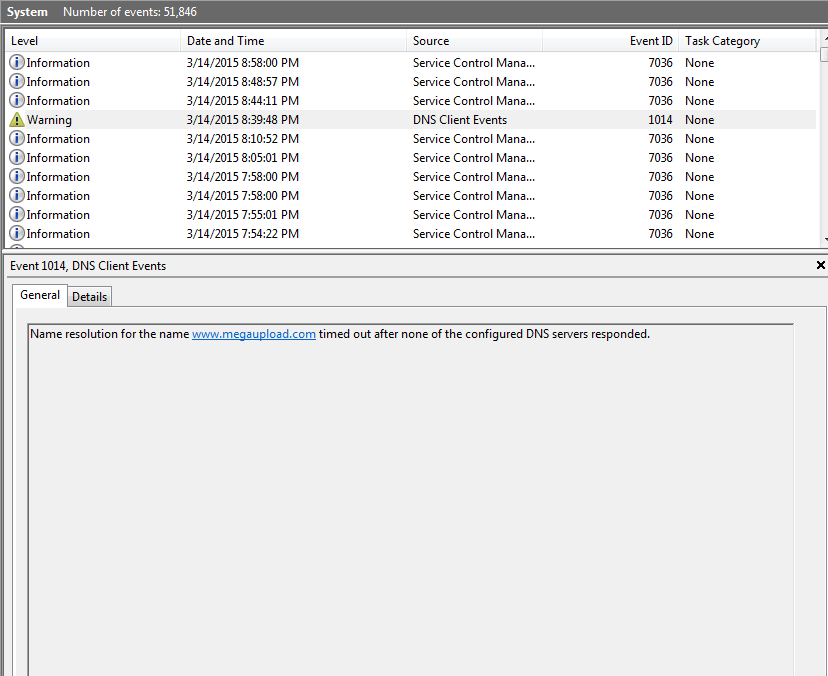
Umm....what? Why is there something about Megaupload in here? I don't even go there (and that site's been gone forever now)??
In addition, if you're curious to how the Event Viewer looks after I get the comp booted up properly...
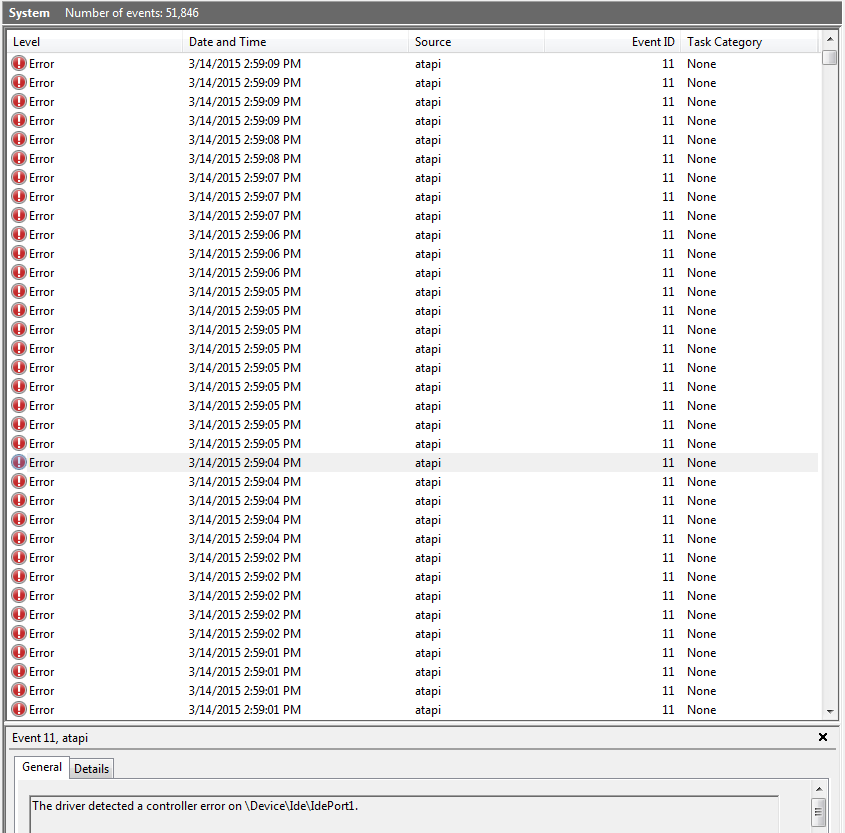
What I am going to try tomorrow, hopefully not screwing up, is to take out one of the RAM sticks (I have 3 2GB RAM sticks, so taking one out shouldn't be too bad). Or, just take out 2 of them and run Memtest on that one single one. Dunno how long that will take though...
LockeZ

I'd really like to get rid of LockeZ. His play style is way too unpredictable. He's always like this too. If he ran a country, he'd just kill and imprison people at random until crime stopped.
5958
The megaupload warning is an example of why the system event log is not a great place to look for meaningful information. You probably visited a website that ran an advertisement that had a script that included an embedded link that used to point to megaupload in the distant past, and so that part of that link of that script of that ad of that site didn't load. Anything in there that's a warning and not an error is definitely not worth reading.
Memtest usually takes a couple hours to finish running, but if you were seriously getting a thousand errors like you said, then it might find an error way before it's done. In which case you can interrupt it.
Memtest usually takes a couple hours to finish running, but if you were seriously getting a thousand errors like you said, then it might find an error way before it's done. In which case you can interrupt it.
The 1000+ errors was me running it overnight for 6-12 hours so yeah.
So storytime! I tried to boot up comp, it did not want to boot up at all. No green light, nothing on the monitor, but could hear the fan running. I opened up case and looked around, and I do believe one of the RAM sticks wasn't seated properly. I took it out and tried to boot computer that way, it booted up (and it also booted up relatively quickly as well as shut down quickly). While trying to figure out how to run Memtest (which I didn't figure out...goddamnit), I just put the other RAM back in, and tried again and it booted up (though when I had the first RAM in alone, on one bootup to the desktop, the Windows Explorer didn't seem to want to work right...so I'm wondering if that first RAM that was left alone is the bad one, or if it's something else? I'd like to get Memtest to work but I don't know how to blast it. I've done it ONCE, and I cannot for the life of me remember how I did it. >_>
So storytime! I tried to boot up comp, it did not want to boot up at all. No green light, nothing on the monitor, but could hear the fan running. I opened up case and looked around, and I do believe one of the RAM sticks wasn't seated properly. I took it out and tried to boot computer that way, it booted up (and it also booted up relatively quickly as well as shut down quickly). While trying to figure out how to run Memtest (which I didn't figure out...goddamnit), I just put the other RAM back in, and tried again and it booted up (though when I had the first RAM in alone, on one bootup to the desktop, the Windows Explorer didn't seem to want to work right...so I'm wondering if that first RAM that was left alone is the bad one, or if it's something else? I'd like to get Memtest to work but I don't know how to blast it. I've done it ONCE, and I cannot for the life of me remember how I did it. >_>
Welp! So today's booting up session was...weird. Past couple days, no problems at all. Today? First thing, Windows couldn't load files, then second time rebooting, it tried to boot up my Vista HDD instead for some reason (but froze), third time it tried to boot up my primary HDD, but froze on the Starting screen (with the logo), then after about half a minute, it went to a blue screen that had like 4 lines, and said something about Fatal System Error that made it shut down, and now 4th try I'm on. I don't like how this is going at all...that's the HDD failing right there...right??

If files are not being read then whatever they are stored on is the problem, the hard drive if the installed OS is not loading correctly.
First it's easy to check RAM if you have more sticks of it. If not then try a different hard drive because that would be step two and the most likely problem. Step three is if it is not the RAM or the HDD then it's most likely the motherboard or CPU which can be a bit spendy to replace.
It sounds like the HDD is messing up to me though.
First it's easy to check RAM if you have more sticks of it. If not then try a different hard drive because that would be step two and the most likely problem. Step three is if it is not the RAM or the HDD then it's most likely the motherboard or CPU which can be a bit spendy to replace.
It sounds like the HDD is messing up to me though.
Yeah, I already resolved the issue. I haven't had anymore issues since I took out one of the RAM sticks that was giving errors.
Oh ok. I didn't see an update on it so I thought you might still be having the problems. Good to know it's fixed.

