



 Full Games List
 Featured Games
 New Games
 Reviews
 Media
Media Images
 Blogs
Blogs Game Updates
 Images Feedback Summary
 Game Design Highlights
 Tutorials
 Articles
 Scripts
 Utilities / Plugins
 Resources
 Engines
 Engine Bulletins
 What is Makerscore?
 Past Events
 Achievements
 Misaos
 Forums
 Post History
 Chat
Chat New to RMN?
 Full Store List
 RMN Music Pack (free)



[RMVX ACE] CONDITIONAL BRANCH NOT WORKING?
Posts
Pages:
1
 RionsRPG
 View playlists
 Close
CloseHELP ME! It's driving me nuts. So I have this gameplay which the player has to press the button that the text says to press. I chose B. But for some reason, it's nt working at all. For several hours, I've been crying, trying AND SHOUTING SO LOUD IN RAGE. What am i doing wrong here??


What do you have set as the trigger for the event? If it's "action button" the event won't be able to tell that the B button is being pressed because you'll have to press enter to move on from the message and by that point the player has no opportunity to press B and have it be recognised before the conditional branch has determined that B isn't being pressed.
What you'll have to do is have self switch A turn on after the message, then make a second page for the event set to parallel process and put the rest of the code in there, and set its activation condition to self switch A.
What you'll have to do is have self switch A turn on after the message, then make a second page for the event set to parallel process and put the rest of the code in there, and set its activation condition to self switch A.

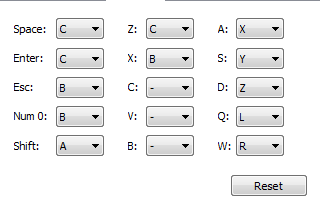
So, just to be clear, you did actually press the Escape, X or Num 0 key, not the actual (letter) B key, right? Because, you know, the "B button" in RPG Maker is not automatically represented by the B key on the keyboard.

author=NeverSilent
So, just to be clear, you did actually press the Escape, X or Num 0 key, not the actual (letter) B key, right? Because, you know, the "B button" in RPG Maker is not automatically represented by the B key on the keyboard.
This was my thinking as well, to be honest. As an example, I've got a conditional branch that checks if players press the X button, but the (default) key they would press is actually "A".
author=Trihan
What do you have set as the trigger for the event? If it's "action button" the event won't be able to tell that the B button is being pressed because you'll have to press enter to move on from the message and by that point the player has no opportunity to press B and have it be recognised before the conditional branch has determined that B isn't being pressed.
What you'll have to do is have self switch A turn on after the message, then make a second page for the event set to parallel process and put the rest of the code in there, and set its activation condition to self switch A.
It's supposed to be Event Touch, but how do I do the event page?

I have never understood why the buttons in RPG Maker and in scripts are never the buttons on the actual keyboard. I always have to press every button to figure out which the real button is. And when I do tutorials in the game I always tell the player the real button on the keyboard, not the fake button.
Pages:
1

