



 Full Games List
 Featured Games
 New Games
 Reviews
 Media
Media Images
 Blogs
Blogs Game Updates
 Images Feedback Summary
 Game Design Highlights
 Tutorials
 Articles
 Scripts
 Utilities / Plugins
 Resources
 Engines
 Engine Bulletins
 What is Makerscore?
 Past Events
 Achievements
 Misaos
 Forums
 Post History
 Chat
Chat New to RMN?
 Full Store List
 RMN Music Pack (free)



REINVENTING THE (INPUT) WHEEL
Posts
Pages:
1

 Merlandese
 View playlists
 Close
CloseIn my next project I need a naming screen, not unlike you'd find in any RPG.
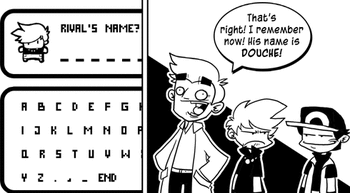
(I plan on using the system for more than just the initial Name Input, but that's irrelevant at the moment.)
After some long discussions about which name inputs worked best or were most intuitive, ranging from the archaic arcade style to the ribbon in Beyond Good and Evil to the keyboard thing in Animal Crossing and back to your basic letter-block grid of SNES-era JRPGs, I think I've come up with a prototype that would be an improvement on the system if used correctly.
Just by looking at this concept image (#nofilter), how intuitive do you think this design is? I could really use a non-biased first impression. :)

And let's make this a discussion! Layer on a ton of input on your experiences with naming systems and what you find you need or don't need. :)
(I plan on using the system for more than just the initial Name Input, but that's irrelevant at the moment.)
After some long discussions about which name inputs worked best or were most intuitive, ranging from the archaic arcade style to the ribbon in Beyond Good and Evil to the keyboard thing in Animal Crossing and back to your basic letter-block grid of SNES-era JRPGs, I think I've come up with a prototype that would be an improvement on the system if used correctly.
Just by looking at this concept image (#nofilter), how intuitive do you think this design is? I could really use a non-biased first impression. :)
And let's make this a discussion! Layer on a ton of input on your experiences with naming systems and what you find you need or don't need. :)
LockeZ

I'd really like to get rid of LockeZ. His play style is way too unpredictable. He's always like this too. If he ran a country, he'd just kill and imprison people at random until crime stopped.
5958
I mean, the game is for PC and/or mobile phones, right? I feel confident that you are not making a console game. So just... just let the player type on their keyboard.
If you are somehow releasing your game on Xbox Live Arcade and need it to really support controller-only input, then stick with the normal way that all other games use where all the letters are on the screen and the player can press Select to switch between lowercase/caps/punctuation, like in your Pokemon "screenshot." It's faster than this method because the letters are arranged in multiple rows.
If you are somehow releasing your game on Xbox Live Arcade and need it to really support controller-only input, then stick with the normal way that all other games use where all the letters are on the screen and the player can press Select to switch between lowercase/caps/punctuation, like in your Pokemon "screenshot." It's faster than this method because the letters are arranged in multiple rows.
For PC games why not just stick to the keyboard for typing in names as oppose to the sluggish "scroll through a box of characters" thing in default RPG games, or give options for both depending on whether a player wants to use a keyboard or a joypad?
On the wheel thing... It looks interesting but I don't see it as being a kind of replacement for established text input systems. You also don't really explain how its supposed to work. Do you turn it like a wheel on a touch-screen?
On the wheel thing... It looks interesting but I don't see it as being a kind of replacement for established text input systems. You also don't really explain how its supposed to work. Do you turn it like a wheel on a touch-screen?
author=LockeZ
I mean, the game is for PC and/or mobile phones, right? I feel confident that you are not making a console game. So just... just let the player type on their keyboard.
author=Ratty524
For PC games why not just stick to the keyboard for typing in names as oppose to the sluggish "scroll through a box of characters" thing in default RPG games, or give options for both depending on whether a player wants to use a keyboard or a joypad?
That would still be a functionality (best case scenario) and all, but the game plays more like a platformer. So having the Movement controls change context would be useful, especially for gamepad.
I think it's important that once I establish a set of inputs for the world as a whole they don't jump to new inputs unless the player specifically wants them. I didn't mention the gameplay so it's definitely a valid concern that I should make the keyboard functional. Thanks! XD
author=Ratty524
You also don't really explain how its supposed to work. Do you turn it like a wheel on a touch-screen?
I don't explain it because I want to gauge non-informed reactions, as if you were to play it for the first time and see a similar setup. So it's definitely useful input here. :)
I'm hoping to make it obvious that it's a wheel that turns by shaping it... like a wheel. XD And the idea that it must be turned is reinforced by the fact that not the entire alphabet is shown. In an arcade input (basically the most flawed of inputs) you still manage to find the other letters through arrow indications despite not being able to see the rest of the alphabet. I'll likely put arrow indications as well, but, like the spiral in Beyond Good and Evil, you can see where you're headed with it.

Beyond Good and Evil's input system was pretty original as console input systems go. I'll give you that. Probably the best property is that the selected character shows up in the input box until you press the action button. At which point, the cursor goes to the next character, and the process repeats until players press DONE. If memory serves me right!
So, if you go with that system, I would suggest doing something similar.
So, if you go with that system, I would suggest doing something similar.
Keyboard input requires some kind of Windows API access through Ruby, which is difficult to code if you don't know Ruby well.
Myself, I just finished programming an arcade-like belt scroll, practically identical to the old inputs that would be used to input initials for high scores. But you can do some modern things with that, like press a button to change all of the uppercase letters to lowercase. And yet, your idea above is even clearer than that.
Myself, I just finished programming an arcade-like belt scroll, practically identical to the old inputs that would be used to input initials for high scores. But you can do some modern things with that, like press a button to change all of the uppercase letters to lowercase. And yet, your idea above is even clearer than that.
author=Marrend
Beyond Good and Evil's input system was pretty original as console input systems go. I'll give you that. Probably the best property is that the selected character shows up in the input box until you press the action button. At which point, the cursor goes to the next character, and the process repeats until players press DONE. If memory serves me right!
So, if you go with that system, I would suggest doing something similar.
Mm, yes, totally good analysis of the system. I have to agree. I think that would be the best use.
author=Zachary_Braun
Myself, I just finished programming an arcade-like belt scroll, practically identical to the old inputs that would be used to input initials for high scores. But you can do some modern things with that, like press a button to change all of the uppercase letters to lowercase. And yet, your idea above is even clearer than that.
It's cool you mention the CAPS button, because that would be the next step in making this system. Right now the outer ring shows CAPS and the middle ring shows lower-case. The biggest flaw with a ribbon of letters is scrolling through the whole thing. The letter grid used in, say, RPG Maker, has a bunch of arbitrary shortcuts to jump between sections of the alphabet, so it is superior in that sort of navigation.
What I'd like to do is have it so both the outer ring and the middle ring are the same alphabet in the same case. When you switch the CAPS it affects both rings. So you essentially make your own bridges in the alphabet. Writing a word like "Banana" would become a very quick process.
Complete first impressions without reading the thread!
Are the wheels interlocked? I'm guessing not, because the 'A' and 'h' are next to each other, but they probably should be if you're going with something "different" that could startle a player into just going AAAA to get past the screen. Which is probably what I would do!
I reckon it would be good to know the target platform, since it seems like in 95% of instances there would be a simpler way to accomplish the input. Pretty much any touch device or console system is going to bring up its own proprietary keyboard when it detects a text field or place to input a string. If it's an RPG Maker game, it's even possible to allow keyboard input with a script.
Are the wheels interlocked? I'm guessing not, because the 'A' and 'h' are next to each other, but they probably should be if you're going with something "different" that could startle a player into just going AAAA to get past the screen. Which is probably what I would do!
I reckon it would be good to know the target platform, since it seems like in 95% of instances there would be a simpler way to accomplish the input. Pretty much any touch device or console system is going to bring up its own proprietary keyboard when it detects a text field or place to input a string. If it's an RPG Maker game, it's even possible to allow keyboard input with a script.
author=Deltree
Complete first impressions without reading the thread!
Are the wheels interlocked? I'm guessing not, because the 'A' and 'h' are next to each other, but they probably should be if you're going with something "different" that could startle a player into just going AAAA to get past the screen. Which is probably what I would do!
I reckon it would be good to know the target platform, since it seems like in 95% of instances there would be a simpler way to accomplish the input. Pretty much any touch device or console system is going to bring up its own proprietary keyboard when it detects a text field or place to input a string. If it's an RPG Maker game, it's even possible to allow keyboard input with a script.
Thanks for the first impression! Good things to process. :)
This will be for Construct 2, and be primarily PC. I have no plans for mobile, but I am keeping functions in mind for it just in case. If I had plans for mobile I would just uproot the whole system as I made the port and replace it with keypad, so just pretend those blasted things don't exist for a moment.
I like that everyone is concerned that I should just rely on keyboard, but give me a little credit here! XD The point of testing new UI/UX is to improve a system in such a way that everything becomes easier and more intuitive. I (hopefully) wouldn't be trying to program this complex and possibly-flawed idea if the best UI option (keyboard) was already the top option.
What will happen is you'll be playing the game like a platformer, using either arrows, WASD, or the gamepad for directional inputs. In my experience, swapping from a controller-like functionality to a full keyboard is not excellent, but doable if all you play on is the keyboard. But if you have the gamepad in you'll need to physically change hardware. So having keyboard input is still going to be implemented if I can pull it all together, and the GUI you see will just flip automatically (outer ring) to what you're typing as you type it. But if you're using something other than a keyboard this will accommodate that better (this is my hypothesis, so "better") than other previous systems.
Ima do it, and patent it, and get famous, guys. No longer will I go by my given name. I will be Merlandolf the White!
author=Merlandese
Ima do it, and patent it, and get famous, guys. No longer will I go by my given name. I will be Merlandolf the White!
xD
Hey, to your credit, this whole thing is pretty intriguing. I do feel, however, that in order to rewrite any kind of standard and convince others to support it, you need to explain what is wrong with the current standard and what it needs to be better.
Still, I AM intrigued!
I may go through my thought process about the points. I think an open-discussion blog thing on it would be interesting, whereas you first decide on the different "types" of this system and then pinpoint merits and flaws within each.
One thing I'm getting from this first impression that is especially useful for the final design is that I need to convey that a) they are wheels (or rather that they rotate as such) and b) that each "ring" rotates independently. I think the first time you start pressing buttons this will be apparent, just like with any game system of its ilk: you see something and start mashing things, then take the feedback into immediate consideration, usually figuring it out quickly. But having this context-free first glance has been very useful so far.
Alright, back to it! :)
One thing I'm getting from this first impression that is especially useful for the final design is that I need to convey that a) they are wheels (or rather that they rotate as such) and b) that each "ring" rotates independently. I think the first time you start pressing buttons this will be apparent, just like with any game system of its ilk: you see something and start mashing things, then take the feedback into immediate consideration, usually figuring it out quickly. But having this context-free first glance has been very useful so far.
Alright, back to it! :)
Here's an update of the system in action. It looks like garbage right now but it works like a charm!
Bare Bones Functionality
Right now it doesn't support keyboard, nor can you confirm your selection, but the Delete/Backspace/ESC erases letters and the Shift key switches between CAP and lowercase. It's also smooth and quick!
EDIT:
With a Better Sprite Font
Bare Bones Functionality
Right now it doesn't support keyboard, nor can you confirm your selection, but the Delete/Backspace/ESC erases letters and the Shift key switches between CAP and lowercase. It's also smooth and quick!
EDIT:
With a Better Sprite Font
I worked on this a lot, then set it aside until my own game had more meat so I could implement it. Like, what's a typing system without a game to type in?
It's in and it's working really well. When you type on the keyboard it automatically switches to keyboard input, so any gripes about a new system are addressed inherently by having two systems. But what if you'r using gamepad? Or a controller? I have that working like I described before. Here's an example of what it looks like now. :)

Not many bells and whistles here. In fact, it looks muddy and cluttered. But that's a case for the GUI pass. Functionally it's solid. Is it a better way of typing than the grid? Than the spiral in Beyond Good and Evil? Than other types? That remains to be seen, but I think it has loads of promise in its simplicity.
I figured that a video is worth a thousand screenshots:
It's in and it's working really well. When you type on the keyboard it automatically switches to keyboard input, so any gripes about a new system are addressed inherently by having two systems. But what if you'r using gamepad? Or a controller? I have that working like I described before. Here's an example of what it looks like now. :)
Not many bells and whistles here. In fact, it looks muddy and cluttered. But that's a case for the GUI pass. Functionally it's solid. Is it a better way of typing than the grid? Than the spiral in Beyond Good and Evil? Than other types? That remains to be seen, but I think it has loads of promise in its simplicity.
I figured that a video is worth a thousand screenshots:
Oh, that makes way more sense than what I was picturing. It's definitely preferable to most gamepad input systems I've seen.
One thing you may wish to include is to have a list of pre-made notes the player can choose from to attach, if the game's design would call for such a thing. It could even be a basic list of 20 or so words ("dangerous," "healing," "important," etc.), if not phrases. I only mention it because, when I played No Man's Sky, it took all of 2 minutes before I stopped naming things by hand and just started pushing everything with a random name because I didn't want to fool with typing on a gamepad any more. If note-taking is an integral mechanic, I think some sort of shortcut would be greatly appreciated.
One thing you may wish to include is to have a list of pre-made notes the player can choose from to attach, if the game's design would call for such a thing. It could even be a basic list of 20 or so words ("dangerous," "healing," "important," etc.), if not phrases. I only mention it because, when I played No Man's Sky, it took all of 2 minutes before I stopped naming things by hand and just started pushing everything with a random name because I didn't want to fool with typing on a gamepad any more. If note-taking is an integral mechanic, I think some sort of shortcut would be greatly appreciated.
Thanks, man!
I was actually going to ask you what you were planning on doing, since you had multi-platform, but I've been reading all your blogs and it seemed clear early on that the characters wouldn't be renamed. Do you have a text input at all, or is it wholly unnecessary? And if so, how did you approach this for gamepads?
Definitely good advice. I'm not sure what the notes were for in NMS, but hopefully I won't have too much to worry about.
This is used to correct an issue I've found in every Harvest Moon and Stardew Valley, where the items are simple but they affect people/things in small, similar ways that make them hard to memorize. The data is indiscreet on purpose; you wouldn't want the Tomato in HM to say "Karen Loves these, Marie Hates them..." and etc. So then you end up taking physical notes (or looking online) in a way that takes you out of the game. The simple fix is to add a notebook option, but even then turning from page to page in a menu notebook is more hassle than just going online. I've rarely used any in-game notebook, even in Professor Layton where it seems so useful.
Using this wheel in my game I allow the option to make item-specific notes that appear as you hover over the item. The game is kind of like Harvest Moon in that the biggest differences are who likes what, so adding personal notes is less of a necessary mechanic and more of the mechanic I felt the genres needed to begin with.
I was actually going to ask you what you were planning on doing, since you had multi-platform, but I've been reading all your blogs and it seemed clear early on that the characters wouldn't be renamed. Do you have a text input at all, or is it wholly unnecessary? And if so, how did you approach this for gamepads?
author=Deltree
One thing you may wish to include is to have a list of pre-made notes the player can choose from to attach, if the game's design would call for such a thing. It could even be a basic list of 20 or so words ("dangerous," "healing," "important," etc.), if not phrases. I only mention it because, when I played No Man's Sky, it took all of 2 minutes before I stopped naming things by hand and just started pushing everything with a random name because I didn't want to fool with typing on a gamepad any more. If note-taking is an integral mechanic, I think some sort of shortcut would be greatly appreciated.
Definitely good advice. I'm not sure what the notes were for in NMS, but hopefully I won't have too much to worry about.
This is used to correct an issue I've found in every Harvest Moon and Stardew Valley, where the items are simple but they affect people/things in small, similar ways that make them hard to memorize. The data is indiscreet on purpose; you wouldn't want the Tomato in HM to say "Karen Loves these, Marie Hates them..." and etc. So then you end up taking physical notes (or looking online) in a way that takes you out of the game. The simple fix is to add a notebook option, but even then turning from page to page in a menu notebook is more hassle than just going online. I've rarely used any in-game notebook, even in Professor Layton where it seems so useful.
Using this wheel in my game I allow the option to make item-specific notes that appear as you hover over the item. The game is kind of like Harvest Moon in that the biggest differences are who likes what, so adding personal notes is less of a necessary mechanic and more of the mechanic I felt the genres needed to begin with.
Yeah, that's right; I've never been big on renaming characters anyway. When I had to allow text input in RM titles, I would typically just use the letter grid and piggyback on a script for keyboard input as an option. I want to say Unity will automatically pop up the platform's on-screen keyboard when the player gives focus to an input field, but I haven't tried it personally, so I can't say for sure. I could be way off base on that, but that would be the most dependable solution for basic text.
That all sounds good, then! Maybe along with punctuation you can add some unicode emojis (hearts, skulls, etc.) to serve as shorthand and help out the player, then. It might even be worth making into a fourth wheel!
That all sounds good, then! Maybe along with punctuation you can add some unicode emojis (hearts, skulls, etc.) to serve as shorthand and help out the player, then. It might even be worth making into a fourth wheel!

Pages:
1


