



 Full Games List
 Featured Games
 New Games
 Reviews
 Media
Media Images
 Blogs
Blogs Game Updates
 Images Feedback Summary
 Game Design Highlights
 Tutorials
 Articles
 Scripts
 Utilities / Plugins
 Resources
 Engines
 Engine Bulletins
 What is Makerscore?
 Past Events
 Achievements
 Misaos
 Forums
 Post History
 Chat
Chat New to RMN?
 Full Store List
 RMN Music Pack (free)



[RM2K3] THE CUSTOM SPRITE ISSUE?
Posts

 Synthmalicious
 View playlists
 Close
CloseI have literally been looking for help on this for 2 weeks. I keep having the issue where whenever I import a .png image, or any other image, it says "unsupported image". I tried the 256 colors, and everything else.
Here is the spritesheet of the character for reference.

Please help me out with this.
Here is the spritesheet of the character for reference.
Please help me out with this.


This is how big a single sprite is. It will not work because it is too small.
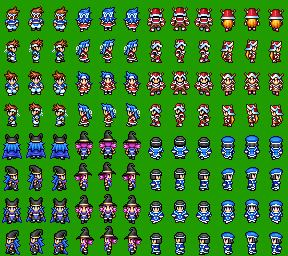
This is how big a full, eight character sprite sheet is.
No exceptions. The size of a full charset is 288x256. Now, in order to make that charset work, it needs to be reduced to 72x128, and then dropped into a file sized 288x256.
Saved as PNG? Check. 8bpp (256 colors)? Check. All that's left is making sure everything's the right size.
"No exceptions. The size of a full charset is 288x256. Now, in order to make that charset work, it needs to be reduced to 72x128, and then dropped into a file sized 288x256."
Will 72 x 81 work?
Will 72 x 81 work?
No. 72 is wide enough, but if it's not 128 pixels high, then your frames will overlap.
EDIT: f you were using VX or VX Ace, this wouldn't be an issue because you could just put a $ at the beginning of the file name and make your charset any size you wanted, but 2K3 can't do that. If you want your sprite to be that short, you have to make sure he's spaced out along the 128 pixel height.
EDIT 2: In fact, here's something that might help.
EDIT: f you were using VX or VX Ace, this wouldn't be an issue because you could just put a $ at the beginning of the file name and make your charset any size you wanted, but 2K3 can't do that. If you want your sprite to be that short, you have to make sure he's spaced out along the 128 pixel height.
EDIT 2: In fact, here's something that might help.
author=pianotm
No. 72 is wide enough, but if it's not 128 pixels high, then your frames will overlap.
EDIT: f you were using VX or VX Ace, this wouldn't be an issue because you could just put a $ at the beginning of the file name and make your charset any size you wanted, but 2K3 can't do that. If you want your sprite to be that short, you have to make sure he's spaced out along the 128 pixel height.
EDIT 2: In fact, here's something that might help.
128 x 113?
72x128 (Shit that was a VX Ace Template). Hold on...

I'm so sorry about that.
EDIT 2: Wait a second...where's your fourth row? You have front, back, and right, but no left walking cycles.
EDIT 3: I'll fix this for you.
I'm so sorry about that.
EDIT 2: Wait a second...where's your fourth row? You have front, back, and right, but no left walking cycles.
EDIT 3: I'll fix this for you.

All you need to do is import this and set the background transparency. You can drop it directly in the charset folder, but you'll still need to set background transparency. You can do that by importing it as normal.
Edit: You still might need to set it 256 color. I don't know. I set it to 256 color but copy pasting might go straight to 24bpps.
72 x 128 is the size of the individual character...if you can't figure out how to do it on the graphics program you're using, believe it or not, I've found that the easiest way is to drop the file in the basic paint program that came with your Windows. Gimp also has an easy resizing function too. Gale, I always have trouble figuring out. Just know that resizing will be proportionate so you may need to add or remove canvas in one direction or the other.
pianotm
Just know that resizing will be proportionate so you may need to add or remove canvas in one direction or the other.
Okay. You know the little handle at the bottom of your image? Drag it out to 128, then stretch your image to fit.
To be honest I might just ask you, or someone else to convert the sprites to charsets... if that's fine with you because I'm having so many issues with them right now.
You have two ways of doing that. Either import it to the data base and when it prompts you to select your transparency, click on the green. Or you can open it in a graphics file like Graphics Gale, and with the image set to 8bbps, make sure the first box in the color palette is the green you're using.

